



When it comes to automated LinkedIn prospecting, two names keep popping up: Dux-Soup and Waalaxy.
Both tools are designed to save you time, automate your outreach, and make lead generation way more efficient. But here’s the thing, they may aim for the same outcome, yet the way they get there is completely different.
In this article, we’ll break down Dux-Soup vs Waalaxy so you can pick the tool that actually fits your workflow, whether you’re a freelancer, a sales rep, or part of a marketing team.
Let’s dive in. ⬇️
Dux-Soup vs Waalaxy: Which one should you actually choose?
Before we get into the details, here’s a quick comparison table to help you see the big picture 👇🏻:
| Features | Waalaxy | Dux-Soup |
| Automated campaigns | ✅ | ✅ |
| Copywriting assistance | ✅ | ❌ |
| Message customization | ✅ | ❌ |
| Statistics customization | ❌ | ❌ |
| Email Finder | ✅ | ✅ |
| Email Templates | ✅ | ❌ |
| Integrations with third-party tools | ✅ | ✅ |
| Multi-channel prospecting | ✅ | ❌ |
| A/B testing | ✅ | ✅ |
| LinkedIn Messaging | ✅ | ❌ |
| Detailed statistics | ✅ | ✅ |
| Ease of use | ✅ | ❌ |
| Customer support | ✅ | ✅ |
| Help Center | ✅ | ✅ |

What is Dux-Soup ?
Dux-Soup Chrome extension automate repetitive LinkedIn tasks like profile visits, connection requests, messages, and follow-ups.
It helps you save time while growing your network and generating more business opportunities.
With a large user base, Dux-Soup offers a solid set of features to boost engagement and make it easier to find and connect with potential leads.
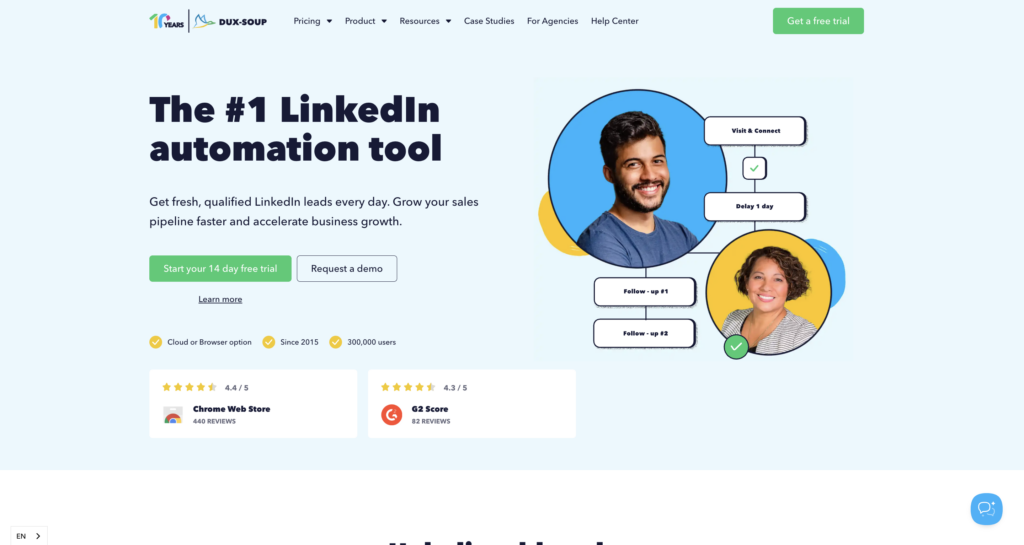
Here’s what you get with Dux-Soup : 🦆
- 🟣 Campaign creation: Build multi-step sequences (visit, follow-up, message, InMail, etc.), with customizable time intervals between each action.
- 🟣 Lead generation and management: Track replies, manage leads in LinkedIn or your CRM, and use campaign stats to optimize performance.
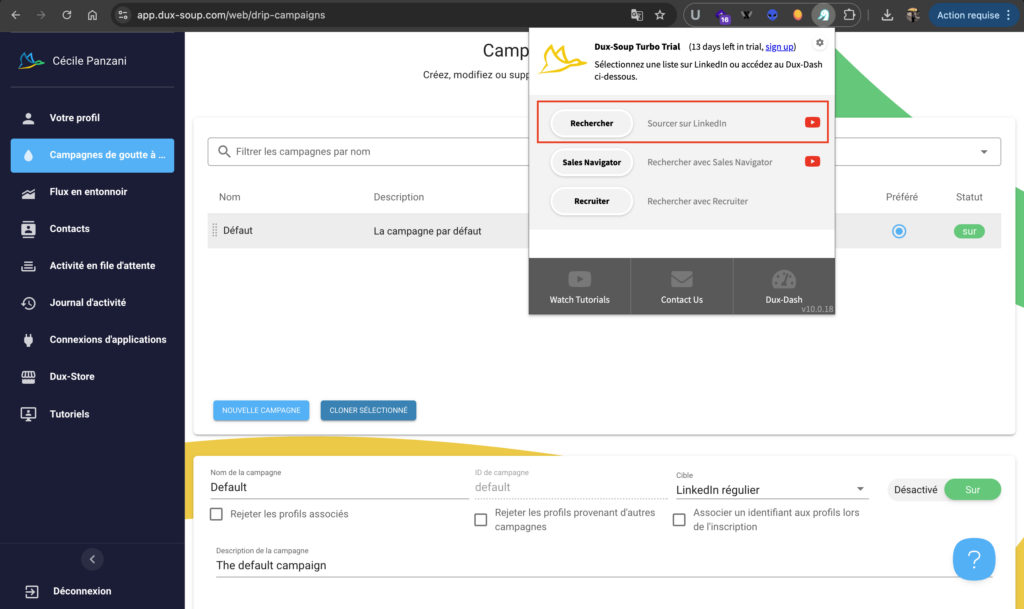
- 🟣 Prospect targeting and search: Run targeted LinkedIn searches and automate actions on profiles that match your ideal audience.
- 🟣 Message personalization: Personalize messages for each prospect to boost response rates.
- 🟣 Data export and management: Export leads as CSV files or sync them with your CRM to keep everything in one place.
- 🟣 Performance tracking: Access analytics to monitor results and improve your campaigns.
Dux-Soup is an effective tool for anyone looking to leverage LinkedIn for business growth and .
Dux-Soup review: What do its users think?
The tool makes it easy to automate prospecting while keeping full control over your campaigns. You can build your own workflows, target the right people, and generate a steady flow of leads.
Another big plus: exporting data is simple, so you can easily use your leads in your CRM. 👀
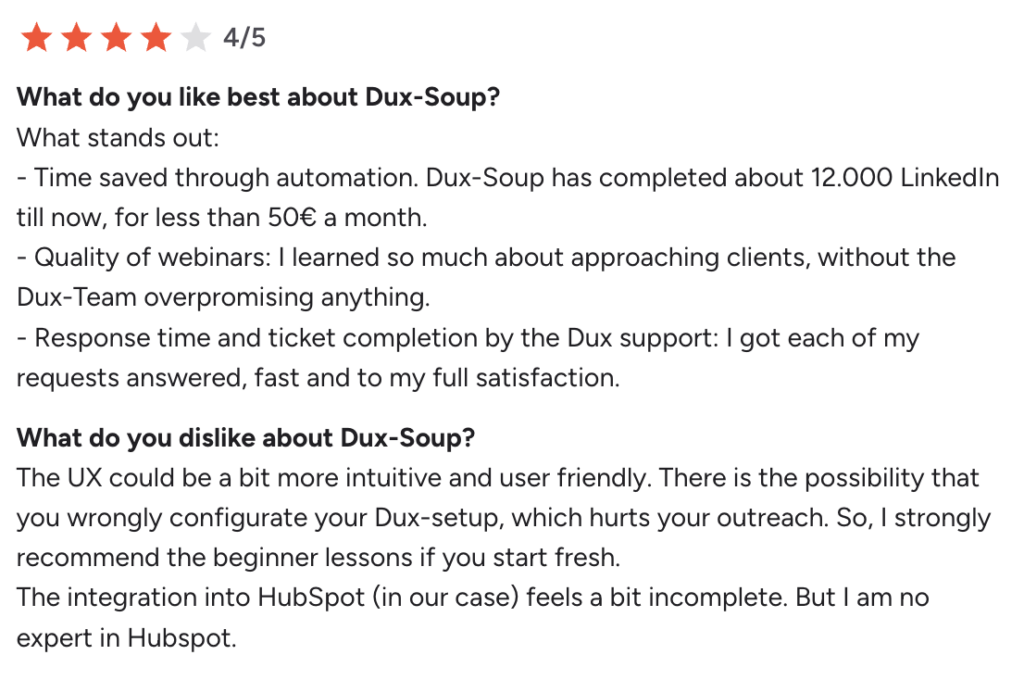
🚨 On the downside, users often mention that the interface feels outdated and less intuitive than newer tools, and that it comes with a steeper learning curve, especially for beginners. Collaboration features are also limited, especially in the cloud version. Some users also report that the extension can occasionally crash LinkedIn.
Finally, as with any LinkedIn automation tool, careful use is necessary to avoid any risk of restrictions.
How much does Dux-soup cost?
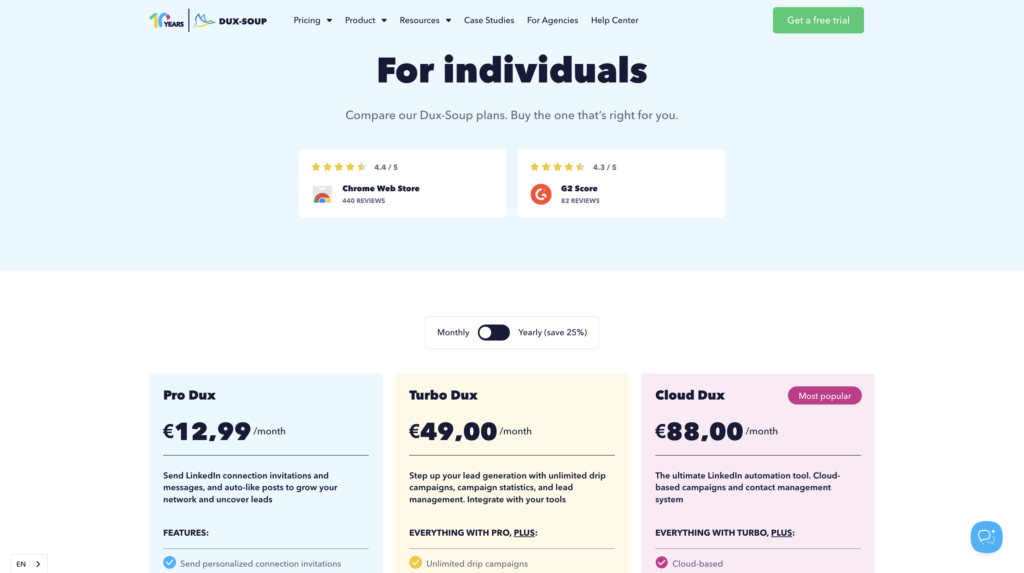
Dux-Soup pricing start at €12.99/month for an individual subscription.. 👇🏻
What is Waalaxy ?
Waalaxy is a tool designed to automate prospecting on LinkedIn and via email.
Available as a Chrome extension, it’s built to be simple, secure, and easy to use, no database or technical skills required.
With Waalaxy, activity limits are built in, you can send up to 200 invitations per week (around 800 per month).
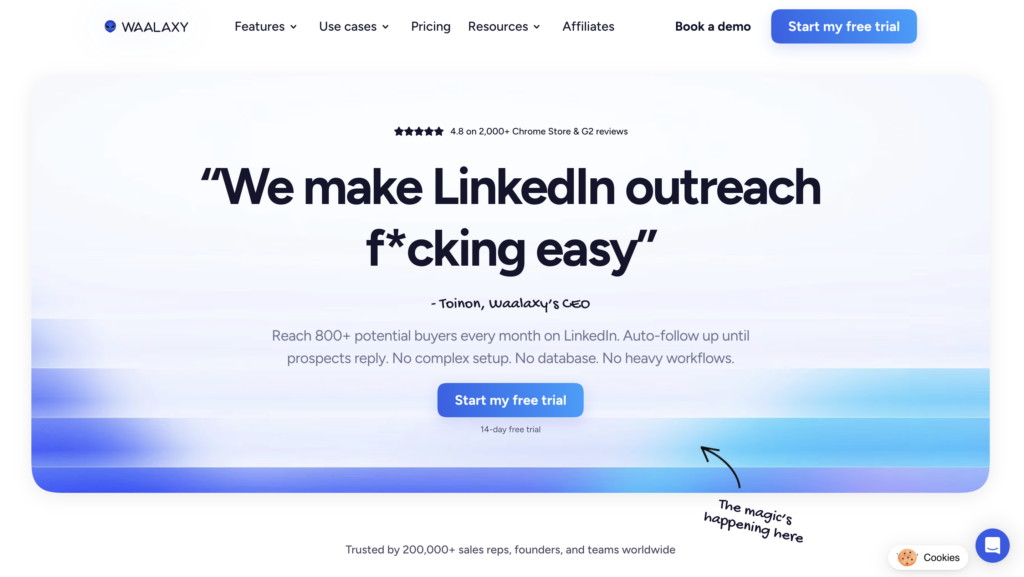
Unlike many tools that are built for technical users and packed with complex features, Waalaxy stands out for its simplicity.
It’s often seen as one of the easiest prospecting tools to use on the market. If you want something simple but still powerful, Waalaxy delivers.
Here’s a quick look at Waalaxy’s key features:
- 🟣 Native integration with your favorite tools like HubSpot, Pipedrive, Salesforce, or noCRM, to keep all your data perfectly synced.
- 🟣 Plans designed for all types of users: sales reps, freelancers, or agencies, with practical features like the Team Plan, template sharing, and management of multiple LinkedIn accounts.
- 🟣 A built-in Email Finder to easily retrieve your prospects’ professional email addresses directly from LinkedIn.
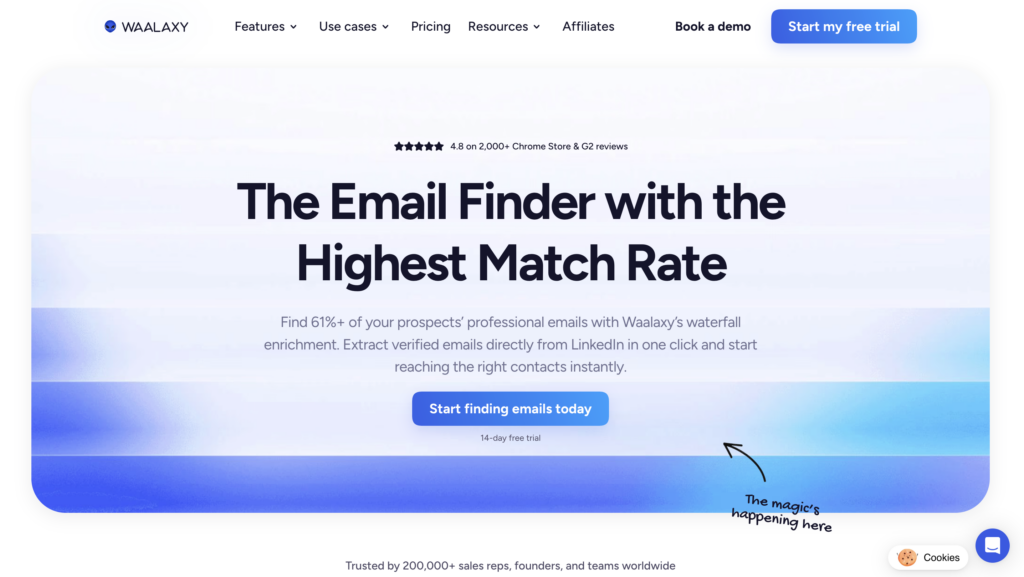
- 🟣 Automated cold email campaigns, with multi-channel sequences ready to use.
- 🟣 Access to Skipcall to streamline appointment scheduling and accelerate your sales cycle.
- 🟣 Automatic import of prospects based on their interactions on LinkedIn (profile visits, comments, reactions, etc.).
- 🟣 A unified inbox to centralize all your conversations and manage them more effectively with filters and sorting options.

- 🟣 Easy-to-launch LinkedIn campaigns thanks to pre-built workflows, even if you’re just getting started.
- 🟣 Customizable dashboards.
- 🟣 AI-powered lead scoring to quickly spot your most promising leads.
Waalaxy reviews: What do its customers say?
What users love most about Waalaxy is how easy it is to use.
The interface is intuitive and quick to learn, even if you’re not technical. Sequences are already structured and organized by channel, so you save time on setup. You can get started right away, no need to build everything from scratch. 😊
You save valuable time and can launch your first campaigns quickly, all while staying withinLinkedIn’s ecosystem.
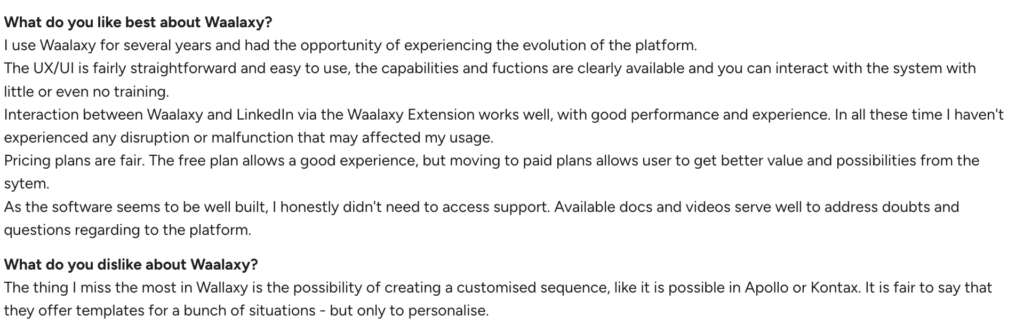
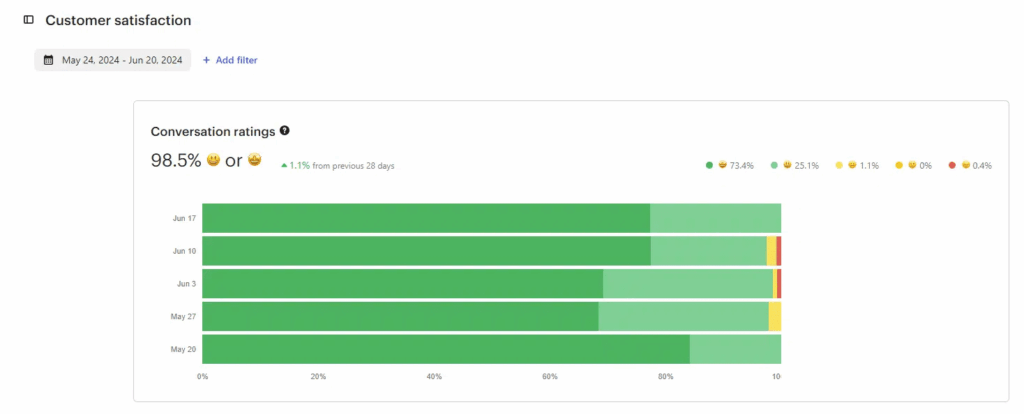
Another big advantage: the platform is available in 10 languages, making it a great fit for international sales prospecting. Customer support also gets consistently strong reviews, with high satisfaction overall.
On the downside, some users mention the lack of a mobile app, a common limitation with this type of tool, as well as limited availability in certain regions.
How much does the Waalaxy extension cost?
A Waalaxy pricing starts at $19 per month. 👀
Monthly
Quarterly
Yearly
Without Inbox
With Inbox
Add-on


What are the strengths and limitations of Waalaxy and Dux-Soup?
Beyond the available features, each tool has its own advantages and limitations depending on the way you prospect. Here’s a more practical overview to help you identify which one best fits your needs : 👇
| Waalaxy | Dux-Soup | |
|---|---|---|
| Strengths | – Intuitive and modern interface – Very easy to use – Multichannel prospecting on -LinkedIn + email – Ready-to-use sequences – Built-in AI to help write messages – Excellent customer support and guidance – Perfect for getting started quickly | – Highly flexible workflows – Strong control over automations – More “power user” oriented – Comprehensive LinkedIn automation – Efficient CRM integrations – Well suited for advanced users |
| Limitations | – Less flexible for highly advanced workflows – Credit-based system for some features – No mobile application | – Outdated interface – More technical learning curve – Available only in English – No native multichannel prospecting – Campaign tracking is less intuitive – More limited message personalization |
Dux-Soup vs Waalaxy: What are the similarities and differences in features?
The best way to compare Dux-Soup and Waalaxy? Actually use them. Launching your first campaign shows you exactly how each tool works in practice.
1) Automation of prospecting campaigns
Here’s how it works with each tool. 👇🏼
How to use waalaxy?
Once logged in, click “Start a campaign” to get started. From there, select your prospects and set up your sequence in just a few steps.

You can fine-tune your campaign using:
- 🎯 Target: Your connections or profiles outside your network
- 📡 Channel: LinkedIn, email, or a multi-channel approach
- ⚙️ Actions: Follow a profile, visit, send an invitation, a message, or enrich your data
- 💬 Volume: Number of LinkedIn messages or emails to send
You can also add or remove filters as you see fit. The advantage here is that you have access to ready-made sequences. No need to build everything from scratch, just pick the one that fits your goal. Everything is structured and Waalaxy guides you step by step : 👇🏼
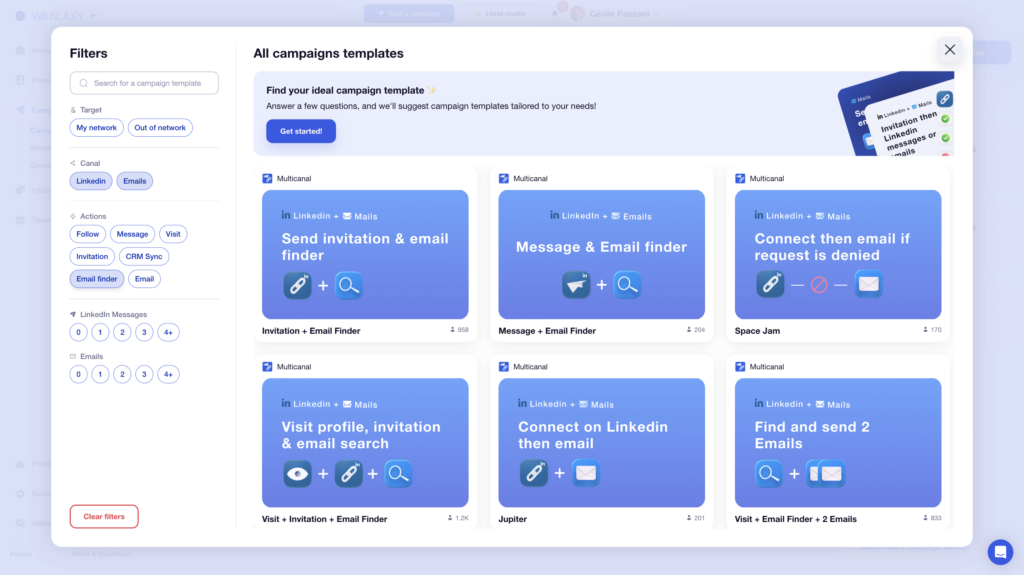
For example, you can choose “ Invitation + 2 messages” You’ll be able to name your campaign (optional).
You can add prospects in several ways:
- 🥇 From your own lists, if you’ve already prepared them.
- 🥈 Via auto-import, which automatically retrieves people who have interacted with your profile.
- 🥉 Directly from LinkedIn using the Waalaxy Chrome extension (from a standard search or via Sales Navigator).

Once your prospects are imported, you can add a note.

All that’s left is to personalize your messages and adjust the time intervals between each action, typically ranging from 0 to 28 days.
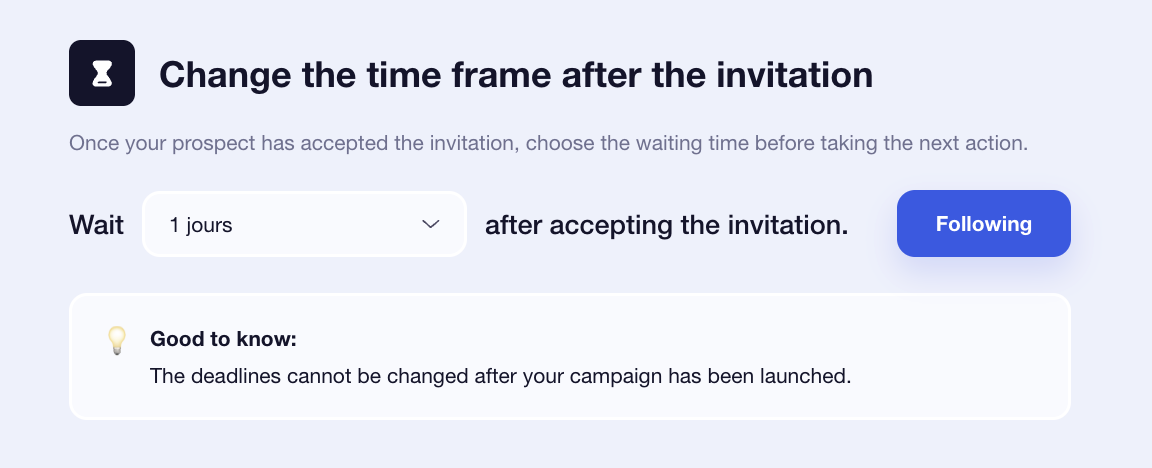
How to use the Dux-Soup extension?
Once you’ve downloaded the extension and completed your dux soup login, click “New Campaign” to get started. Then define your messages and sequence.
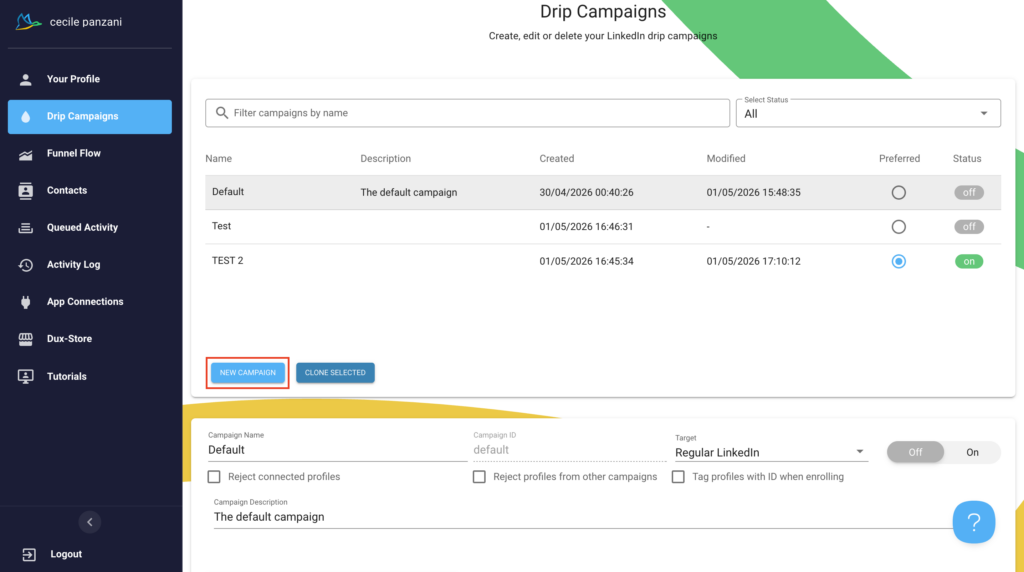
➡️ Your sequences can include:
- Profile visits.
- Connection requests.
- Messages.
- Reminders.
- IMs.
- Skill recommendations or post likes.
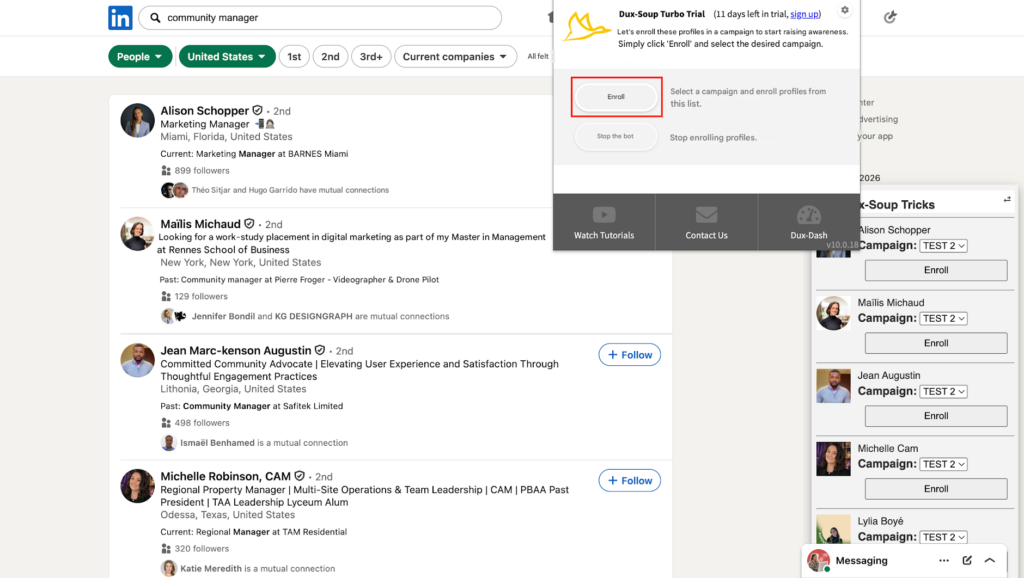
Next, add your prospects. Click the Dux-Soup icon in the top-right corner, then run a standard LinkedIn search.
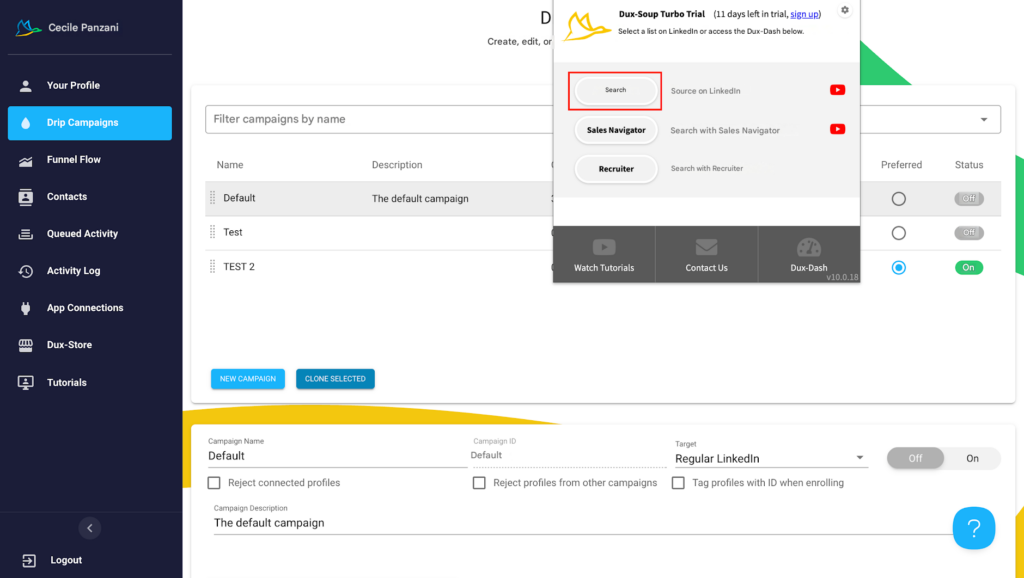
Once you’ve done that, just perform a standard search. After applying all that best define your target audience, you have two options for adding a selected audience to the campaign:
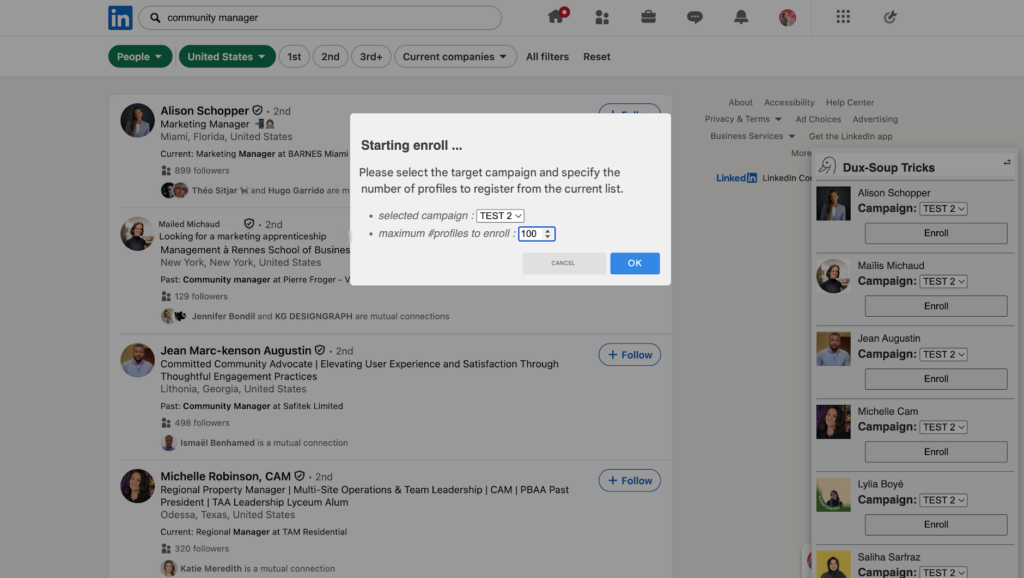
- To add all profiles : Click the Dux-Soup icon again and add all profiles from your search results to a campaign. A pop-up appears where you choose the campaign and set how many profiles to add. The campaign launches automatically. 🔄
- Click on “OK,” and Dux-Soup will add everyone on the list to the campaign and launch it automatically. 🔄
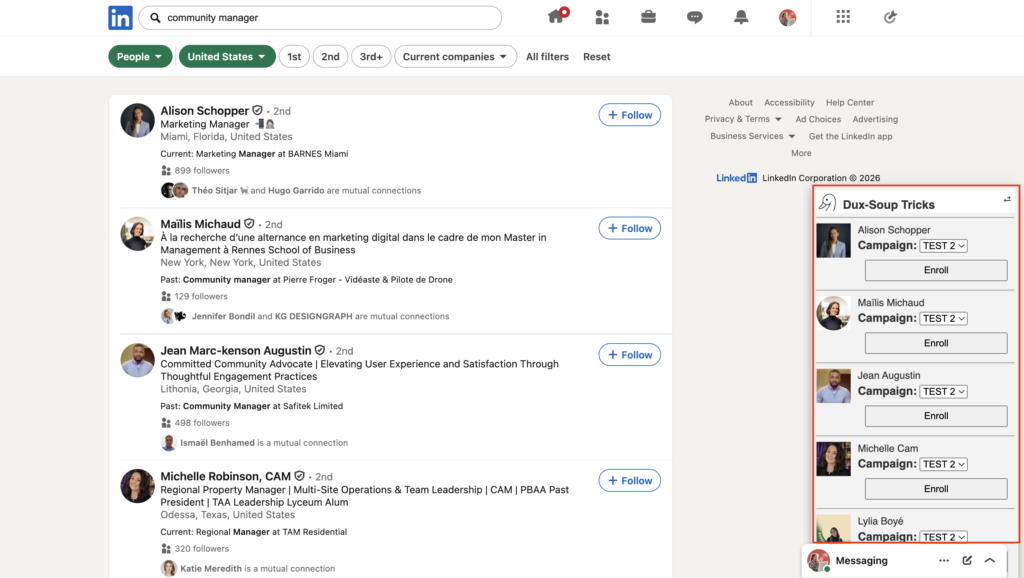
- To manually select : Use the Dux-Soup “Tricks” panel on the right side of LinkedIn to add profiles one by one to a campaign.
Before we continue, here’s a quick comparison chart!
| Features | Waalaxy | Dux-Soup |
|---|---|---|
| Sending automated emails | ✅ | ❌ |
| Message personalization | ✅ | ✅ |
| Multi-channel prospecting | ✅ | ❌ |
| Integration with third-party tools | ✅ | ✅ |
| Automated email sequences | ✅ | ❌ |
| Email template library | ❌ | ❌ |
| Automated tracking and follow-ups | ✅ | ✅ |
| A/B testing | ✅ | ✅ |
| Prospect list creation | ✅ | ✅ |
| Import leads from LinkedIn via Chrome extension | ✅ | ✅ |
| Sequence templates tailored to specific use cases (sales, recruitment, etc.) | ✅ | ❌ |
2) Customizing and scripting messages
Once your campaign is set up, it’s time for a crucial step: writing your messages. 📮
How does it work with Waalaxy?
After selecting your leads, you’re taken straight to the message editor on LinkedIn. The interface is clean and easy to use, so you can focus on your message.
If you need inspiration, you can use Waami, the built-in AI, to quickly generate personalized messages.
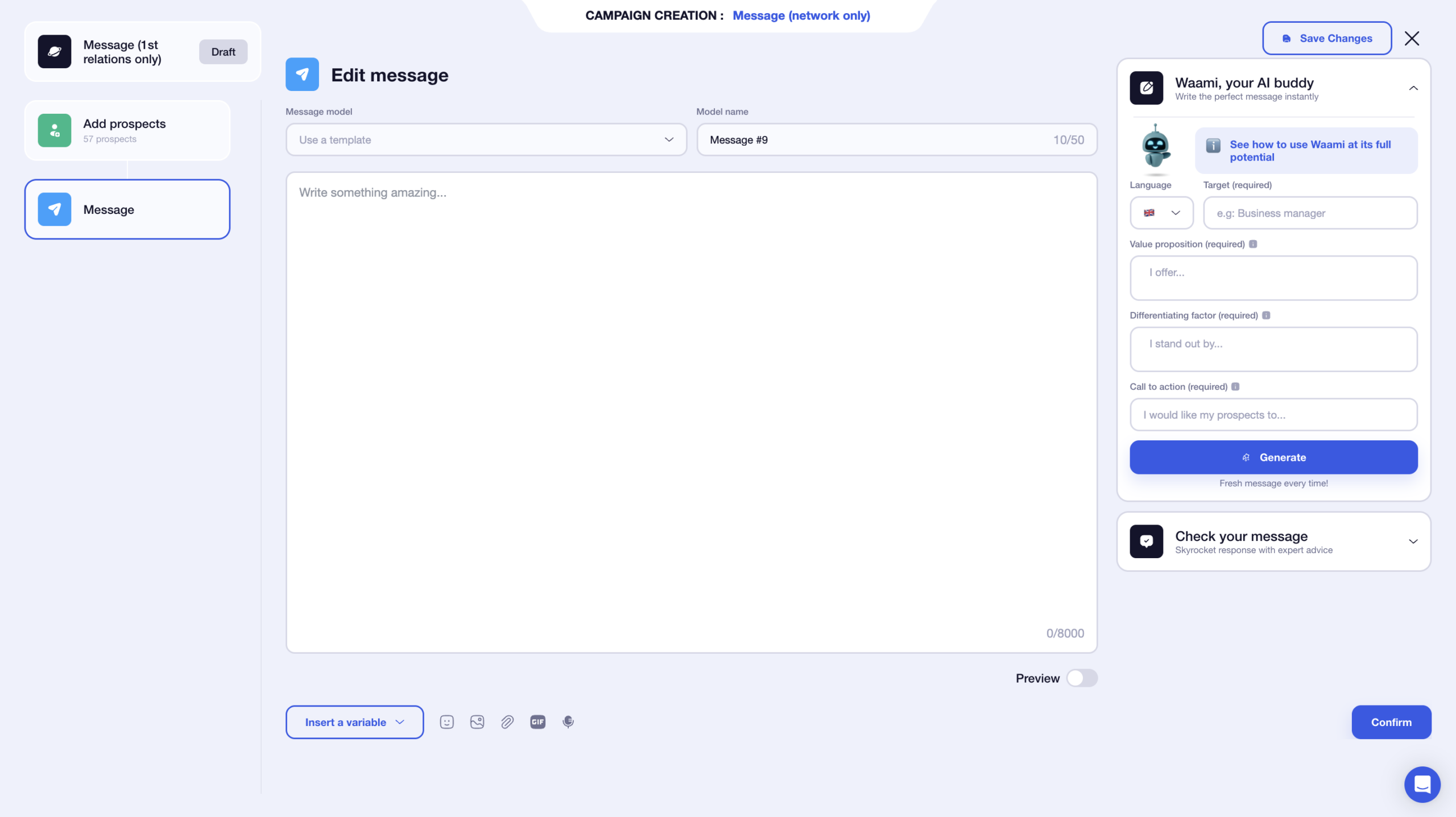
You can also save messages as templates, which saves time on future campaigns, no need to start from scratch every time. 👀
You get up to 8,000 characters, although shorter messages usually perform better.
You can also add several elements to your text:
- 🔗 Attachment.
- 🗣️ Voice notes.
- ✳️ Variables (first name, last name, and company).
- 📸 Images.
- 🎥 GIFs.
You also get a live preview of your message, so you can instantly see how it will look, especially useful when working with variables.
What makes this smooth is that the interface focuses entirely on writing, without distractions from the rest of the sequence.
Once your messages are ready, you’ll see a full campaign summary, then you’re good to launch.

How does it work with Dux-Soup?
With Dux-Soup, messaging is more limited. You can send messages, but you can’t add attachments, images, or rich content.
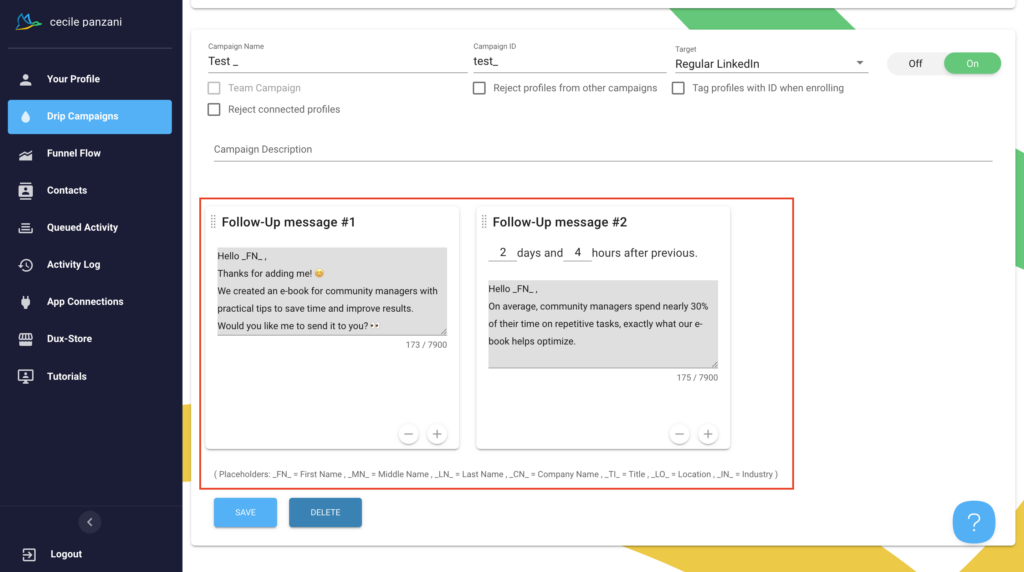
Variables have to be inserted manually, so you need to be more careful when writing your messages. You also don’t get a full preview, which makes it harder to double-check everything before sending.
Once you’re done, just click “Save” and launch your campaign.
Now, let’s take a look at our little summary table. 👇🏼
| Features | Waalaxy | Dux-Soup |
|---|---|---|
| Variables | ✅ | ✅ |
| Images | ✅ | ❌ |
| Attachments | ✅ | ❌ |
| GIFs | ✅ | ❌ |
| Voice notes | ✅ | ❌ |
| Message templates | ✅ | ❌ |
| Preview | ✅ | ❌ |
| Clone campaigns | ❌ | ✅ |
| AI | ✅ | ❌ |
3) Managing Responses and Tracking Engagement Rates
Once your campaign is live, it’s time to track performance. This step is key to improving your results. 📊
How does it work with Waalaxy?
You can access all your stats directly from the dashboard. Everything is centralized and easy to read.
To refine your analysis, you can filter by:
- 1️⃣ Campaign dates.
- 2️⃣ Select the campaign you want to analyze.
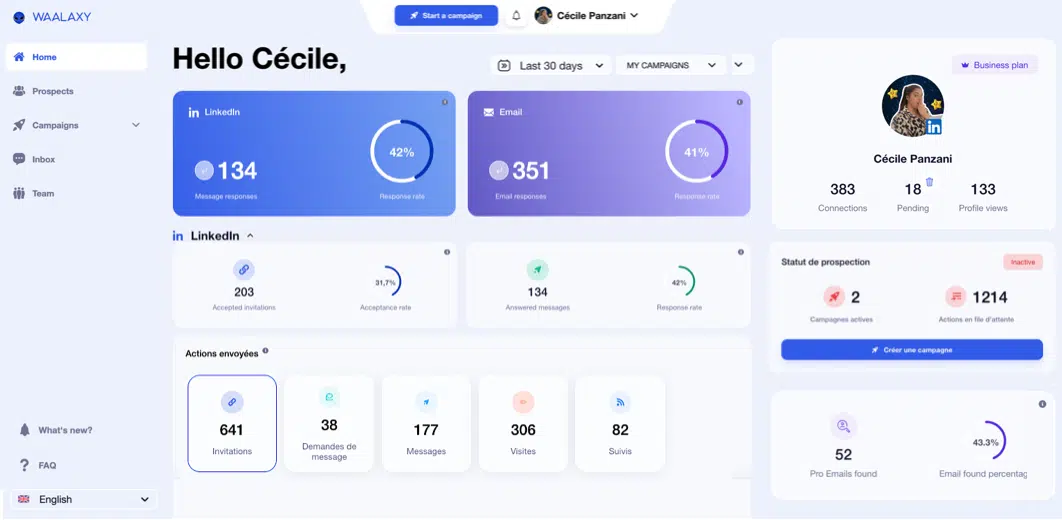
Waalaxy highlights key metrics like responses and response rates.
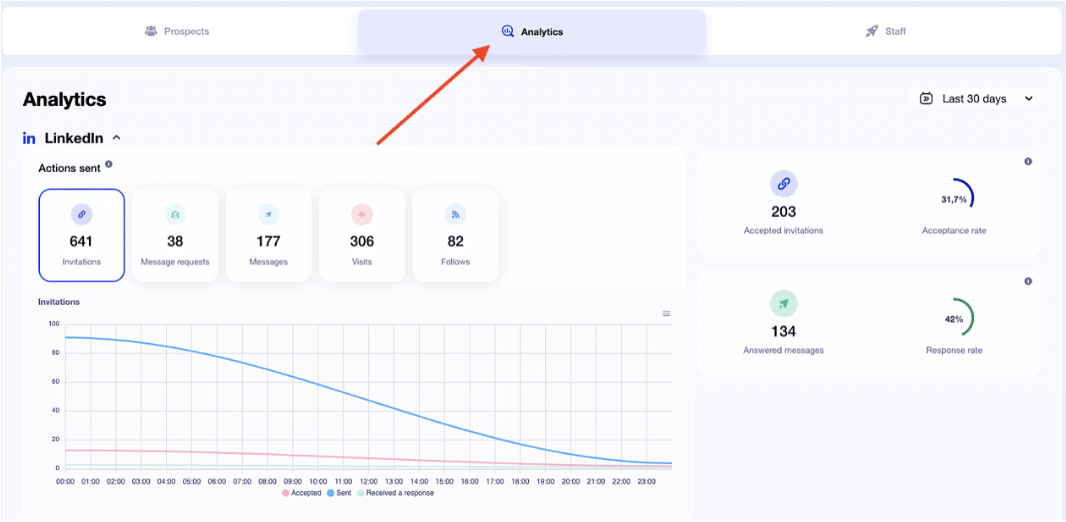
Depending on the campaign, you’ll see:
- 1️⃣ Number of accepted invitations + acceptance rate.
- 2️⃣ Messages that generated a response + response rate.
- 3️⃣ Details of sent actions in graph form (with CSV export available).
For email campaigns, you’ll also find other important metrics :
- 📬 Deliverability rate.
- 💬 Response rate.
- ❌ Undelivered emails and bounce rate.
All this data is available in the section dedicated to your campaign statistics.
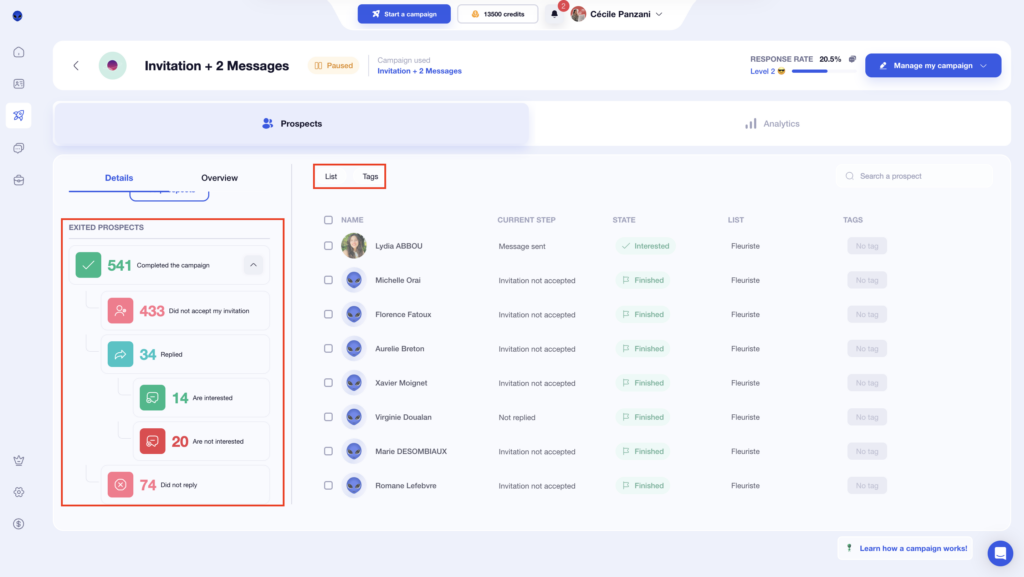
You’ll also get a full overview with: ⬇️
- Prospect breakdown by stage.
- Each prospect’s details, including:
- The stage.
- The status.
- The list of prospects.
- The tag.
- Filters based on stage, status, or tags.
At Waalaxy, we love ease of use. A basic understanding of certain performance metrics is all it takes.
How does it work with Dux-Soup?
With Dux-Soup, you’ll need to go to the “Funnel Flow” page to access your stats.
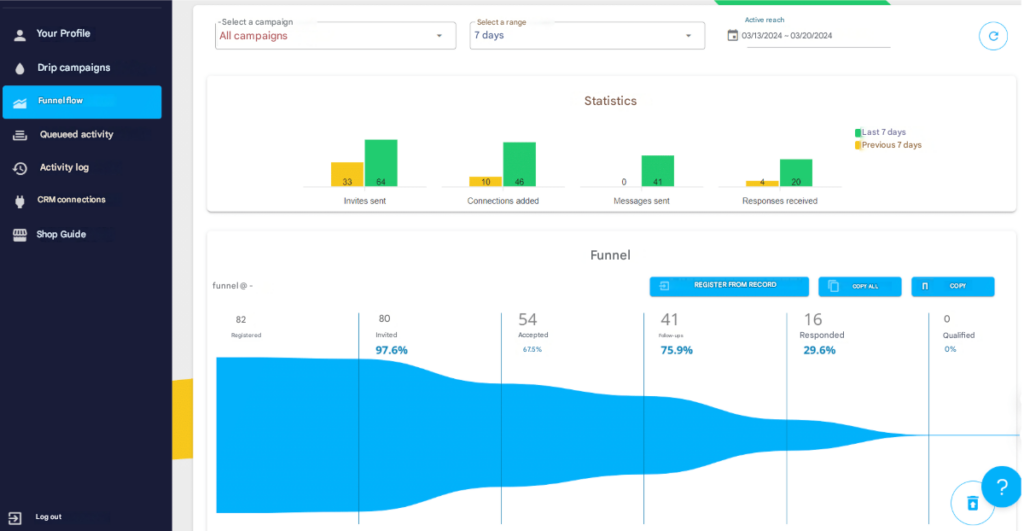
At the top, you can select the time period and campaign. 🤓
The Funnel Flow includes three panels:
- ⏰ The Statistics panel displays KPIs for B2B lead generation within the specified timeframe.
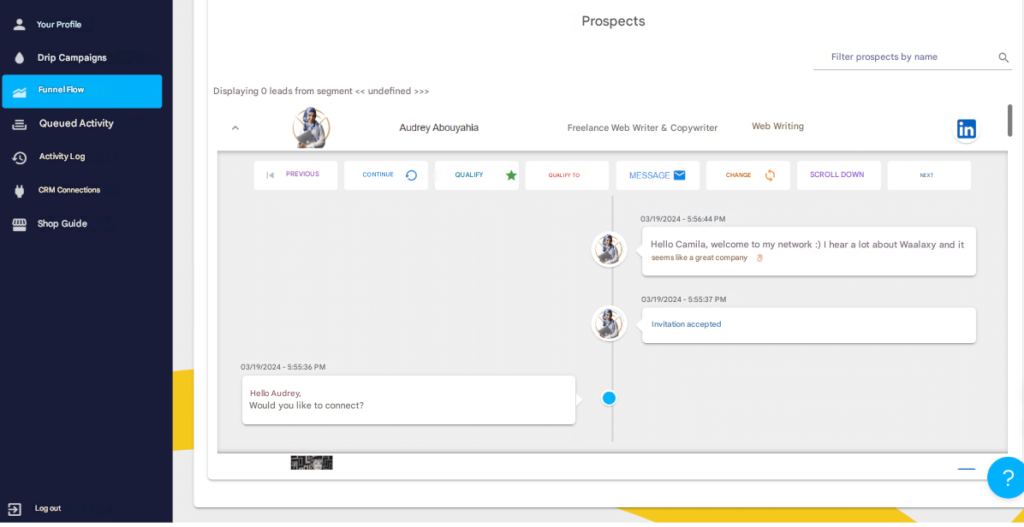
- 🌪️ The Funnel is located in the middle of the Funnel Flow and includes a variety of actions you can take, as well as a display of all profiles with Dux-Soup activity during the selected period.
- 🔎 Insights provides features to effectively manage your campaign funnel flow and efficiently manage your LinkedIn inbox.
You know the drill, here’s a quick summary table!
| Features | Waalaxy | Dux-Soup |
|---|---|---|
| Statistics | ✅ | ✅ |
| Dashboard filters | ✅ | ✅ |
| Multiple KPIs available | ✅ | ✅ |
| Customizable statistics | ❌ | ❌ |
| Separate statistics for LinkedIn and email | ✅ | ❌ |
| Suitable for beginners | ✅ | ✅ |
4) Integration, CRM, and accounting with other tools
To get the most out of your prospecting efforts, connecting Waalaxy to your existing tools (CRM, marketing, automation…) makes a real difference. 👀
How does it work with Waalaxy?
Waalaxy offers native integrations with popular CRMs, making it easy to manage and track your leads. If you want to go further, you can also connect Waalaxy to automation tools like Make, n8n, or Zapier using an API key.
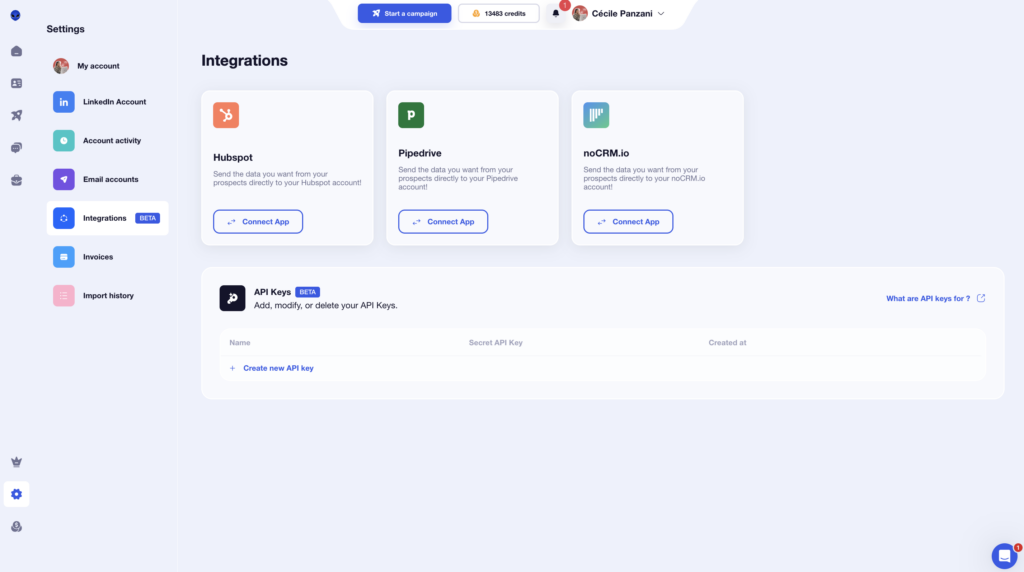
But that’s not all. Directly from your campaigns, you can also connect other handy tools:👇🏻
- Airtable.
- Brevo (Sendinblue).
- Sellsy.
- Axonaut.
- Google Sheets.
The goal is simple: automate your data flow as much as possible and eliminate repetitive tasks.
How does it work with Dux-Soup?
Dux-Soup lets you connect to various CRMs and other integrations like Salesforce or Microsoft Teams.
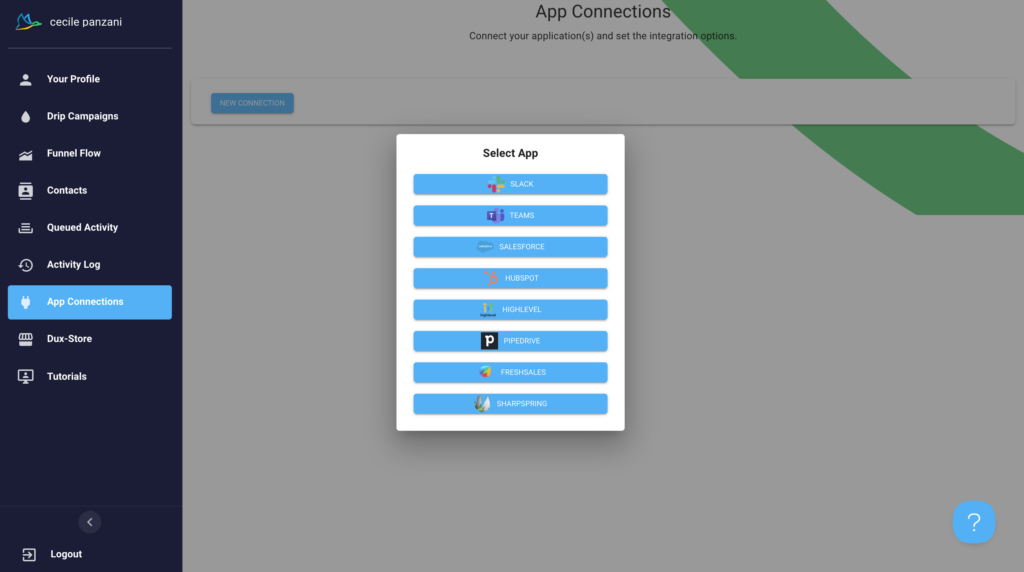
Here’s a summary of the CRM integrations for both tools.
| Features | Waalaxy | Dux-Soup |
| CRM Integrations | ✅ | ✅ |
| Available with paid plans | ✅ | ✅ |
| Multiple CRMs supported | ✅ | ✅ |
| API keys | ✅ | ❌ |
5) Ease of use and user interface
Let’s talk about design and user experience. 💟
Waalaxy
From the start, Waalaxy stands out with its clean and intuitive UI/UX. Everything is designed to help you navigate quickly without wasting time figuring things out.
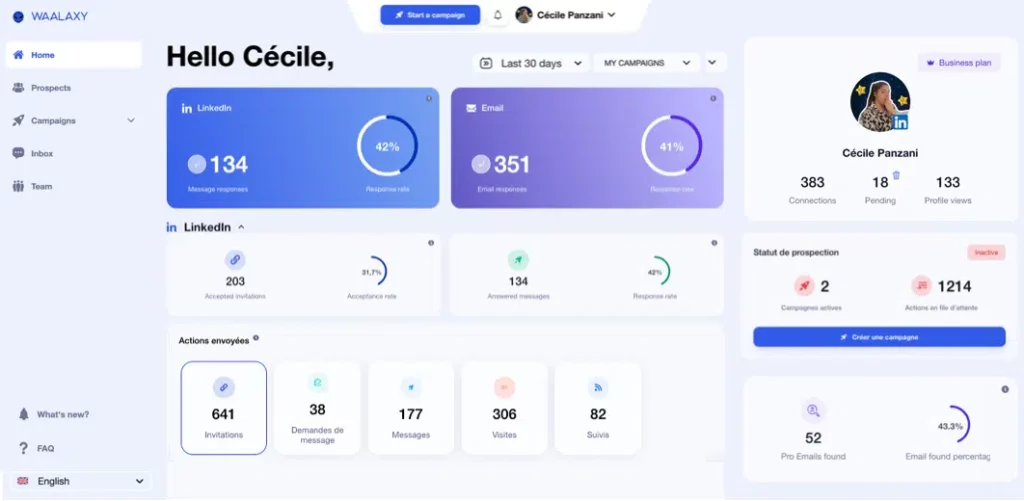
The visual style is consistent, with smart use of color, making the experience smooth and easy to follow. You always know where to click and what to do next.
In just a few clicks, you can access your campaigns and key metrics like response count or response rate.
The collapsible menu keeps the interface clean and easy to read, proof that real thought went into the UX.
For your LinkedIn campaigns, a simple color-coding system helps you quickly visualize the status of your prospects:
- 🩶 Gray: not connected.
- 🧡 Orange: pending.
- 💙 Blue: connected.
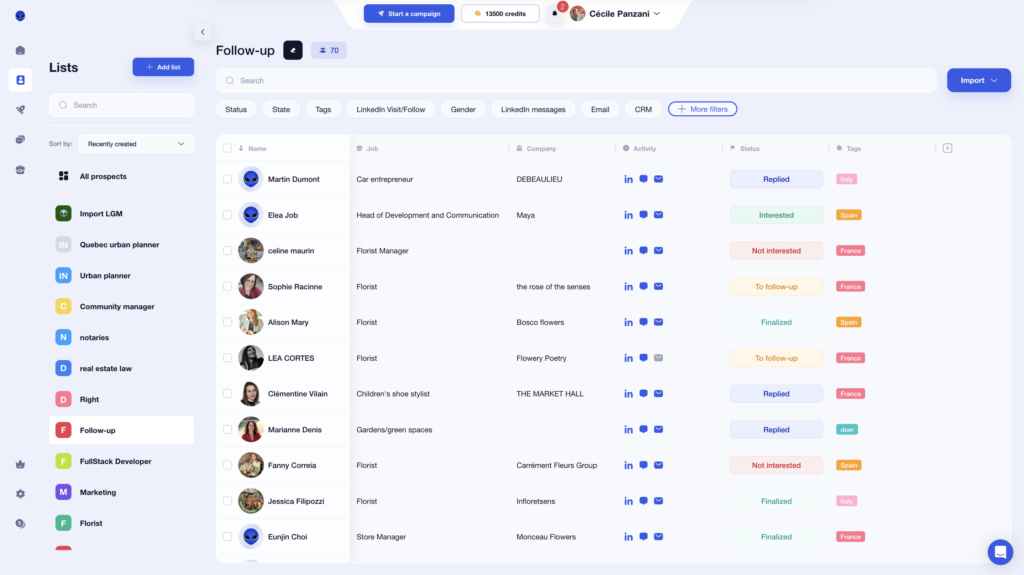
Hover-over tooltips appear to guide you, without cluttering the interface.
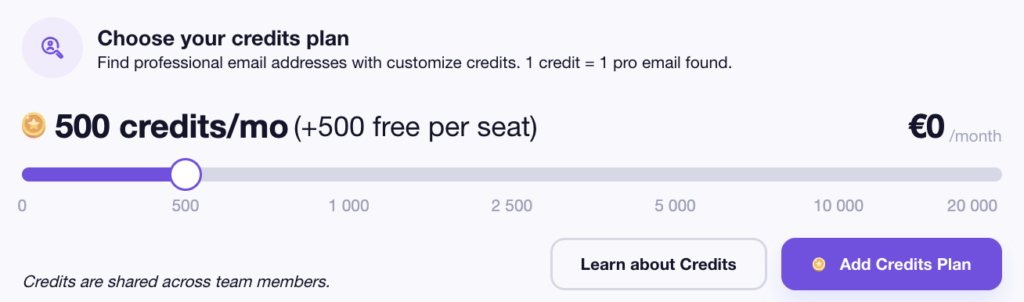
The Waalaxy Email Finder, works on a credit system, and you can check your balance in one click directly from your profile.
Here’s a quick overview of the rates :
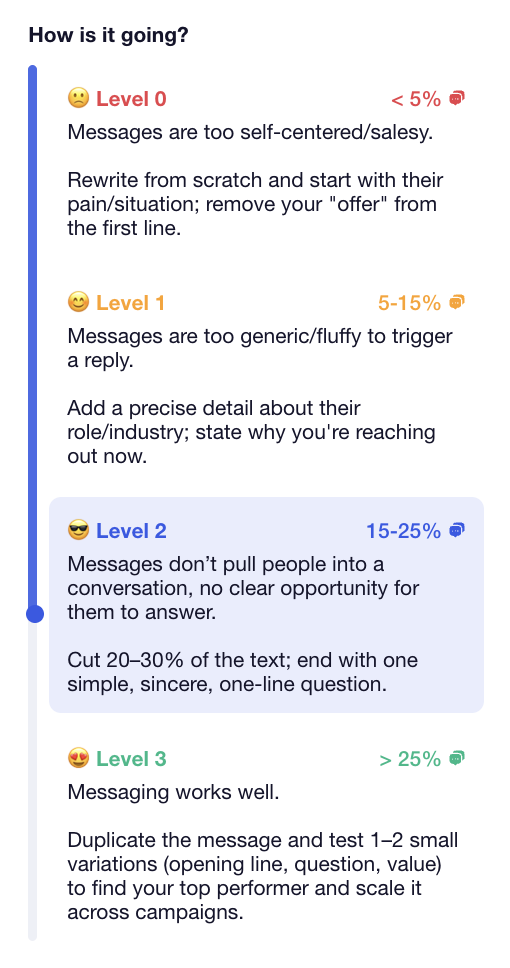
Ease of use is one of Waalaxy’s biggest strengths. You can launch, track, and analyze campaigns in minutes even if you’re not technical. 😅
For example, each campaign includes a performance score (0 to 3) based on response rates, along with a quick explanation to help you understand your results.
You still have full control over your campaigns:
- 📆 Choose the days and times to send.
- 🧾 Manage quotas.
- 🎛️ Easily adjust settings.
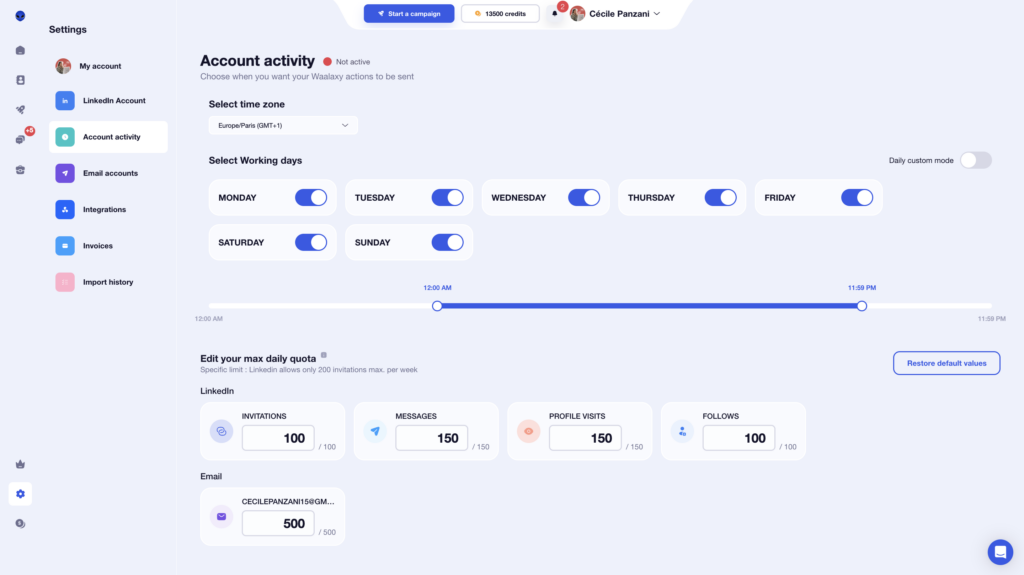
Overall, the experience is smooth, accessible, and easy to use from start to finish.
How does it work at Dux-Soup?
Dux-Soup’s interface is more basic and lacks visual consistency. It’s also only available in English, which can be limiting for some users.
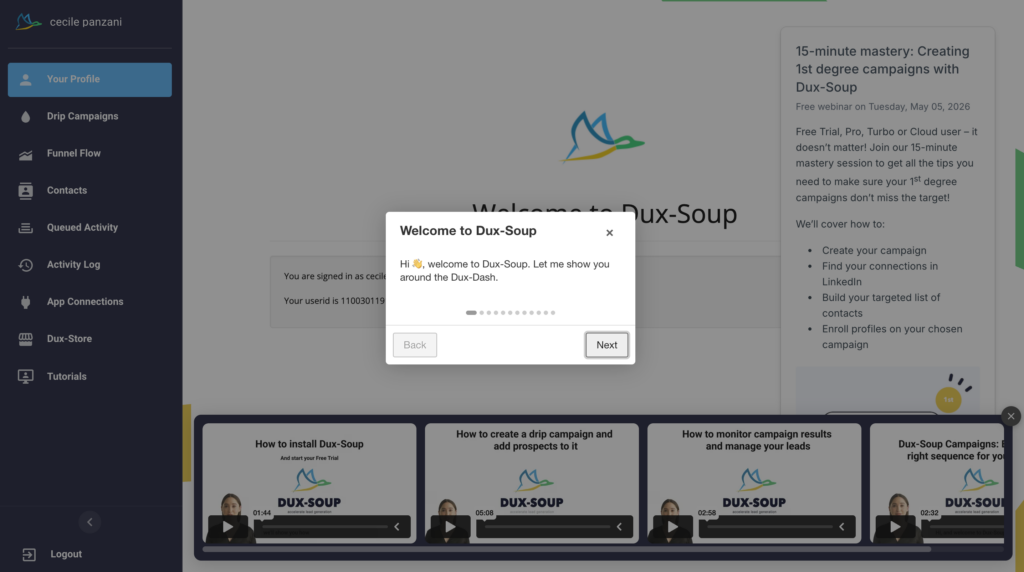
However, the tool’s onboarding is good. It’s pretty simple to get started, but once campaigns are running, you get less visibility into what’s happening compared to Waalaxy (where key info is front and center).
There’s also little visual distinction between features, which can make navigation confusing at times.
➡️ For example:
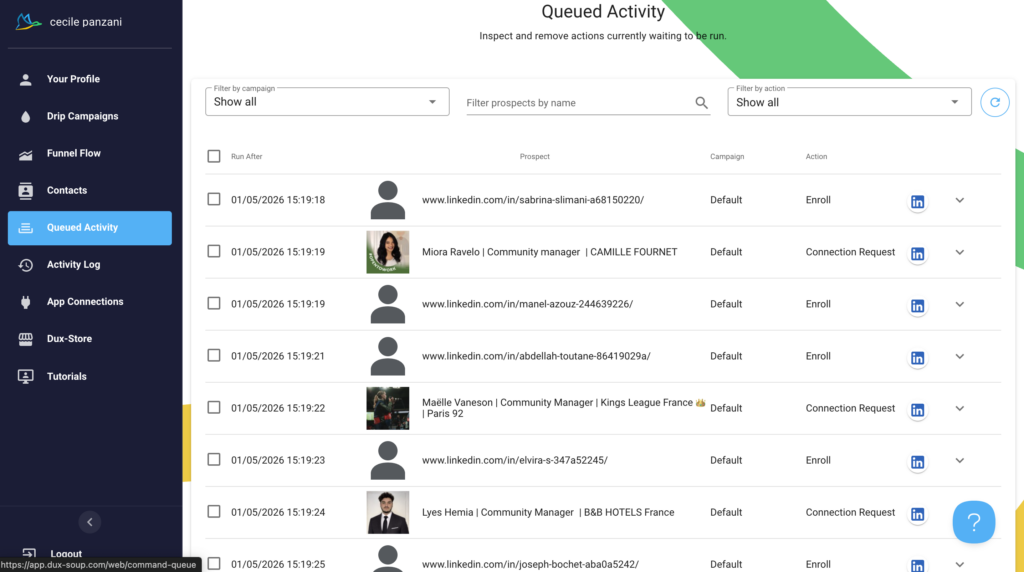
- In the Activity Log, you can sort by status, but it’s not always clear what certain icons mean.
- In the Drip Campaigns tab, it’s harder to find the list of enrolled prospects.
- Campaigns aren’t clearly labeled, which increases the risk of launching the wrong one.
Here’s our quick recap below:
| Feature | Waalaxy | Dux-Soup |
|---|---|---|
| Available in multiple languages | ✅ | ❌ |
| Clean interface | ✅ | ❌ |
| Consistent visual identity | ✅ | ✅ |
| Campaign accessible on the homepage | ✅ | ❌ |
| Intuitive menu | ✅ | ❌ |
| Easy to use | ✅ | 🟠 |
| Menu visible at all times | ✅ | ✅ |
6) Support resources available to users
When using a lead generation tool, you want to move fast without friction, without relying on support at every step. Let’s see how Waalaxy handles this. 🔎
What about Waalaxy?
Waalaxy offers customer support via chat, available Monday through Friday, from 8:30 AM to 6:00 PM.
But the real strength is in its self-service resources. Before even contacting Waalaxy support, you get access to a comprehensive knowledge base that covers most questions:
- ✔️ Clear and detailed answers.
- 🎥 Video tutorials to guide you step by step.

The goal is simple, help you solve issues quickly without wasting time.
From the interface, you can also access other tools in the Waalaxy ecosystem, like Skipcall or Kawaak.
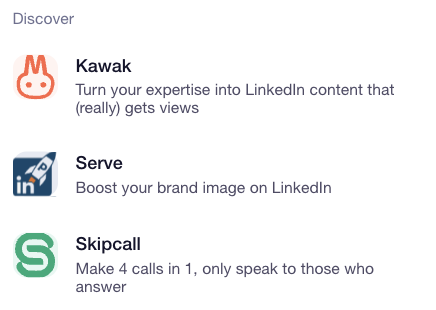
You’ll also find hundreds of resources across the blog and Help Center to help you get started and optimize your campaigns.

You can join an active community (3,900+ members) to connect and share insights on:
- 🚀 The latest strategies.
- 📈 Proven best practices.
- 🛠️ Tools related to growth hacking, sales and prospecting.
Waalaxy also offers multiple formats to learn at your own pace:
- 📖 A daily newsletter
- 🎬 A YouTube channel
- 📘 Ebooks focused on prospecting
- 🎥 Webinars
- 👀 A blog covering everything from LinkedIn and marketing to outreach, automation, and recruiting …).
Whether you’re just getting started or already experienced, everything is designed to help you improve quickly with resources available anytime.
What about Dux-Soup?
With Dux-Soup, you get in-app chat and solid customer support but it’s only available in English.
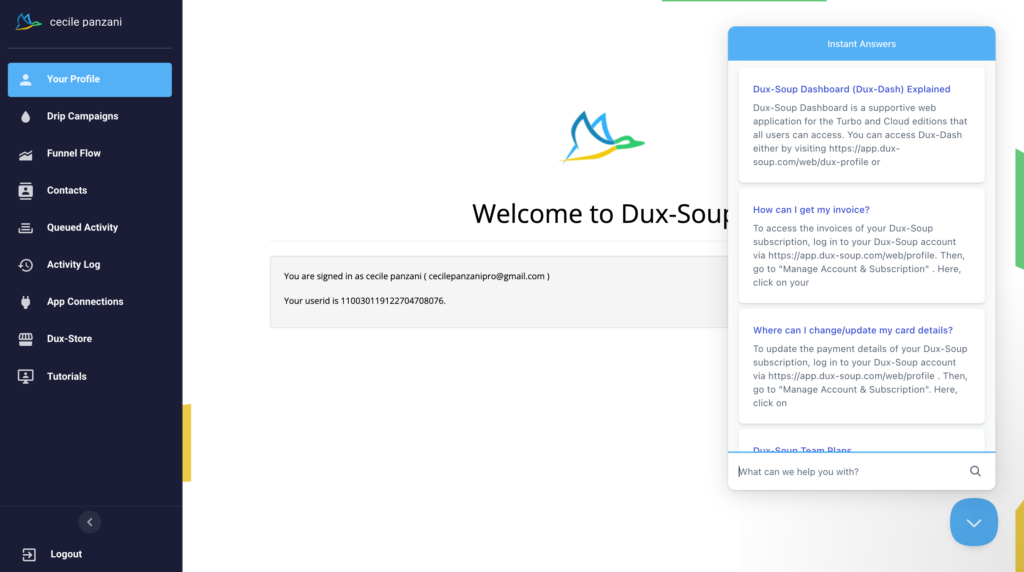
You can also request a callback from their support team. These free calls last up to 15 minutes.
Dux-Soup has expanded its support offering with two additional options:
- Booster sessions: Starting at $79.95/hour, these sessions help you build workflows or define and target your ICP on LinkedIn.
- Technical sessions: Also starting at $79.95/hour, focused on integrations and technical setup.
While Dux-Soup isn’t the most popular tool on the market, it has built an active community that helps answer user questions. 🤓
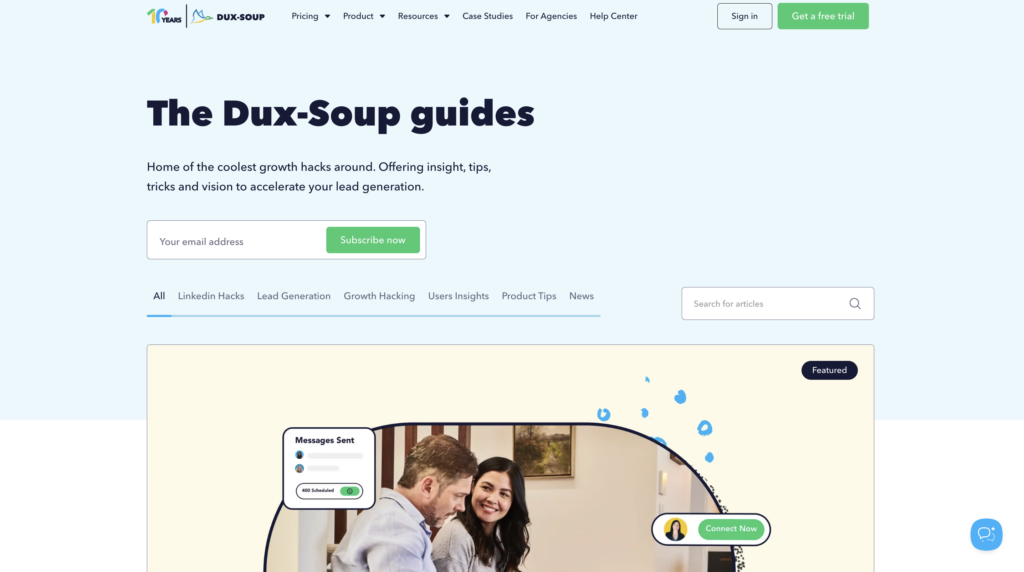
You’ll also find a help center and additional resources directly on their website.
Quick recap:
| Features | Waalaxy | Dux-Soup |
|---|---|---|
| FAQ | ✅ | ✅ |
| Blog | ✅ | ✅ |
| YouTube channel | ✅ | ✅ |
| News/updates | ✅ | ❌ |
| Help center | ✅ | ✅ |
| Customer support | ✅ | ✅ |
| Community | ✅ | ✅ |
| Newsletter | ✅ | ✅ |
| E-book | ✅ | ❌ |
| Webinaire | ✅ | ✅ |
| Free calls | ❌ | ✅ |
Let’s do a recap about Dux-Soup Vs Waalaxy
At the end of the day, both tools help automate LinkedIn prospecting but they’re clearly not in the same league.
👉🏻 Dux-Soup is a solid option if you’re looking for flexibility and a high level of control. But it comes with a steeper learning curve, it’s less customizable, and the overall experience isn’t as smooth day to day.
👉🏻 Waalaxy, on the other hand, focuses on what really matters: simplicity, speed, and efficiency. Everything is designed to save you time, sequences, multichannel outreach, and a clean interface. You can launch campaigns in minutes, without overcomplicating things.
No matter which platform you choose, what really matters is making sure it aligns with your marketing and outreach strategy.
FAQ : Dux-Soup vs Waalaxy
How do you migrate from Dux-Soup to Waalaxy?
Switching from Dux-Soup to Waalaxy is simple and doesn’t require any technical skills:
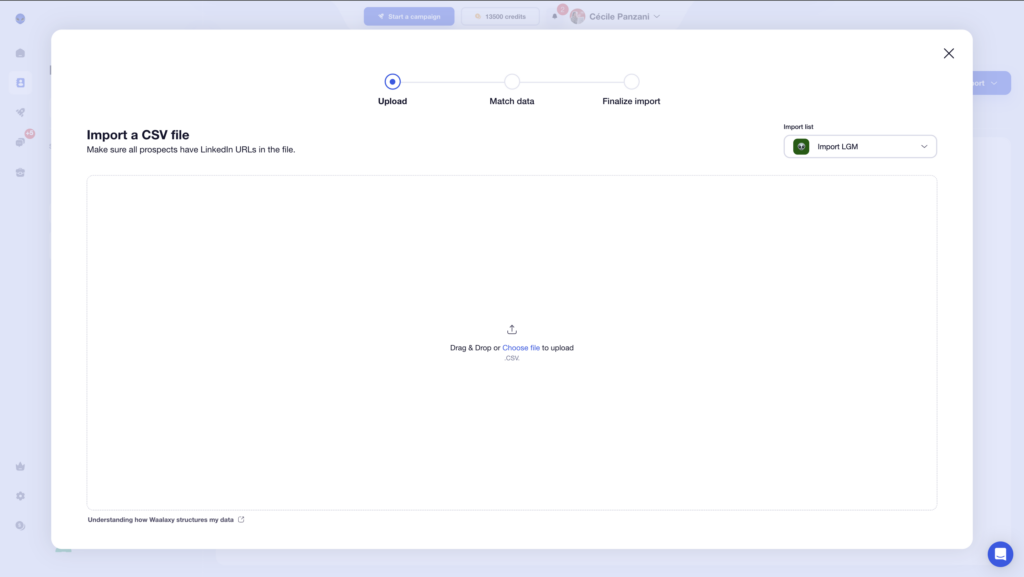
- 1️⃣ Export your leads from Dux-Soup as a CSV file (name, email, company, LinkedIn URL, etc.).
- 2️⃣ Import them into Waalaxy using the “Import prospects” section, making sure each field is properly mapped.
- 3️⃣ Relaunch your campaigns by rebuilding your sequences or using ready-made templates.
Is Dux-Soup allowed on LinkedIn?
Dux-Soup works as a Chrome extension that automates various tasks on LinkedIn.
While it can save you a lot of time when it comes to , LinkedIn has strict rules against automation tools that interact with the platform without explicit permission. 🙈
Dux-Soup operates in a gray area when it comes to LinkedIn’s terms of service. That means you need to be careful to stay within LinkedIn’s guidelines to avoid restrictions or account suspension.
How can you avoid getting your LinkedIn account restricted or blocked?
Here are a few best practices to stay under LinkedIn’s radar:
- ➡️ Keep your activity at reasonable levels (connection requests, messages, etc.).
- ➡️ Avoid actions that are too fast or overly repetitive.
- ➡️ Personalize your messages to stay natural and avoid getting flagged.
- ➡️ Add delays between each action.
- ➡️ Don’t run multiple automation tools at the same time.
Keep your behavior as human as possible, that’s the key to staying under the radar.
Which is the best LinkedIn automation tool?
It all depends on what you’re looking for.
👉🏻 Dux-Soup is often appreciated for its flexibility and more technical approach, making it a good fit for users who want advanced control.
👉🏻 Waalaxy, on the other hand, focuses on simplicity, with an easy setup, ready-to-use templates, more customizable messaging, and a more guided experience.
Can you manage multiple LinkedIn accounts with Waalaxy?
Yes, you can manage multiple LinkedIn accounts with Waalaxy using the Team plan.
This is especially useful if you work in a team, run an agency, or manage multiple profiles at once. With it, you can: 👇🏻
- Centralize your actions.
- Share templates.
- Track performance across multiple accounts.
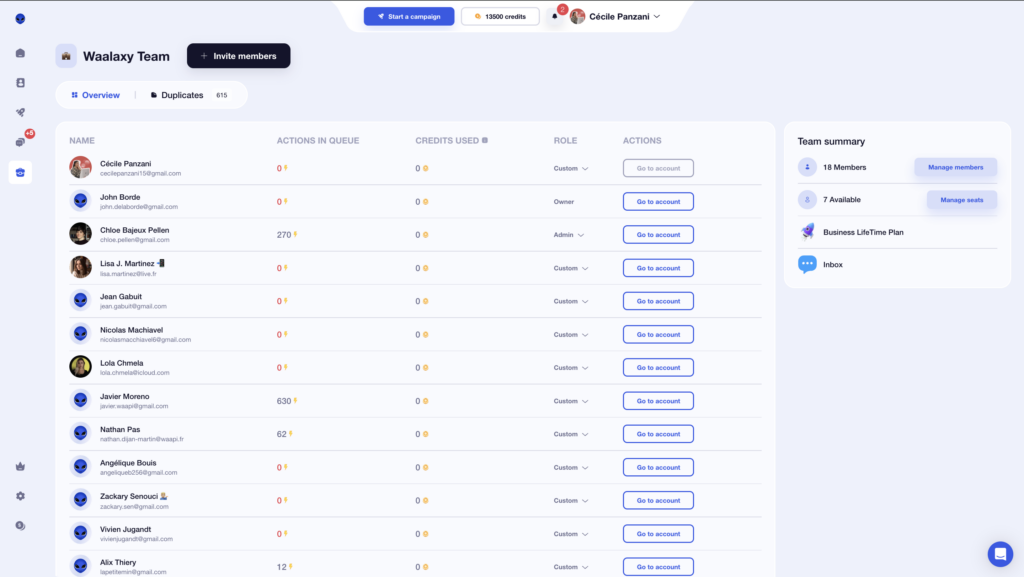
A great feature for scaling and organizing your outreach.
That’s it ! You now have everything you need to choose between Dux-Soup and Waalaxy. 🧚🏻♀️
 Elodie
23/06/2026
Elodie
23/06/2026 













