

- What is LinkedIn Ads?
- What are LinkedIn Ads’ advertising formats?
- LinkedIn Advertising: What’s the price?
- How do you win your bids on LinkedIn?
- How do you create your first successful LinkedIn Ads campaign?
- How do you generate qualified leads with LinkedIn Ads?
- How do you promote your business on LinkedIn Ads?
- How do you optimize your LinkedIn Ads?
- What’s the best alternative to LinkedIn ADS?
- FAQ
- How do you advertise on LinkedIn Ads?
- Conclusion
Wondering how to make the most of LinkedIn Ads for your business? 🔥
Welcome to this article dedicated to a complete discovery of LinkedIn Ads! My goal is to guide you in choosing the tools best suited to your strategy on LinkedIn, in order to maximize your impact and your results. 🎯
Indeed, you’ll see that you have several options and that they will depend on your needs.
I’m taking you behind the scenes of the network to help you understand advertising on LinkedIn and make the most of it. 🤑
Let’s go! 🚀
What is LinkedIn Ads?
Never heard of LinkedIn Ads? No worries, I’ll explain what it is 😁. LinkedIn Ads is an online advertising platform developed by LinkedIn (the largest professional networking platform). It allows advertisers to target professionals based on:
- Industry. 🏭
- Their job function. 💼
- Their education. 🎓
- Geographic area. 🌍
- Their company. 🏢
- Etc…
Advertisers can run ads in the form of banners, sponsored posts, or even videos 📹. These ads can then be shown on profiles, search pages, in groups…
LinkedIn Ads gives advertisers the ability to reach a qualified and highly targeted audience. This can be particularly useful for those looking to reach decision-makers, managers, or recruiters. You can also promote your brand, your products, or your services, and on top of that, generate qualified leads.⭐️
What are LinkedIn Ads’ advertising formats?
I’m not telling you anything new when I say that LinkedIn is THE professional social network:
- LinkedIn has 700 million members worldwide in 2020 🌍.
- The network has the best free B2B database 📊.
- It allows you to obtain qualified people and grow your brand awareness 🚀.
Given its success, LinkedIn has a strong interest in using advertising as a way to make money, and you have a strong interest in using LinkedIn to do the same. 😉
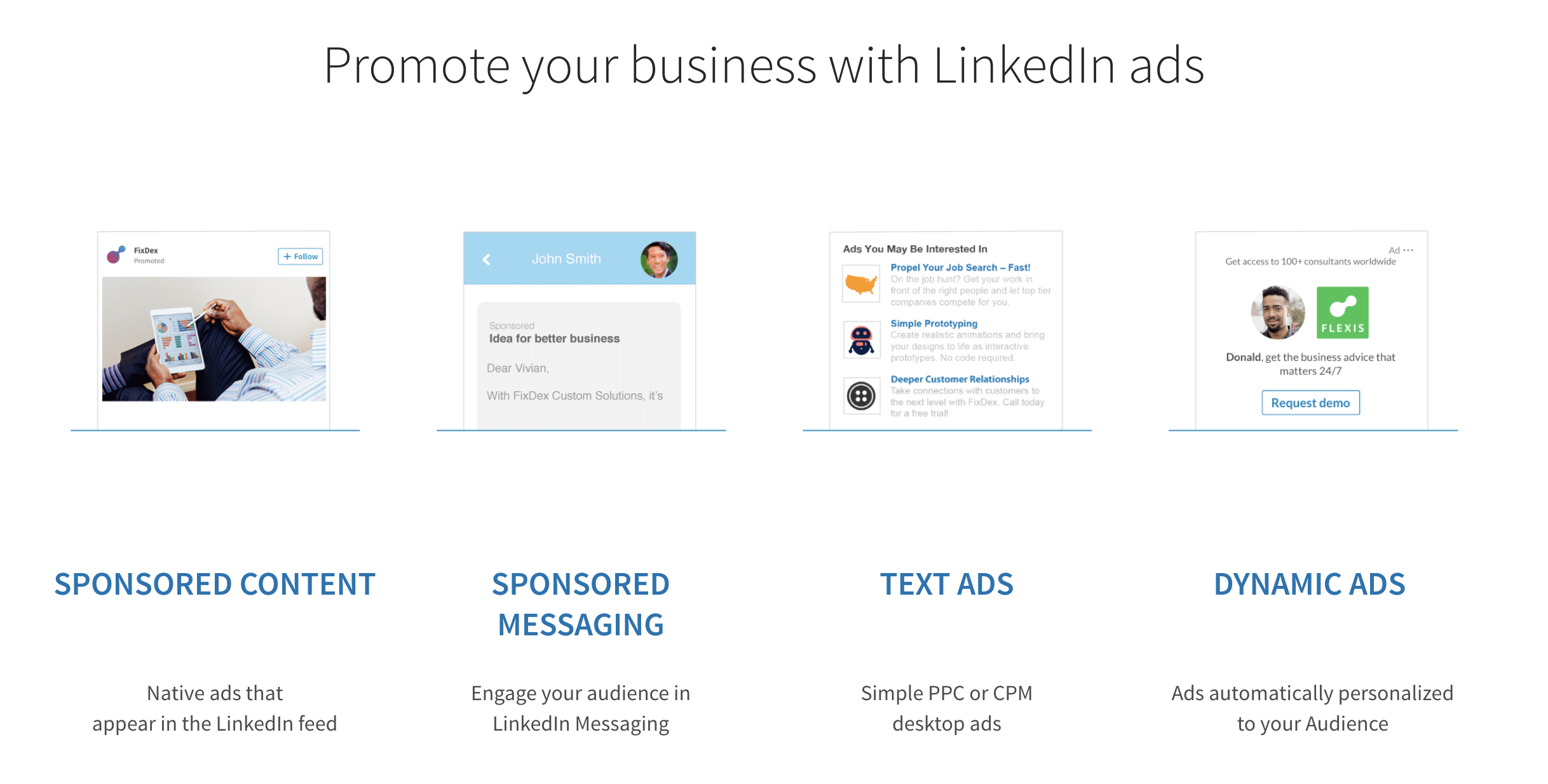
➡️ There are 4 paid options:
- Sponsored messaging ✉️.
- Text ads 📝.
- Dynamic ads 💡.
- Sponsored content 📢.
LinkedIn’s algorithm is designed more or less the same way as other networks. That is to say, its goal is to keep users connected and engaged. This allows, among other things, to make them consume ads purchased by advertisers.
LinkedIn has therefore bet on optimizing the customer experience, whether for the advertiser (the one offering the ad) or the prospects (the targets for whom the ad is intended).
As a result, LinkedIn focuses on quality ads before thinking about quantity.
This is where the Campaign Manager comes into play.
Getting to know LinkedIn Ads Manager
The Campaign Manager is a bit like the advertiser’s Swiss Army knife assistant. It makes the entire process easier, so that even a beginner can get started with LinkedIn Ads.
What’s rather nice is that you can customize your data according to your goals thanks to the Campaign Manager. It also lets you launch your campaigns and track your results.

Let me explain how it works and what these famous options are 😏.
1 – Sponsored content or sponsored ads
2 – Text Ads
What is Text Ads according to LinkedIn?
It’s a version of sponsored content with a title, short text, and an image, to which you add a call to action (a button to visit your site, your landing page…). It appears in your target’s news feed.
3 – Sponsored messaging
This is a short text sent to your targets’ inbox, aimed at sparking curiosity and encouraging them to learn more about the content.
Generally, the format offered by LinkedIn isn’t very popular, because your messages carry the sponsored label.
Users therefore know that it’s an ad sent automatically, which doesn’t fit with the network’s development and current social norms.
LinkedIn users are looking for more authenticity and more personalized exchanges.
Should you use sponsored messaging?
As I mentioned, if you go through LinkedIn you’re required to have the sponsored label on your message. Honestly, we’ve all already received these messages in our LinkedIn inbox, and it would be a lie to say we pay attention to them.
You too, didn’t you just skip over their messages without reading them, because you just felt like you were being spammed? Admit it. 😜
Sponsored messages can nevertheless be great tools for getting in direct contact with the prospect and meeting a growing demand, that of having more personal exchanges. Of course you need to know how to write your prospecting messages, but you also need the right tool.
If you’re interested in sponsored messaging, I’m not going to tell you that you absolutely must use Waalaxy, it’s up to you to choose the tool you prefer. However, I will tell you not to use LinkedIn sponsored messaging under any circumstances, and to compare the tools on the market to find out which one suits you.
And if you’d like to learn more about automating your actions on the network, I invite you to read .
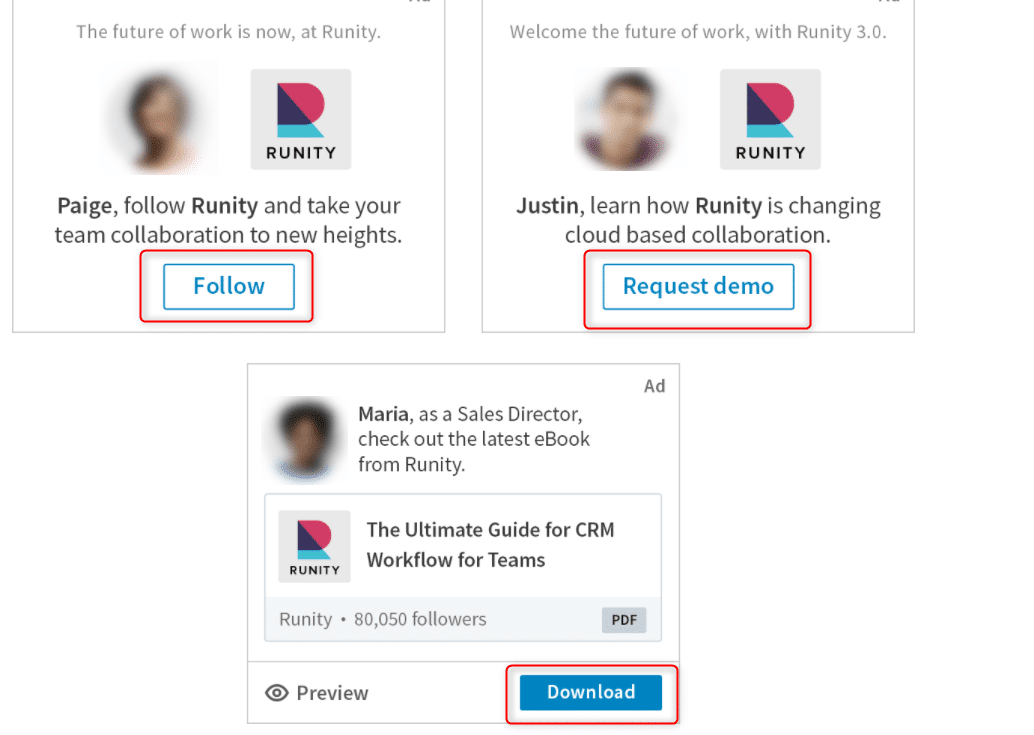
4 – Dynamic Ads
LinkedIn Advertising: What’s the price?
- Cost per mille; to build brand image. 📢
- Cost per click; to generate B2B leads. 🤑
Let me explain:
First of all, you want to position yourself on a target. This will be the same target as other bidders.
LinkedIn therefore puts you in competition with them.
Why? Because there isn’t enough dedicated space to fit all your lovely ads, and LinkedIn isn’t interested in spamming its users too much, but rather in offering them the most relevant ads possible.
LinkedIn’s goal is twofold: offer the best ads to users and meet advertisers’ needs.
First, you’ll choose a maximum amount you’re willing to pay. This will be the cost per click or the cost per mille, depending on your goals.
How do you win your bids on LinkedIn?
Two factors are key to your success 🔑:
- The amount you want to bid per click or per mille.
The higher the amount, the higher your chances of winning the bid. That said, it’s important to understand your goals and estimate your budget before deciding on the amount you want to pay per click.
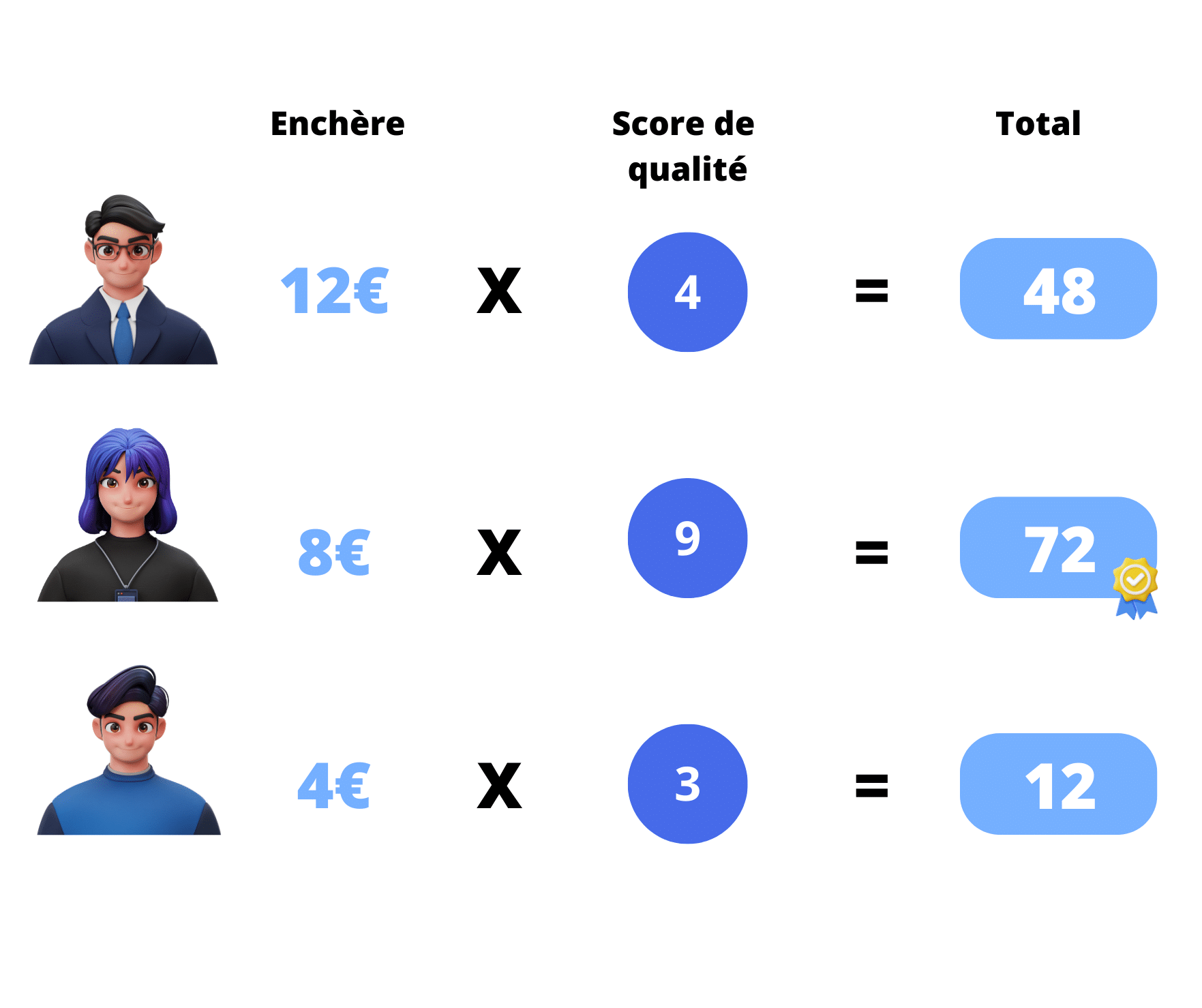
For example: If you win the bid at €12 CPC and you have a budget of €1,000, you’ll get 83 leads, and then your ad will end.
- The quality score: this refers to how users interact with your ad.
As I explained earlier, LinkedIn has every interest in offering relevant content to users, since every time they click or view the ad you’ve posted, LinkedIn makes money.
LinkedIn’s algorithms will therefore give you a quality score to measure the effectiveness of your ads. The higher it is, the higher your chances of winning the bid. 🎯
How is the quality score calculated?
It’s based on a set of factors:
- Your performance on your previous LinkedIn Ads (click-through rate, user engagement),
- Ad relevance: this is assessed based on how relevant your keywords are to the content and message of your ads,
- The relevance and user-friendliness of the landing page (of course, if you send users to dubious pages, LinkedIn isn’t going to help you out),
- Shares, likes, comments on your ads (user engagement).
Of course, LinkedIn is careful never to tell you what your score is, otherwise you might bid less money to start with, and that doesn’t suit them too well. 😂
On top of that, just to add a bit more complexity to all this, the amount you bid isn’t the amount you’ll actually end up paying. ❗
It’s a pro rata between the total score of the advertiser who came in second place and your own quality score. (I did warn you it was complicated 😂)
Don’t worry, I’ve made some nice little visuals to show you:
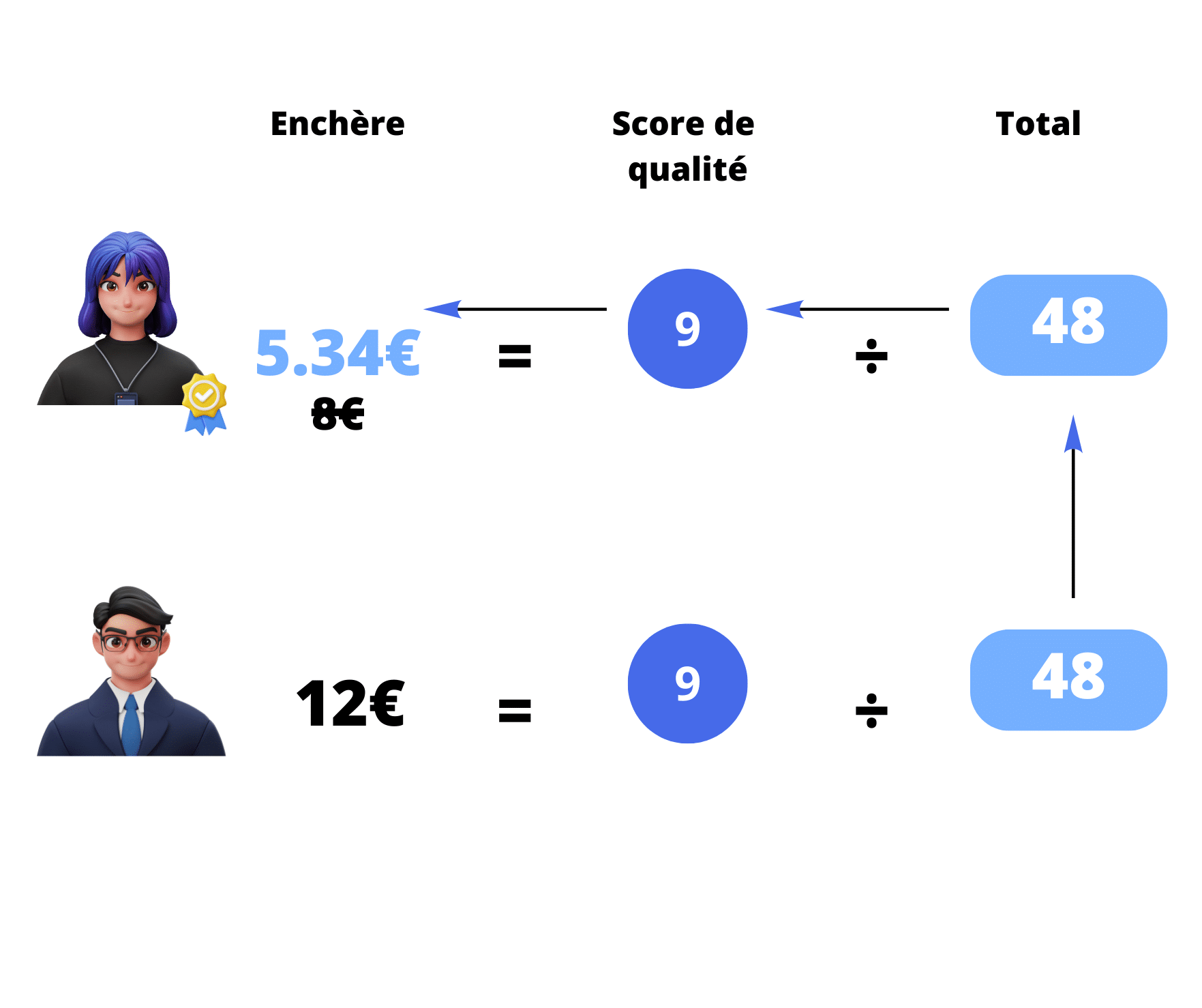
LinkedIn therefore earns €5.34, which is less money than what you’d originally bid, but according to LinkedIn, it’s higher quality and will therefore be better appreciated by users.
So it’s very much in your interest to choose your targets carefully and to take great care over the visuals and copy of your ad campaigns if you want to win.
How do you create your first successful LinkedIn Ads campaign?
Hubspot study: On LinkedIn Ads, the average click-through rate is 0.15% and the conversion rate is 6.1%.
Now that you have an idea of the average, you know where you stand. That said, we’re not going to settle for the average, and we’re going to look together at the mistakes to avoid so you can double these percentages. 🎯
How do you generate qualified leads with LinkedIn Ads?
So first off, it all depends on your target. Of course, here we’re mainly talking about a B2B target. If your prospects aren’t in the business world, then this might not be your best acquisition channel. That said, between us, I know from experience that it’s a channel that shouldn’t be overlooked.
But in any case, if you’re doing Ads, think B2B.
Professional-level targeting
What’s great about LinkedIn is that your target is right there 🎯, all you have to do is create the most precise targeting possible.
So, first, you need to define a clear target. And LinkedIn helps you do that.
Targeting your audience on the network is much simpler than on others like Facebook or Instagram.
➡️ You can do it based on professional criteria:
– Job title 🧑💼.
– Company 🏢.
– Field of expertise 🧠.
– Seniority at the company or in the field 📆.
– Demographic data: “age and gender” 👥.
– The target’s educational background 🎓.
– Target an email list 📧.
– Target a list of companies 🗂️.
– Target a group or members of a page 📄.
Retargeting
Retargeting (via the matched audience option), which involves feeding the machine with examples. Basically, you’re telling LinkedIn:
“look, this guy, he likes what I do, so I want more guys like him”
You add new people who have visited or taken an action on your site, and you refine your targeting going forward. Note that lookalike audiences are also used in LinkedIn Ads, following the same principle as LinkedIn’s algorithm for posts.
So remember to retarget by analyzing the profiles that respond to your ads. 🥳
Exclusion options
Remember to exclude people from your lists. 🚪
For example, if you’re targeting the “France” geographic area, you can exclude certain cities like “Marseille” or “Paris” (so as not to play favorites). 😂
How do you promote your business on LinkedIn Ads?
There are several reasons to advertise on LinkedIn:
- Improve your brand image and visibility 🌟.
- Build your branding 🎨.
- Sell your products 🛒.
- Build a database that you’ll “nurture” (feed, pamper) and sell to later 🌱.
Each of these ad campaigns will carry a different message and therefore needs to be built differently.
To promote your business, make sure your ad is:
- Clear and precise in its message 📝.
- With quality visuals 🖼️.
- Highlighting your added value 🌟.
- The company name and logo must be visible 🏷️.
- Prefer a button linking to your blog rather than your LinkedIn company page. There’s more information, and it helps convert prospects into customers 🔗.
- Avoid overly long text, keep it clean ✂️.
- Follow your company’s brand guidelines 🎨.
To promote your business on LinkedIn, you can also:
- Optimize your company page 🏢.
- Publish quality content 📄 (be consistent).
- Use professional images 📸.
- Develop a multichannel prospecting strategy 🌐.
- Run A/B tests – only you will know what works best for your campaigns 🧪.
How do you optimize your LinkedIn Ads?
Even though LinkedIn’s algorithm performs well, it’s not enough to just let it run without doing anything. In fact, you can, but you risk not maximizing your performance 📉.
The best approach is to regularly check your ads in LinkedIn Campaign Manager 🖥️. You can adjust and refine them along the way.
To check your results, you have access to several KPIs (metrics) 📊:
- Cost per click (CPC) 💸.
- Click-through rate (CTR) 📈.
- Number of leads (if you’re running a lead generation campaign) 🧲.
Optimization can involve:
- Changing visuals and other graphic elements 🖼️.
- Improvements to the copy ✍️.
- Adjusting the message and the value offered 🎯.
What’s the best alternative to LinkedIn ADS?
There are dozens of tools for prospecting, but some are more effective than others. Our favorite? Waalaxy! It’s designed to automate your LinkedIn and email prospecting campaigns. It’s the simplest and most intuitive solution on the market. Plus, it has a free-forever plan!
This tool was designed for different types of clients: sales reps, marketers, executives, agencies, recruiters. 💡
Here are Waalaxy’s main strengths and features:
- Automatic lead import. 📥
- Deployment of automated prospecting campaigns (200 invitations/week). 🚀
- Optimization and personalization of messages and emails to maximize conversions. ✨
- Managing replies and engagement via LinkedIn messaging. 💬
- Smooth integration with other tools (CRM). 🔄
- Use of AI for prospecting and email retrieval. 🤖
- Accessible interface and complete user support. 📚
[maxbutton id=”126″ url=”https://www.waalaxy.com/fr/tarifs” text=”Try Waalaxy for free 🚀” ]
FAQ
How do you advertise on LinkedIn Ads?
To create an ad, simply click on “For Business” then select “Advertise.” Let yourself be guided through the following steps. 👀

- Choose your format: sponsored messaging, text ads, dynamic ads, or sponsored content 💰.
- Get started with bidding 📈.
- Follow the steps in Campaign Manager 📋.
- Analyze your performance and run tests 🧪.
- Repeat for your next campaigns 🔄.
How do you set up LinkedIn Ads?
First, you need to define your goals, your budget, and your target via the Campaign Manager. 💸
Then, you simply need to understand the 4 different LinkedIn offerings in order to select the one that suits you, or find another tool to make the most of the network.
Finally, you need to win the bidding so that LinkedIn publishes your ad instead of your competitors’.👀
What’s a good CTR on LinkedIn?
🌟 It’s useful to analyze your click-through rate (CTR) because it lets you determine whether you need to adjust your communication and web marketing plan.
📊 A high CTR indicates that the advertiser’s ad campaign meets the expectations of the users interacting with it. For visuals, this means the ads are well targeted. In SEA (paid search), a high CTR for an ad corresponds to properly chosen, relevant keywords. Moreover, the concept of a “good CTR” is very relative. How relevant the advertiser’s ad is depends on the type of ad format, the channel, the device it’s displayed on (SEA, display, mobile…), etc.
📈 As for CTR on LinkedIn, it’s assessed as follows:
- 0%-2%: Engagement on LinkedIn is insufficient and needs to be improved. It’s a good idea to contact a specialized agency to review your editorial line and digital communication strategy.
- 2%-5%: Engagement on LinkedIn is good and reflects users interacting with the content.
- 5% and above: Engagement on LinkedIn is high, the community is active, and it helps improve your reputation.
🔍 What factors influence click-through rate?
There are many factors that can affect click-through rate. These include:
- Audience relevance 🎯: Internet users are more likely to click on an ad that matches their needs and interests.
- Ranking in search engines 🔝: Pages that rank very high in search engine results pages (SERPs) will have the highest CTR.
- Link placement 🔗: The placement of links and CTA buttons on pages and ads can influence how many people click on them.
- Visuals 🖼️: Images, colors, layout, and size can affect CTR.
- Industries 🏢: Some industries have higher click-through rates than others.
All these factors influence CTR across many social media platforms, not just LinkedIn. 🌐
How much does advertising on LinkedIn (LinkedIn Ads) cost?
Several factors will determine the price of your ad. First, the budget you decide to allocate to it. Then, the maximum cost per click (CPC) or cost per mille (CPM) you want to invest. 💰
Next, you’ll submit a bid and you’ll be put in competition with other advertisers. The price you’ll pay if you win the bid doesn’t match what you originally bid. It’s a pro rata between the score of the advertiser who came in second place and your own. 👀
There you go, now you know everything about LinkedIn Ads! 🚀
Conclusion
➡️ There are 4 types of LinkedIn Ads offerings:
- Sponsored messaging ✉️.
- Text ads 📝.
- Dynamic ads 🎯.
- Sponsored content 📄.
In this article you were able to see the pros and cons of these offerings, how to win bids to advertise on LinkedIn, as well as our tips for making the most of the network by using tools.
Ready to launch your first LinkedIn Ads campaign? 🔥
 Alexis
08/07/2026
Alexis
08/07/2026