



- What Is the LinkedIn Services Marketplace?
- Why Isn’t the LinkedIn Services Marketplace Enough to Generate Leads?
- How does LinkedIn services Marketplace work?
- How Do You Generate Qualified Leads With the LinkedIn Services Marketplace?
- Why Combine the LinkedIn Services Marketplace With Outbound Prospecting?
- Let’s Recap the LinkedIn Services Marketplace
- FAQ: LinkedIn Services Marketplace
Finding clients consistently as a freelancer or consultant isn’t always easy. 😅
That’s exactly why LinkedIn launched the LinkedIn Services Marketplace. The goal? Help professionals showcase their services directly on LinkedIn and get discovered by potential clients.
The concept is solid, but visibility alone doesn’t automatically generate leads.
So, how does the LinkedIn Marketplace actually work? How do you optimize your profile to stand out? And most importantly, how do you turn that visibility into paying clients?
What Is the LinkedIn Services Marketplace?
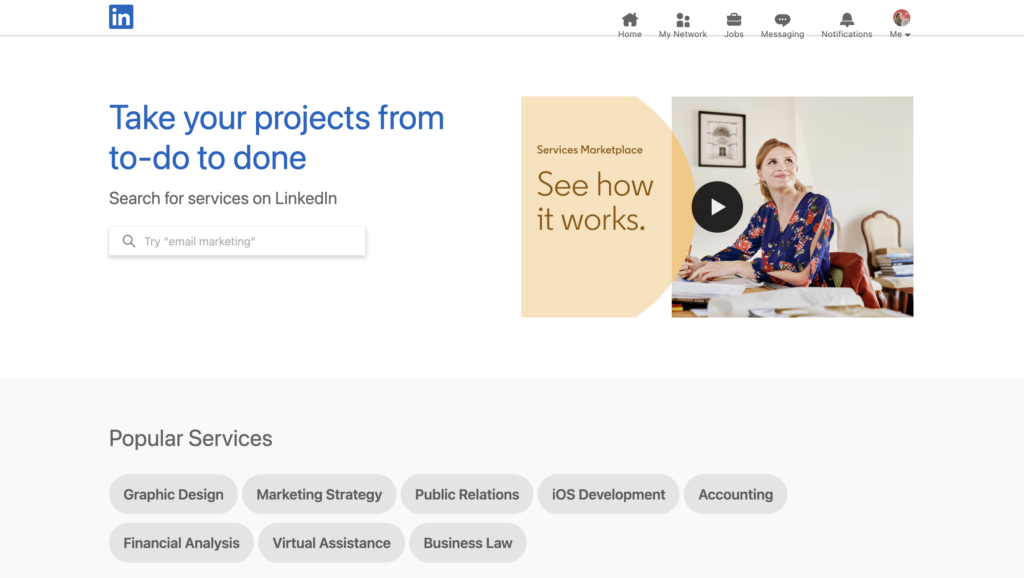
The LinkedIn Services Marketplace is a feature that lets freelancers, consultants, agencies, and independent professionals offer their services directly on LinkedIn.
Users can search for service providers by skill, whether it’s marketing, copywriting, recruitment, or design or something else entirely.
Professionals can create a LinkedIn Services page to appear in search results and receive inquiries from potential clients. Unlike platforms such as Malt, Upwork, or Fiverr, LinkedIn Services also depends on your profile, your network, and your activity on the platform.
Is the LinkedIn Services Marketplace Free?
Yes, LinkedIn Services Marketplace is completely free to use.
You can create a LinkedIn Services page, add your services, and appear in search results without paying for an extra subscription. Unlike some freelance platforms, LinkedIn also doesn’t take a cut of your projects.
To get started, you just need a LinkedIn profile and to enable the feature from your account settings.
Is LinkedIn Premium Worth It for Selling Services?
Yes, LinkedIn Premium can be worth it for freelancers, consultants, and agencies… but only if you actively use LinkedIn to generate leads.
Premium includes several useful features:
- 👀 See who viewed your profile.
- 📩 Send more InMail messages.
- 🔎 Access advanced search filters.
- 📈 Get additional visibility insights.
These tools can help you identify prospects more easily and improve your outreach strategy. That said, LinkedIn Premium alone won’t magically generate clients.
Your results still depend on your positioning, your profile quality, your content… In most cases, LinkedIn Premium works best as a support tool not as a replacement for outbound prospecting or content creation.
So, if you actively use LinkedIn to grow your business, Premium can definitely help. But if you expect leads to come automatically just because you upgraded your account, you’ll probably be disappointed. 🫠
What Features Does the LinkedIn Services Marketplace Offer?
The platform includes several features designed to help you increase visibility and attract client requests.
The core feature is your LinkedIn Services page. On that page, you can highlight:
- 👩🏻💻 Your services.
- 🧠 Your areas of expertise.
- ✍️ A description of your business.
- 🏢 The industries you work with.
Once your page is live, you can appear in LinkedIn search results when potential clients look for a service provider.
LinkedIn also allows visitors to:
- 📩 Send a service request directly.
- 👤 View your profile.
- ⭐ Read your recommendations.
- 📚 Explore your work experience.
- 📱 Check out the content posted on the platform.
That’s exactly what makes the LinkedIn Services Marketplace different from traditional freelance platforms: your credibility also depends on your overall LinkedIn presence. The more active and optimized your profile is, the more likely prospects are to trust you and reach out.

Why Isn’t the LinkedIn Services Marketplace Enough to Generate Leads?
On paper, the LinkedIn Services Marketplace sounds like a great way to attract client inquiries. But in reality, visibility on LinkedIn doesn’t guarantee a consistent flow of leads.
The first issue is competition. More than 2 million professionals already use LinkedIn Services, which makes some categories extremely competitive.
Result:
- ❌ Your profile can easily get buried among hundreds of other providers.
- 📉 Your visibility depends heavily on LinkedIn’s algorithm.
- ⏳ Client inquiries can be unpredictable.
Another big limitation: you have very little control over how many leads you get. Some weeks, you may receive several inquiries. Then nothing for an entire month.
This is the main problem with a strategy based solely on inbound marketing: you are entirely dependent on the platform and its visibility. And unlike outbound prospecting tools, the LinkedIn Services Marketplace doesn’t let you proactively reach out to prospects.
That’s why many freelancers now combine several strategies:
- ✨ LinkedIn visibility and profile optimization.
- 📣 Consistent content creation.
- 🚀 Automated outbound prospecting campaigns.
How does LinkedIn services Marketplace work?
Creating a LinkedIn Services page is pretty straightforward.
The key is setting it up correctly to maximize your chances of appearing in search results and attracting the right client inquiries.
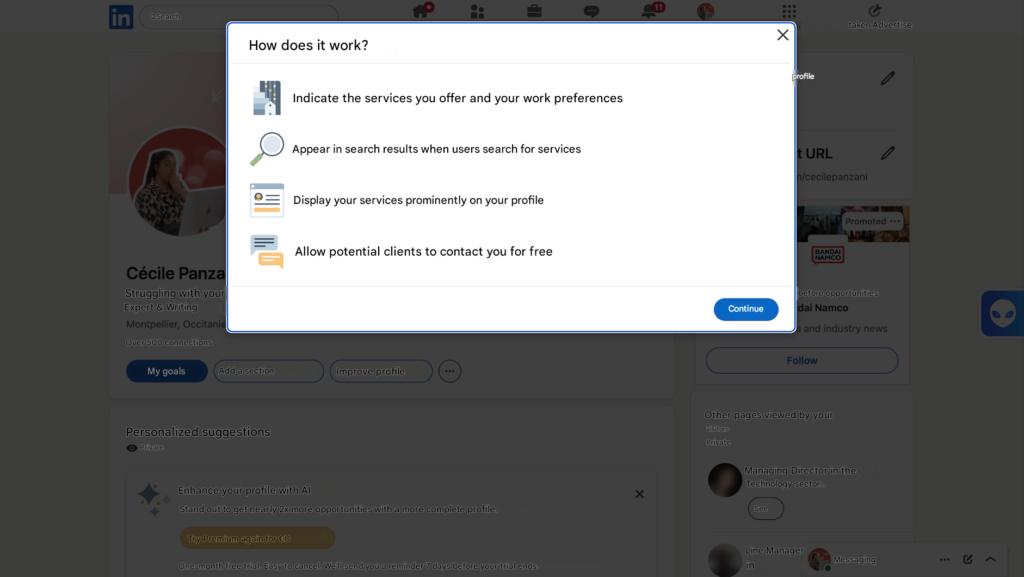
Here’s how to build a page that actually gets attention !
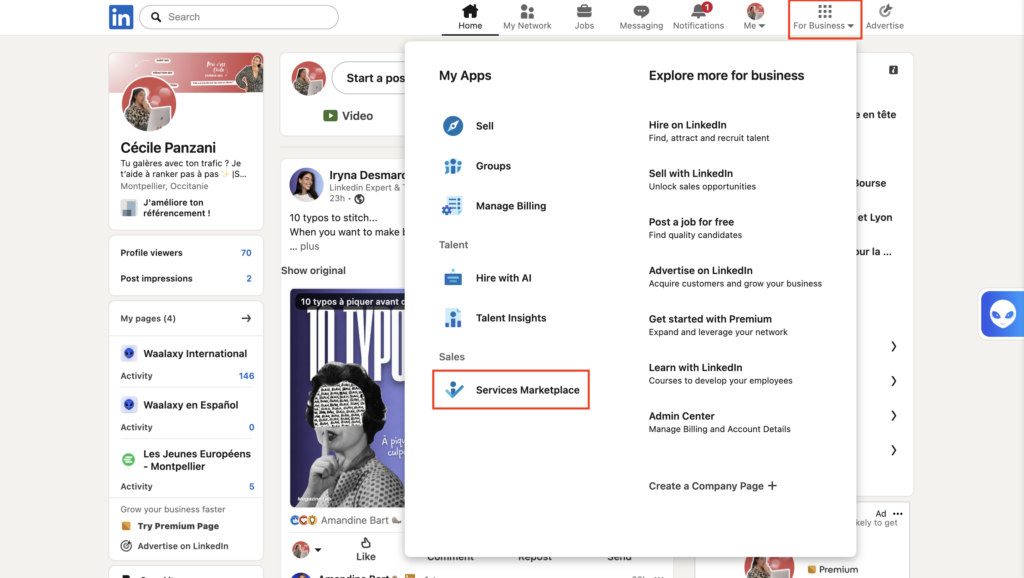
1. Go to the LinkedIn Services Marketplace
From your LinkedIn profile, click on “ For businesses: ” then “ Services Marketplace ”. LinkedIn will then guide you through creating your page.
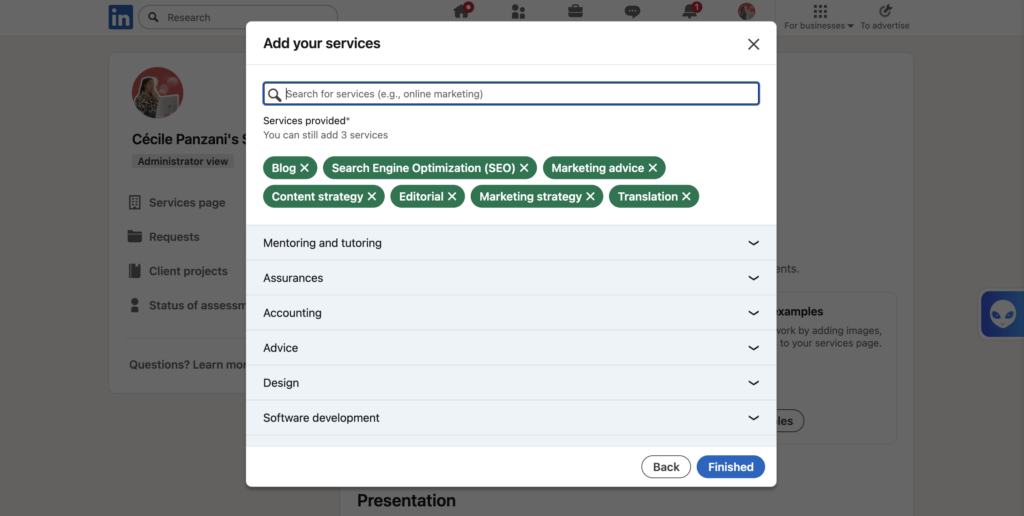
2. Choose Your Services Carefully
Avoid selecting too many different services. The clearer your positioning, the better LinkedIn will understand your expertise, and the more potential clients will immediately know what you offer.
You can select up to 10 services from a list of 250 LinkedIn services categories list.
3. Write a Description That Sells Your Expertise
Your description should be clear, concrete, and results-oriented. You should explain:
- ✍🏻 What you do.
- 🗣️ Who you’re targeting.
- 📈 The results you deliver.
But this description also plays an important role in LinkedIn’s internal search engine optimization.
Just like on Google, there’s SEO on LinkedIn. It uses keywords to understand your expertise and display your profile in search results. The more terms related to your work your description contains, the more you increase your chances of appearing in front of the right prospects.
For example, a freelancer who simply writes ❌ “Marketing Consultant” …will usually get less visibility than someone who writes ✅ “B2B LinkedIn Consultant specializing in lead generation”
LinkedIn gives you up to 500 characters, so keep it concise and avoid vague, generic descriptions.
4. Select Your Geographic Area
LinkedIn automatically pulls the location from your profile.
That means you can’t directly add multiple cities inside the LinkedIn Services Marketplace. However, you can mention that you work remotely.
This is useful if you want to work with clients throughout USA or internationally.
5. Add Your Rates
LinkedIn allows you to display a rate range. Even if it’s only an estimate, it helps prospects qualify themselves before reaching out and avoids unnecessary back-and-forth. 💸
Transparent pricing also helps build trust.
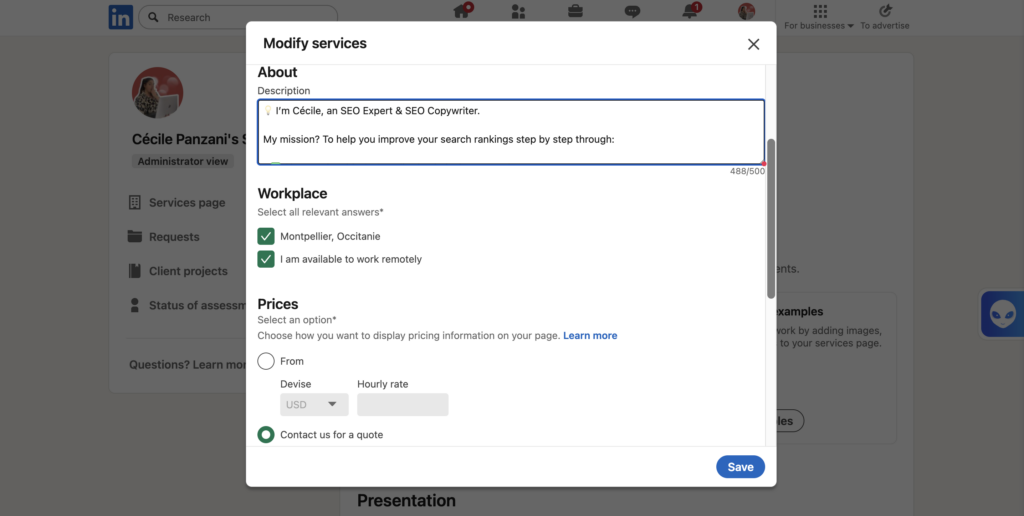
Your page can be live in just a few minutes! 😍
How Do You Decline a Request?
If you receive a request that doesn’t match your skills or business, you can decline it directly from the “Requests” tab in the LinkedIn Services Marketplace.
Simply open the relevant request and select the “No thanks” option to decline it. It’s always better to decline quickly than leave a prospect hanging.
How Do You Manage Reviews on Your Services Marketplace Page?
Once your LinkedIn Services page is created, you can manage customer reviews directly from the “Status of assessments” tab.
LinkedIn allows you to invite up to 20 past clients to evaluate your service level and assign a rating of up to 5 stars.
You can track invitations you’ve sent and monitor pending requests directly from your Services page.
If an invitation goes unanswered for too long, LinkedIn also lets you withdraw it. This can be useful if you don’t want to send a reminder to the client.
Withdrawing an invitation does not notify the client, restores your invitation credit, but prevents you from sending a new request to that same person for 3 weeks.
In general, positive reviews can significantly boost your credibility on the LinkedIn Services Marketplace.
However, you can’t simply delete a negative review because you dislike it. Unless the review violates LinkedIn’s policies, it stays visible. If needed, you can report a review by clicking the three dots in the top-right corner of the review.
How Do You Add Media?
To add media to your LinkedIn Services page, go to the editing section of your page and click “Add Media.”Adding media makes your page more engaging and helps build credibility with potential clients.
LinkedIn currently allows you to add:
- 📸 An image.
- 🎥 A video.
- 🔗 A link to a website, document, or video.
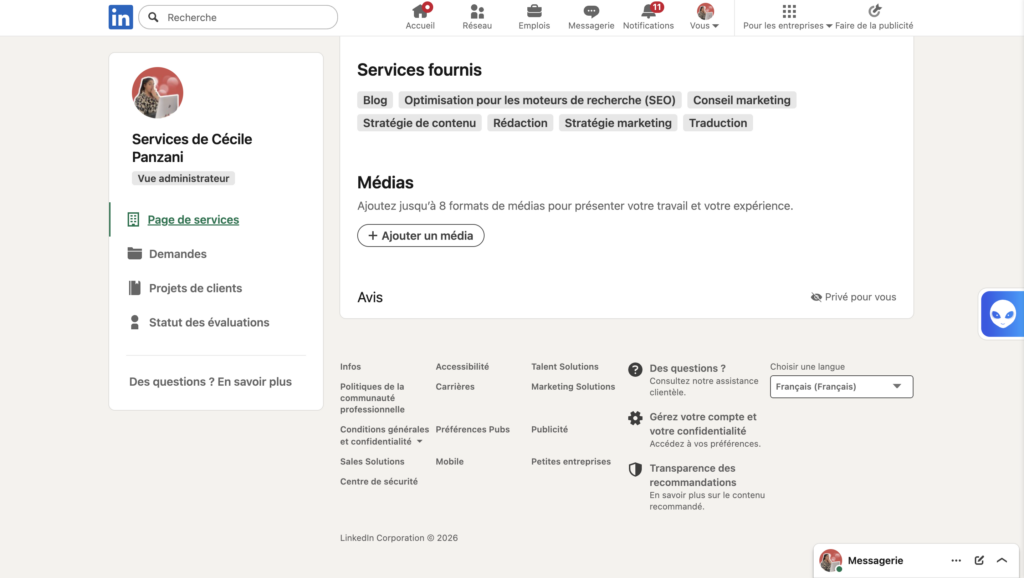
LinkedIn recommends:
– A minimum size of 1128 x 376 px for images.
– A 16:9 aspect ratio for videos.

How Do You Generate Qualified Leads With the LinkedIn Services Marketplace?
Creating a LinkedIn Services page is only the beginning.
But to truly generate qualified leads, you need to focus on building your visibility and credibility on LinkedIn.
The first step is defining a clear niche.
The profiles that usually get the best results are the ones focused on a specific expertise instead of offering broad, generic services.
Your LinkedIn profile also plays a huge role. Before contacting you, many prospects will check:
- 📚 Your work experience.
- ⭐ Your recommendations.
- 📱 Your content.
- 👤 Your activity on the platform.
Posting content regularly helps position you as an expert and increases your visibility on the platform.
You should also respond to inquiries as quickly as possible. A prospect who receives a clear and personalized reply is far more likely to keep the conversation going.
Finally, LinkedIn services marketplace generally works best when combined with an . Instead of waiting solely for incoming requests, many freelancers and agencies also use LinkedIn to generate more leads.
In most cases, combining inbound and outbound strategies is what creates a steadier and more predictable flow of leads.
Here are some additional tips from LinkedIn 👇🏻:
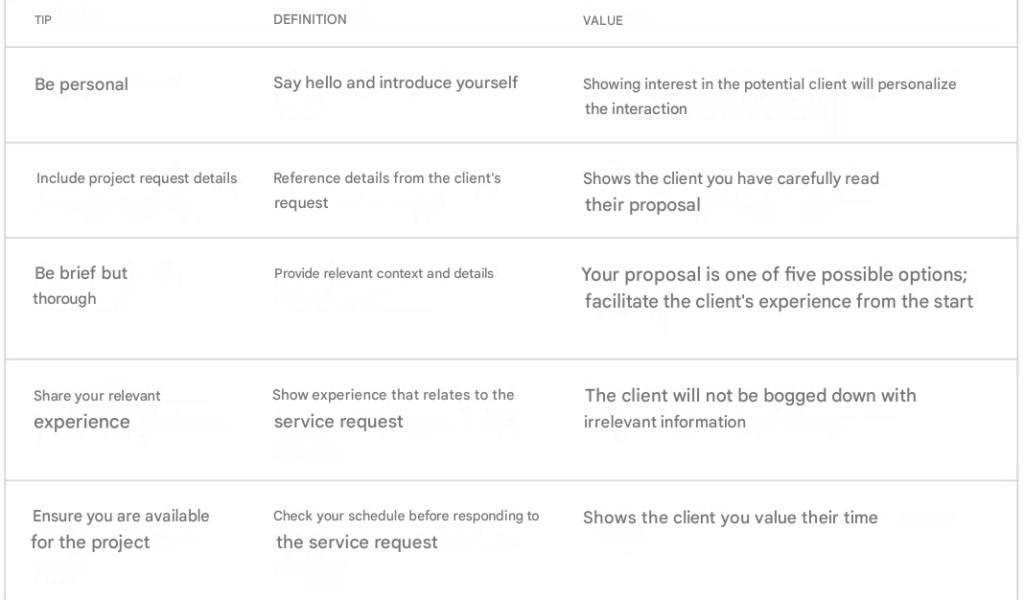
Why Combine the LinkedIn Services Marketplace With Outbound Prospecting?
LinkedIn Marketplace can be an excellent tool for gaining visibility and receiving incoming requests.
The problem is that a strategy based solely on inbound remains difficult to control. Some weeks may generate several requests… then nothing for a month.
Visibility on LinkedIn depends heavily on the algorithm, your activity, your content, and the level of competition in your market. Even with a well-optimized LinkedIn Services page, building a consistent flow of leads can still be difficult.
That’s exactly where outbound prospecting comes in.
Instead of waiting for prospects to find you, the goal is to proactively reach out to the right people.
Today, many freelancers and agencies combine:
- ✨ LinkedIn services marketplace.
- 📣 Content creation.
- 🤝 .
- 📩 Outbound prospecting.
This approach helps you land new clients while avoiding total dependence on inbound leads.
Which Tool Should You Use for Outbound Prospecting?
The goal is no longer just to wait for inbound leads, but also to actively seek out qualified prospects. Among the most widely used tools is Waalaxy. 👽
Waalaxy is a LinkedIn and email prospecting tool designed to automate your outreach strategy without requiring any special technical skills. Available as a Chrome extension, it allows you to manage all your prospecting directly from the social network.
The tool allows you to:
- 🟣 Send up to 200 LinkedIn invitations per week.
- 🟣 Create automated LinkedIn and email campaigns.
- 🟣 Launch pre-built multichannel sequences.
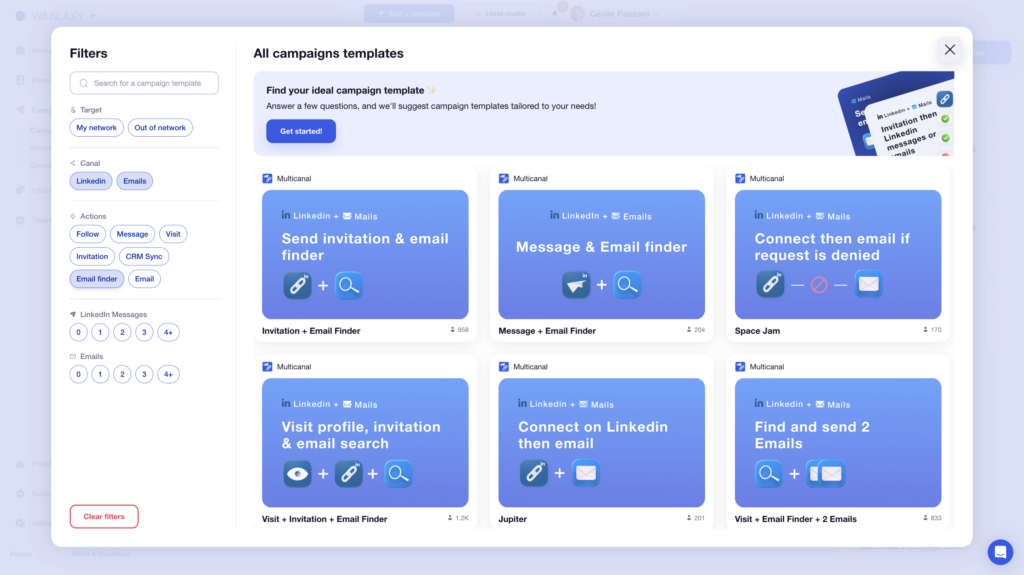
- 🟣 Retrieve professional email addresses using the Email Finder.
- 🟣 Centralize conversations in a unified inbox…
How to Use Waalaxy With the LinkedIn Services Marketplace ?
The LinkedIn Services Marketplace often creates visibility, even when prospects don’t contact you immediately.
For example, some people may visit your profile or services page because they’re looking for a service provider, without necessarily sending a request right away.
With Waalaxy, you can automatically import LinkedIn profile visitors so you can contact them more easily. The tool also allows you to import leads based on their LinkedIn engagement:
- 👁️ Profile visits.
- 💬 Comments.
- 💖 Reactions to your posts.
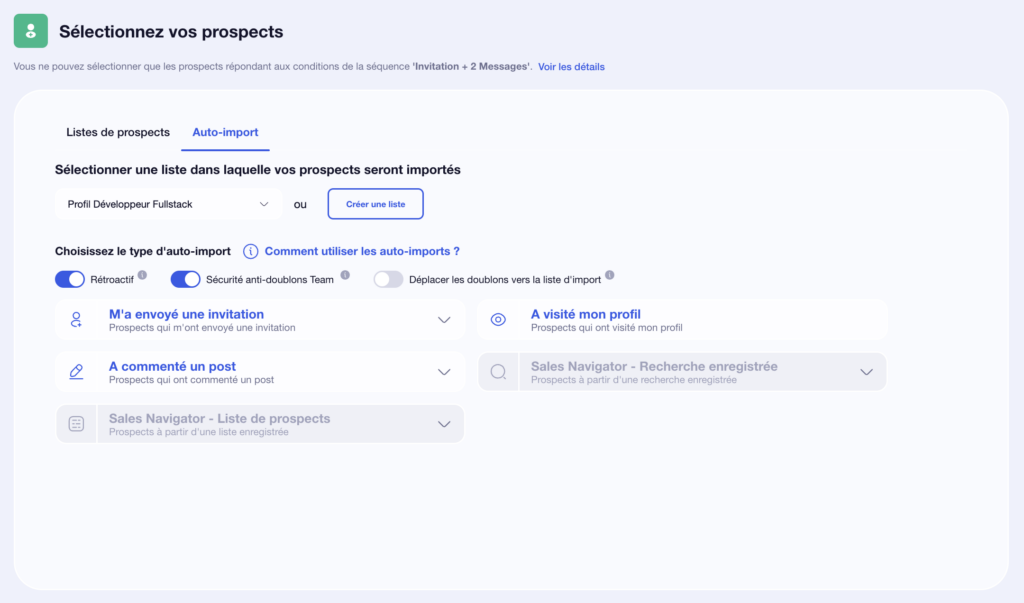
This helps you identify prospects who may already be interested in your services before they ever contact you.
Instead of passively waiting for incoming requests, Waalaxy lets you start a conversation at the right time, automatically follow up with certain contacts, and turn a simple profile visit into a real business opportunity.
It is precisely this combination of passive visibility via LinkedIn Marketplace and active outreach that allows you to generate more qualified leads and build a more stable pipeline on LinkedIn.
Let’s Recap the LinkedIn Services Marketplace
The LinkedIn Services Marketplace allows freelancers, consultants, and agencies to offer their services directly where potential clients are already spending time.
And unlike traditional freelance platforms, your credibility doesn’t just depend on your Services page. It also relies on your LinkedIn profile, your content, and your network.
But as you’ve seen, simply being on the LinkedIn Services Marketplace doesn’t guarantee a steady flow of leads. Competition keeps growing, LinkedIn’s algorithm is unpredictable, and inbound inquiries can become inconsistent fast.
That’s why the profiles that perform best generally combine:
- ✨ Visibility.
- 📱 .
- 🤝 Network.
- 📩 Outbound prospecting.
The goal isn’t just to wait for opportunities anymore, it’s to build a reliable lead generation system that consistently brings in qualified prospects.
FAQ: LinkedIn Services Marketplace
Is the LinkedIn Services Marketplace VS Upwork, Malt, or Fiverr?
It all depends on your goal. Each platform has strengths and limitations based on your business model, audience, and prospecting strategy.
| Platform | Best For | Advantages | Limitations | Commission |
|---|---|---|---|---|
| LinkedIn Services | Freelancers and B2B agencies | Personal branding, LinkedIn visibility, qualified leads, outbound outreach | Heavy dependence on LinkedIn’s algorithm | 0% |
| Malt | Premium freelance projects in France | High-quality clients, strong reputation | Strong competition | 5% to 10% |
| Upwork | International freelance market | Huge volume of projects | Very high competition and aggressive pricing | 0% to 15% |
| Fiverr | Productized or standardized services | Fast client acquisition | Lower pricing and weak customer retention | 5% to 20% |
Can You Sell on LinkedIn?
Yes… but mainly services.
With LinkedIn Services Marketplace, you can offer various digital services. However, LinkedIn is not a traditional e-commerce marketplace like Amazon or Etsy.
The platform is therefore not designed to sell physical products directly.
The main purpose of LinkedIn Services is to connect businesses with freelancers, consultants, and agencies through service requests.
How Do You Rank Higher in the LinkedIn Services Marketplace?
LinkedIn does not officially disclose the exact workings of its algorithm.
But several factors seem to influence your visibility:
- ⭐ A complete profile.
- 📚 Client recommendations.
- ✍️ Regular activity on LinkedIn.
- 🤝 A well-developed network.
- 📈 A well-optimized services page with the right keywords.
The more active and credible your profile looks, the better your chances of appearing in search results.
How Can You Increase Incoming Requests?
Creating a LinkedIn Services page isn’t always enough. To generate more inquiries, you can:
- ✍️ Post content regularly.
- 🎯 Clarify your positioning.
- ⭐ Add social proof.
- 📩 Grow your network.
- 🚀 Combine and outbound prospecting.
The goal is to stay visible while proactively reaching out to prospects.
Does LinkedIn Services Work for Agencies?
Yes, the LinkedIn Services Marketplace can be very beneficial for an agency, particularly in sectors such as marketing, recruitment, communications, or B2B prospecting.
The platform helps increase your visibility directly on LinkedIn and makes it easier to get discovered by prospects already searching for a service provider. It’s also a strong credibility builder thanks to your LinkedIn profile, client recommendations, and the content you publish regularly.
Now you know everything about the LinkedIn services marketplace. 🧚🏻♀️
 Laura
22/06/2026
Laura
22/06/2026 













