



LinkedIn prospecting is now a core channel for selling products and services. More and more professionals are turning to LinkedIn to generate leads, start conversations, and close deals. 👀
The problem?
Most people still don’t know how to use LinkedIn effectively. They rely on outdated tactics, generic messages, or approaches that simply don’t work.
Prospecting plays a key role in any sales and marketing strategy. And when it comes to prospecting on LinkedIn, success depends less on volume and more on using the right approach, at the right time, with the right tools. 🔨
In this guide, we’ll break down: 👇🏼
- How LinkedIn prospecting actually works today.
- Which approaches help you connect with the right prospects?
- And how to turn LinkedIn into a real client acquisition channel.
How to prospect on LinkedIn?
For many people, LinkedIn is still closely associated with résumés and recruitment.
And while that’s true, it’s far from its only use 👀 You can (and should) also use it for social selling and precise targeting for sales outreach.
LinkedIn is first and foremost a professional network, with nearly 1 billion users worldwide. Each of these users shares valuable information: job title, industry, experience, location, education, company size, and more.
In other words, LinkedIn offers a massive amount of contextual, professional data, data that goes far beyond hiring.
Recruiters have been leveraging this data for years. Sales teams, on the other hand, are only beginning to fully unlock its potential.
LinkedIn’s premium plans and sales features aren’t designed exclusively for recruitment. They are just as relevant for sales professionals looking to: 👇🏼
- Identify qualified prospects.
- Understand their context before reaching out.
- Build more relevant, personalized conversations.
And despite what some people still believe, using LinkedIn for business development isn’t a workaround—it’s exactly how the platform is meant to be used.
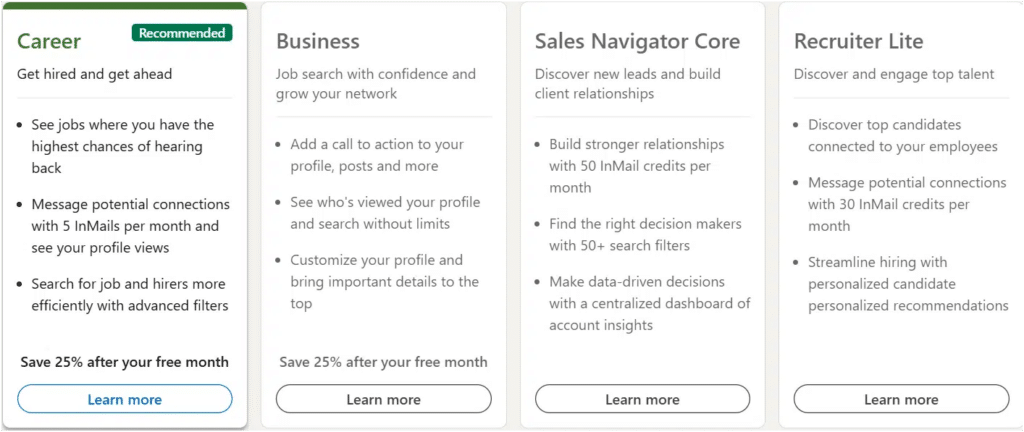
According to LinkedIn, the platform is designed to help you:
– Find new customers
– Promote your brand
– Share content
– Build and nurture professional relationships
– Strengthen your personal brand
LinkedIn prospecting is no longer a trend. It’s quickly becoming a standard practice for modern sales teams.
Traditionally, companies relied on cold emails and cold calls to prospect or share content.
Today, inboxes are saturated 📨 and cold calls are increasingly ignored, making it harder to start real conversations.
LinkedIn has changed the game.
It lets you identify the right people, understand their context, and engage in a professional environment built for networking.

What is LinkedIn Prospecting?
In simple terms, a prospect is a potential customer for your business.
In the context of LinkedIn prospecting, a prospect is the person your sales efforts are focused on; someone you’re actively trying to reach, engage, and convert 🔄
These prospecting actions can take many forms: targeting specific profiles, running outreach campaigns, sharing relevant content, or starting one-to-one conversations.
On LinkedIn, prospecting is not about reaching as many people as possible.
It’s about identifying the right profiles: people who are already close to your ideal customer profile and more likely to engage with your offer 💪🏼
That’s why LinkedIn prospects represent a real business opportunity: they’re not random contacts, but targeted individuals who only need the right approach to move forward 😇
LinkedIn Sales Prospecting Email VS Message
1. LinkedIn Prospecting via Email
Email is often the first channel people think about when it comes to prospecting.
And for one simple reason: you need email addresses to distribute high-value content effectively.
When you’re sharing content with an existing audience, this usually isn’t an issue—you already have their email.
But when it comes to reaching new prospects, that’s where things get complicated.
Most of the time, you simply don’t have their contact details.
There’s another problem.
After more than two decades of heavy use, email prospecting has lost much of its impact. Inbox fatigue is real.
Between newsletters, automated follow-ups, and generic sales emails, most messages are skimmed or ignored entirely 💬
Receiving yet another “game-changing offer” or generic sales pitch rarely grabs attention anymore.
And that’s where LinkedIn prospecting starts to make a real difference 🤔
2. LinkedIn prospecting email or message
LinkedIn prospecting solves many of the limitations of email outreach.
Instead of relying on professional email addresses that are often hard to find or warm up, sales teams can reach prospects directly through public LinkedIn profiles via connection requests or InMail.
LinkedIn messages tend to get higher open and response rates than emails because they feel more personal 😇
You’re contacting someone through their professional profile, not sending a generic message to a crowded inbox.
Now that we’ve covered the basics, let’s move on to the foundations of an effective LinkedIn prospecting strategy.
Use an Automation Tool for your LinkedIn Prospecting Strategy
If you want to scale your LinkedIn prospecting while keeping a high level of personalization, automation becomes essential.
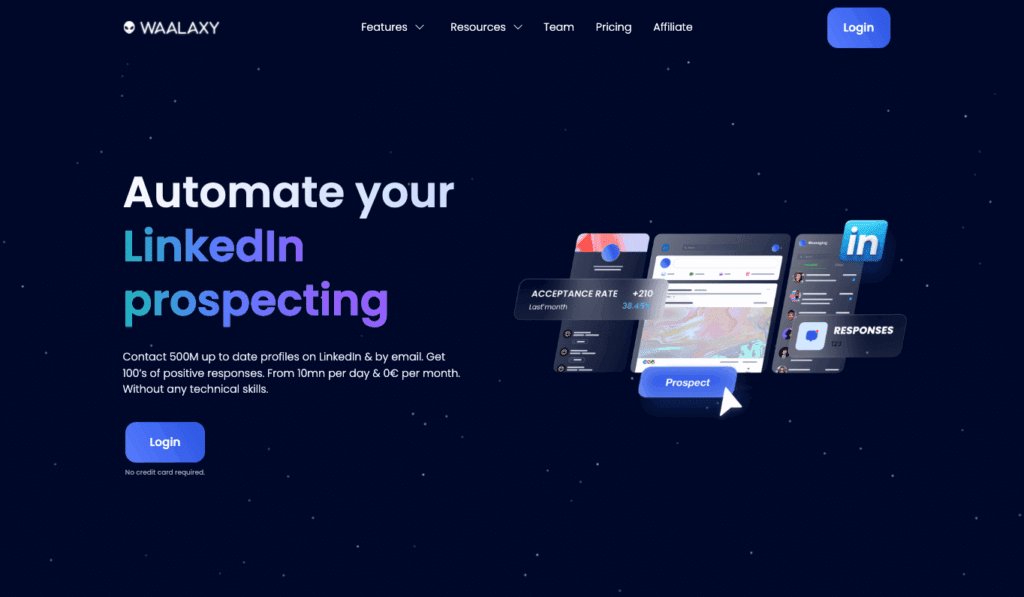
That’s where a LinkedIn prospecting tool like Waalaxy comes in. 👽
Let’s take a closer look.
1) Target people who comment on posts
The «Lead Magnet» is a technique well known among LinkedIn prospecting sales teams, serving a dual purpose: increasing the reach of your LinkedIn posts while generating qualified leads.
The principle is simple: you publish a LinkedIn post offering access to valuable content—usually a high–value article or a white paper—in exchange for a like and/or a comment ✨
As people engage with your post, its visibility increases. At the same time, everyone who gains access to your content becomes a qualified lead.
“Okay, that’s all well and good, but if 250 people like my posts, I’m going to spend hours contacting them by hand!”
Well, no! 😅 With Waalaxy, you can automatically add commenters or likers to a campaign and send them a private message.
2) Target people who comment on someone else’s post
See the idea?
The same LinkedIn prospecting approach can also be used to target highly qualified leads, even when the content wasn’t originally created for them.
The logic stays the same: you automatically export these profiles and reach out using a connection request + message + follow-up sequence.
Bonus: You can customize your approach based on the post they engaged with.
Example for a connection request: ✍️
« Hello {{firstname}}, I saw you liked Benoit Dubos’ post on how to automate 100% of your B2B sales prospecting on LinkedIn.
As a Growth Marketing expert, let’s get in touch! ».
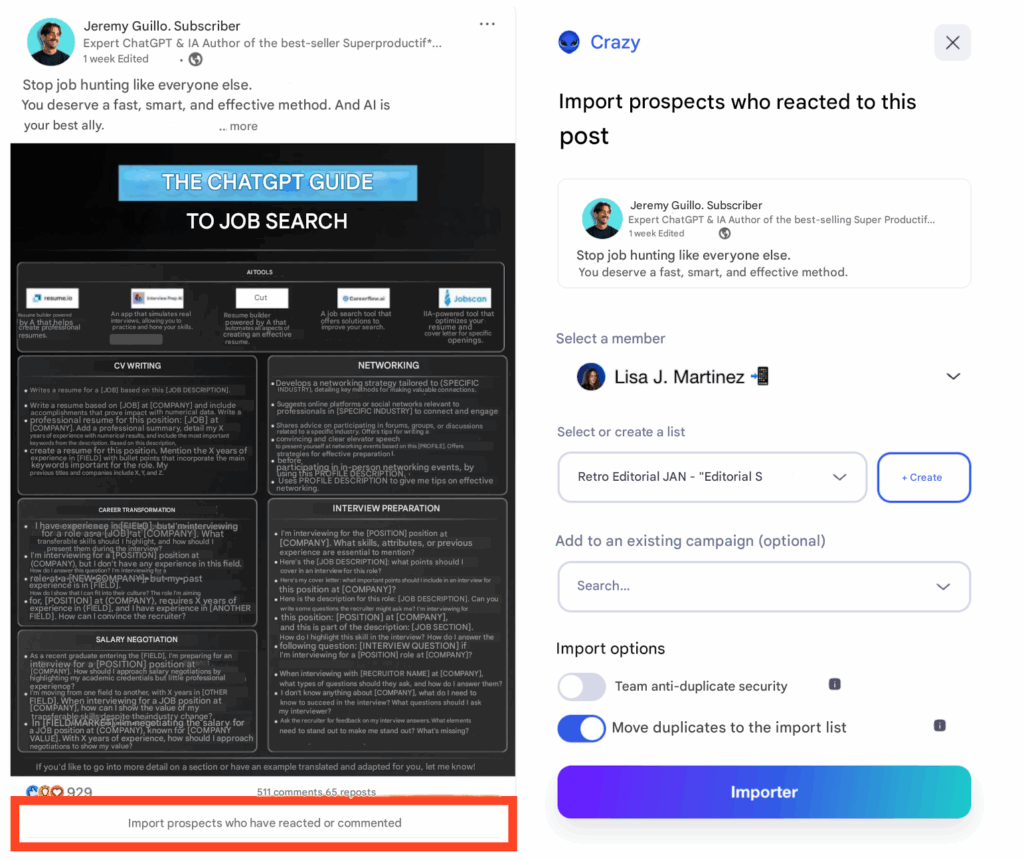
With Waalaxy, you can target people who comment on other users’ posts using LinkedIn automation. 👽
Start by finding a post your ideal audience is engaging with. Then use Waalaxy’s Post Commenters feature to extract the list and launch an automated outreach campaign with personalized messages.
This approach helps you turn engaged profiles into leads while staying within LinkedIn’s limits.
3) Target your competitors’ users
Another effective about prospecting on LinkedIn is to target users from competitor communities, especially on Facebook. 🔵
This approach doesn’t apply to every business, but when competitors actively run Facebook groups, it can be very effective.
LinkedIn groups can help target people with shared interests. Facebook groups often go one step further, as they are frequently used to manage highly engaged user communities. 💬
In this case, Waalaxy can extract members from a competitor’s Facebook group and reach out to them on LinkedIn using an automated connection request and message sequence.
4) Target subscribers to a LinkedIn page
Targeting people who follow a LinkedIn page can be just as effective.
In this case, there’s no need for third-party tools, everything can be done directly with Waalaxy in just a few minutes. ⏱️
That said, not everyone who follows a competitor’s company page is necessarily a user or customer.
Unlike LinkedIn groups, page followers can’t be validated based on membership or usage.
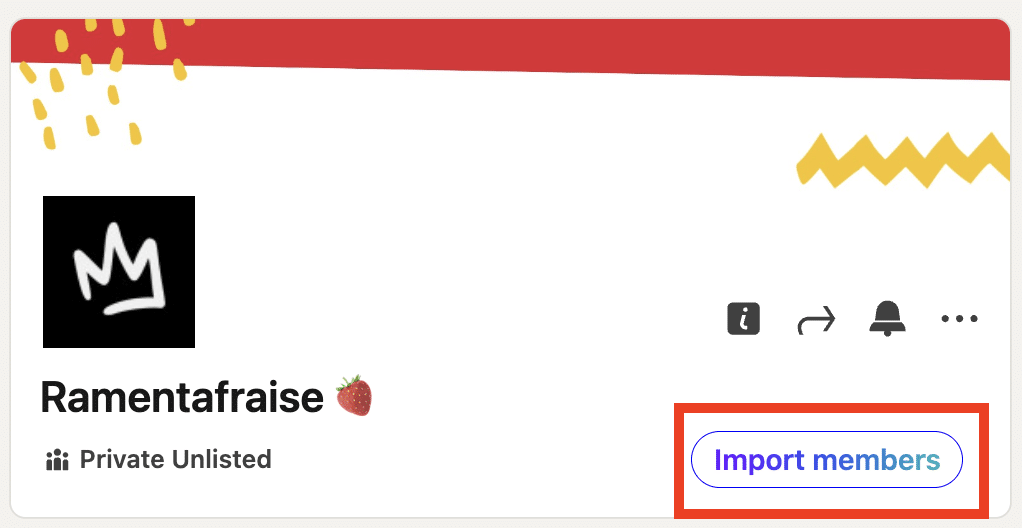
That said, this LinkedIn prospecting approach remains highly effective. 👀
Even if these people are not active users of a competitor’s product, they’ve still shown interest in a competing solution, which often indicates a real underlying need.
5) Use multichannel to Follow up your prospects on all channels
To maximize your conversion rates, the best strategy is to contact prospects via multiple channels. Multiplying the points of contact means increasing the chances of getting a response from your prospect.
📈 The idea is simple: combine LinkedIn prospecting and e-mail prospecting.
Start with a classic scenario on LinkedIn (connection request + message), then you follow up intelligently by sending an e-mail if your prospect hasn’t responded. 👀
This is where Waalaxy makes all the difference. Not only does it automate the whole prospecting process, but it also offers you the best enrichment rates on the market. 📊
Thanks to Waalaxy, you’ll never run out of data on your prospects again:
- +60% of professional e-mails were found on average.
- 15 data sources in 1 (we directly integrate the best LinkedIn scraping tools on the market, such as Dropcontact, Bettercontact, FullEnrich…).
- <1% bounce rate thanks to triple verification.
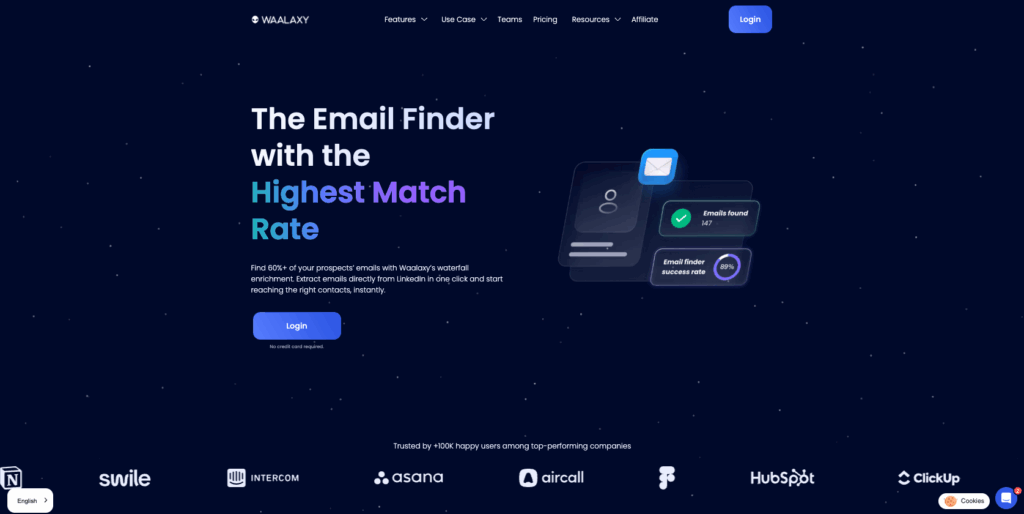
With Waalaxy, e-mail searches are ultra-simple and secure:
- 1 click from a LinkedIn profile, from your Waalaxy lists or campaigns.
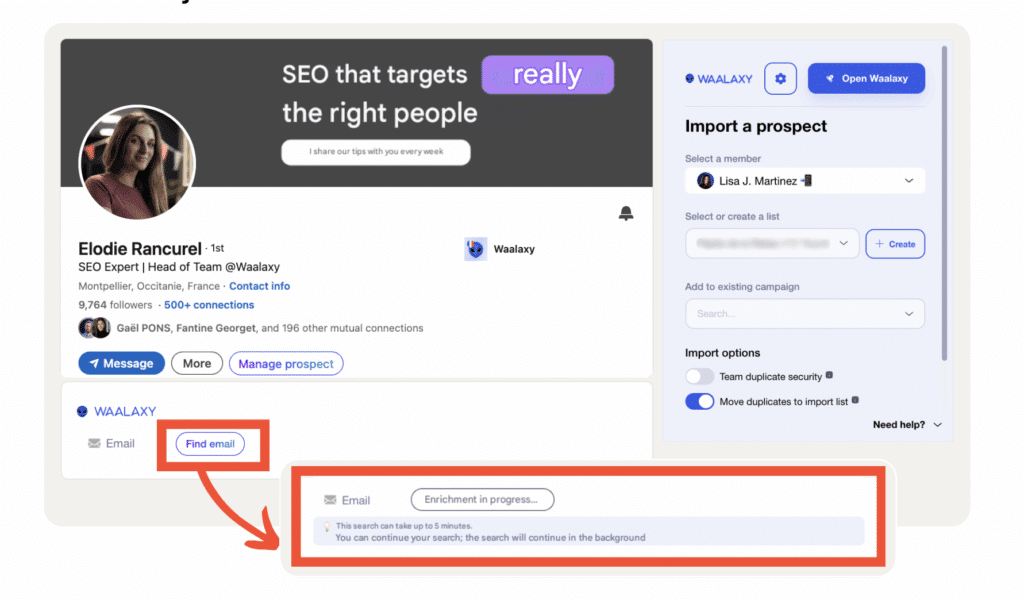
- Import from standard search, Sales Navigator, Recruiter Lite or via CSV.
- Instant access to over 500M profiles (100% GDPR & CCPA).
- Export to HubSpot, Salesforce, Pipedrive, and 2000+ apps via Zapier/Make.
👉 Result: optimized multi-channel prospecting, reliable data, higher conversion rates and huge time savings compared to manual research.

How to find prospects on LinkedIn? The 5 Methods
To find prospects on LinkedIn, here are a few tips. ⏬
#1 Find your personas
A buyer persona defines your target audience—your ideal customer.
This is the first step in any LinkedIn prospecting or marketing strategy and one of the most important. Everything that follows depends on it. 👀
If your persona is off, the rest won’t work.
That’s why it’s worth taking a few minutes to clearly define your Ideal Customer Profile (ICP) before launching any campaign. ⏱️
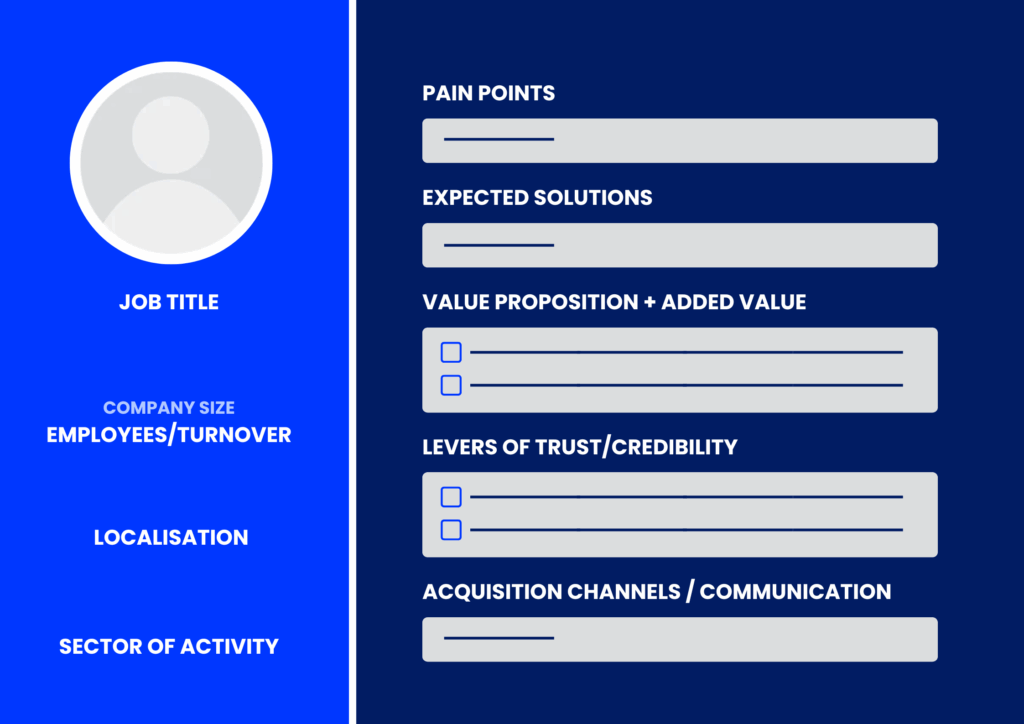
To build an effective buyer persona, you need to ask the right questions about the people you want to target. The goal is to clearly understand who they are, what they care about, and what problems they’re trying to solve.
Here’s a simple step-by-step framework you can use:
- Demographic data ⭢ start with basic information that helps you identify your target (role, industry, location, company size, etc.).
- Context and goals ⭢ understand what your audience wants to achieve, whether those goals are professional or personal.
- Motivations and frustrations ⭢ identify the pain points your solution can address and what drives decision-making.
Precision matters here.
You can’t target everyone—but by clearly defining your personas, you can focus your LinkedIn prospecting on the customers who are most likely to convert.
This is a basic rule of prospecting. You can’t target everyone. You should always start by targeting a niche and then eventually expand that niche as you grow your business. 📈
#2 Filter your prospects on LinkedIn Sales Navigator
It’s time to start finding customers. 😎
I’d rather tell you now, we’re only going to deal here with the targeting enabled by LinkedIn Sales Navigator.
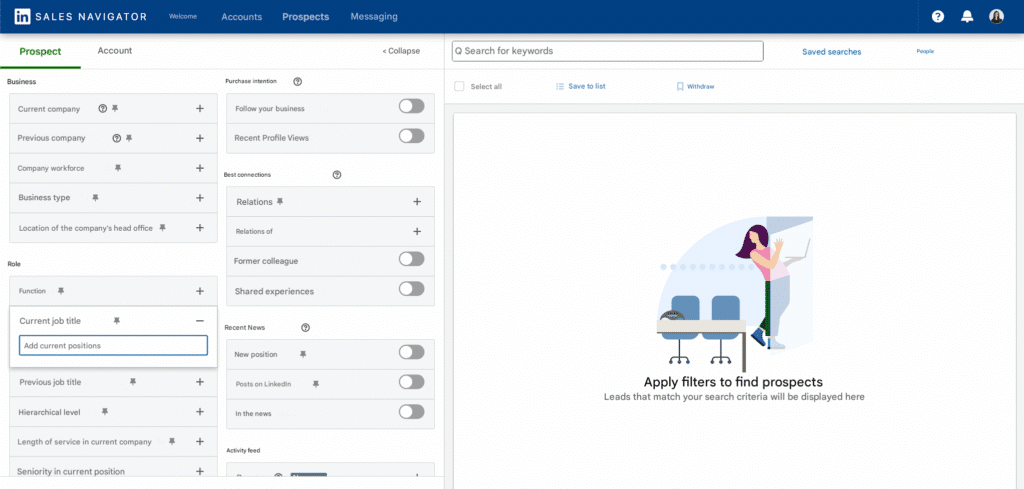
The standard LinkedIn boolean search function is far too limited for LinkedIn prospecting (yes, LinkedIn needs to do business too).
If you’re just starting out and can’t yet afford a Sales Navigator subscription, rest assured, we’ve thought of everything with an article on how to use Sales Navigator without paying for it? 🤑
1) Not using relevant keywords
One of the first mistakes to avoid in LinkedIn prospecting is relying too heavily on keywords.
This might feel counterintuitive, especially if you’re used to searching on Google. But LinkedIn works differently.
When you run a keyword search on LinkedIn, the platform scans the entire profile for that term. As a result, you can end up with matches that have little to do with what you’re actually looking for.
For example, searching for “marketing” may surface profiles of people who studied marketing years ago, but now work in a completely different role or industry. 👀
2) Don’t exceed 2500 search results
We can’t stress this enough, but there’s no point in conducting LinkedIn searches that return more than 2,500 results, for two reasons: 👇🏼
- 1️⃣ LinkedIn only returns the first 100 results, and each page contains 25 profiles. So, no matter what, a maximum of 2,500 profiles are displayed.
- 2️⃣ The larger your result, the less you can personalize, and the less you personalize your LinkedIn prospecting, the more your conversion rates suffer.
If you had to choose just one filter to find the right contact, this would be it. Generally speaking, it’s the LinkedIn filter on which you’ll base your search for prospects (but not necessarily).
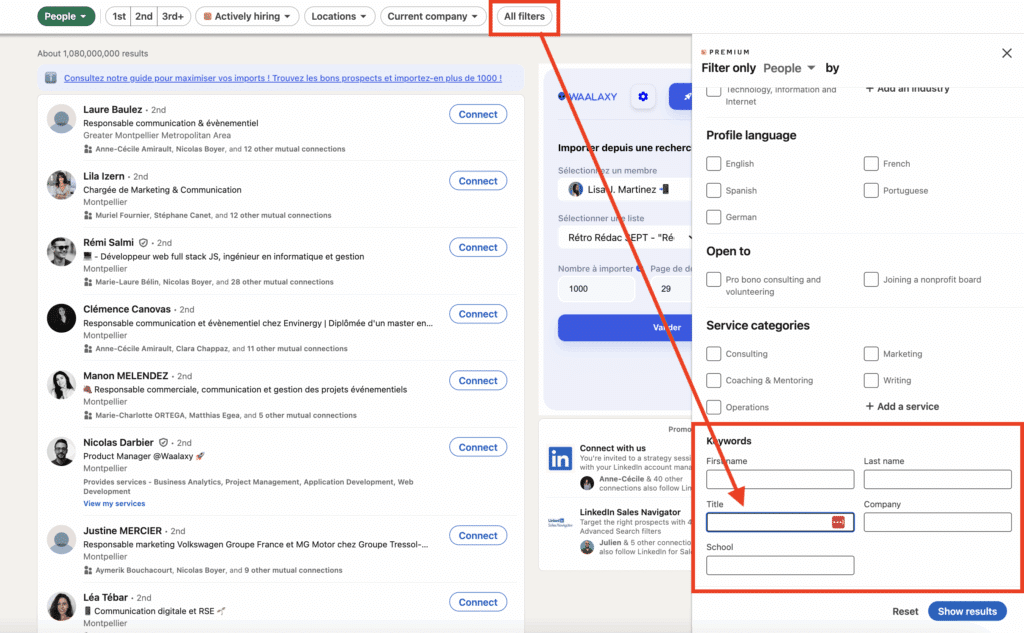
3) Use Sales Navigator’s advanced search functions
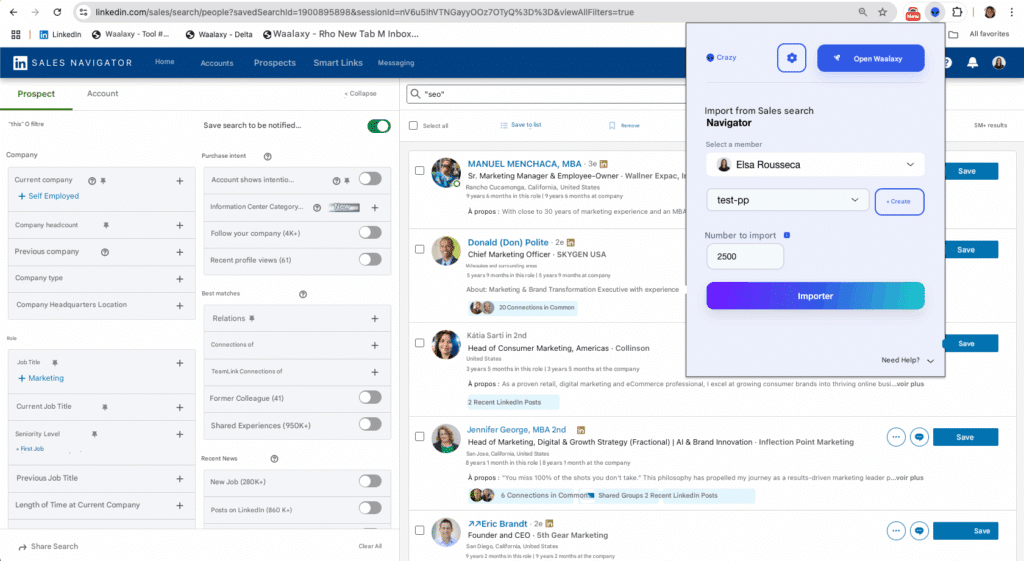
Once you’ve validated your settings, using LinkedIn Sales Navigator allows you to perform yet another layer of filtering based on your search. 🔍 This can be fascinating, depending on what you’re offering.
Once the filtering is complete, export the contacts to Waalaxy to find their data and fine-tune your prospecting on LinkedIn approach.
#3 Take care of your LinkedIn prospecting copy
Once you’ve built a solid list of prospects, that’s a good start.
But on its own, it’s not enough. What really makes the difference is how you communicate with them.
This is where copywriting comes into play—the ability to persuade and sell through clear, written messages.
Effective LinkedIn prospecting isn’t just about reaching out. It’s about using the right structure and the right wording to start a conversation that feels relevant and natural.
Without a clear message, even the best targeting won’t deliver results. 🦋
1) Send an invitation without a note to develop your network
A connection request without a note often gets a higher acceptance rate—especially when notes are poorly written, too long, or overly sales-driven.
This is a common rule in LinkedIn marketing: a bad note can turn a prospect off before the conversation even starts.
2) The hook of the LinkedIn prospecting message
The hook, as its name suggests, comes first in your communication. It’s a short sentence that should arouse your interlocutor‘s curiosity. 🧐
This sentence should make your interlocutor want to continue reading your message. The « question » format generally works quite well.
For example: “👉Have you ever wondered how to improve your team’s productivity?” “Have you ever thought about taking a real break to feel good?”
Pay particular attention to this sentence. You’d be surprised how quickly we analyze an exchange and how eager we are to find out more.
A few seconds are enough to determine whether we continue reading your LinkedIn prospecting message. ⏱️
The better you segment your prospects, the easier it will be to find an effective catchphrase.
3) Clear value proposition
You need to be able to explain in one or two sentences how you or your product solves the problem or question raised in your teaser.
4) Clear call-to-action (CTA)
Finally, this call to action gives your prospect the opportunity to go further. At this point, you’ve convinced your prospect of the merits of your approach. 🧲
Examples of CTAs for B2B business:
– Download now.
– Get started.
– Request demo.
– Try now.
– Contact us.
– Learn more.
He knows just enough to be interested but needs further information.
5) Follow up at the right time
Many prospects won’t accept or reply to your first message—and that’s completely normal. Follow-ups are a key part of any effective prospecting strategy. 💭
Ideally, plan one or two follow-ups, spaced a few days apart. Keep them short, personalized, and focused on the value you bring.
You can vary the angle by sharing a relevant resource, asking a simple question, or restating your offer in a different way. 👀
When done right, follow-ups increase your visibility and significantly improve your chances of starting a qualified conversation.
#4 Optimize your performance with A/B testing
A/B testing means comparing two different hypotheses by splitting your test volume into two groups:
one version A and one version B.
You then analyze the results, compare performance, and keep the approach that performs best. This process can be repeated multiple times to continuously improve results.
Over time, this helps you refine your messaging and stick to the communication style that delivers the strongest results. 💟
How do I set up A/B testing in a Waalaxy campaign?
Setting up A/B testing on your LinkedIn approaches is very simple. With a tool like Waalaxy, all you have to do is create two different teasers and split your campaign in two.
You then send your first message to one half of your Waalaxy campaign and your second message to the other half.
Once your LinkedIn prospecting campaign is over, you analyze 🔎 the results directly using our integrated dashboard and keep the best-performing message for the rest of the campaign.
#5. Bonus Step: Optimize your LinkedIn profile
Just as you need to be clear about whom you want to target, you also need to be clear about who you are and what you can contribute.
Your target’s first reflex when reading your note or message will be to visit your profile to find out more about you and your value proposition. So there are many rules to follow so your LinkedIn profile is optimized. 📄
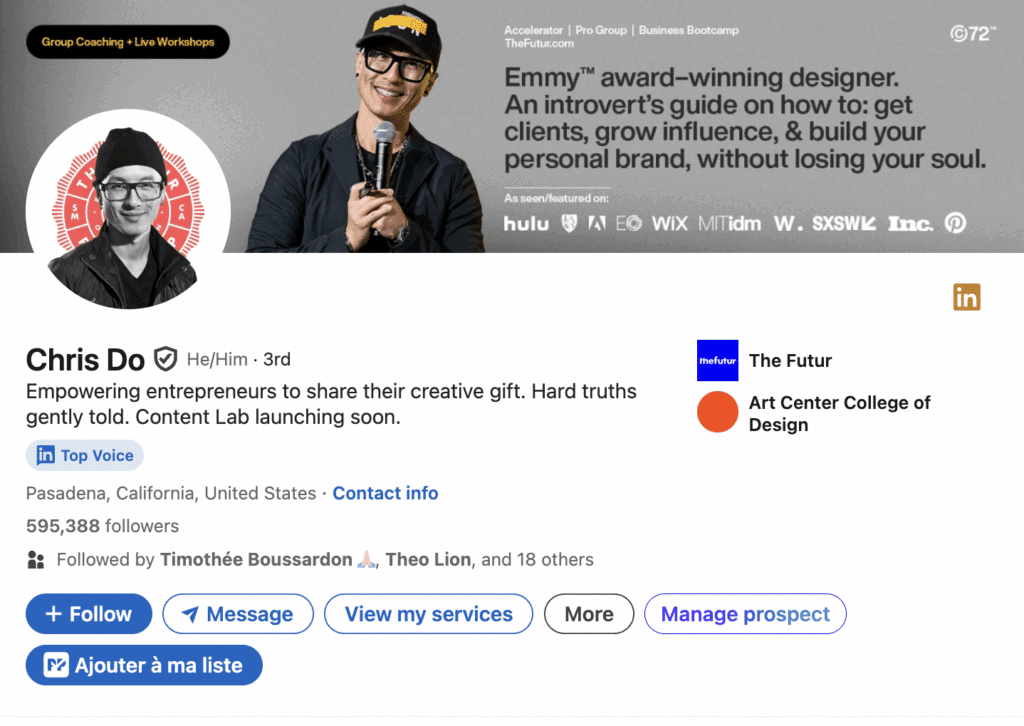
1) Have an explicit LinkedIn headline
Having a LinkedIn title means telling your target audience what you do in a few words: “I teach you how to sell on LinkedIn.” It means attracting potential customers without making any LinkedIn prospecting efforts to prospect.
Don’t forget to mention the company you work for, “Head of Customer Experience @Waalaxy.”
Forget long, pompous titles that mean nothing. 🙈
2) Have a professional profile photo
It’s surprising how many people prospect on LinkedIn with low-quality profile photos that don’t reflect their professionalism. 🌚
You don’t need to look like a model to make a good impression. A clean, well-lit photo goes a long way—and basic retouching can make a real difference.
First impressions matter because people rely on mental shortcuts. One of them is the halo effect: we tend to associate positive traits like competence or credibility with people who present themselves well.
Investing in a professional photo shoot for yourself or your sales team is rarely a bad decision.
It’s a small investment that can significantly improve how prospects perceive you.
Bonus: You can use a small colored circle (in your company or product colors, for example) around your photo to make it stand out even more.
3) Use your Cover Photo to showcase what you do
LinkedIn lets you add a LinkedIn banner to the background of your profile. It’s essential to use it in your prospecting on LinkedIn to add a more visual aspect to your otherwise drab profile.
It’s worth spending a little time working on your image or having it done if you don’t have the skills.
4) Take advantage of the LinkedIn summary to prospect
Your job title should stay concise, but the summary section is where you can say more about what you do, your background, and what led you to where you are today.
This is the right place to use storytelling to capture attention. And attention matters—because once people are interested, they’re more likely to engage with you.
That’s exactly the principle behind Inbound Marketing: attracting prospects who don’t know you yet by sharing relevant content and gradually turning that attention into trust—and then into customers.
5) Highlight your LinkedIn profile
LinkedIn allows you to highlight a number of elements on your profile. This could be your site, but also past publications or even articles.
Use this section to highlight your LinkedIn content and prospecting channels to give your visitors the opportunity to feed their curiosity when they visit your profile. 🤔
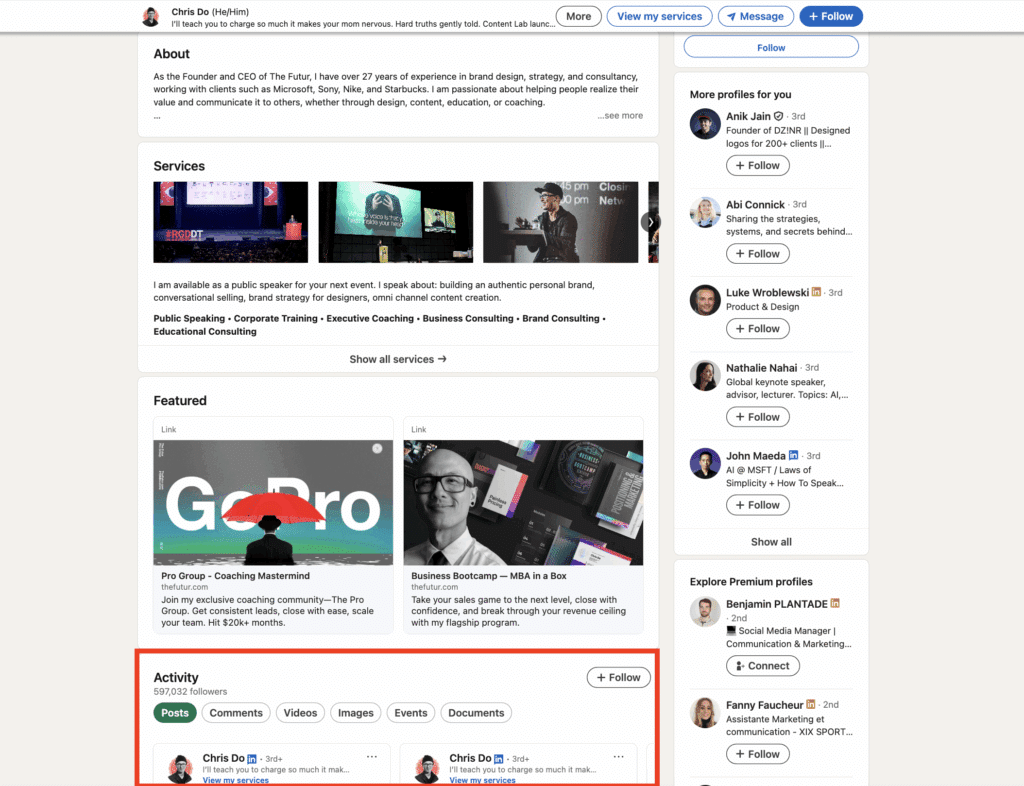
If you have a French profile and an English one, LinkedIn users will automatically redirect those who don’t speak French to your English profile and make it easier for you to make your first contact with it.
6) Expand your LinkedIn network
An optimized profile won’t do much if your network isn’t active and relevant. The goal isn’t to collect hundreds of random connections—it’s to connect with the right people: potential leads, customers, partners, influencers, or industry experts. 💬
Send connection requests regularly (often without a note) and accept requests that strengthen the quality and consistency of your LinkedIn audience. The more relevant your network is, the more reach and impact your content can generate.
Make it a habit to engage with your connections by liking, commenting, and sharing. That relationship-building is what turns your network into a real source of opportunities. 📑
LinkedIn Prospecting Tips & LinkedIn Message Template
So, how many prospecting on LinkedIn messages does it take to get a conversion? 😏
Now that you’ve set the foundations, let’s move on to what matters most: the tools and messages that actually work. 👇
Automated Scenario with the Best LinkedIn Prospecting Tool
Everything we’ve seen so far involves several repetitive tasks that couldn’t be automated. Let’s move on to the most interesting part: LinkedIn prospecting automation.
We’ve noted that the two ways to get in touch with an individual on LinkedIn were either to send a LinkedIn connection request or to send a message.
What if I told you that you could automate the sequence of these two actions? 🤯
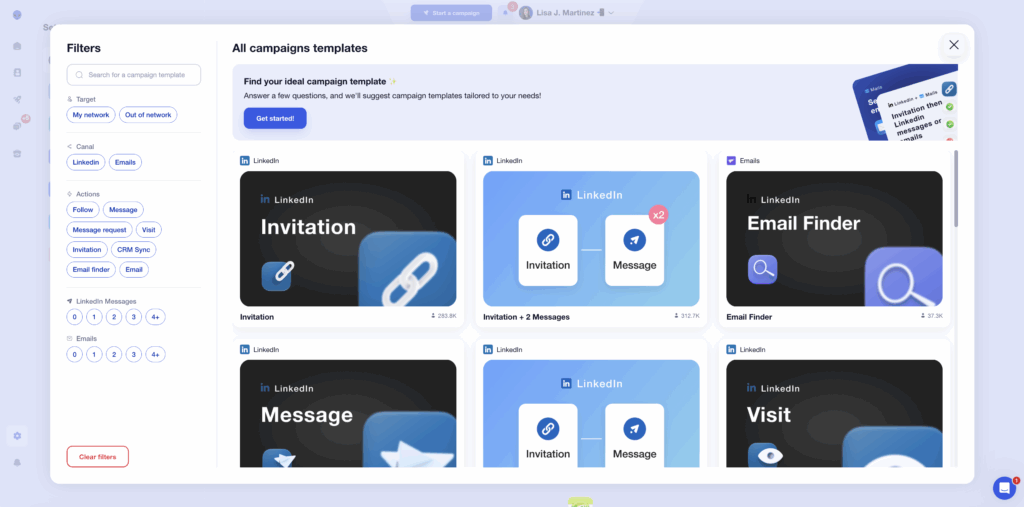
This is what the prospecting on LinkedIn features of Waalaxy campaigns offer.
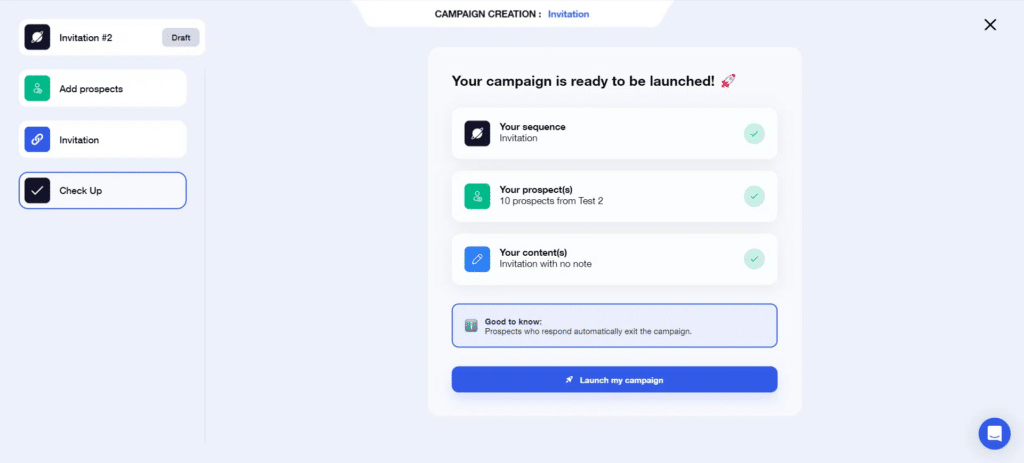
In fact, this feature allows you to link a series of LinkedIn and email prospecting actions together, including requests, adds and messages.
The principle is simple:
- 1️⃣ You choose the number of reminders you want to send,
- 2️⃣ You write the content of your approaches; you can use personalized variables,
- 3️⃣ Send your sales campaigns.
Your activities are then carried out automatically, without you having to lift a finger.
All the ways to automate your LinkedIn prospecting are detailed in our prospecting e-book (the guide that will show you why and how to automate prospecting on LinkedIn), available on the Waalaxy blog. 🚀
And why am I telling you all this? Simply because, by making one or even two follow-ups after your request to add a contact, you multiply your conversions.
How to approach a prospect on LinkedIn? 15 LinkedIn Prospecting Messages Examples
Here are a few LinkedIn prospecting message examples that work well. 🫶
If you want more, check out our additional templates you can use in your LinkedIn outreach campaigns.
1. Member of the same Group
Hi {{firstName}}, I noticed we’re both in the {{groupName}} group. I’d love to connect and exchange insights.
2. Posts with a Hashtag
Hi {{firstName}}, I really enjoyed your post on {{hashtag}}. What’s your take on the {{trendName}} trend?
3. Wrote a comment on Posts
Hi {{firstName}}, I saw your comment on this post ({{postLink}}) and really liked your perspective. I’d love to connect.
4. Industry leader
Hi {{firstName}}, I came across your profile while searching for leaders at {{companyName}}, and you stood out right away. I’d love to learn more about your background and what you’re currently working on.
Looking forward to connecting!
5. Connection in common
Hi {{firstName}}, your profile popped up in my feed because we have a few connections in common, and what you’re doing at {{companyName}} caught my attention. I’d love to connect and follow your work more closely.
6. Visited your profile
Hi {{firstName}}, LinkedIn showed me you visited my profile—thanks for stopping by. Was there something specific you were looking for? Happy to connect and chat.
7. Expand your network in a specific region
Hi {{firstName}}, I work in the {{industry}} space, and I’m trying to better understand the challenges around this topic in {{region}}. I’d love to connect and get your perspective.
8. Similar ecosystem with a touch of humor
Hey {{firstName}} — looks like we’ve got a lot of mutual connections, and LinkedIn keeps putting you in the “top prospecting people” category. I’ll be honest: I sent this request so my network looks cooler… but in your case, I’m pretty sure it’s actually deserved 😉
Would love to connect!
9. Find a mentor
Hi {{firstName}}, I’m starting a new project, and I’m looking to learn from people who are strong at LinkedIn prospecting. If you’re open to it, I’d love to connect and learn from your experience.
10. News of your Industry
Hi {{firstName}}, as a leader, I’d love to get your perspective on how {{newsTopic}} is impacting your company. Has it changed anything for your business so far?
11. LinkedIn suggestion
Hi {{firstName}}, LinkedIn suggested your profile, and I’m glad it did. I took a quick look, and I’d love to connect and learn more about what you do.
12. Change of posts
Hi {{firstName}}, I noticed you recently changed roles—congrats! What’s the biggest new challenge you’re tackling in your new position?
13. People who follow your company
Hi {{firstName}}, I noticed you follow {{companyName}} on LinkedIn—thanks for the support. I’d love to connect and share a few updates we’ve been working on.
14. Problem request
Hi {{firstName}}, I saw you’re a key player in the {{industry}} space. I’m doing some research to better understand the biggest challenges in the sector so I can build a relevant solution.
In your opinion, what are the top 3 issues the industry is facing right now?
15. Request for advice on an article
Hi {{firstName}}, I’m currently writing an article about {{topic}} and I’d love to include an expert perspective.
Since you work in {{topic}}, what’s your take on {{question}}?
Hello {{firstname}}, I’m currently writing an article on (name of subject). As an expert in (name of subject), I’d be interested in your opinion on (name of question).
I look forward to hearing from you.
These LinkedIn prospecting message templates can be reused for every case. 👀
How about a Recap about LinkedIn Prospecting?
Are you still with me? Good. Let’s try to sum up what we’ve seen in this article in a few lines. 😇
Firstly, we saw that LinkedIn is THE number 1 social network when it comes to LinkedIn prospecting and lead generation.
But in order to take full advantage of the platform for LinkedIn prospecting, you first need to do some preliminary work to:
- Optimize your profile.
- Master LinkedIn search filters.
- Set up A/B testing.
We then looked at how automated LinkedIn prospecting scenarios can boost your conversion rates.
To help those of you who may have run out of inspiration, we’ve given you over 15 examples of invitation notes that will help you maximize your acceptance rate.
Finally, we’ve highlighted the best LinkedIn automation strategies that combine personalization and performance through the use of Waalaxy. 🥳
FAQ: LinkedIn Prospecting
What’s the best LinkedIn Prospecting technique?
There’s no single best technique for prospecting. What works for one person won’t necessarily work for another—especially when it comes to messaging, tone, or approach.
That said, the more you grow a relevant network, the more likely you are to create meaningful, high-quality connections on LinkedIn. Of course, you can’t connect with just anyone 👀
That’s why defining clear buyer personas is critical. Proper segmentation helps you target the right profiles, personalize your outreach, and maximize engagement 🎯
Should I post content to boost my LinkedIn prospecting strategy?
Yes, posting content can significantly strengthen your LinkedIn prospecting efforts.
A consistent LinkedIn content strategy, as part of a broader social selling approach, helps increase:
- Connection acceptance rates
- Private conversations
- Trust and credibility
- Conversions over time
You don’t need to be a professional copywriter to succeed. But you do need to follow a few basic principles around clarity, value, and consistency 🧲. To make this easier, tools like Kawaak can help structure and improve your LinkedIn posts 🐰
How do I choose the right automated LinkedIn prospecting tool?
The right tool should simplify your workflow, not add complexity.
Automation tools help you:
- Save time
- Scale outreach safely
- Stay consistent without manual effort
Waalaxy is designed to be accessible—even with no prior technical skills 🤓
As an AI-powered Chrome extension for LinkedIn and multichannel prospecting, it helps sales teams automate outreach while staying compliant and human ✨
What are the best practices for LinkedIn prospecting? (Do’s & Don’ts)
✅ Do’s
- Personalize connection requests and follow-ups
- Keep messages short, clear, and value-driven
- Optimize your LinkedIn profile before reaching out
- Space follow-ups (every 2–3 days)
- Engage with prospects’ content before pitching
- Test different approaches (with/without notes, CTAs, formats)
❌ Don’ts
- Send generic, copy-paste messages
- Write long, overly salesy notes
- Reach out with an incomplete or weak profile
- Spam prospects with daily follow-ups
- Pitch immediately without building rapport
- Stick to a single method without testing
How many LinkedIn messages should I send per day?
Quality always beats quantity.
Sending 20–40 well-targeted messages per day is far more effective and safer than blasting hundreds of generic messages. Sales prospecting works best when relevance and personalization come first.
Is LinkedIn prospecting allowed by LinkedIn?
Yes, when done correctly.
LinkedIn is designed for professional networking and business conversations. As long as you:
- Respect connection limits
- Avoid spammy behavior
- Personalize outreach
LinkedIn prospecting is not a workaround, it’s exactly how the platform is meant to be used.
What are the best tools for LinkedIn prospecting?
The best LinkedIn prospecting tools are the ones that help you target the right profiles, personalize outreach, and scale safely without turning your prospecting into spam.
Most effective stacks usually include:
- A targeting tool to identify qualified prospects
- An automation tool to structure outreach and follow-ups
- (Optionally) a content or enrichment tool to improve personalization
For LinkedIn-first or LinkedIn + email strategies, Waalaxy is often enough on its own. It combines targeting, automation, and multichannel sequences in a single tool, without requiring technical skills.
For more advanced use cases, tools like LinkedIn Sales Navigator can help refine targeting, while other platforms may be useful for large-scale email-first or highly complex workflows.
💡 The key isn’t using more tools but using the right ones for your outreach volume and strategy.
You now have everything you need to start prospecting effectively on LinkedIn. All that’s left is to test, iterate, and scale 🐉
 Toinon
13/02/2026
Toinon
13/02/2026 













