



- Why Send LinkedIn Cold Messages?
- How Should You Send a LinkedIn Intro Message?
- How Do You Actually Reach Out to Someone on LinkedIn?
- 10 Best LinkedIn Message Examples That Actually Get Replies
- 3 LinkedIn Message Examples for Partnerships
- 3 LinkedIn Message Templates to Recruiters
- How Can You Automate Your LinkedIn Outreach Messages?
- Quick Recap on LinkedIn Outreach Messages
- FAQ: Linkedin message examples
Want to prospect on LinkedIn and looking for message examples that actually work?
You’re in the right place. 👀
In this guide, you’ll find 16 proven LinkedIn message examples, plus practical tips to help you start conversations and get more replies in 2026.
Why Send LinkedIn Cold Messages?
So, why should you even bother sending B2B messages on LinkedIn? Because it’s become the place to connect with decision-makers. By 2025, LinkedIn has over 27 million users in France, that’s around 80% of the working population. Pretty impressive, right? 🤔
But LinkedIn isn’t just about big numbers, it’s a powerhouse for career growth and prospecting:
- 96% of B2B professionals are on the platform.
- More than 41 million companies are listed.
- A new hire happens every 3 seconds worldwide.
That’s a massive pool of opportunities. And it’s only getting bigger. LinkedIn’s lead generation potential keeps growing, with 70 million new users joining between 2022 and 2025 alone. 😱
In other words: your prospects are already there. The real question is, are you reaching out the right way?
Because yes, there are plenty of ways to send messages on LinkedIn… but only a few actually get replies. 😉

How Should You Send a LinkedIn Intro Message?
Your first touch on LinkedIn matters more than you think. That initial interaction often decides whether someone clicks on your profile… or scrolls right past you. 🫠
Should you add a note to your connection request?
Or is it better to keep it empty?
When you send a connection request, LinkedIn gives you two options: add a personalized note or leave it blank.
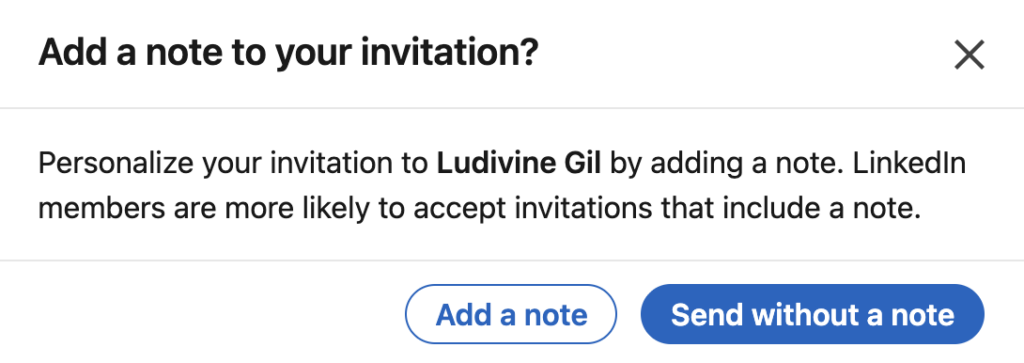
Sounds like a no-brainer, right? Personalization should win. Well… not so fast. We analyzed over 64 million campaigns to compare performance with and without a note. 🗒️
An invitation without a follow message has a higher acceptance rate than one with a note ⬇️:
- Without a note: 34.3% acceptance rate.
- With a personalized note: 32.3%.
The same observation applies to the response rate ⬇️:
- Without a note: 20%.
- With a note: 15%.
It’s best not to include a note with your invitation so you don’t lose potential clients along the way. If you want to maximize your chances, start with a simple LinkedIn connection request before sending your first LinkedIn invitation message. ❌
How Do You Actually Reach Out to Someone on LinkedIn?
There are two main ways to contact someone on LinkedIn:
- 1️⃣ Send a message to someone already in your network.
- 2️⃣ Send a connection request without a note, then follow up with a message a few days after they accept.
Here’s how to craft messages that actually attract clients 👇🏻:
- Keep it short and simple (3–5 lines, no jargon).
- Personalize it (first name, context, industry).
- Focus on them not you.
- Don’t sell right away just start a conversation.
- Lead with value: an idea, insight, or observation.
- End with an open-ended question to spark a reply.
Now let’s look at how to create a LinkedIn message that attracts, engages, and converts using several methods. 👀
The AIDA Method to Get Started with Prospecting
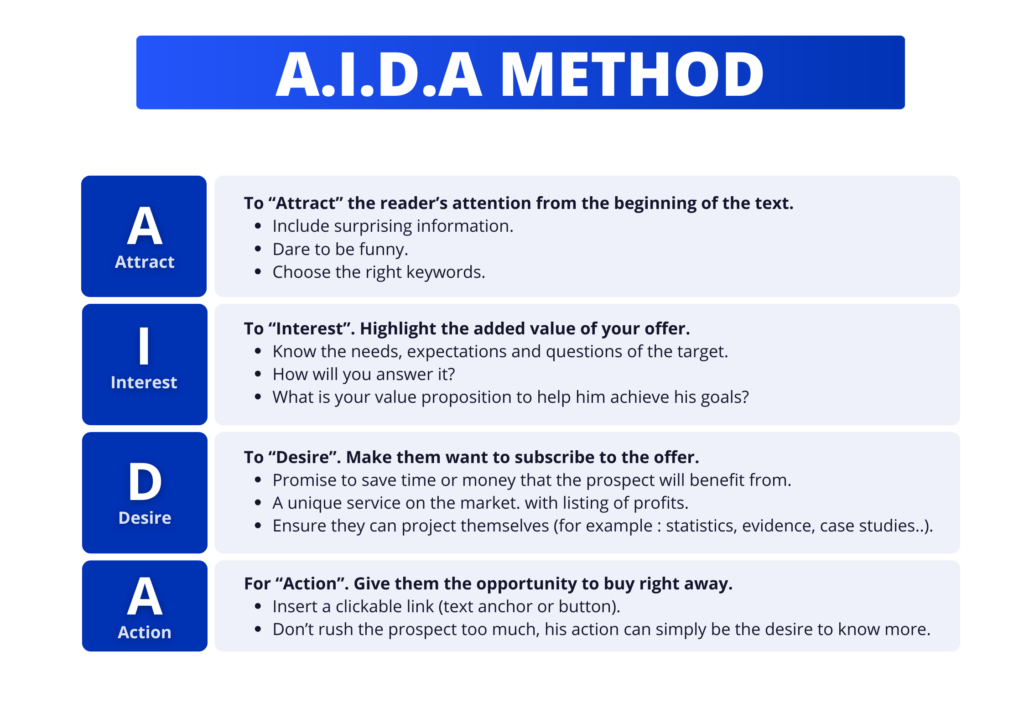
The AIDA method is a marketing classic. It works perfectly for your LinkedIn posts:
- A – Attention: Hook them from the first line.
- I – Interest: Show you understand their challenges.
- D – Desire: Give them a reason to care.
- A – Action: Wrap up with a clear next step (chat, connect, learn more…).
👉 LinkedIn message example:
“Hi {{FirstName}},
I saw you’re working on [topic].
I’ve been sharing a few tips on this—want me to send them your way?”
The B.A.B. method to get straight to the point
Another powerful method is the B.A.B. method 👇🏻:
- Before: Describe their current situation and highlight key challenges.
- After: Show what could improve and introduce a possible solution.
- Bridge: Explain how you can help make that change happen.
👉 LinkedIn message example:
“Before, I used to spend hours manually finding prospects on LinkedIn.
Now I automate the process and I’ve doubled my results.
Have you tried something like this before?”
These frameworks help you write messages that spark interest without jumping straight into a pitch. 🔍
LinkedIn message template for Lead Generation
Here’s a simple example to start a conversation with a prospect without coming on too strong right from the start.
💡 Copywriting tips:
- Use a short opening line (under 15 words).
- Mention a shared interest or a clear benefit.
- Don’t try to sell in the first message.
A good message relies primarily on empathy, curiosity, and perceived value, rather than an overly direct pitch:
👉 LinkedIn message example:
“ Hi {{FirstName}},
I saw you’re active in [industry].
I’m working with a few companies in this space to help them [specific benefit].
If you’re open to it, I can share a couple of strategies that have worked well.”

10 Best LinkedIn Message Examples That Actually Get Replies
Here are more LinkedIn prospecting message examples you can tailor to your goals.
1) LinkedIn Outreach Message Example
Sending a personalized message right after someone accepts your connection request is one of the easiest ways to stand out. Here’s what you want to do:
- Identify the prospect’s needs.
- Find common ground and professional affinities.
- Show your genuine interest and willingness to meet their needs / provide value (then elaborate on this later in the conversation).
👉 Example LinkedIn outreach message:
“Hi {{FirstName}},
I came across your profile and noticed your experience in (job title/industry).
I share insights on (topic) that might be useful for what you’re working on, happy to send a few your way if you’re interested.”
Focus on what they get out of the conversation not just what you do. Using words like “relevant” or “insightful” can also help reinforce the value you’re bringing but don’t overdo it. 😅
2) LinkedIn Message Example to Give Them a Reason to Talk About Themselves
Everyone likes to feel heard, understood, and valued. 👸🏻 And that’s exactly what your message should do.
In your LinkedIn outreach messages, the goal is to capture your contact’s attention and encourage them to talk about themselves, not to subject them to a long sales pitch or tire them out by reading your message.
👉 Example LinkedIn outreach message:
“Hi {{FirstName}},
I’d love to learn more about your role at {{Company}}.
What challenges are you facing around [topic] right now?”
✅ Why does it work? Because this LinkedIn message values the person, opens up the conversation, and creates a two-way exchange that can continue over time.
3) LinkedIn Message to Highlight the Other Person
Messages that highlight the other person tend to get more repliesup to 17% more, according to LinkedIn data.
Copywriting tip: You can sincerely compliment them on a project, a post, or an achievement (without having to suck up to them 👞). This shows that you’ve taken the time to take an interest in their work.
👉 Example LinkedIn opening message:
“Hi {{FirstName}},
I read your recent post on (topic), loved your take on it.
It’s refreshing to see someone in (industry) explain it so clearly.”
There’s nothing like speaking from the heart. There’s always something to admire in other people’s work. You just need to find what that is with your prospect. ✨
4) LinkedIn Message Example to Gather Information
👉 LinkedIn message example to connect:
“Hi {{FirstName}},
your profile caught my attention!
I’d love to learn more about what you do, it’s a space I find really interesting.”
Only use informal language if it fits your target audience and their industry (creative sector, young Gen Y and Gen Z professionals, startups, etc.). Otherwise, keep a professional tone. 👩🏻💻
5) Best LinkedIn Message for sales reps
This type of message puts your brand front and center and pitches your product or service right away. It can come off as a bit aggressive. 🫣
👉 LinkedIn Message Example :
“Hello {{FirstName}},
I noticed you’re working on (topic).
I’ve been helping teams in your space improve (specific result on pain point).
Happy to share a few ideas if it’s relevant, open to it?”
This can work with warm B2B leads, but it’s risky for cold message on LinkedIn. Use only if your target is already aware of their need and if you’re sure your solution will meet their expectations. 👀
Focus on long-term results, and always A/B test your LinkedIn cold outreach to avoid losing potential leads. 🛠️
6) LinkedIn Message to follow up with a prospect
👉 LinkedIn message example:
“Hi {{FirstName}},
Just wanted to follow up in case my last message got buried.
If generating new leads is still a priority, I have a few ideas that might help.
I also put together a quick article on LinkedIn prospecting might be useful for your role as (role).”
This example of a LinkedIn follow-up message is effective because it relies on:
- Powerful keywords that are part of business language.
- Appeal to their curiosity and sense of pride by saying that you have the best solutions and techniques for their industry (they, too, want to be the best, just like you). 😎
- Ends with a simple, easy-to-answer question.
7) Mention a Mutual Connection
LinkedIn prospecting is very similar to the interaction between two people on the street or at a party. We feel the same things 👇🏻:
- 🤝 Need to belong to a : A friend of a friend is part of the same social circle, so you’ll pay them more attention.
- 🧠 Need to share common values: If you know the same people, there’s a good chance you have things in common.
- 🌟 Trust: People rely on their network for recommendations and solutions
Having mutual LinkedIn connections builds trust and makes you more likely to respond to a message from someone close to your circle. ⭕️
👉 LinkedIn message example:
” Hi {{FirstName}},
Nice to meet you! I saw we both know (name).
Have you worked together before?
I also noticed you’re active in (industry/topic) thought it’d be great to connect.”
8) LinkedIn Message Example After a Post or an Event
This type of LinkedIn message works very well after interacting with a LinkedIn post, a webinar, or a professional event.
The connection is still fresh, so you can reach out naturally without sounding pushy. 🎎
👉LinkedIn message example:
“Hi {{FirstName}},
I’m a (job title) at (company).
I saw your post on (topic) and really liked your perspective on (specific point).
I have a few ideas that could be relevant for you—happy to share more if you’re open to it.”
9) LinkedIn Message for Group Members
This is a strategy that’s often overlooked but highly effective for building connections within a specific niche. 🪹
👉 LinkedIn connection message example
“Hello {{FirstName}},
I saw we’re both in the “[group name]” LinkedIn group.
I often chat with members about [topic], and your posts stood out.
Open to connecting?”
10) New Job or Promotion LinkedIn Message Example
Announcing a new job isn’t just about keeping your network informed, it’s also a great opportunity to reignite conversations and build connections with future prospects. 🕺🏻
👉 LinkedIn Message Example :
“Hello {{FirstName}},
I wanted to let you know that I recently joined [company] as [job title].
I’m now working on [topic/issue].
I thought this might interest you, I’d love to chat if this topic resonates with you.”
3 LinkedIn Message Examples for Partnerships
Building a network of partners is one of the smartest and most underused, strategies on LinkedIn. 👀
It’s also a real boost for your image, as it builds trust and credibility. Here are a few message examples to help you leverage new partnerships on LinkedIn.
11) Partnership Intro LinkedIn Message Example
The goal here is always to establish an authentic, personalized connection (without selling) with people with whom you truly share values, and to build partnerships that could benefit both parties. 🌟
👉 LinkedIn message example :
“Hi {{FirstName}},
I’m a (job title) in (industry).
I saw you’re a (job title) at {{Company}}, and I’d love to discuss your projects, news, and posts related to (topic).
Always great to connect with people in this space.”
Use this after they’ve accepted your connection request. 🌐
For example, if you work in , you can find content experts, copywriters, growth hackers, and SaaS experts. 📇
12) Partnership Request LinkedIn Message Example
LinkedIn partnership messages work best when they’re based on mutual benefit. So make that obvious from the start. 😉
👉 LinkedIn message example:
“Hi {{FirstName}},
I noticed we both work in (industry).
I’m looking to collaborate with people in this space and find ways to generate leads together.
Open to chatting about it?”
You can also adapt this type of message to other niche scenarios, such as backlink exchanges (SEO/SEA), which is a great way to make your content stand out from the competition. 🔗
We recommend targeting blogs that cater to the same audience as yours but offer different solutions. Don’t target your competitors, they’ll never agree to promote you (even if it’s a mutual exchange). 😂
13) Testimonial Request LinkedIn Message Example
A collaboration message with a brand,like this one, aims to boost social proof and visibility for both your LinkedIn profile and your partner’s. 🤓
👉 Example LinkedIn recommendation message:
“Hi {{FirstName}},
Thanks again for collaborating on (project).
If you found it valuable, would you mind leaving a quick recommendation on LinkedIn?
Happy to return the favor 🙌”
What’s great about this LinkedIn outreach message template is that this doesn’t cost you much, but can pay off big time.
If you’ve already worked together, most people are happy to support you publicly. 😇
3 LinkedIn Message Templates to Recruiters
LinkedIn is the social network where you can boost your career. 🚀 95% of recruiters use it to find new talent.
So, if you’re looking for a job and still sending handwritten letters through the mail… We really recommend stepping into the 21st century and using LinkedIn, it’ll be easier, more user-friendly, and you’ll faster. 🏃🏻♀️
14) & 15) LinkedIn message examples to a recruiter
So, how do you write a LinkedIn message to a recruiter? If you want to contact someone on LinkedIn about a job opening, your message should be clear and concise; focus on your motivations and your expertise. 🤓
Examples of LinkedIn messages for recruiter :
👉 LinkedIn Message Example :
“Hi {{FirstName}},
I came across a role for (position) that fits my background.
I’d love to chat briefly to learn more about it.
Would that be possible? 😁”
“Hello {{FirstName}},
As I’ve been researching your company, I thought you might be looking for a {job title}.
I’d love to bring my skills to your team while continuing to grow in {field}.
Open to a quick chat to see if there’s a fit?”
Of course, you should always tailor it to your . 🎯 Do your research on the recruiter and the company (goals, vision, values) before sending or writing your LinkedIn message. 🔍
If you’re not connected yet, add a short note to your connection request. 📬
16) LinkedIn message template for job seekers
Here’s a second, slightly more casual example you can use, it’s also a good example of a LinkedIn unsolicited application message.
👉 LinkedIn message example unsolicited application message:
“Hi {{FirstName}},
Hope you’re doing well !
I’ve heard great things about {{Company name}} through (contact).
I’d love to hop on a quick call and see if I could be a fit.
Thanks, and have a great day!”
If you need a little more help with your job search, especially to make sure you stand out to recruiters—there’s a summary guide on the topic. 👀
How Can You Automate Your LinkedIn Outreach Messages?
Automating your LinkedIn actions saves timewithout losing personalization. 🎨
With automation tools like Waalaxy:
- Easily manage your prospect lists. 📇
- Build campaigns and import thousands of prospects in minutes. 📨
- Launch personalized workflows consisting of various predefined and automated actions using your sample LinkedIn messages to “nurture” your prospects. 📚
- Track your performance (acceptance rate, response rate) in a built-in CRM. 📊
How do I get started with automating my actions on LinkedIn?
Start by using LinkedIn search to find qualified leads 👇🏻
- Type your search: “community manager”, “developer” ,”CEO”, Click on «people » then on filters to refine your search.
- Open your automation tool via the Chrome extension. Create the name you want for your campaign.
- Click “Import” and let the magic happen.
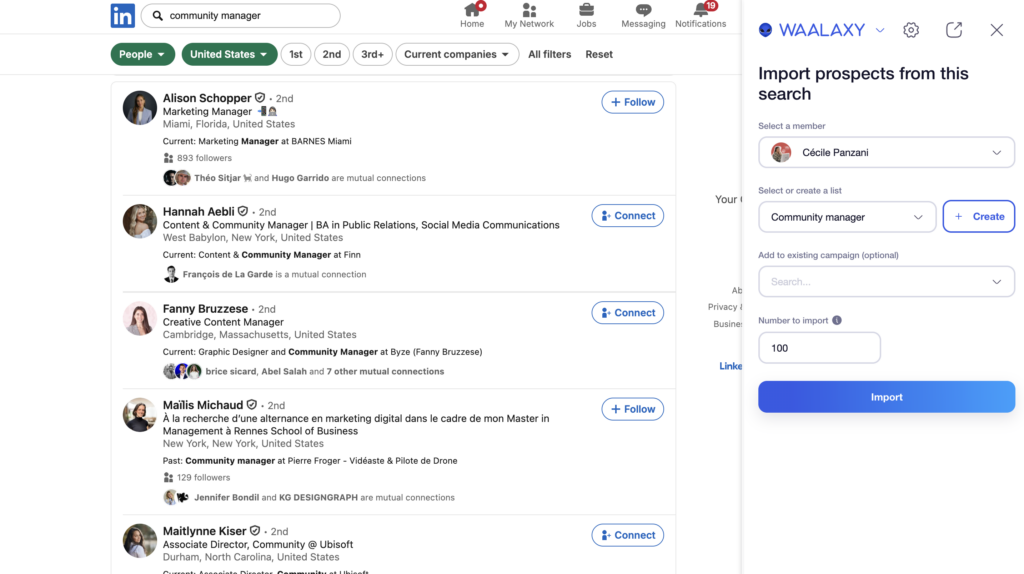
With Waalaxy, you don’t have to rely on a LinkedIn search to find prospects. You can also use the auto-import feature to bring in prospects from your network, groups, events… 🥳
Next, head to your B2B prospecting automation tool! Choose your scenario from a wide selection. We recommend using the « Invitation + Message »:
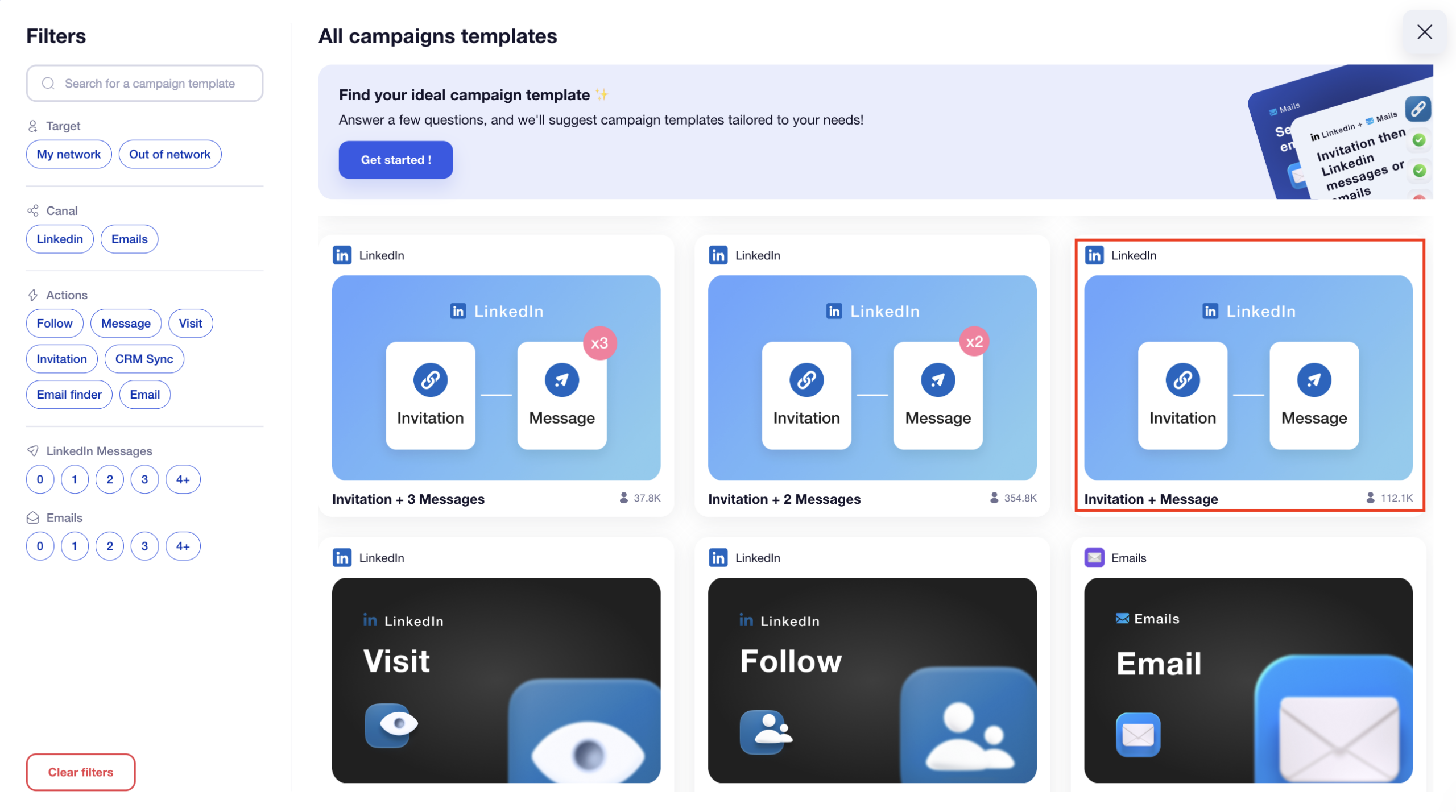
- The tool sends a connection request message (no note) automatically.
- If the prospect accepts the request, we move on to step 2 of sending the automated message (you can set the delay between steps 1 and 2 here). 🔥
- If the prospect declines, the sequence stops.
- If they reply, you’ll receive the message in your LinkedIn inbox (Waalaxy Inbox) and can launch the conversion phase. 🤑
Once you’ve uploaded your prospects to your campaign and chosen your scenario, you can copy and paste one of the sample LinkedIn prospecting messages and tweak it slightly to suit your target audience. 🎯
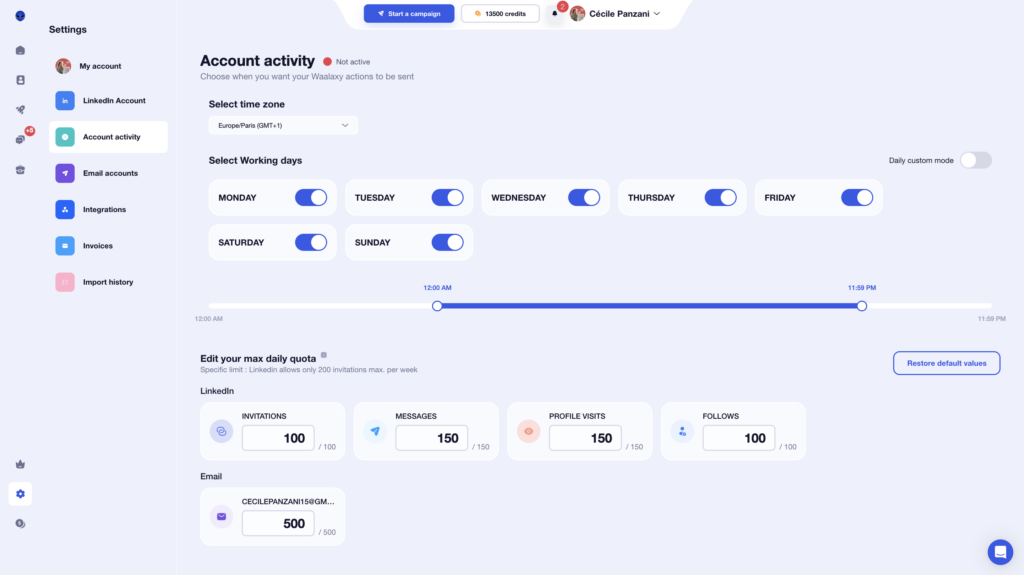
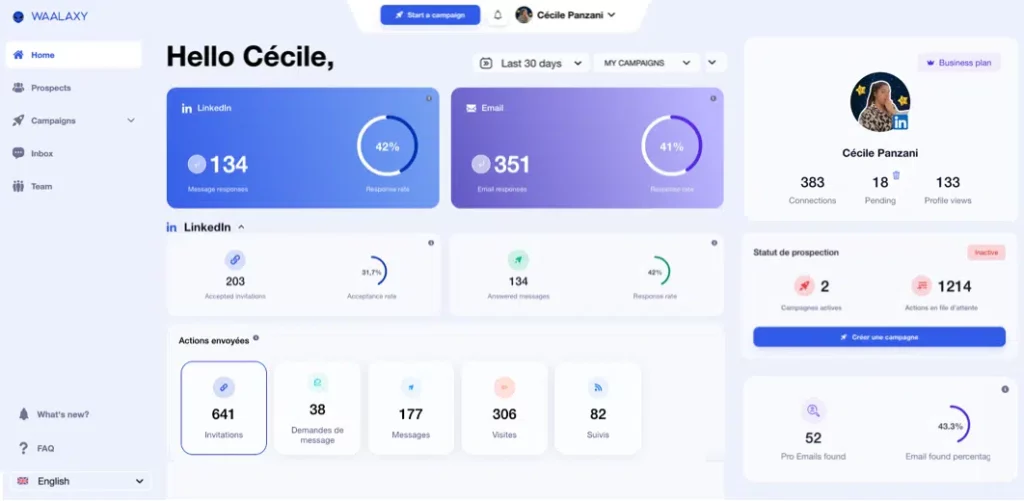
Waalaxy will let you know that your campaign is running on its own, just like a pro. 😋 You can see:
- The number of actions that will be carried out today and in the coming days until the end of your campaign.
- The results of your ongoing campaigns directly on the extension’s home page.
By following this method, you can send hundreds of personalized LinkedIn messages per week, while maintaining a human touch, saving time, and gaining clients. 😉
That’s how you scale outreach without sounding like a robot.🤖
Automated LinkedIn Prospecting Message Example
When you’re automating outreach, your message needs to stay simple. Why? Because you’re reaching out at scale, with less context on each person. 🤑
👉 LinkedIn message example :
“Hello {{FirstName}},
My name is (your first name), and I’m a (your job title) at (company).
I came across your profile and wanted to reach out about (topic).
If you’re interested, let’s connect!”
This LinkedIn message is short, clear, and fully compatible with an automated campaign, ensuring a fairly good response rate and/or acceptance rate.
Quick Recap on LinkedIn Outreach Messages
You’ve now got everything you need including ready-to-use LinkedIn templates, to succeed with your outreach.
From the message to personalization, every detail matters. The idea isn’t to do more, but to do it better. Keep a few simple basics in mind 👇🏻:
- Be sincere and relevant.
- Avoid mass copy-and-paste messages.
- Always A/B test your approaches.
With a clear strategy, LinkedIn becomes a powerful tool for creating opportunities: clients, partners, collaborations, or even new career opportunities. 🥰
And if you want to save time without losing quality, tools like Waalaxy can automate your outreach. 😎
FAQ: Linkedin message examples
How to write a good LinkedIn message?
If you’re not sure where to start, keep it simple:
- Log in to your .
- Search for the person you’re interested in.
- Click “Connect” (if you aren’t already connected).
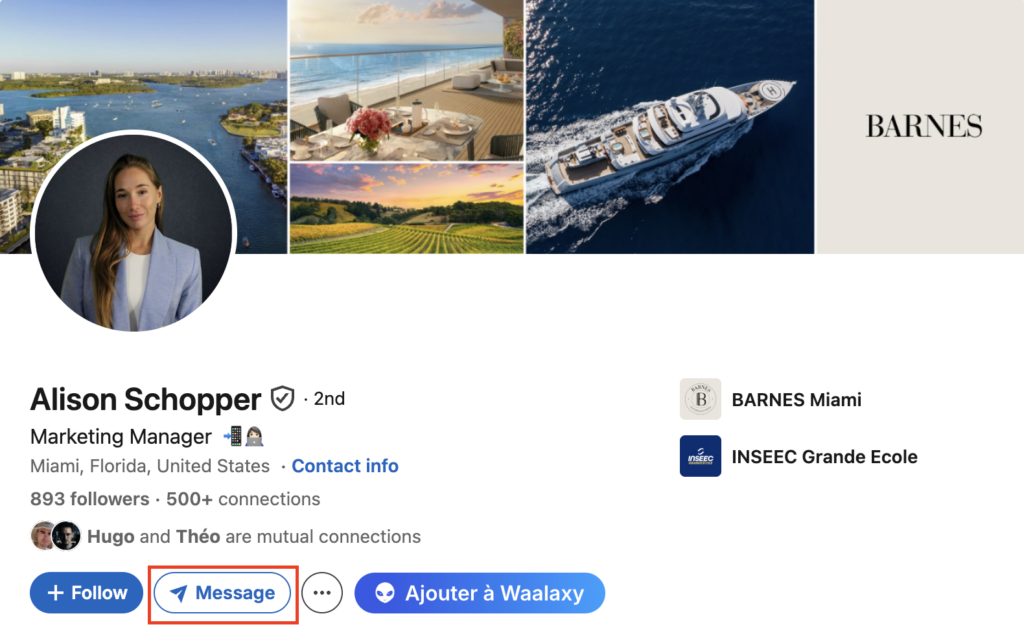
- Send a message (if you’re already connected).
- Delete the LinkedIn message if necessary.
You can also send a message via LinkedIn Messenger without a Premium :
- Send a personalized connection request.
- Reach out through shared groups.
A well-written LinkedIn message is better than a generic InMail. 😅
How to Message on Linkedin ? The Best Practices Before and After Sending a LinkedIn Message
Before sending your first LinkedIn message, make sure your profile is ready to impress. 🥹
Optimize your profile. | Professional photo, clear banner, value-driven description. Add your key experiences and measurable results. |
| Make your activity visible. | Post regularly (1–2 times a week). Comment on or share posts in your field. |
| Analyze best practices. | – Messages under 300 characters get 5% more replies – Personalized messages can double your acceptance rate – Following up after 3–5 days is 60% more effective than doing it immediately – Best time to send messages: Tuesday to Thursday, 8–10 a.m. |
✅ After sending:
- Track responses and note patterns, as well as the phrases that work best.
- Respond quickly a lead response time of less than 24 hours is recommended.
- Test multiple versions of the same LinkedIn message template to refine your results.
Can I tell if my LinkedIn message has been read?
Yes, LinkedIn lets you see if your message has been read using the LinkedIn read receipt. When the recipient opens your message, a small “Viewed” or their profile photo appears below your message in the inbox. 📮
This feature depends on privacy settings. If the person has disabled read receipts, you won’t be able to tell if your LinkedIn message has been read.
What is the difference between DM and InMail?
A DM (Direct Message) is sent to people you’re already connected with. It’s free and usually more conversational.🗣️
An InMail lets you message people you’re not connected with. It requires a Premium account and uses credits. 🪙
| Feature | DM | InMail |
|---|---|---|
| Connection required | ✅ Yes | ❌ No |
| Cost | Free | Paid (credits) |
| Tone | Casual, conversational | More formal |
| Use case | Nurturing / follow-up | Cold outreach |
Now you know what kind of LinkedIn message to send for your strategy! 😇
 Elodie
26/06/2026
Elodie
26/06/2026 













