



Today, more and more users are seeking alternatives to GMass. Why? 🤔
Simple, accessible, and effective for small volumes, GMass has long appealed to its target audience, but needs are changing: increased volume, team coordination, stricter deliverability, multi-channel sequences… And the tool quickly shows its limitations as soon as you want to scale up. 😬
So much so that on Google, we see everywhere 👀: Should we leave GMass now? Can we still stay on it temporarily?
In other words, something is wrong, GMass is no longer enough, and many are considering migrating. If this is the case for you, stay with us! On the agenda: 👇🏼
- The best alternatives to Gmass.
- How to choose the email outreach tool that best suits your growth.
We’ll give you a sneak peek at the article with this table.
| Features | Gmass | Waalaxy | SalesHandy | Reply.io | Smartlead | Mailmeteor | LaGrowthMachine | Apollo.io |
|---|---|---|---|---|---|---|---|---|
| Email enrichment | ❌ | ✅ | ⚠️ (minor) | ⚠️ (extension) | ❌ | ❌ | ✅ | ✅ |
| Multi-channel sequences (LinkedIn + Email) | ❌ | ✅ | ❌ | ⚠️ (email + calls) | ❌ | ❌ | ✅ | ⚠️ (email only) |
| Integrated warm-up | ❌ | ✅ | ✅ | ⚠️ | ✅ | ❌ | ❌ | ❌ |
| Multi-domain/multi-inbox rotation | ❌ | ❌ | ⚠️ | ❌ | ✅ | ❌ | ❌ | ❌ |
| Centralized inbox | ❌ | ✅ | ⚠️ | ❌ | ✅ | ❌ | ✅ | ❌ |
| A/B Testing | ❌ | ✅ | ⚠️ | ✅ | ⚠️ | ❌ | ❌ | ⚠️ |
| Built-in AI (messages/optimization) | ❌ | ⚠️ | ❌ | ✅ | ⚠️ (Spintax AI) | ❌ | ❌ | ❌ |
| Integrated CRM | ❌ | ✅ (native and via sync) | ❌ | ❌ | ❌ | ❌ | ❌ | ✅ |
| CRM integrations (HubSpot, Pipedrive, etc.) | ❌ | ✅ | ✅ | ✅ | ⚠️ | ❌ | ✅ | ✅ |
| GDPR Compliant | ❌ | ✅ | ⚠️ | ⚠️ | ⚠️ | ❌ | ⚠️ | ⚠️ |
| Native Lead Finder | ❌ | ⚠️ | ⚠️ | ⚠️ | ❌ | ❌ | ❌ | ✅ |
| Ideal for sales/SDR teams | ❌ | ✅ | ⚠️ | ✅ | ✅ | ❌ | ✅ | ✅ |
What is GMass?
GMass is one of the most popular emailing tools for sending mass campaigns, performing mail merges, personalizing messages, and automating certain follow-ups… all while being directly integrated into Gmail.
The tool was designed as an extension to simplify campaign sending. It is mainly aimed at freelancers, small teams, and anyone looking for a lightweight, inexpensive solution.
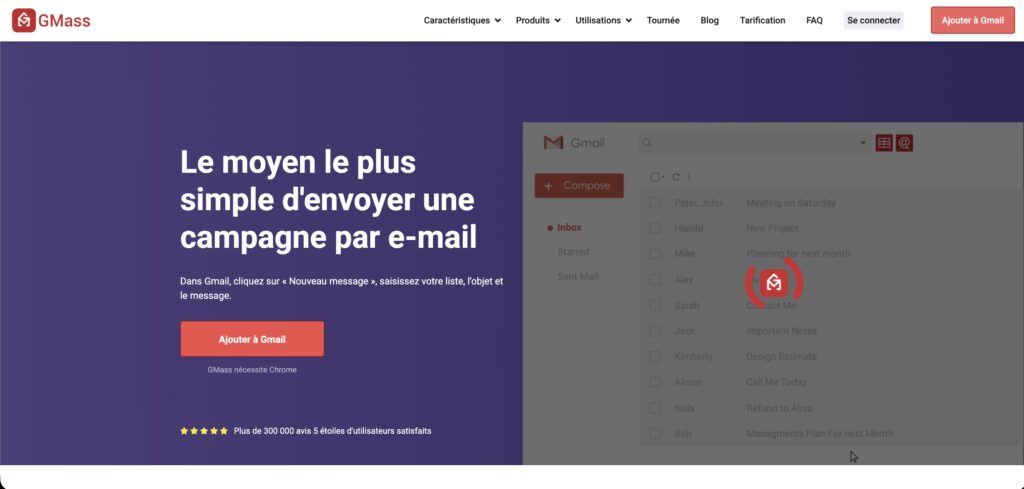
Unlike more advanced cold emailing platforms, GMass uses Gmail’s system completely, which makes it easy to use and accessible, but also means it has some downsides like lower sending limits, inconsistent delivery rates, and no features for
What features does GMass offer?
GMass centralizes the essential features of an email outreach tool directly in Gmail, providing ample resources to initiate or manage small campaigns.
- Unlimited email sending.
- Mail merge with customization: import a Google Sheet and customize each email (name, company, variables, etc.).
- Automatic sequences: scheduled follow-up email if the prospect does not open or respond.
- Integrated tracking: opens, clicks, replies, and bounces.
- Smart sending blocks: GMass automatically distributes mailings to stay under Gmail limits.
- Send from native Gmail: Chrome extension that adds a GMass button to your Gmail interface (with spam resolver)
- Simple list building: quickly collect addresses from a Gmail search (unlimited number of contacts and free address verification).
- A/B testing: test multiple email variations.
- API & webhooks: for advanced users who want to connect other tools.
- Automatic removal of duplicates and bounces to maintain a clean database.
- Inbox rotation (multisend).
However, these features show their limitations as soon as requirements increase.
Gmass pricing
GMass offers a simple and relatively affordable pricing model:
- Standard Plan: ideal for individuals, with basic mail merge features.
- Premium Plan: adds automatic sequences and advanced tracking.
- Professional Plan: collaboration and management of multiple users.
Prices generally range from €20 to €40 per month, making it one of the most affordable tools on the market.
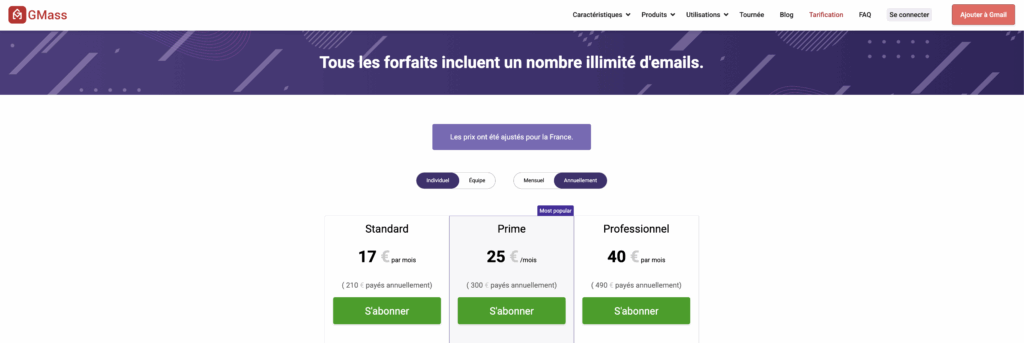
The low cost is due to the absence of advanced features such as domain rotation, integrated warm-up, or multichannel.
Gmass customer reviews
Users appreciate GMass for its simplicity and value for money, but many point out its difficulty in scaling, its Gmail limitations, and sometimes poor deliverability on regular mailings.


This is often the trigger for looking for more robust GMass alternatives. It is also one of the reasons why GMass is very poorly rated, with an average score of 1.9/5 (based on 32 reviews) on TrustPilot. 😬
Advantages and disadvantages of GMass
To summarize, here is a summary table of the advantages and disadvantages of GMass to help you make an informed decision before comparing it to other tools 🧮:
| Pros ✅ | Limitations ❌ |
|---|---|
| Effortless to use. | Limited volume: depends entirely on Gmail quotas (500 emails/day as standard). |
| Ideal for small volumes (freelancers, creators, microbusinesses). | Unstable deliverability: without warm-up, domain control, or rotation, campaigns can quickly end up in spam. |
| Very affordable price. | No multichannel: impossible to add LinkedIn, calls, or automated tasks. |
| Powerful mail merge with native Google Sheets integration. | No robust CRM integrations: only a few options via webhooks/API. |
| Discreet and natural sending via Gmail (rather than external servers). | Not designed for teams/limited collaborative management. |
| Interface directly in Gmail. | No advanced domain management (no multi-inbox, no multi-domain, no SMTP). |
| No advanced segmentation or conditional logic. |
In short, it’s a limited tool when you want to scale up, work as a team, or move to a more professional outreach.

Top 8 best Gmass alternatives
There are tons of cold email outreach tools on the market, but we’ll tell you why Waalaxy, SalesHandy, Reply.io, Smartlead, MailMeteor, LaGrowthMachine, Woodpecker, and Apollo are the best and why they are good alternatives to Gmass. 💥
Some are excellent for mass cold emailing, others for multi-channel prospecting, complete automation, scaling, CRM, international marketing outreach, and more.

GMass Alternative No. 1: Waalaxy
Waalaxy is currently one of the simplest tools for automating/scaling multichannel prospecting and outreach (LinkedIn + cold email + data enrichment) with native integration into Gmail.
Unlike tools that are limited to sending emails, Waalaxy covers the entire prospecting chain: research, enrichment, segmentation, outreach, follow-up… all in a single interface.
What distinguishes Waalaxy from Gmass?
Where GMass is limited to sending emails from Gmail, Waalaxy goes much further:
- Full multichannel: LinkedIn + native email (Gmail/Outlook), in automated sequences.
- Integrated Email Finder: the best on the market, finding up to 60% more professional emails thanks to 15 connected data sources.
- Triple email verification (Dropcontact, Bettercontact, Fullenrich) guarantees +99% deliverability.

- High-volume management: unlimited emails sent via native Gmail + 800 LinkedIn actions/month.
- Advanced conditional logic: actions triggered based on behavior (click, response, profile visit, etc.).
- Numerous customization options (variables, custom response template, etc.) and text formatting (attachments, colors, hyperlinks, email signature, etc.).
- The all-in-one approach includes search, enrichment, prospecting, follow-up, and CRM synchronization.
In other words, GMass is an email sending tool, and Waalaxy is a comprehensive prospecting platform capable of scaling your campaigns.
Key features of Waalaxy
Waalaxy combines all the essential features in a single tool, positioning itself as a true prospecting hub:
- A database of over 500 million profiles is accessible via LinkedIn.
- Automatic scraping of profiles, lists, groups, events, reactions, CSV files, etc.
- Multi-channel campaigns: Email + LinkedIn, with ready-to-use templates.
- Email Finder & Enrichment: automatic search for professional emails.
- Waalaxy Inbox to manage all conversations in one place.
- Smart sequencer with advanced conditions.
- Simple segmentation & scoring of enriched leads.
- Comprehensive dashboard: KPIs, open rates, responses, bounces, etc.
- CRM integrations (HubSpot, Salesforce, Pipedrive, and Zapier/Make).
- Free integrated tools: ICP Generator, Headline Generator, and freemium enrichment.
- Available in over 11 languages for international teams.
It’s the perfect tool for sales teams, founders, and freelancers.
Waalaxy Pricing
Pricing is simple, transparent, and tailored to all needs:
- Freemium: ideal for testing (unlimited emails + 25 enrichment credits + 80 LinkedIn invitations/month).
- Pro ($19/month): simple prospecting and LinkedIn automation.
- Advanced ($49/month): LinkedIn scaling + native Gmail emails.
- Business ($69/month): 800 credits/month enrichment + advanced multichannel.
- Enterprise: custom pricing and access to 1-on-1 coaching and Sales Navigator included.
Monthly
Quarterly
Yearly
Without Inbox
With Inbox
Add-on

It is the tool with the best price/performance ratio on the market, especially thanks to its multichannel and integrated enrichment features.
Waalaxy is therefore a premium alternative to GMass, especially if you want to scale up, add LinkedIn, automatically enrich your leads, and achieve better deliverability.
Waalaxy Customer Reviews
Finally, Waalaxy is highly rated by its users, with an average score of 4.4 out of 5 (based on 251 reviews) on Capterra and 4.8 out of 5 for user reviews on the Chrome Store.
✅ Especially for:
- Easiest interface to use.
- Powerful, native email finder with ultra-reliable enrichment (+99% deliverability).
- Hyper-efficient multi-channel action sequences.
- Customer support recognized as one of the best on the market: ultra-responsive and human.
- All-in-one tool: avoids multiple subscriptions and unnecessary complexity.
- All the support resources are available to assist users!
❌ The only objection from users? That the Waalaxy extension is only available on Google Chrome.
GMass Alternative #2: SalesHandy
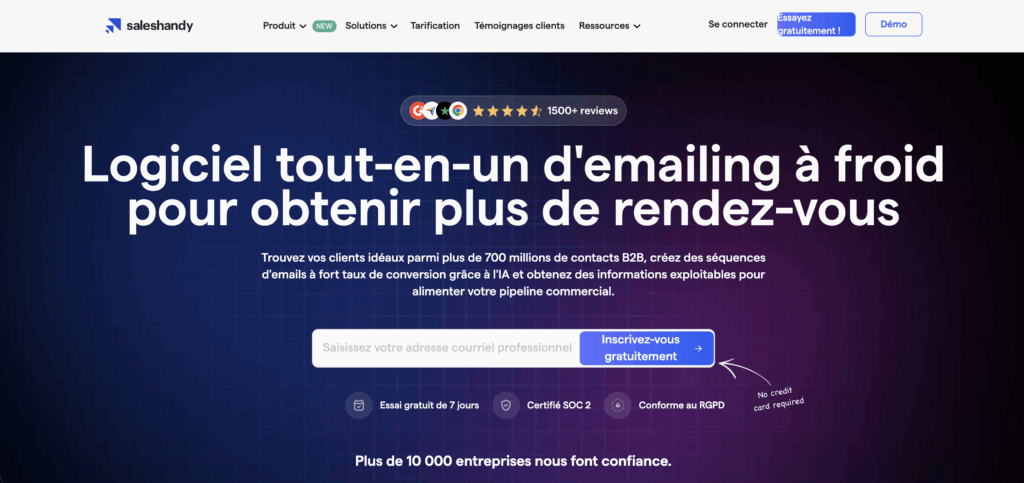
While GMass is limited to sending emails via Gmail, SalesHandy is a comprehensive and scalable outreach platform designed for high-volume cold emailing with built-in warm-up, sender rotation, advanced tracking, automated sequences, and team management.
More than just a mail merge, it offers a true emailing infrastructure optimized for deliverability and campaign management with:
- Freelancers and small teams looking for simple automation.
- SMEs/startups looking to scale without a complex stack.
- Agencies/sales teams sending large volumes and requiring reporting and deliverability.
Key features of SalesHandy
- Cold email & automated sequences: creation of personalized campaigns, with placeholders, delays, automatic follow-ups based on behavior (no opening, no response, click, etc.)
- Warm-up & deliverability: warm-up of mailboxes, sender rotation, and sending reputation management to maximize the chances of emails arriving in the inbox.
- Tracking & analytics: tracking opens, clicks, replies, bounces, and performance reporting to evaluate each email campaign.
- Lead Finder & email verification: access to a B2B contact database + address verification before sending to reduce hard and soft bounces.
- Team management & multi-accounts: option to add multiple users and manage different sender accounts, useful for agencies or SDR teams.
- Integrations & automation: compatibility with CRM (HubSpot, Pipedrive, others), Zapier, Outlook/Gmail, API, etc., to integrate SalesHandy into a complete sales & marketing stack.
SalesHandy Pricing
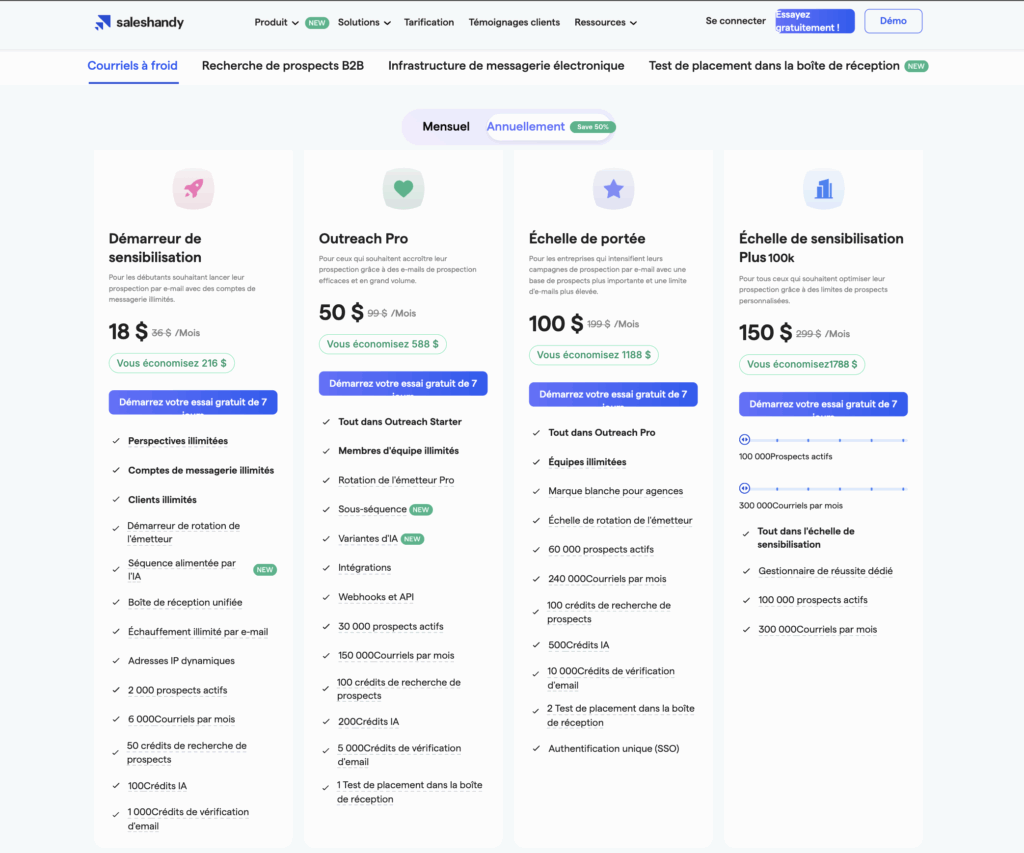
SalesHandy provides a free trial (or test period) that allows you to evaluate the tool before subscribing, followed by several pricing plans based on your needs:
| Plan | Approximate price/month/user* | Usage/target |
|---|---|---|
| Outreach Starter | ~ $36/month (or equivalent). | Freelancers, small campaigns. |
| Outreach Pro | ~ $69–99/month. | SMEs, small teams. |
| Outreach Scale | ~ $199/month (or equivalent). | High volume, agencies, large teams. |
SalesHandy customer reviews
SalesHandy has an average rating of 4.6/5 on customer review platforms such as G2, with generally positive customer reviews, but some feedback mentions limitations on a very large scale.
| Advantages ✅ | Disadvantages ❌ |
|---|---|
| Intuitive interface, easy to learn. | Variable deliverability at very high volumes (warm-up less powerful than a dedicated SMTP setup). |
| Automated sequences and integrated warm-up (no need for external tools). | Email-only: no LinkedIn, SMS, or calls. |
| Good tracking system (opens, clicks, replies). | Cost can increase for large teams. |
| Integrated lead finder and email verification. | A/B testing less advanced than some competitors. |
| Scalable: suitable for freelancers, SMEs, and agencies. | Some limitations on advanced customization. |
| No team management. |
The tool is still considered an excellent upgrade for those coming from GMass who want a more robust solution without complexity or excessive cost.
However, if you are looking for a multi-channel approach (LinkedIn, calls, etc.) or a highly sophisticated email router, you will need to consider a more comprehensive tool.
GMass Alternative #3: Reply.io
Reply.io is not just a simple email sending tool like GMass.
Where GMass is limited to mail merges in Gmail, Reply.io is a B2B prospecting automation tool that simplifies sending multichannel campaigns and managing outreach at scale while integrating analytics and AI tools.

Key features of Reply.io
Reply.io offers a 100% scaling-oriented approach, with a flexible sequencer and advanced options to orchestrate a complete email + LinkedIn + phone pipeline.
Here are the key features that set Reply.io apart:
- Multi-channel sequences: email + LinkedIn + calls + SMS + tasks.
- AI-assisted writing: automatically optimized messages.
- Advanced A/B testing: test subjects, content, and timing.
- Lead scoring & analytics: automatic prioritization based on engagement.
- LinkedIn Chrome extension: extract leads and add them directly to sequences.
- Lead Generation Tool: integrated prospect search.
- Native CRM integrations (HubSpot, Pipedrive, Salesforce).
- Team management & permissions: useful for SDRs/BDRs.
- Integrated calling tools: VoIP + call tracking.
- Security & compliance with international postal standards.
In short, GMass is a mailing tool. Reply.io is a comprehensive automation system.
Reply.io Pricing
Reply.io offers several plans, depending on the level of functionality desired:
- Multichannel: approximately $90/month (multichannel sequences + advanced automation).
- Email volume: starting at around $159/month per user (emails + simple sequences).
- Enterprise: starting at $500/month per user, depending on integrations, call volume, and AI features.

The tool is clearly geared towards SMEs, growing startups, and SDR teams requiring comprehensive, multi-channel workflows.
Reply.io customer reviews
Reply.io has an average rating of 4.6/5 on major review platforms. Users particularly appreciate the power of the multi-channel sequencer, the overall ease of use, and the integrated AI. However, some point to an outdated interface and limited LinkedIn automation.
| Advantages ✅ | Disadvantages ❌ |
|---|---|
| Excellent value for money. | Slightly outdated interface. |
| Smooth workflow and easy-to-configure campaigns. | Partial LinkedIn automation (some actions remain manual). |
| Suitable for freelancers, startups, and SMEs. | Deliverability varies if DNS/warm-up configuration is not optimal. |
| Responsive and well-rated customer support. | Learning curve for advanced features. |
| Integrated AI to improve messages. | Localization sometimes approximate. |
| Excellent multichannel sequencer (email + calls). | Not suitable for ultra-premium uses. |
Reply.io is a solid alternative to GMass for scaling up, especially:
- If you are seeking additional power, multichannel capabilities, and automation, then Reply.io is a suitable choice.
- If your outreach goes beyond simple cold emailing or you manage an SDR/BDR team,
GMass Alternative #4: Smartlead
Smartlead is a tool designed to send cold emails on a huge scale, ideal for B2B agencies, scale-ups, and sales or growth teams that need to manage multiple email accounts/domains/clients with massive volumes and flawless deliverability.
Unlike GMass, which is restricted by Gmail quotas and a basic mail merge that functions for only a few hundred emails, Smartlead provides a more scalable solution.
Smartlead offers a robust, high-performance infrastructure that allows you to send thousands of emails every day.
It is a machine designed for intensive prospecting that does more than just send emails: it secures the sender’s reputation, distributes mailings, automates follow-ups, and centralizes responses in a master inbox.

Key features of Smartlead
Smartlead is a tool dedicated to high-volume cold email prospecting and mass outreach systems, with everything you need to automate, protect your reputation, manage mailings, optimize campaigns, and centralize responses:
- Dedicated IPs and architecture optimized for high deliverability…
- Unlimited send boxes + automatic warm-up,
- Domain rotation and unlimited multi-domain/multi-inbox management,
- Advanced and customizable automated sequences (conditions, follow-ups, behavioral reminders),
- AI Spintax to generate text variations and avoid spam filters,
- Email verification,
- Send via SMTP, Gmail, or Outlook.
- Master Inbox (centralized replies),
- Campaign builder + Bulk upload,
- Comprehensive reporting (opens, clicks, bounces, reputation, spam) to monitor reputation and optimize campaigns,
- API + Webhooks to integrate it into an existing stack,
- Team management: multi-user/multi-client/multi-account management, permissions and shared folders, white label, outsourcing, etc.
Where GMass remains simple to use, Smartlead covers all the technical layers necessary to maintain very high deliverability and scale without the risk of ending up in spam.
Smartlead Pricing
Smartlead generally offers a free trial (14 days) to test the features before committing, followed by simple, performance-based pricing:
| Plan | Base price* | Description / Recommended use |
|---|---|---|
| Basic. | Approx. $39/month. | For beginners, small volumes, testing the tool. |
| Pro. | Approx. $94/month. | Regular cold emailing, small teams, medium volume (with warm-up, multiple mailboxes, and advanced sequences). |
| Customized. | Approx. $174/month (or more depending on usage). | For agencies, high volume, multiple accounts, and clients (including a large number of domains, users, and inboxes). |

Even at intermediate levels, Smartlead already allows for very high volumes thanks to rotating domains and SMTP.
Smartlead customer reviews
Smartlead has an average rating of 4.7/5 on major review platforms. Users particularly highlight Smartlead’s exceptional deliverability, its ability to handle massive volumes, and its ease of scaling cold email.
However, some users express concern about the tool’s potential complexity for beginners and its lack of native sourcing features.
| Advantages ✅ | Disadvantages ❌ |
|---|---|
| Excellent deliverability (sender rotation + integrated warm-up). | Less suitable for beginners (DNS/deliverability knowledge required). |
| Ideal for scaling (intensive cold emailing/high volume/unlimited mailboxes). | No integrated LinkedIn prospecting (email only). |
| Master Inbox to centralize responses from multiple mailboxes. | Functional interface but less modern than some competitors. |
| Robust automation (sequences, follow-ups, triggers, etc.). | Limited internal CRM (basic segmentation/pipeline). |
| Very good value for money for large volumes. | Some advanced features (AI Spintax, multi-domains) require some learning. |
| Perfect for agencies and B2B teams (multi-account, white label, multi-client). | Support and advanced options mainly available in higher-tier plans. |
| Flexible configuration (SMTP, multi-domain, Gmail/Outlook). | May seem like overkill “”for small volumes or simple uses. |
| Responsive support & active community. | Limited enrichment/sourcing features. |
In short, for teams that want to overcome the limitations of GMass to truly scale their outreach while protecting the reputation of their domains, Smartlead is one of the best options on the market.
If your usage remains moderate or you need lead enrichment or data sourcing, you will need to pair Smartlead with an external tool or choose a more all-in-one platform, such as Waalaxy.
GMass Alternative #5: Mailmeteor
Mailmeteor is the alternative tool that most closely resembles GMass.
Mailmeteor operates using Google Sheets and Gmail, but it takes a simpler, lighter approach, with less complex sequences than GMass and without the need to worry about warm-up, domain rotation, or outreach infrastructure.
- It takes a simpler, lighter approach, with less complex sequences than Gmass and without worrying about warm-up, domain rotation, or outreach infrastructure…
- Focused on occasional or low-volume use: sending personalized emails, “one-shots,” or small campaigns, without complexity or email automation, directly from Sheets.
It’s a bit like a lighter version of Gmass, making it ideal for one-off campaigns, internal newsletters, or light mass messages. GMass can quickly appear to be too large or overly concentrated on cold emailing.

Key features of Mailmeteor
Mailmeteor focuses on the essentials: sending personalized emails in moderate volumes, reliably and quickly, without getting bogged down in complex options.
- Custom mail merge: send personalized emails from Google Sheets with placeholders (name, company, and variables).
- Minimalist interface: straightforward to configure, without installing complex Chrome extensions.
- Basic tracking: tracking of opens, clicks, and replies.
- Voluntary limitation of features: no sequences, no warm-up, and no rotation, which simplifies use for occasional mailings.
- Gmail/Google Workspace compatibility: ideal if you already use the Google ecosystem.
- Easy export of results: sending, tracking, and status in the same Google Sheet.
Mailmeteor Price
Mailmeteor is often praised for its excellent simplicity/price ratio:
- Free version: allows you to send a limited number of emails—enough to test the tool or for occasional mailings.
- Paid plans (starter, premium, and pro): around $10–$30/month per user, depending on volume and desired features.
Pricing is simple, with no long-term commitment, often suited to freelancers, independent contractors, or small teams.
The cost remains modest, making it an affordable tool for low-intensity campaigns.

Mailmeteor customer reviews
Mailmeteor has an average rating of around 4.6/5, mainly thanks to its ease of use and seamless integration with Google Workspace.
The tool is presented as an ideal solution for one-off mailings, simple mail merge campaigns, or light newsletters. When it comes to B2B cold emailing, however, its limitations become apparent.
| Advantages ✅ | Disadvantages ❌ |
|---|---|
| Very simple and intuitive. | No warm-up period. |
| Native Google Workspace integration. | No domain rotation. |
| Perfect for mail merges and one-off mailings. | No automated sequences. |
| Very good value for money. | No multichannel (email only). |
Mailmeteor is therefore a long way from being a modern outbound platform or CRM and does not claim to compete with complex and scalable tools.
For simple, light, or occasional needs, it is an effective alternative to GMass. But if you are looking to go beyond the limits of GMass, Mailmeteor will not be enough.
For a real upgrade, a more comprehensive solution such as Waalaxy will be necessary.
GMass Alternative #6: LaGrowthMachine
LaGrowthMachine (LGM) positions itself as a comprehensive multi-channel prospecting platform, capable of orchestrating highly personalized sequences combining LinkedIn, email, and Twitter.
GM does more than just send automated emails; it manages an entire outbound workflow, with integrated/automatic enrichment (not offered by Gmass), automatic prospect status updates, advanced conditional logic, and a collaborative dashboard.
In short, GMass = simple emailing.
LGM = comprehensive multichannel prospecting for growth and sales teams.

Key features of LGM
LaGrowthMachine offers powerful features designed for advanced prospecting campaigns, making it one of the most comprehensive multichannel tools on the market:
- Fully automated multichannel sequences: LinkedIn + email + Twitter.
- Conditional logic based on prospect engagement (opening, response, profile visit, etc.).
- Integrated enrichment: automatic retrieval of professional emails from LinkedIn or CSV files.
- Automatic synchronization: update prospect status with each interaction.
- Smart Inbox: centralization of conversations, follow-ups, and reminders.
- Collaborative dashboard: simplified team management.
- Native CRM integrations: HubSpot, Pipedrive, and Salesforce.
- Automated LinkedIn import: profiles, lists, events, searches, etc.
- Segmentation and tagging: advanced lead organization.
Please note:
❌ No generative AI for writing.
❌ No phone numbers in enrichment.
LGM Price
LaGrowthMachine adopts a premium positioning, consistent with its power and target audience (teams that want to automate large-scale email campaigns):
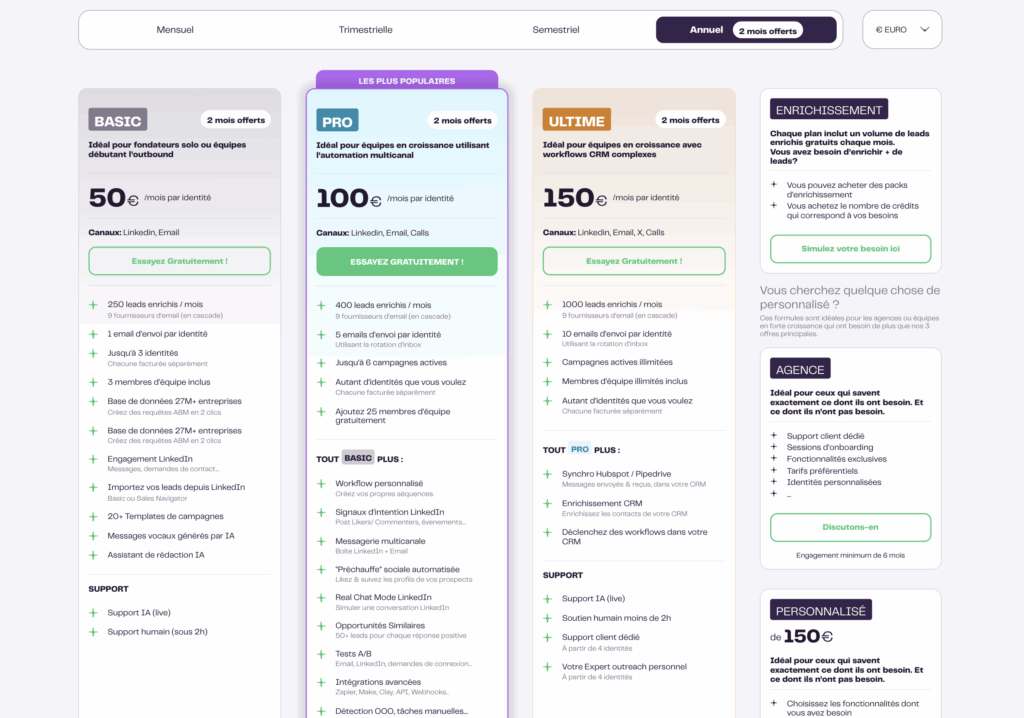
- Basic Plan: approximately $50/month/user.
- Pro Plan: approximately $100/month/user.
- Ultimate Plan: approximately €150/month/user.
- Custom plans starting at $150/month/user.
- Quotes available for all options: enrichment and agency/team.
There is no free version, unlike some Gmail-based tools.
LGM customer reviews
LaGrowthMachine has an average rating of 4.8/5, making it one of the highest-rated multi-channel prospecting tools on the market, designed to manage complex large-scale campaigns.
However, its premium positioning and steeper learning curve may deter smaller teams or users looking for a simpler tool.
| Advantages ✅ | Disadvantages ❌ |
|---|---|
| Advanced multichannel automation. | High price. |
| Built-in native enrichment. | More complex learning curve. |
| Clear, team-oriented interface. | No AI writing. |
| Highly reliable CRM synchronization. | No phone numbers. |
| Ideal for growth/sales teams. | Interface only in English. |
LGM is a high-end alternative to GMass, ideal for moving to scalable and sophisticated multi-channel prospecting.
Want to learn more about this tool? Check out our comparison article LaGrowthMachine VS Waalaxy. 🎁
GMass Alternative #7: Apollo.io
Apollo is an all-in-one B2B prospecting platform that finds your prospects, enriches their data, automatically launches your sequences, and tracks your performance in an integrated mini-CRM.
Where GMass only sends emails and lacks data sources, advanced automation, scoring, or enrichment, Apollo allows you to:
- Identify and import prospects from a database of over 265 million contacts;
- Automatically enrich emails, phone numbers, and LinkedIn profiles;
- Create multichannel sequences;
- Track your campaign KPIs as a true sales engagement tool.
Apollo is therefore a more advanced alternative, geared more towards structured and scalable prospecting, ideal for SDR/BDR teams.
Key features of Apollo
Apollo combines data, automation, and tracking (several essential building blocks for modern B2B prospecting), making it a complete Sales OS tool, much broader than GMass.
- Internal B2B database (265M+ enriched and continuously updated contacts).
- Chrome extension: extraction of prospects from LinkedIn or websites.
- Advanced search: over 65 filters (size, position, sector, technology, intent data, etc.).
- Automatic enrichment: emails, phone numbers, and social profiles.
- Automated email sequences: templates, personalization, multichannel.
- Integrated CRM: opportunity management, pipeline, and interaction history.
- Lead scoring: prioritization of prospects based on their engagement.
- Workflows & automatic tasks: reminders, follow-ups, manual tasks, and call scheduling.
- Comprehensive analytics: opens, clicks, responses, and opportunities generated.
- Native CRM integrations: HubSpot, Salesforce, Pipedrive, Close, etc.
- Directly integrated appointment scheduling.
Apollo Price
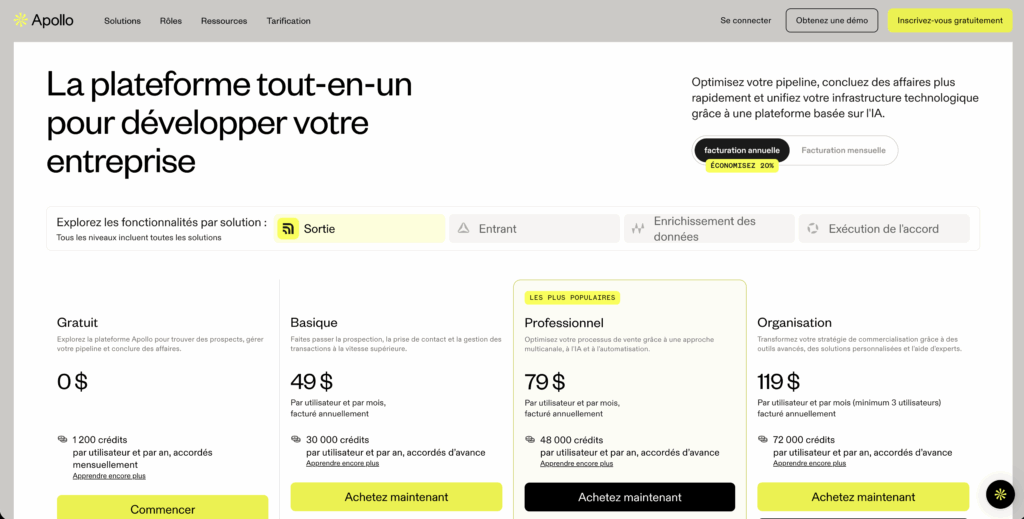
Apollo offers several subscription levels, suitable for startups and large sales teams alike:
- Free: limited but useful for testing the database.
- Basic: starting at $49/month/user, with access to sequences and basic filters.
- Professional: approximately $79/month/user, with lead scoring, advanced enrichment, and full automation.
- Organization: approximately $119/month/user, with international dialer, advanced reporting, and premium features.
The free and basic plans are limited in terms of enrichment volume, but the feature/price ratio remains excellent for a tool in this category.
Apollo customer reviews / pros and cons
Apollo.io receives an average rating of 4.6/5 on major review platforms. Those seeking an all-in-one data and outreach platform particularly appreciate the tool.
However, some reviews mention limitations compared to simpler tools such as GMass or Mailmeteor.
| Advantages ✅ | Disadvantages ❌ |
|---|---|
| Rich and up-to-date database. | Some duplicate/outdated data. |
| Effective email automation. | Support can be slow at times. |
| Seamless CRM integrations. | Longer learning curve. |
| Intuitive interface. | Limits on calls/SMS in low-cost plans. |
| Excellent value for money. | Only available in English. |
In short, Apollo is a premium alternative to GMass, ideal for combining sourcing, enrichment, and outbound in a single powerful tool.
Want to learn more about this tool? Check out our Apollo alternatives comparison article. 🎁
How to choose from all the Gmass alternatives?
Choosing an alternative to GMass depends on your sending volume, deliverability needs, CRM stack, team organization, and outbound maturity.
Opting for a simple emailing tool is not the goal, but rather a solution that truly aligns with your strategy.
To achieve this, here is a 5-step method:
- Audit GMass: volumes, opens, replies, bounces, issues.
- Choose 1–2 tools based on your priorities (volume, multichannel, CRM, data, etc.).
- Clean up and segment your lists (ICP, email verification).
- Test 2–3 sequences (short, long, and multi-channel if possible).
- Compare KPIs: open rate, reply rate, bounce, spam, and deliverability.
In addition to the table at the beginning of the article, we continue to simplify the choice of the right tool for your situation and needs. Here are our recommendations. 👇🏼
1. Send volume & Gmail limits
GMass is limited by Gmail (500 to 1,500 emails/day), without multi-domain or inbox rotation.
- For large volumes, choose Smartlead, SalesHandy, Woodpecker, or Reply.io.
- For light use, Mailmeteor (or GMass itself) is sufficient.
2. Warm-up & deliverability
Essential for cold emails: warm-up, rotation, anti-spam, verification, and reputation.
- The best: Smartlead, SalesHandy, and Woodpecker.
- The most limited: GMass, Mailmeteor.
3. CRM integrations
If you use a CRM, check for native syncs and automated integration.
- Top integrations: Waalaxy, Reply.io, Apollo.io, and SalesHandy.
- Basic: Mailmeteor, GMass.
4. Automation & sequences
- For advanced sequences: Waalaxy, Reply.io, Smartlead, and Apollo.io.
- For simple sequences: SalesHandy, Woodpecker.
- Occasional use: Mailmeteor.
5. Multichannel (LinkedIn + email)
To increase the response rate:
- Multichannel: Waalaxy, Reply.io, LaGrowthMachine.
- Email-only: Smartlead, SalesHandy, Woodpecker.
6. Budget & hidden costs
The price depends on the warm-up, the number of domains, and scalability.
- Excellent value for money: Waalaxy, SalesHandy, and Smartlead.
- Premium: Apollo.io, LaGrowthMachine.
- Low-cost: Mailmeteor.
The right choice depends less on the tool… and more on your strategy. Analyze your volume, channels, and stack to choose the GMass alternative that will truly enable you to scale your outbound communications.

Conclusion: Why are GMass users looking for better alternatives?
GMass remains an effective solution for sending emails from Gmail… But as soon as you want to scale up or structure a real outreach strategy, the tool quickly shows its limitations.
That’s why many are turning to more comprehensive tools that offer greater reliability, more features, and better results.
As with any outreach tool, the actual effect will depend on your volume, your sending practices, and the quality of your contact database.
👉 If this is the case for you, we particularly recommend Waalaxy, which combines:
- High-performance enrichment from LinkedIn,
- Simple and powerful multi-channel sequencer (LinkedIn + email),
- Optimized deliverability thanks to native Gmail sending,
- Intuitive interface and excellent support,
- In a tool that is 100% GDPR compliant.
Looking for an alternative that can really scale up your prospecting? Waalaxy is the most comprehensive and effective option available to try right now.
Frequently Asked Questions (FAQ)
🏁 To conclude, here are the answers to the most frequently asked questions about Gmass. 👇🏼
Is Gmass reliable/GDPR compliant?
GMass is a reliable tool for sending emails via Gmail, but it is not specifically designed to meet European GDPR requirements (unlike European tools such as Waalaxy or Dropcontact).
This does not mean that it is illegal, but that it does not offer native GDPR guarantees and that it is up to the user to ensure compliance: legitimate contact database, unsubscribe option, justification of legitimate interest, deletion upon request, etc.
This specificity can pose a problem for European companies.
When to stick with GMass and when to switch?
Staying with GMass is relevant if:
- You send few emails (less than 200/day).
- Your campaigns are simple and occasional.
- You work exclusively from Gmail.
- You don’t need warm-up, multichannel, or advanced automation.
Switching to another tool becomes essential if:
- You want to increase volumes and exceed Gmail limits.
- You need better deliverability.
- You work in a team (SDR/BDR/marketing).
- You want multichannel sequences (LinkedIn + email).
- You use a CRM and want true synchronization.
- You need a warm-up, domain rotation, or a more mature outbound strategy.
In short: GMass = simple usage. Alternatives = ramping up.
How to migrate from GMass to Waalaxy?
The migration is simple and takes place in 5 steps:
- Export your GMass contacts from Google Sheets or Gmail (CSV format).
- Import your lists into Waalaxy, which automatically fills in any missing information (professional emails, LinkedIn data, etc.).
- Recreate your sequences in a multi-channel version (emails + LinkedIn) using Waalaxy templates.
- Configure your Gmail sending settings (native and secure) and check your DNS settings.
- Launch a test campaign on a small segment to validate deliverability.
KPIs to monitor after migration: open rate (should increase by 10-30%), response rate, bounce rate (should decrease), actual volume sent, number of routing domains used, and sender reputation.
Data retention: Your contacts are not deleted by GMass. You can freely export them and import them into Waalaxy without losing any information.
Now you know all about the different GMass alternatives (and why Waalaxy is the best). We’ll let you judge for yourself—it’s up to you! 🕹️
 Lisa
15/01/2026
Lisa
15/01/2026 













