



- LinkedIn Scraping: Definition and Best Practices
- What Is Web Scraping LinkedIn?
- Why Scrape LinkedIn Data?
- How to Set Up LinkedIn Scraping?
- LinkedIn Scraping API: What You Can and Can’t Do
- How to Do LinkedIn Scraping with a Dedicated Tool?
- How to scrape emails on LinkedIn ?
- 8 LinkedIn scraping tools to consider
- What should you do with your scraped LinkedIn profiles?
- Examples of ready-to-use messages for LinkedIn scraping
- 8 best practices for scraping LinkedIn data safely
- What are the legal restrictions on LinkedIn scraping?
- Recap: LinkedIn scraping in a nutshell
- FAQ: Scraping LinkedIn Data
You’ve probably heard about LinkedIn scraping everywhere. But how can you extract data from LinkedIn without being a developer? 🤔
This guide shows you exactly how it works. We’ll walk you through the best tools, explain how to extract information from profiles, and show how automation tools like n8n or Waalaxy can help streamline the process.
You’ll also learn about the limits of scraping, how to stay compliant with LinkedIn’s rules, and how to avoid common mistakes when collecting data.
In short, you’ll discover how to extract information from profiles and search results, automate data collection, and turn that information into actionable prospecting insights. 📊
No coding required. 🚀 Learning how to do this properly will help you turn profiles into real business opportunities.
LinkedIn Scraping: Definition and Best Practices
LinkedIn scraping refers to the automated collection of publicly available information from the platform. The goal is to gather data such as profiles, company pages, or search results to build lists and support workflows like prospecting, recruitment, or market monitoring. Many companies use these methods to create structured and actionable prospect lists, especially for sales and recruitment teams.
The objective isn’t to collect data at scale, but to do it responsibly and at a human pace for legitimate use cases.
✅ Focus on data quality rather than volume.
Use proper segmentation, deduplication, enrichment, and verification to ensure your data remains accurate and useful.
⚠️ Avoid sudden activity spikes or aggressive automation. Non-compliant usage is the fastest way to trigger LinkedIn’s detection systems and put your account at risk. To do this effectively, you need a clear method and the right tools from the start.
Today, more than 150,000 users rely on Waalaxy to automate prospecting and collect data efficiently on LinkedIn.
Our community gives us an average rating of 4.8/5 ⭐ Ready to try it and share your feedback?

What Is Web Scraping LinkedIn?
Web scraping LinkedIn refers to the process of automatically collecting publicly available information from the platform using a script, a LinkedIn scraper, or specialized tools designed to scrape LinkedIn data. 🤖 In practice, these tools automate data extraction to save time and improve efficiency.
This technique allows teams to scrape LinkedIn data such as LinkedIn profiles, company pages, job listings, or search results, and then reuse that information for prospecting, recruitment, analytics, or market research.
Most LinkedIn scraping tools work by extracting structured information from pages and turning it into usable datasets. This process is commonly known as LinkedIn data extraction.
Important: According to the LinkedIn User Agreement, automated data collection from the platform is restricted. In practice, however, many companies still perform web scraping LinkedIn using publicly available data while respecting privacy rules such as GDPR and maintaining human-like usage patterns.
The goal of this guide is to show you how to scrape LinkedIn data responsibly, using the right tools and the right cadence for legitimate business use cases.
Why Scrape LinkedIn Data?
Scraping LinkedIn data allows you to retrieve valuable information from the web. 🌐 For example, you can build targeted prospecting lists, analyze competitors, or monitor activity in a specific market. Teams scrape LinkedIn data to build accurate and up-to-date prospect databases.
What Can You Do with Scraped LinkedIn Data?
With LinkedIn scraping, companies can extract useful information from LinkedIn profiles, such as name, company, job title, location, or industry. Businesses scrape LinkedIn data to identify new prospects, analyze markets, and improve targeting.
This makes it easier to identify potential customers, partners, or qualified candidates for recruitment. 🔍
Because LinkedIn is the largest professional network in the world, web scraping LinkedIn can help you access up-to-date professional data and structure it for your sales or marketing workflows.
Key Use Cases of LinkedIn Scraping
Extracting LinkedIn data also helps teams analyze industry trends, conduct accurate market research 🕵️, and improve the personalization of marketing campaigns. ✨
Better data means better targeting, which ultimately leads to more effective outreach.
In short, the platform concentrates a unique professional database. When used correctly, LinkedIn scraping helps you to:
- Build lists of accounts and contacts from targeted searches
- Prioritize markets and identify technologies used by prospect, qualify your KPI
- Prepare multi-channel campaigns (connection request, message, verified email)
- Track job changes or weak signals among key accounts
- Align marketing and sales with structured and up-to-date B2B data
Keep in mind the golden rule: quality over quantity. A clean, de-duplicated list tailored to your value proposition will always convert better than a large, heterogeneous dataset. ✨ Prioritizing quality is what drives performance.
💯 Be careful, however, to respect LinkedIn’s rules and terms of service.

How to Set Up LinkedIn Scraping?
Start by defining your objective and identifying the LinkedIn profiles or companies you want to target. 🎯
Most teams use LinkedIn scraping tools to automate the process of collecting and structuring data. A reliable solution like Waalaxy or Sales Navigator can help you run targeted searches, scrape LinkedIn profiles, and segment the results into qualified prospect lists.
Using the best LinkedIn scraper tools allows you to automate data collection while keeping a human pace and focusing on relevant profiles. 📍
Once your targeting is defined, the next step is to extract LinkedIn data from search results or profile pages and organize it for outreach, recruitment, or market research workflows.
To scrape LinkedIn data efficiently, combine targeting, extraction, and automation into a single workflow.
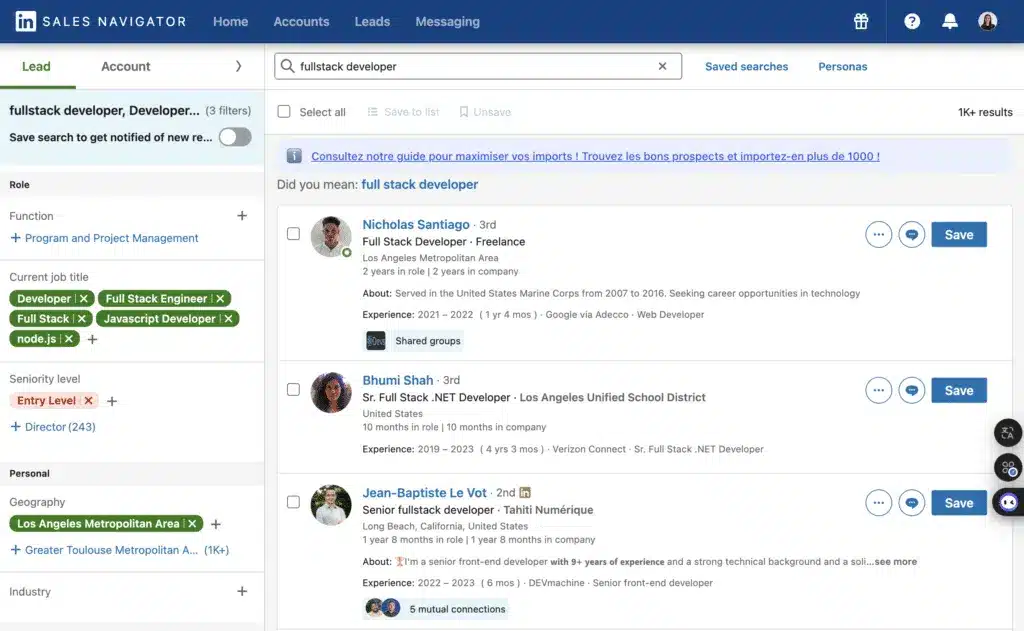
Not a developer and still want to scrape LinkedIn? 😏
No problem, I’ll show you how to scrape LinkedIn using Waalaxy, in just a few easy steps!
LinkedIn Scraping API: What You Can and Can’t Do
The official LinkedIn API is available only to approved partners and specific use cases. It does not allow large-scale access to LinkedIn profiles, and it doesn’t support scrape LinkedIn data workflows or automated LinkedIn scraping.
In other words, the API cannot be used as a LinkedIn scraper to extract large volumes of profile data.
In practice, most teams rely on LinkedIn scraping tools or workflow automation tools to collect publicly available information and structure it for prospecting.
A common workflow looks like this:
- Run targeted searches to scrape LinkedIn profiles
- Extract relevant information from search results
- Enrich and clean the dataset
- Import the contacts into Waalaxy to activate outreach sequences (LinkedIn messages or verified email)
This approach allows you to extract LinkedIn data in a structured way, while focusing on relevance and maintaining a compliant usage cadence on the platform. Since the API is limited, most teams rely on dedicated tools to scrape LinkedIn data instead.
👉 The goal is not massive web scraping LinkedIn, but rather collecting useful LinkedIn data to power your sales workflows.
How to Do LinkedIn Scraping with a Dedicated Tool?
Let’s say you want to extract data from LinkedIn using your professional network contacts.
👉 It’s very simple:
Go to LinkedIn and click “Import from a search” using the Waalaxy Chrome extension to start your workflow and extract LinkedIn data efficiently.
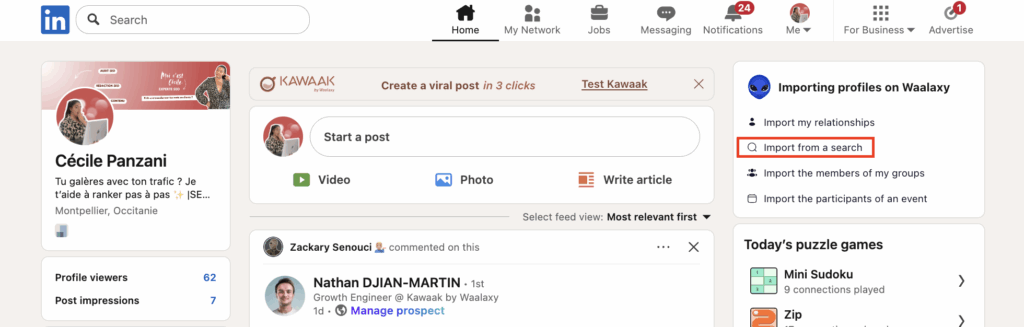
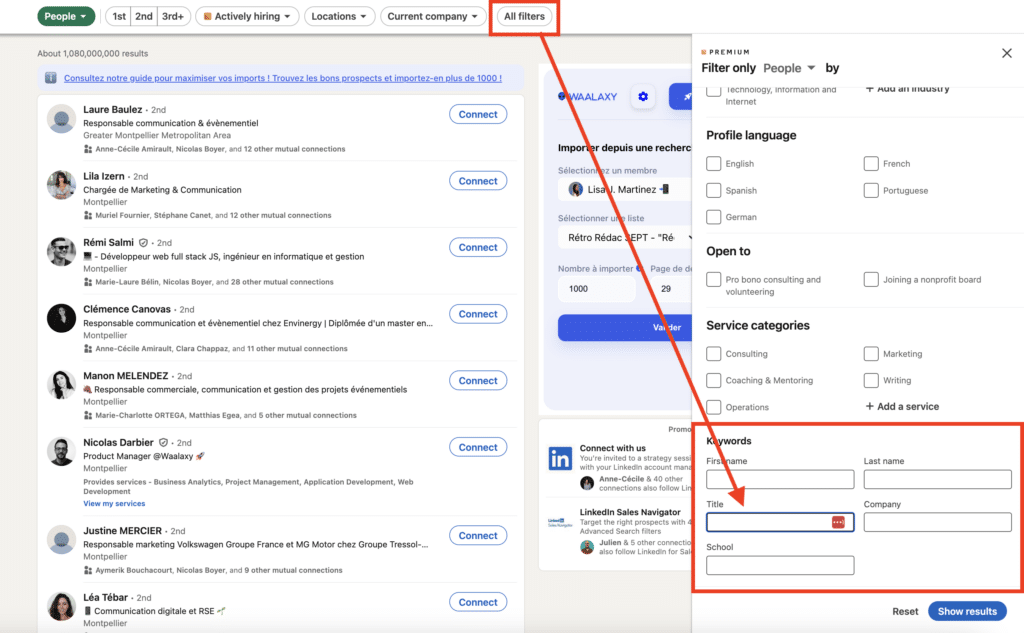
- Sort results by “People”, then go to “All filters” to add your keywords (job title…). 💫
- Create a campaign by clicking on “Select a list” then select the number of user profiles you want to scrape.
- Finally, click on “Validate”.
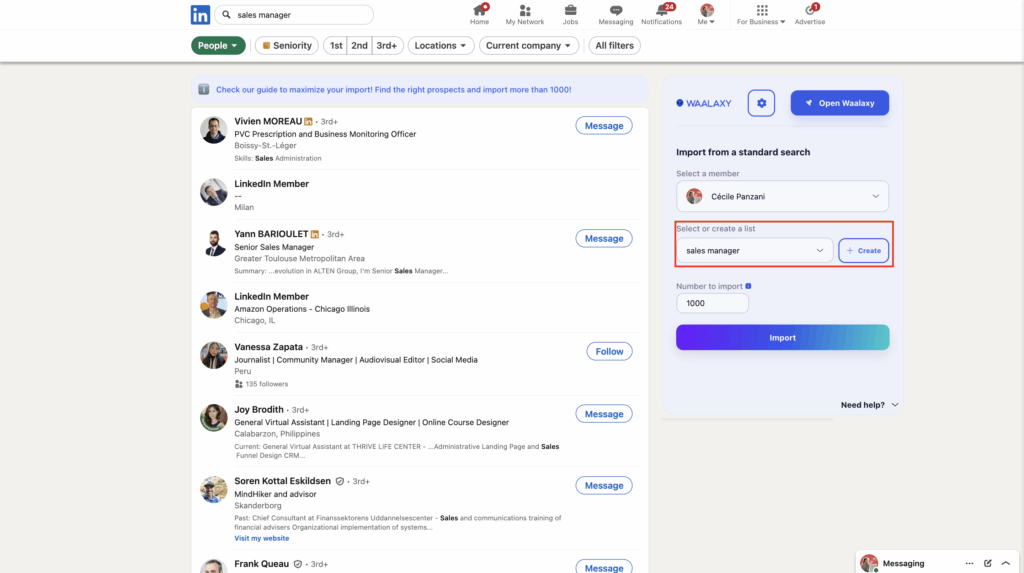
The profiles will be exported to Waalaxy. 👽 Once the export is complete, all you have to do is download your contact info in CSV format from Waalaxy.
Once on the Waalaxy CRM: 👇
- Click on “Prospect list”,
- Then select the previously created campaign. There you’ll find the profiles you’ve just exported.
- To obtain the file containing all the information, select all the profiles, then click on “Export”, check your message and validate.
You’ll get a CSV file containing first name, last name, email address, company, job title, LinkedIn Premium status, region, profile link, and phone number when you scrape LinkedIn data.
When importing leads, Waalaxy scans each lead and can detect leads already present in the tool, whether in one of your lists or in the list of one of your Team members. 🕵️♂️
It is therefore unlikely that a lead will appear twice in the tool, in the list or in a campaign. 😍
If you’d like to know more about our anti-duplication controls, then this article is for you. 💖
Here’s a simple and secure way to export all your data! 😜
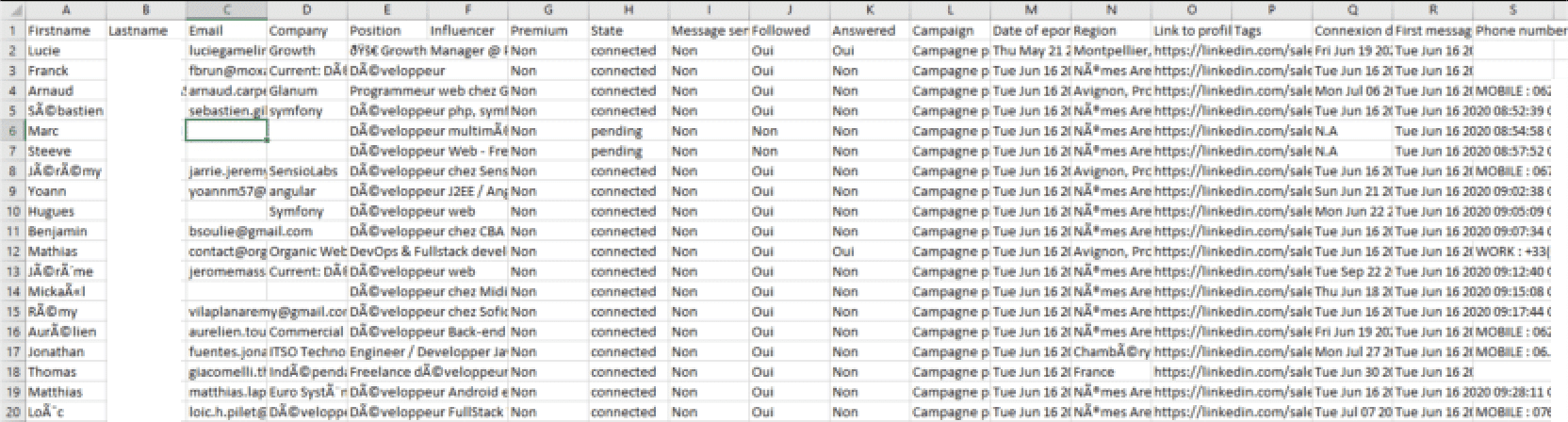
This way, you’ll be able to scrape hundreds of pages of people’s searches on LinkedIn.
On the other hand, you won’t have your prospects’ emails if you’re not in touch with them. 📩 When you scrape LinkedIn data, you’ll often need an enrichment step to access contact details.
How to scrape emails on LinkedIn ?
You often ask us: how do you scrape profiles and emails from LinkedIn, without risking your deliverability or your account?
Here’s the recommended process. When you scrape LinkedIn data, email enrichment becomes a key step in activating your campaigns:
- Target precisely (KPI, persona, zone) and import your search results into Waalaxy.
- Cascade enrichment with an integrated LinkedIn email scraper (Email Finder) andbounce check before sending.
- Filter: keep only validated addresses, remove team duplicates.
- Sequence: start with LinkedIn (profile visit, connection, message), then switch the email to verified addresses only.
- Measure (responses, appointments, bounces) and iterate to continuously improve how you scrape LinkedIn data.
Remember: “scrape LinkedIn emails” doesn’t mean “send en masse”. The winning combo is: clean collection, verification and human cadence.
8 LinkedIn scraping tools to consider
Our #1 recommendation among the best LinkedIn scrapers remains Waalaxy, which combines light LinkedIn scraping, data enrichment, de-duplication, and multi-channel activation in a single workflow.
It also works as a LinkedIn email scraper, helping you extract and verify contact data while organizing your prospecting campaigns.
Depending on your specific needs, you can also explore the following LinkedIn web scraping tools to scrape LinkedIn data at scale.
1. Waalaxy: the best LinkedIn scraper for scraping LinkedIn data
Waalaxy is designed to help you scrape LinkedIn data efficiently while managing your prospecting workflows from a single platform.
- Ideal for: importing results from a LinkedIn search, scraping LinkedIn profiles, deduplicating contacts, cascading enrichment, launching connection and message sequences, and tracking responses from a single interface.
- Highlights 💌: simple Chrome extension, configurable quotas to keep a human cadence, team anti-duplication, cascading LinkedIn email scraper (Email Finder), LinkedIn and email sequences, plus synchronization via webhooks or CSV exports.
- Please note: professional email addresses are not always available if you are not connected to the person. Use email enrichment and verification before sending messages to protect your deliverability when you scrape LinkedIn data.
2. PhantomBuster: targeted automation for LinkedIn scraping
- Ideal for: chaining “Phantoms” (small automations) on LinkedIn searches, retrieving profile lists, and pushing them into a spreadsheet or CRM to scrape LinkedIn data efficiently.
- Strengths: large catalog of automations, scheduling features, and Zapier integration. for connecting with other tools in your stack.
- Good to know: requires careful configuration of limits and execution timing. It’s a strong complement if you want flexible workflows with one of the most popular LinkedIn scraping tools to scrape LinkedIn data efficiently.
3. Evaboot: clean Sales Navigator profile scraper
- Ideal for: cleaning and exporting LinkedIn Sales Navigator results when scraping LinkedIn profiles, with improved field accuracy and noise filtering.
- Highlights: strong focus on list quality, making it especially useful for Sales Ops teams and SDRs working on LinkedIn data extraction.
- Worth knowing: mainly designed for exporting data. Activation and outreach workflows usually happen later in your stack to scrape LinkedIn data efficiently.
4. TexAu: automation workflows for LinkedIn scraping
- Ideal for: growth teams and agencies looking to scrape LinkedIn profiles, extract data from searches, and automate prospecting workflows without coding.
- Strengths: large library of automation recipes, cloud execution, integrations with CRMs and spreadsheets, and flexible workflows for scraping LinkedIn data or enriching lead lists.
- Good to know: TexAu offers powerful automation capabilities, but requires careful setup and reasonable usage limits to stay compliant with LinkedIn’s policies.
5. Apify: ready-to-use “Actors” (robots) platform
- Ideal for: orchestrating large-scale data workflows, APIs, storage, and scheduling when you need higher scraping volumes.
- Apify provides ready-to-use automation programs called Actors that collect and process data from different platforms, including LinkedIn. Its marketplace offers many prebuilt scripts that can be integrated into broader workflows to scrape LinkedIn data at scale.
Test on 100 profiles. Compare the rate of verified e-mail matches, the rate of connection acceptance and responses to the first message. The best stack is the one that performs at home, not on the product sheet. 📈
6. Bright Data: LinkedIn job scraping and web data platform
- Ideal for: enterprises and data teams needing large volumes of LinkedIn job data, market insights, or recruitment analytics.
- Bright Data offers a LinkedIn job scraping solution designed for large-scale data collection. It relies on a vast proxy network and customizable workflows to extract structured job listings and recruitment insights.
- Strengths: large proxy infrastructure, LinkedIn job scraper, scalable data collection.
- Good to know: powerful but complex, mainly suited for advanced teams with strict compliance requirements.
7. Captain Data: LinkedIn scraper and no-code automation
- Ideal for: sales, recruitment, and growth teams wanting to scrape LinkedIn profiles, enrich lead databases, and automate workflows without coding.
- Captain Data provides no-code automation to extract LinkedIn data, enrich contacts with emails, and send leads to CRM or sales tools.
- Strengths: ready-to-use automations, strong integrations, data enrichment.
- Good to know: designed for intermediate users; complex workflows may require some learning, and costs can increase with higher volumes.
8. Octoparse: multi-site no-code scraper
- Ideal for: multi-source data collection projects where you scrape LinkedIn data as part of a broader data or market intelligence workflow.
- Octoparse provides a visual no-code interface that allows teams to extract data from multiple websites without programming.
- Strengths: intuitive visual extraction engine, multi-site scraping capabilities. ⚙️
- Good to know: always configure very cautious scraping rates and isolate data flows to avoid detection or blocking. 🛡️
What’s the best LinkedIn scraping tool?
To link extraction, enrichment, de-duplication and multi-channel activation, we recommend Waalaxy.
For very specific prospecting needs, PhantomBuster, Evaboot, Octoparse or Apify …can complete the picture, depending on your technical constraints.
| Tool | Best for | Key strengths |
|---|---|---|
| Waalaxy | Easy LinkedIn scraping and outreach in one workflow | Chrome extension, email enrichment, deduplication, multichannel sequences |
| PhantomBuster | Custom LinkedIn scraping automations | Large automation library, scheduling, Zapier integrations |
| Evaboot | Clean Sales Navigator exports | Accurate data fields, list cleaning, export optimization |
| TexAu | Automation workflows for LinkedIn scraping | Automation recipes, cloud execution, CRM integrations |
| Apify | Large-scale data workflows and scraping infrastructure | Actor marketplace, API integrations, scalable cloud execution |
| Bright Data | Enterprise LinkedIn job data collection | Massive proxy network, job scraper, compliance-ready infrastructure |
| Captain Data | No-code LinkedIn scraping and lead enrichment | Workflow automation, CRM integrations, contact enrichment |
| Octoparse | Multi-site no-code scraping projects | Visual builder, multi-source extraction, easy setup |
What should you do with your scraped LinkedIn profiles?
You didn’t just collect rows in a spreadsheet. You can now turn those profiles into conversations, then into meetings. 🤝 Import them into Waalaxy, enrich the data, remove duplicates, and launch outreach sequences. ✉️
From connection request to reply, everything happens in one place. 💥
Organize before you start web scraping LinkedIn
- Create dedicated lists by persona or intent.
- Clean up and de-duplicate to eliminate duplicates.
- Add clear tags: “Founder”, “HR”, “Hot prospect”, “To be relaunched”.
- Filter by position, sector, company size, language.
Choose the right sequence according to your objective 🎯
🎯 For each scraping objective on LinkedIn, choose a dedicated Waalaxy sequence and adjust its pace, messages, and conditions (connection accepted, response received) to scrape LinkedIn data and improve your acceptance and response rates.
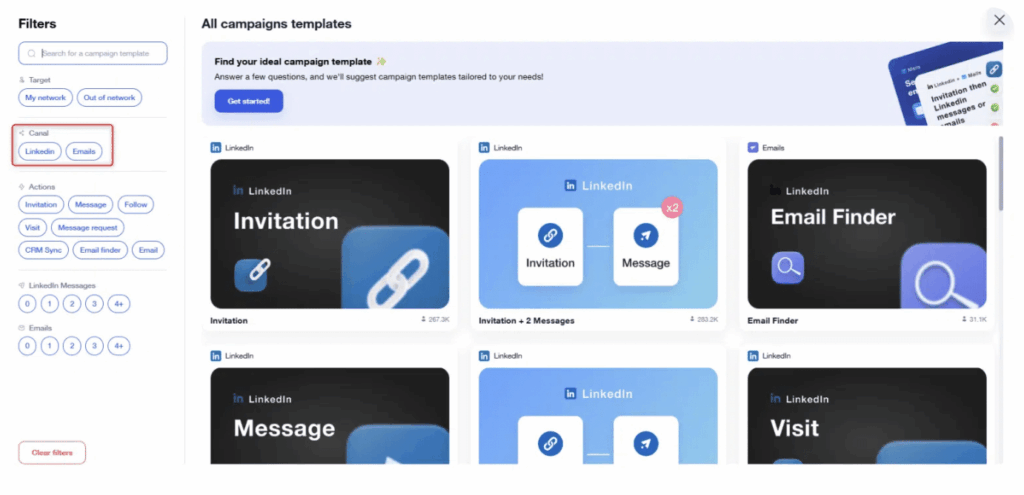
Use case 1: First contact “” on cold audience
- Profile visit.
- Invitation without note.
- Two day wait.
- Brief, useful message that provides a resource.
- Four-day wait.
- Contextual follow-up.
Waalaxy settings: stop on response, smart limits, random delays.
Use case 2: rebound on recent interest (lukewarm lead)
- Invitation with short personalized note.
- One-day wait.
- Value message linked to the interest identified: study, article, feedback.
- Three-day wait.
- Closed question for easy response.
Use case 3: quick appointment setting on highly targeted ICP
- One-sentence personalized invitation.
- One-day wait.
- Message “problem, solution, proof, call to action” with two suggested time slots.
- Three-day wait.
- Concise follow-up offering an alternative (short call, message exchange).
Use case 4: recruitment
- Invitation.
- Very short discovery message: mission, impact, range, next step.
- Follow-up with a concrete project example.
Waalaxy functions to activate to convert
These features are designed to help you enrich LinkedIn data efficiently and turn it into high-performing prospecting campaigns.
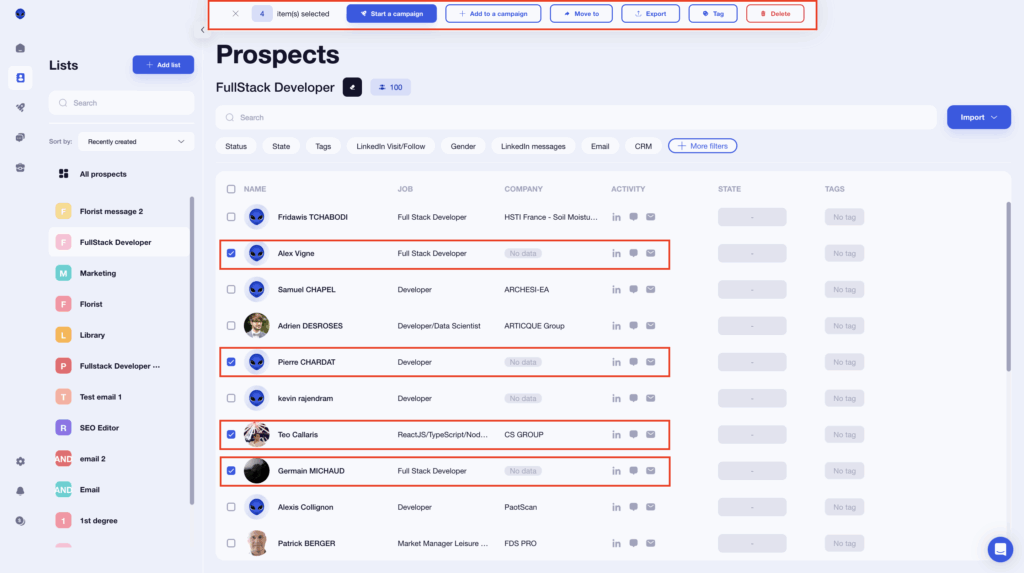
- Dynamic variables: {firstName}, {company}, {job Title}.
- Conditions: advance only if connection is accepted, automatic pause as soon as there’s a response.
- Automatic tags according to the stage reached, to segment follow-up calls.
- Intelligent limits and random delays to keep volumes within safe limits.
- Centralized Inbox for quick response and exchange history.
Examples of ready-to-use messages for LinkedIn scraping
Here are some examples (you can also opt for automated scripts)
Opening message (after acceptance)
“Hello {firstName}, I’ve seen your recent topics on {breadpoint}.
Ihave concrete feedback from {similar company}.
If this is an issue of the moment, I’ll share a clear summary. Interested?“
Short follow-up
“Hello again {firstName}, here’s the promised summary, read in five minutes.
Would you prefer me to emphasize {benefit A} or {benefit B}?“
Booking direct
“If helpful, let’s set aside fifteen minutes this week. Would Tuesday late morning or Thursday early afternoon suit you?“
8 best practices for scraping LinkedIn data safely
LinkedIn scraping must be approached carefully to avoid platform limits or account restrictions. 🤫
Here are some best practices for efficient and secure data collection:
- Segment precisely: use LinkedIn and Sales Navigator’s native filters (location, company size, job function, level) to target the right prospects. Less but better 📍
- Stay at a human pace: LinkedIn imposes limits and may suspend accounts that are too active. Plan short, regular sessions to keep a low profile.
- Work in short sessions: prioritize a few minutes, several times a week, rather than a single big spike.
- Automate intelligently : use a reliable tool like Waalaxy and set up daily quotas with random delays to mimic human browsing. 👽
- Systematically de-duplicate: eliminate duplicates between lists, campaigns and team members to keep a clean pipeline.
- Check messages before sending: protect your deliverability with a systematic check before any campaign.
- Document your legal basis: work with public and compliant data, and respect data and pro network rules (information, minimization, right to object, unsubscribe link).
- Measure and decide: track send messages, connection acceptances race, responses to first messages and appointments. Adjust what doesn’t convert.
Discover also our tips on how to do a good search on LinkedIn! ⚡
What are the legal restrictions on LinkedIn scraping?
It’s normal to wonder whether scraping LinkedIn is legal. 🧐
The GDPR
First, you must consider the GDPR. These regulations aim to protect personal data, and some LinkedIn scraping practices may conflict with them.
When you scrape LinkedIn data, several factors matter. The information collected must be publicly accessible.
The unsubscribe link
According to LinkedIn’s Terms of Service, data obtained through LinkedIn web scraping for commercial purposes is not officially allowed. 😬
Consent is also important. If you plan to contact someone by email after you scrape LinkedIn profiles, you should have their consent, unless they are already a customer. 📩
In addition, people must be able to object to marketing messages through an unsubscribe link.
Under GDPR, personal data used for prospecting can generally be stored for up to three years after collection or the last contact. 📅
Even though LinkedIn discourages scraping on LinkedIn, many companies ou outbound sales teams or Revops still scrape those data using specialized tools while trying to remain compliant. 🤫
You can get banned from LinkedIn for using data collection techniques.
Recap: LinkedIn scraping in a nutshell
LinkedIn Scraping is a powerful way to extract data from a LinkedIn profile to lead generation, recruitment, and business development. 🦾
When used correctly, scraping data on LinkedIn helps teams identify prospects, enrich contact information, and structure outreach campaigns.
However, it must be done carefully. Companies should always respect the terms of use and applicable regulations to avoid restrictions or account issues. ✂️
A strong prospecting workflow usually starts with a precise search on LinkedIn Sales Navigator, which determines the quality of the leads you will extract. 🔍
Then comes the data extraction phase, often handled by specialized scraping tools.
🚀 Tools like Waalaxy simplify scraping on LinkedIn by combining data extraction, enrichment, and outreach automation while helping reduce the risk of account bans.
Because of its simplicity and price/performance ratio, many teams consider Waalaxy one of the most practical tools available today. 👽
FAQ: Scraping LinkedIn Data
Is LinkedIn scraping allowed?
Automated data collection, including scraping on LinkedIn, is not authorized by the platform.
However, in some countries, using public information may be possible if there is a valid legal basis. In Europe, companies must comply with the RGPD: data minimization, transparency, retention limits, and the right to object.
LinkedIn may restrict or suspend accounts when abnormal scraping activity is detected. For this reason, it is recommended to work at a human pace and focus on legitimate prospecting use cases. 🤐
Can I be banned for LinkedIn scraping?
Yes, it is possible to be banned from LinkedIn if scraping activity violates the platform’s rules.
LinkedIn prohibits extracting profile data through automated scraping tools. Excessive automation or abnormal activity can trigger account restrictions or bans.
When using a LinkedIn profile scraper, it is therefore essential to respect platform limits and maintain natural activity patterns. 👍
How can I do web data scraping on LinkedIn for free?
You can start to scrape LinkedIn data for free by downloading Waalaxy and launching your first search.
First, perform a search on LinkedIn to identify your target prospects. Then use Waalaxy to import them into a dedicated list for prospecting campaigns.
The free version allows up to 80 invitations per month, which is enough to begin collecting and organizing business contacts. 📅
 Toinon
30/03/2026
Toinon
30/03/2026 













