



- What is automated LinkedIn messaging ?
- Why Use Automated LinkedIn Messaging?
- Can You Send Automate LinkedIn Messages Natively ?
- How Automated LinkedIn Messaging Works ?
- Which Automation Tools to Use for Automated LinkedIn Messaging ?
- Best Practices for Automated LinkedIn Messaging
- How to Send an Automatic LinkedIn Message with Waalaxy ?
- Manage Replies to Your Automated LinkedIn Messages
- 5 Examples of Automated LinkedIn Messages
- Track and Measure Your Automated LinkedIn Messaging Results
- Let’s do a recap about Automated LinkedIn Messages
- FAQ : Automated LinkedIn Messaging
On LinkedIn, messaging is pretty much a must if you want to grow your network or create opportunities. The challenge? The more people you reach out to, the harder it is to stay personal without spending hours on each message. ⏳
Automated LinkedIn messaging saves time while keeping your outreach natural and human. 👩🏻 When done right, it lets you reach more people without rewriting the same message over and over.
What is automated LinkedIn messaging ?
Automated LinkedIn messaging is the process of sending messages at scale while keeping a personal touch.
Instead of writing each message one by one, you prepare your messages in advance, target the right people, and let a tool send them for you with personalized elements. ✨
But automation doesn’t mean sounding robotic. 🤖

Why Use Automated LinkedIn Messaging?
Sending messages one by one quickly becomes a time drain, especially as your network grows. Automated LinkedIn messaging helps you:
- Save valuable time by handling repetitive tasks automatically. ⏳
- Boost productivity and reach more people, faster without rewriting the same messages all day. 🚀
- It helps you generate more B2B leads. The more qualified prospects you reach out to, the more opportunities you create to start real conversations. 🎯
- It can even improve your credibility. Well-timed, personalized messages make you look consistent, professional. 🤝
Can You Send Automate LinkedIn Messages Natively ?
LinkedIn’s messaging system already offers several useful features. You can message your connections, start conversations, and reach people in shared groups. 📩
If you want to go further, you can also use InMails to contact people outside your network through a Premium subscription. It’s useful but limited and paid.
The problem? LinkedIn doesn’t offer native automation. Everything is manual, which quickly becomes time-consuming as your outreach grows. ⏳
You’ll quickly run into limitations such as 👇🏻:
- Messaging mostly limited to your connections or shared groups.
- InMails that are limited and paid.
- No ability to send messages at scale.
- No option to schedule sequences.
- No automated follow-ups.
- Limited tools to organize and track conversations.
So while LinkedIn messaging works well, scaling your outreach becomes difficult without an external tool. 🌐

How Automated LinkedIn Messaging Works ?
Think of automated LinkedIn messaging as a sequence of actions that mimics a natural conversation with your prospects.
1) Start with a connection request and an initial message
The first step is sending a connection request, sometimes with a short note. Once it’s accepted, follow up with a message to start the conversation naturally. The goal isn’t to sell right away, but to open the discussion. 💬
2) Automate follow-ups to stay top of mind
Very few prospects reply to the first automated LinkedIn messaging touchpoint. It’s not always a lack of interest it’s often timing, priorities, or simple visibility. 👀
That’s where follow-ups make the difference. By automating them, you create multiple touchpoints without extra effort, boosting your chances of getting a reply. ⏳
In B2B LinkedIn outreach, more than 60% of replies happen after the second or third message. Skip follow-ups, and you miss most opportunities.
3) Combine LinkedIn and email for multichannel outreach
You can take it further by combining LinkedIn and email in the same sequence. For example, send a LinkedIn message first, then follow up by email a few days later.
Multichannel campaigns can increase response rates by more than 30 %.
Which Automation Tools to Use for Automated LinkedIn Messaging ?
There are several types of LinkedIn automation tools available, each designed for different needs. Some are great for getting started, while others are built to scale campaigns or manage multichannel outreach. Here are the three main categories.👀
Cloud-based tools
These LinkedIn message automation tool run entirely online. They operate in the background without relying on your computer, making them more reliable and better suited for scaling outreach. 📈
| Tool | Why ? |
|---|---|
| Waalaxy | LinkedIn tools for lead generation. Easy to use with strong features (LinkedIn + email), great for structuring campaigns quickly. |
| Expandi | A US market leader known for safety and advanced cloud automation. |
| Dripify | Very intuitive, ideal for sales teams that want to launch campaigns fast. |
| LaGrowthMachine | Built for multichannel outreach, combining LinkedIn, email… |
Chrome extensions
These tools are installed directly in your browser. They’re easy to use and quick to set up, making them a solid option for getting started, though more limited at scale. 🤓
| Tool | Why ? |
|---|---|
| Waalaxy | Easy to install and quick to use, a good starting point. |
| Dux-Soup | Very popular for beginners, but riskier at scale if misused. |
| Octopus CRM | Simple interface with basic automation features. |
Desktop tools
These tools are installed directly on your computer. They offer more control and advanced features but require more setup and your machine needs to stay on. 🙃
| Tool | Why ? |
|---|---|
| Linked Helper | A powerful tool with advanced features for experienced users. |
| SalesRobot | Focused on advanced automation and personalization workflows. |
Best Practices for Automated LinkedIn Messaging
To make automated LinkedIn messaging work, it all comes down to how you use it. Automation can backfire quickly if it’s poorly executed. The goal isn’t to send more messages, it’s to send better ones. 😇
Here are the key best practices to keep in mind:
- Don’t pitch too early : A sales message right away usually kills the conversation before it even starts. Focus on building a connection first. 🤝
- Avoid spammy messages : Generic copy-paste messages are spotted instantly and ignored. If it feels automated, it won’t work. 🚫
- Focus on real personalization : Mentioning something specific about the person, their content, or a shared context makes a huge difference. 🎯
- Keep your messages short : People don’t read long paragraphs. The clearer and simpler, the better. ⏳
- Optimize your profile : Before replying, most people will check your LinkedIn profile. If it’s not clear or credible, you lose the opportunity. 👀
- Define a clear persona : If you try to reach everyone, you reach no one. The more precise your targeting, the better your results. 🔎
How to Send an Automatic LinkedIn Message with Waalaxy ?
You don’t need a tool to start… but you need one to scale. With Waalaxy, you can automate your LinkedIn messages without losing the human touch. The goal isn’t to blast messages, but to build a smooth sequence that feels like a real conversation. 💬
1) Find and Target Profiles
If you’re reaching the wrong people, even the best message won’t work. On LinkedIn, you’re not lacking contacts. You’re lacking the right contacts. How do you find them? 😅
Start with LinkedIn search and basic filters, but to get real results, you need to go deeper. Use job titles in quotes, company size, industry, location, and seniority level to narrow your audience.
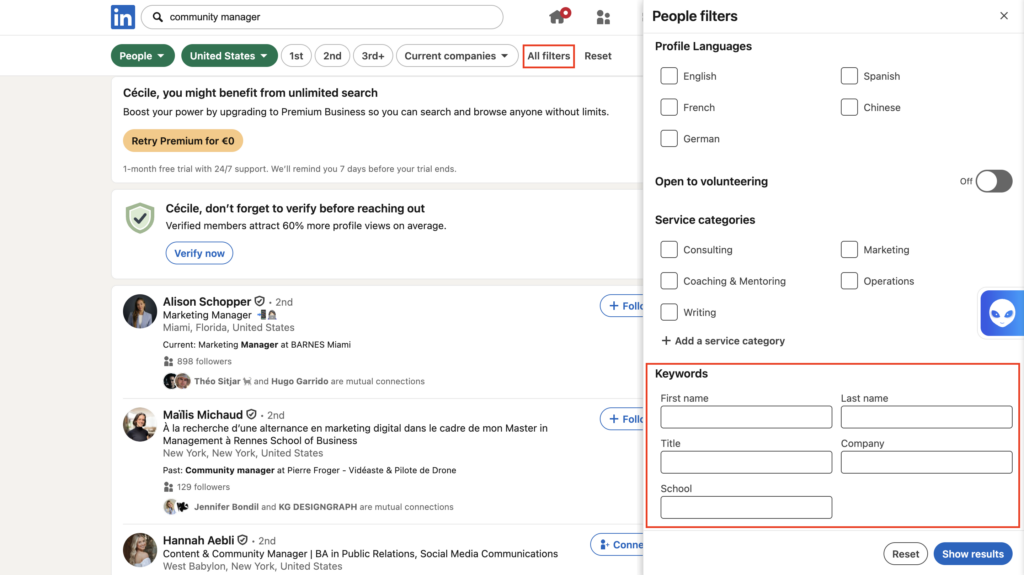
With LinkedIn Sales Navigator, you can refine even more with advanced filters like company growth, job changes, or activity signals.
Top-performing campaigns don’t target broad audiences, they focus on highly specific segments. For example, “Head of Marketing in SaaS companies with 10 to 50 employees” will always outperform a generic “marketers” list.
You can also use intent signals. People who liked your posts, viewed your profile, joined the same groups, or recently changed jobs are often more likely to reply. 👀
2) Import and Segment Prospects
Once you’ve found your profiles, the next step is to organize them properly. This is where a lot of campaigns succeed… or fail. You can have great targeting, but without segmentation, your messages will feel generic.
With Waalaxy, you can import prospects in several ways. Directly from LinkedIn searches, via CSV files, or from interactions like profile visits or engagement. 👀
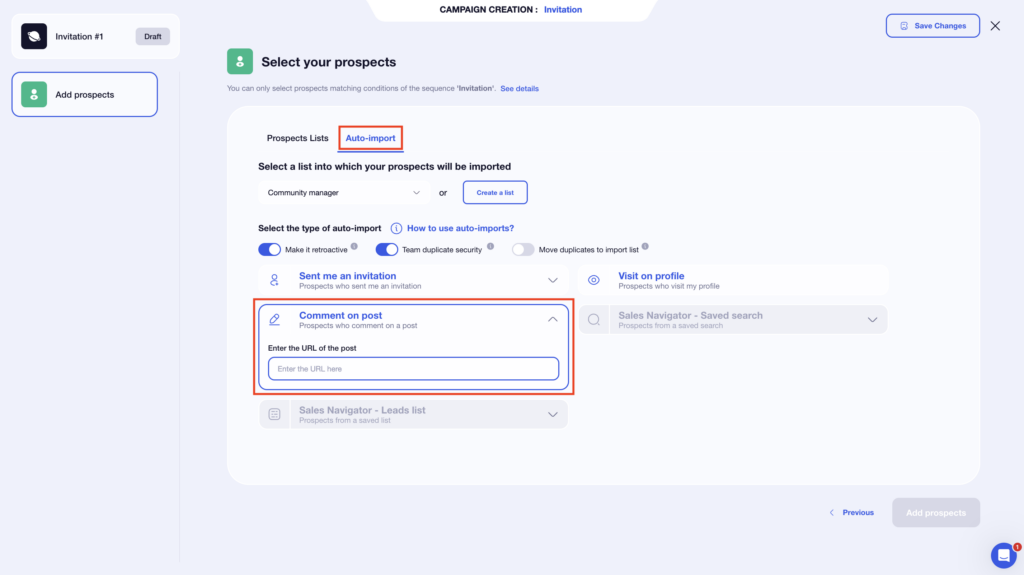
Then, you organize your lists to build structured and relevant campaigns.
You can also take it further by analyzing campaign results. Identify who’s interested, who replied, and who didn’t, then create new lists based on that data. This helps you continuously refine your targeting. 🔁
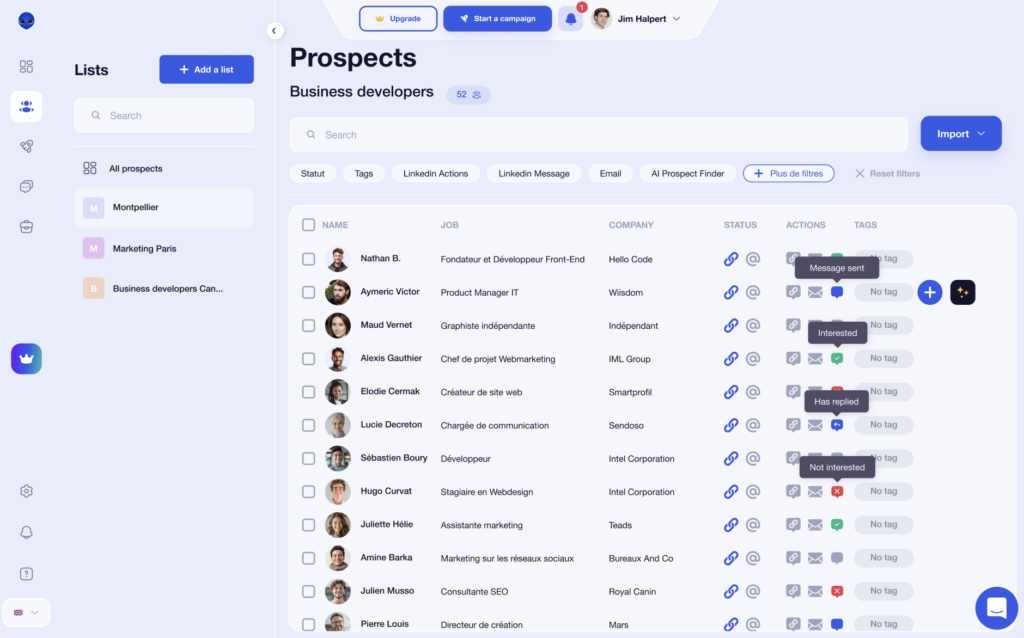
➡️ You can:
- Create lists based on personas or industries.
- Use tags to refine segmentation.
- Set up blacklists to avoid re-contacting certain prospects.
- Build new lists based on campaign results.
Good segmentation improves reply rates because your messages become more relevant and targeted. 🎯
3) Choose a Campaign Sequence
This is where you shape your approach. Basically, you decide how you reach out… and how you follow up without being pushy. A good automated LinkedIn messaging sequence isn’t just a chain of messages. It’s a flow that feels natural and easy to engage with. With Waalaxy, you have different options depending on your goal. 😉
You can send connection requests to grow your network. Adding a note is optional and not always effective. 🕺🏻
Based on 2,000 invitations, here’s what we typically see:
– Empty note: 38%.
– Non-personalized note: 36%.
– Personalized note: 33%.
– Full note (without link): 32%.
– Full note (with link): 26%.
You can follow up with messages to start conversations. Or go further with multichannel by combining LinkedIn and email to stay visible across touchpoints. 👀
Timing is the real lever. Too fast feels robotic, well spaced feels human.
4) Write and Personalize Your Automatic LinkedIn Message
If your message doesn’t grab attention, nothing else works. With Waalaxy, you can personalize messages at scale without writing each one manually. The goal isn’t just to save time, it’s to automate without sounding automated. 😌
You can use variables like first name, company name, or job title to customize each message at scale. You can also rely on Waami, Waalaxy’s AI assistant, to generate messages based on your target profile and your offer. It helps you save time while keeping your messaging relevant. 🤖
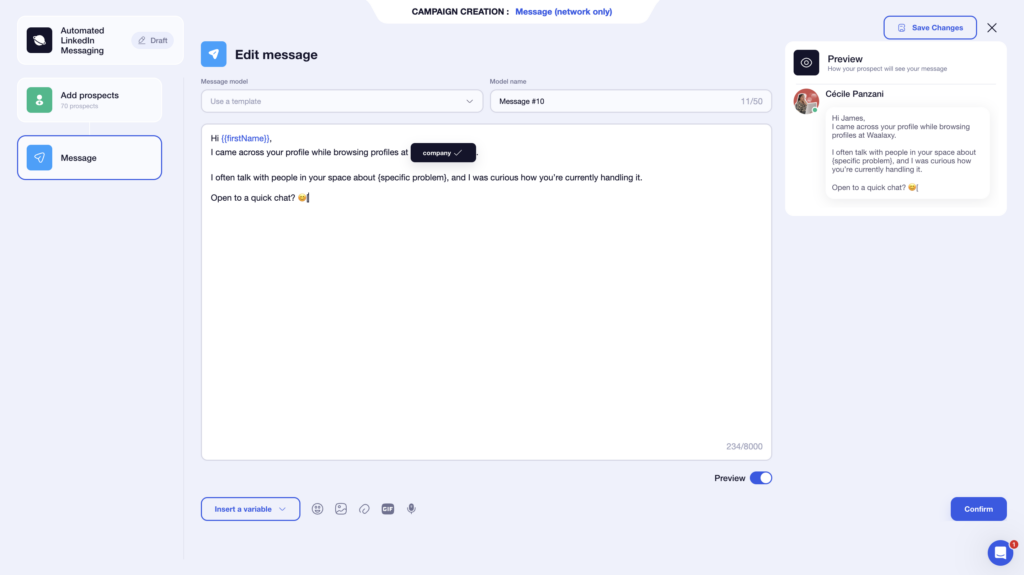
➡️ What you can include in your messages :
- Variables to personalize at scale.
- A simple CTA to encourage replies.
- Messages templates you can reuse and improve.
- Clear context to show your message isn’t random.
A good message doesn’t try to sell right away, it starts a conversation. An open question, shared context, or relevant observation will always outperform a direct pitch. 🤓
5) Launch the Campaign
Once everything is set up, it’s time to launch your campaign. But automation doesn’t mean doing whatever you want. To make it work long term, you need to respect LinkedIn’s guidelines and keep a natural behavior.
With Waalaxy, actions are designed to stay within platform limits. The tool simulates human behavior with built-in quotas and delays. 📆
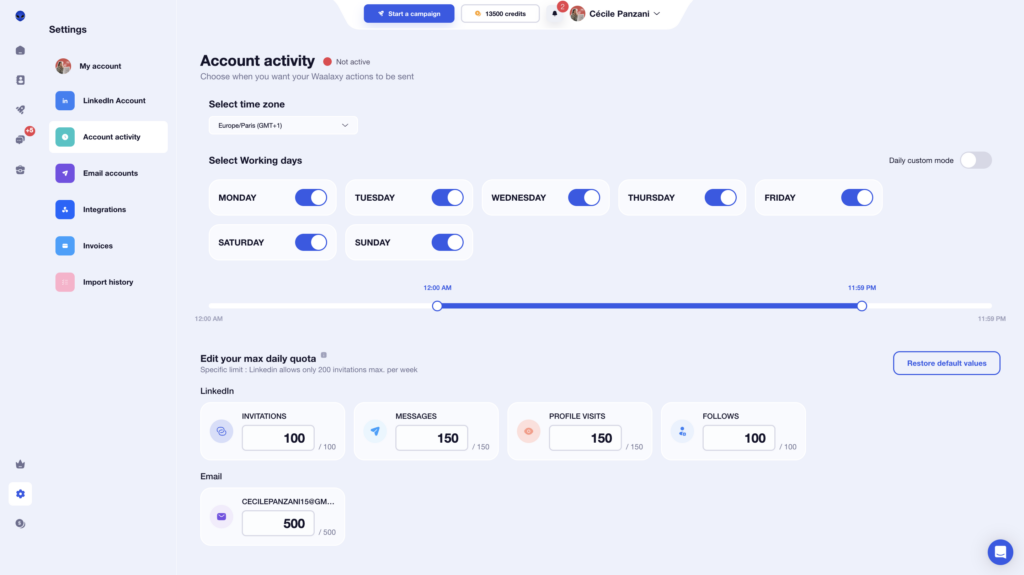
➡️ What you should respect :
- Don’t exceed weekly connection request limits.
- Space out your actions to avoid looking automated.
- Target qualified profiles to avoid being flagged as spam.
- Avoid overly salesy or repetitive messages.
Manage Replies to Your Automated LinkedIn Messages
Once your messages are sent, the real work begins. Managing replies gets messy fast if everything stays in your LinkedIn inbox. That’s where a tool like Waalaxy comes in. 💬
The goal isn’t just to reply faster, but to structure your conversations so you don’t miss any opportunities.
B2B sales studies show that responding within the first hour can increase your chances of conversion by up to 7x.
Here’s what you can do in practice 👇🏻:
- Organize : Keep all your conversations in one place to stay organized and avoid losing messages. 📥
- Automate : Set up automated replies or reminders so you never forget a follow-up. ⏳
- Customize : Personalize your responses using variables or notes to keep a human touch. 🎯
- Reply : Answer faster with saved replies and shortcuts. 💬
- Automate follow-ups : Schedule follow-ups to keep conversations going without extra effort .🤝
- Structure your conversations : Use tags to track prospects and move them through your pipeline. ⭕️
Done right, this step turns simple conversations into real business opportunities.
5 Examples of Automated LinkedIn Messages
Automation alone isn’t enough to make your messages work. It all comes down to how you write and structure your outreach. On LinkedIn, you only have a few seconds to grab attention, otherwise, your message gets ignored. 🥲
Keep this in mind! A good message is short, relevant, and conversation-driven, not sales-driven. 🥹
Here are practical examples and why they work. 👀
Message to a Recruiter
Hi {firstname},
I recently applied to {company} and wanted to follow up.
I’d love to understand your priorities for this role and see how I could add value.
Would you be open to a quick 10-minute chat this week? 😊
➡️ Why it works :
- Clear intent without sounding pushy.
- Shows motivation and value.
- Specific CTA (10-min chat).
Message to a Prospect
Hi {firstname},
I saw you’re working on {specific topic} at {company}.
We’ve been helping similar teams improve {pain point/result}, and I was curious how you’re approaching it today.
If it’s relevant, you can grab a quick slot here 👉🏻 {Calendly link}.
➡️ Why it works :
- Strong personalization with relevance.
- Value-first approach (not salesy).
- Frictionless CTA with a direct booking link.
Message to a Group Member
Hi {firstname},
Noticed we’re both in the {group name}.
I’ve been following discussions around {topic}, lots of great insights lately.
I’d love to connect and hear your take. 🙂
➡️ Why it works :
- Natural entry point (shared LinkedIn group).
- Focus on conversation, not pitch.
- Soft CTA that invites engagement.
Message after a profile visit
Hi {firstname},
Saw you checked my profile, so I figured I’d say hi. 👋
Out of curiosity, what caught your attention?
Happy to share more about what we’re doing if it’s relevant on your side.
➡️ Why it works :
- Perfect timing.
- Direct but friendly tone.
- CTA that triggers a response naturally..
Invitation note
Hi {firstname},
I came across your profile while looking into {industry} and thought it made sense to connect.
Always good to expand your network with people in the same space.
Open to connecting? 🤝
➡️ Why it works :
- Very simple and natural.
- No friction to accept.
- Clear and low-commitment CTA.
Track and Measure Your Automated LinkedIn Messaging Results
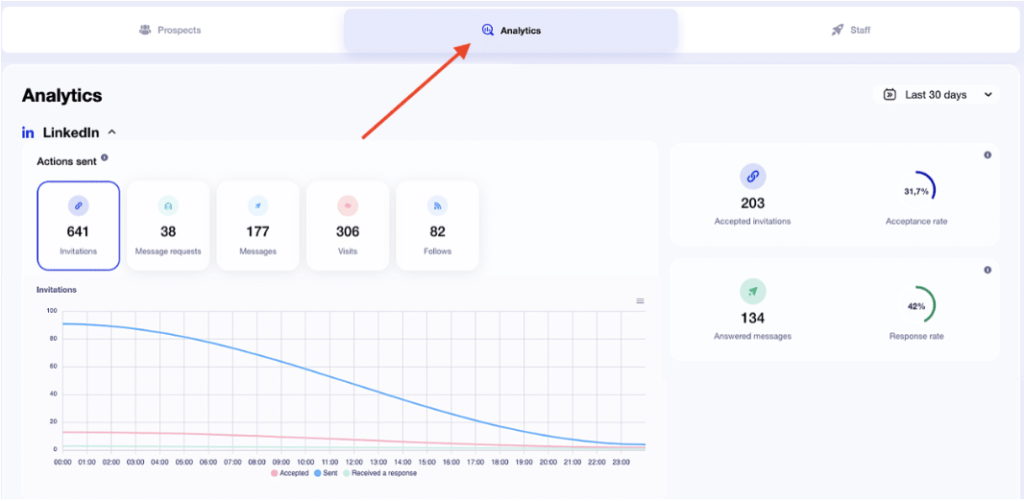
Automating your messages is great. But without tracking, you’re basically guessing. To improve your results, you need to measure what works… and what doesn’t. 📊
Here are the key KPIs to track : 👇
| KPI | What it measures ? | Whhttps://blog.waalaxy.com/en/linkedin-response-rate/y it matters ? |
|---|---|---|
| Acceptance rate | % of connection requests accepted | Shows the quality of your targeting and outreach |
| Reply rate | % of replies received | Directly measures message effectiveness |
| Conversations started | Number of active conversations | Indicates engagement level |
| Conversion rate | % of prospects turned into opportunities | Measures real business impact |
| Message volume | Number of messages sent | Reflects your ability to scale |
👉 The goal isn’t just to track numbers, but to use them to improve your outreach over time.
A tool like Waalaxy gives you a clear dashboard to monitor performance and continuously optimize your campaigns. 🔄
Let’s do a recap about Automated LinkedIn Messages
Automated LinkedIn messaging isn’t just about saving time, it’s about scaling smart outreach. It’s a powerful way to structure your outreach and connect with more people without sacrificing quality.
When used the right way, it helps you start more conversations and create more opportunities… without spending your day writing the same messages. 🫠
Just remember the tool does the work, but your approach makes the difference. 😉
FAQ : Automated LinkedIn Messaging
Does LinkedIn allow automated messages on LinkedIn?
LinkedIn doesn’t officially allow automated messaging. According to its policies, using bots, scripts, or third-party tools to automate actions like sending messages or connection requests is prohibited. ❌
➡️ In practice, this means:
- No bulk automated messaging.
- No bots or scripts to interact automatically.
- No tools that simulate human behavior at scale.
LinkedIn’s goal is clear: keep interactions authentic and human. But here’s the reality automation is widely used… but only safe when it mimics human behavior. 👯♀️
Otherwise, your account can get restricted. 🙄
What are LinkedIn limits and safety rules for automation?
LinkedIn doesn’t publicly share exact limits, but one rule is clear: your activity must look human and avoid excessive or automated behavior. According to LinkedIn guidelines, using tools that automate actions is prohibited if it leads to unnatural activity or spam. 👾
👉🏻 In practice, here are commonly accepted limits:
- Around 100 to 200 connection requests per week.
- A limited number of messages per day.
- Actions spaced over time (no instant bulk sending).
- A healthy acceptance rate to avoid negative signals.
What LinkedIn actually monitors. It’s not just about volume… it’s about your overall behavior. 😬
How to tell if a LinkedIn message is automated?
An automated LinkedIn message isn’t always obvious… but in most cases, there are clear signs. LinkedIn users receive a lot of outreach, so they quickly recognize patterns. 👀 Here are common red flags:
- A generic message with no clear context.
- Personalization limited to just the first name.
- A sales pitch right from the first line.
- A message you’ve seen multiple times before.
- No natural follow-up when you reply.
Automation itself isn’t the issue… message quality is. 🙃
Can bots message you on LinkedIn?
No, bots in the strict sense can’t directly message you on LinkedIn.
LinkedIn prohibits bots that automate actions in unnatural or excessive ways. Messages always come from real user accounts. Some tools automate messaging, but they aren’t fully autonomous bots, there’s always a human behind the setup. 👩🏻💻
How does the Waalaxy inbox work?
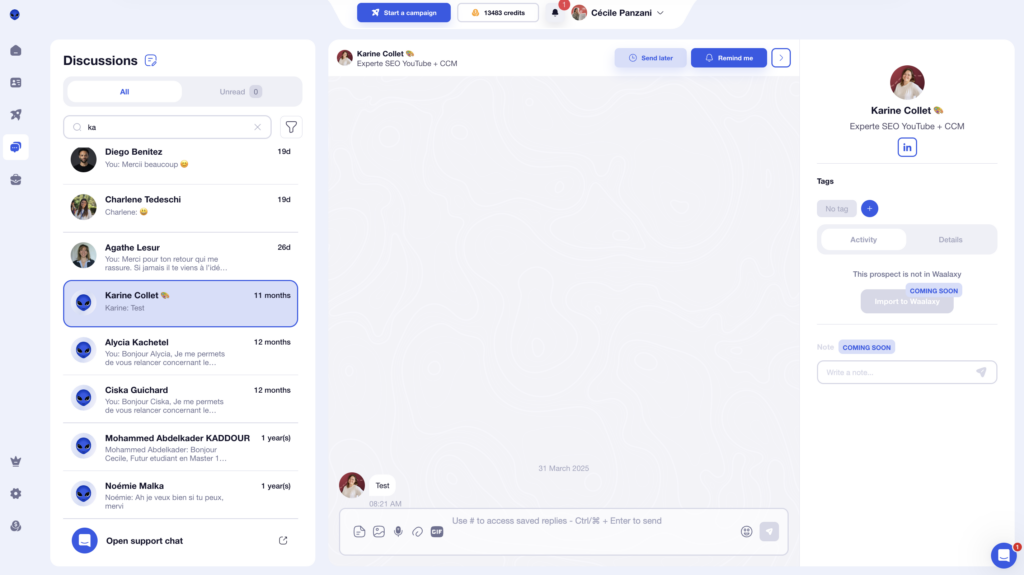
The Waalaxy Inbox is basically an upgraded version of LinkedIn messaging. It centralizes all your conversations and adds features to save time and stay organized. 👩🏻🏫
Here’s how it works 👇🏻 :
- All your messages are gathered in one place, so nothing gets lost.
- You can schedule follow-ups automatically and never miss a prospect.
- You use saved replies to respond faster.
- You organize conversations with tags and filters.
The Inbox replaces the LinkedIn interface, but sends the exact same actions to LinkedIn servers. So everything looks fully natural from LinkedIn’s side. 😌
You now have everything you need to master automated LinkedIn messaging. 🕺🏻
 Toinon
26/04/2026
Toinon
26/04/2026 












