



- What is a Waalaxy campaign automation?
- What are the 7 actions available in a LinkedIn automation campaign?
- Frequently asked questions about conditions, deadlines, and statuses in Waalaxy campaigns
- What are the different stages of prospects?
- How do the actions in a Waalaxy campaign flow together?
- Top 10 most common questions about a Waalaxy campaign
- How about a recap?
- Additional questions about Waalaxy
When we started working on Waalaxy, I remember the day when we said to the developers: « Everything is a campaign. » 👊
Because that’s the foundation of Waalaxy. The rocket engine. And like an engine, there are different technical building blocks and design choices that are made… In short, not everything is necessarily obvious. 😅
So welcome to this GIGA FAQ for a Waalaxy campaign.
In this article, we will answer absolutely every question you could possibly have. After reading it, Waalaxy will hold no more secrets for you. 😏
Ready to see what’s under the hood? Then let’s go. 🚀
What is a Waalaxy campaign automation?
On Waalaxy, a campaign automation is the execution of one or more actions on a list of prospects.
Here’s how it works:
- I import a list of prospects from LinkedIn or a CSV file (learn more about imports).
- I choose the sequence that matches my needs and my subscription.
- I configure my Waalaxy campaign.
- I launch my Waalaxy campaign.
From there, actions will be queued and executed according to deadlines and quotas.
If you want to know in detail how to launch your first Waalaxy campaign, we have a dedicated article. 👀

What are the 7 actions available in a LinkedIn automation campaign?
To date, Waalaxy allows you to perform a number of LinkedIn actions, namely:
- Send a connection request (or invitation).
- Send a message to your connections.
- Follow a profile.
- Visit a profile.
But Waalaxy is also a great tool for multi-channel prospecting, allowing you to enrich your prospects’ profiles by searching for their email addresses, send emails to your prospects, and, most importantly, synchronize your prospects’ data with your CRM. 👀
Here are the 7 actions you can take in a Waalaxy campaign. ⤵️
Action #1: sending a connection request (or invitation)
This step automatically sends an invitation to your prospect on LinkedIn. This step is essential in order to send messages later on.
You cannot send a message to someone you are not connected to on LinkedIn.
Action #2: Send a message on LinkedIn
This step allows you to send a message on LinkedIn to the people you are connected to (and only to those people).
If your prospect is at relationship level 2 or 3, they are not part of your network, and therefore you will first need to go through an invitation stage.
Action #3: Follow a LinkedIn profile
This action will automatically follow your prospect on LinkedIn. This means that their content is likely to appear in your news feed.
This step is generally used because most users are notified that you are following them.
As this is not a very common practice, especially if they do not post regularly on LinkedIn, they will often visit your profile in return or follow you back.
If your profile piques their curiosity, they are likely to add you directly.
Between 5 and 10% of prospects followed send a friend request in return. 👽
Action #4: Visit a profile on LinkedIn
This action will simulate a visit to your prospect’s LinkedIn profile. 👀
Your prospect will be able to see your profile among the latest people who have visited their profile and will sometimes be notified that you have visited their profile.
Action #5: Email automation enrichment (Email Finder)
This step allows you to enrich your prospect profiles by searching for professional email addresses. To do this, we use Dropcontact, which is GDPR compliant.
Please note, however, that this step requires credits.
500 credits are included in the Waalaxy Business subscription, but you can purchase additional credits if you are on the Freemium or Advanced plan 😉
Action #6: Send an email
This step allows you to send an email to your prospect. It is conditional on your prospect having a known email address. This can be an email address retrieved from LinkedIn or an email address found using the Email Finder step.
Here are the weekly email limits you can send depending on your email provider:
- Outlook: 100,
- Office 365: 10,000.
- AOL: 100.
- GoDaddy: 250.
- Rackspace: $10,000.
- Yandex: 500.
- Gmail: 2500.
- Others: 500.
Action No. 7: CRM synchronization
This step allows you to send lead data to an external tool, for example, to feed a CRM. This step can be present in sequences with a CRM Sync step or in all sequences, including sending a message, note, or email.
Depending on the CRM you use, integration can be:
- Native, meaning you don’t have to use a third-party tool to synchronize it. This is the case for HubSpot and noCRM.io.
- Non-native, in which case you need to use an integration tool, such as Zapier or Make, to synchronize your prospect data with your CRM.
Frequently asked questions about conditions, deadlines, and statuses in Waalaxy campaigns
In order to ensure that prospects meet the necessary conditions for a given step, or simply to condition their progress in the campaign, there are different stages of « conditions. »
What are the two types of LinkedIn conditions with Waalaxy?
BEFORE conditions
When your prospects enter a Waalaxy campaign, particularly in the case of complex sequences (i.e., those with different paths), Waalaxy will perform checks to determine which path to send your prospect to.
Let’s take the Elysium sequence as an example.
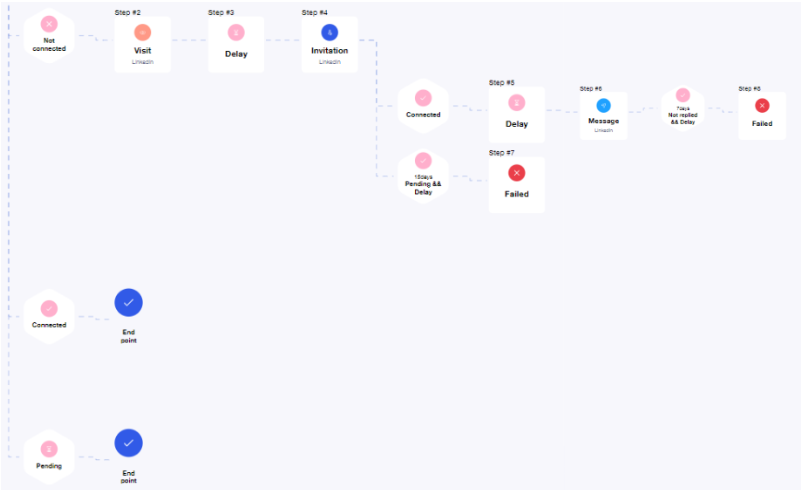
This sequence has three branches. In order to send leads to one of the three branches, the condition checked by Waalaxy is the connection status:
- Branch 1: if the leads is “logged in.”
- Branch 2: if the leads is “not logged in.”
- Branch 3: if the leads is “on hold.”
The conditions AFTER
After sending an action, in most cases there are conditions that must be verified before your prospect can move on to the next step. They are represented as follows. ⤵️
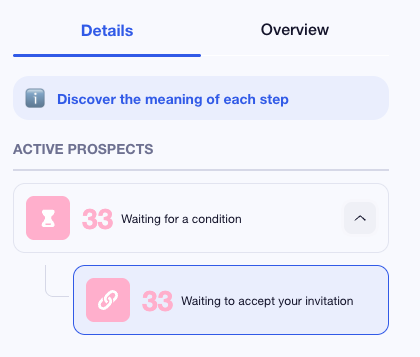
For example, after sending a LinkedIn invitation, Waalaxy will wait 10 to 15 days (depending on the sequence) for the prospect to accept the invitation. If they accept, they will move on to the next step; if not, they will leave the campaign.
In the case of campaigns with multiple messages/emails, Waalaxy will also wait a few days: if the prospect responds, they will leave the campaign; otherwise, they will receive a follow-up message.
If you ever get lost, you can click on the ℹ️ in Waalaxy. 👀
How do deadlines work?
Well, the delay on Waalaxy is a waiting time, either between two steps or before validating a condition.
It can therefore appear as a separate step, «Delay,» or be associated with another condition, such as «Not connected + Delay 15 days.»
In the first case, the prospect will move to the next stage as soon as the delay has been exceeded.
In the second case, they will move to the next stage as soon as the delay has been exceeded IF the condition is valid. 😜

What are the different stages of prospects?
1) Active prospects
Once you have programmed your sequence, the lead will soon receive one of the following actions.
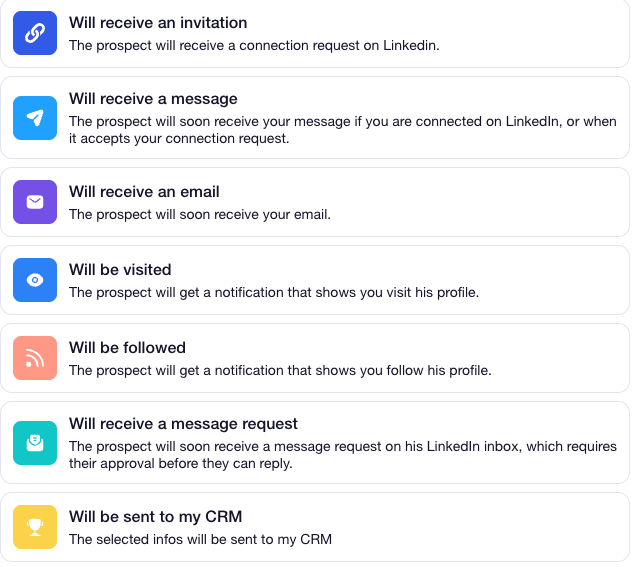
Then, they will be enriched (DropContact searches for your prospects’ professional email addresses).
Finally, they will be waiting for one of the following conditions. ⤵️
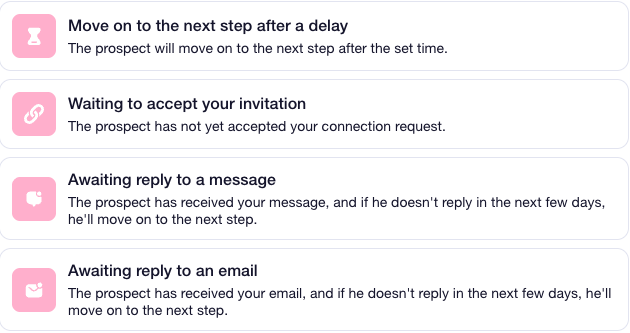
To learn how to prospect for leads, we have an e-book dedicated to this topic. ⤵️
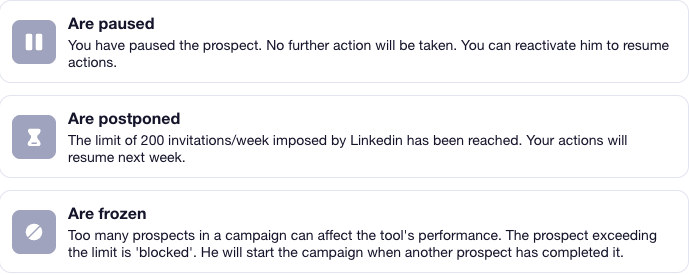
2) Stalled Prospects
Sometimes a prospect may be at a standstill. There are three reasons for this. ⤵️
3) Prospects removed
For this last part, there are several possibilities:
- Removed manually (you manually removed the lead from the campaign).
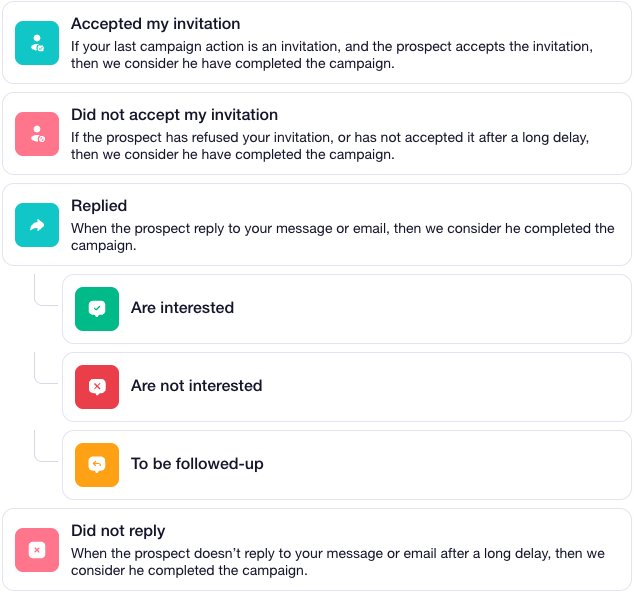
- Have completed the campaign.
If so, you have all these possible scenarios. ⤵️
The 6 different prospect statuses in a Waalaxy campaign
In campaigns, your prospects can have different statuses depending on their progress in the campaign:
- In progress: the prospect has an action in progress in the queue.
- On hold: you have paused the prospect (or campaign); no action will be sent, and it will not move on to the next step until you restart it.
- Completed: the lead has reached a stage of « failure » or a stage of « exit » in the sequence.
- Responded: applies to campaigns involving the sending of messages. When a lead responds to you, they leave the campaign with the status “Responded.”
- Blocked: In a campaign, there can only be 5,000 active prospects at a time. If you have added more than 5,000, the additional prospects will be gradually integrated into the campaign as space becomes available.
- Deferred: This means that the next invitation action cannot be sent until the following week, as your weekly invitation quota has been reached on LinkedIn (200 per week).
How do the actions in a Waalaxy campaign flow together?
The value proposition behind the systematic use of «campaigns» is to have automatic sequences between two actions performed on a lead.
Thus, a sequence will be read from left to right (or from top to bottom, depending on how the sequences are displayed). Actions are executed if the prospect meets the upstream condition(s).
A delay does not correspond to an exact time between two actions but to the time between the execution of the first action and the queuing of the other.
Therefore, the delay can vary greatly depending on the number of actions in your queue and your quotas.
Simplified example to understand the logic
Let’s take an example to illustrate how a Waalaxy campaign works with the sequence «Visit – Invitation – Message»:
- 1️⃣ The prospect enters the campaign if they are not connected (if they are connected or on hold, they will take on the status “End”).
- 2️⃣ The prospect’s profile will be visited ⭢ we will wait for a period of time that you have determined.
- 3️⃣ Once the time limit has passed, an invitation will be sent to the prospect: if you are already connected to the prospect, they will leave the campaign with an error 🔴.
- 4️⃣ Once the invitation has been sent, a 15-day deadline is triggered (this deadline may be 10 days depending on the sequences).
If your lead accepts the invitation, they will move on to the message-sending stage.
If they decline, they will leave the campaign and will not receive the LinkedIn message for that campaign. They will then be marked as “failed.” - 5️⃣ Your prospect has accepted the invitation and received the message, and a 7-day period has begun.
If a response is detected within 7 days, they will leave the campaign as a “success” and will have the status “Responded”.
If they do not respond to your message after 7 days, they will leave the campaign as “Failure” and will have the status “Completed.”
As soon as a prospect responds to a message, email, or login note, they leave the campaign and no longer receive any actions from it.
If you use sequences with multiple messages, you should view them as follow-ups 😉.
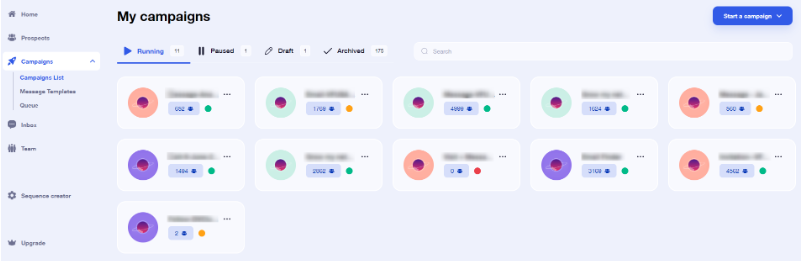
What do the colored dots in my Waalaxy campaign mean?
Depending on the status of your prospects in your campaigns, your campaigns will display a small circle of different colors with the following meanings:
- 🔴: You no longer have any prospects in this campaign.
- 🟠: You have prospects in progress in this campaign but no actions in the queue, which means that the remaining prospects in this campaign are waiting for a condition to be met before moving on to the next stage (for example, a deadline or the prospect accepting your connection request).
- 🟢: You have actions queued for this campaign.
Top 10 most common questions about a Waalaxy campaign
Now that you understand how a Waalaxy campaign works, here are the 10 most frequently asked questions our users ask us.
These questions resolve 95% of cases.
1) Does a prospect leave the campaign once they have responded?
Yes! Waalaxy aims to help you get in touch with your prospect and get responses to your messages. So, as soon as a prospect responds, they are removed from the campaign.
No one wants to reply and receive a second unrelated automated message right away, right? 😅
If you want to save time managing responses from your prospects, use Inbox Waalaxy instead. 📩
2) How do I pause a Waalaxy campaign?
To pause a Waalaxy campaign, simply go to the tab “Campaigns,” then “Campaign list.” Two clicks are all it takes:
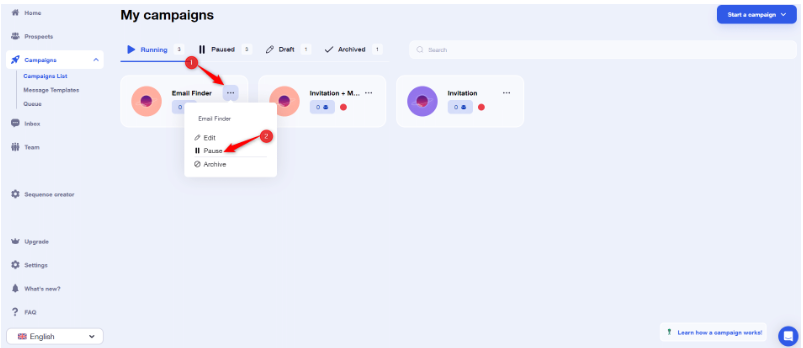
When a Waalaxy campaign is paused, all actions are removed from the queue, and no prospects move on to the next step.
If the campaign is linked to an auto-import, it will continue to import prospects into the campaign, but they will remain at the entry point. They will only move forward when the campaign is restarted. 😊
If you restart it, if a prospect was waiting for a delay and/or a condition and that delay and/or condition is met, their action will be queued.
The other prospects will have their actions put back in the queue, in the same place in the campaign (however, the order of the queue may change slightly).
Pausing is not a trivial action, especially if it is done on hundreds of prospects.
3) How do I archive a Waalaxy campaign?
To archive a Waalaxy campaign, the process is the same as for pausing it; only the button is different 😉:
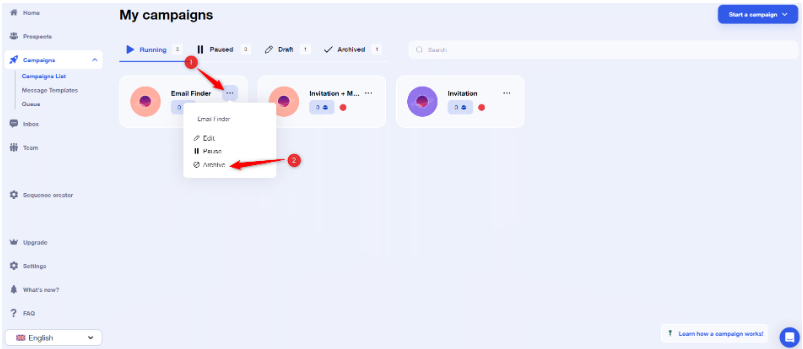
When you archive a Waalaxy campaign, the actions are also removed from the queue, and your prospects are once again available to be included in a new campaign.
Please note, however, that archiving a campaign is permanent; you will not be able to unarchive “”a campaign 😓.
4) How do I pause, restart, or remove only certain prospects from a Waalaxy campaign?
If you want to pause, restart, or remove only certain prospects from the campaign, simply select them directly from the Prospects tab “Prospects” of the campaign and choose the desired option:
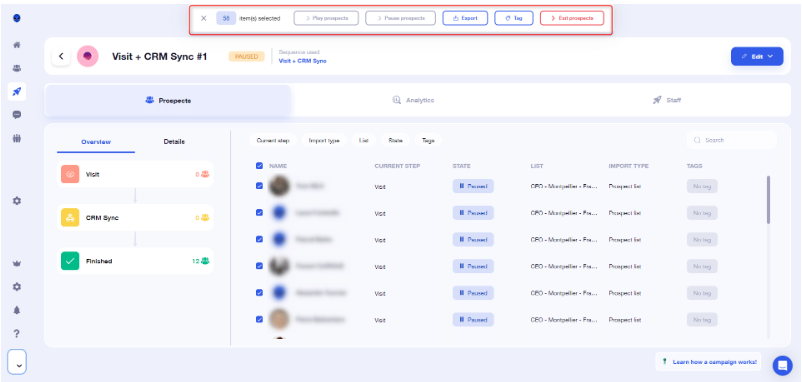
A paused lead will restart the campaign where it left off when you stopped it.
If you remove a prospect from the campaign and then add them back later, they will start from the beginning (provided they still meet the entry conditions, but that’s another story 😅).
5) How do I import prospects into an existing Waalaxy campaign?
It is entirely possible to add leads to a Waalaxy campaign that is already underway
It’s very simple:
- Select the desired prospects.
- Click on “Add to an existing campaign” at the top.
- Select your campaign.
- That’s it!
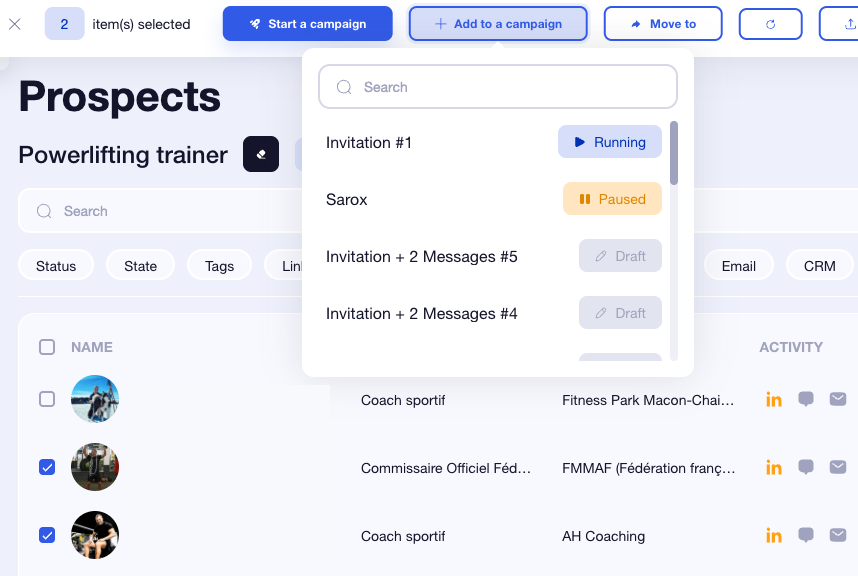
6) Why don’t my prospects appear when I try to import them from my list in the campaign?
When you choose to add prospects to a Waalaxy campaign from « Add prospects » in the sequence viewer, your prospects may not appear after you have selected the list.
This means that they are already in another campaign (even if it is paused) or that they do not meet the entry conditions for your campaign ❌.
Note that a lead can only be in one Waalaxy campaign at a time.
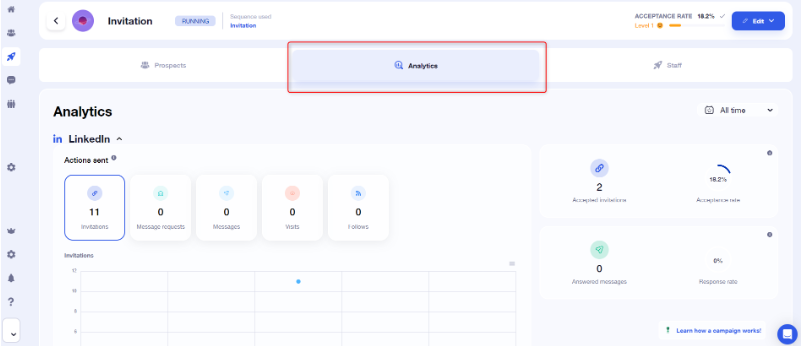
7) How can I view the performance of my Waalaxy campaign?
“You can view your campaign performance indicators from the Waalaxy home page, or in the Statistics tab” of your campaigns:
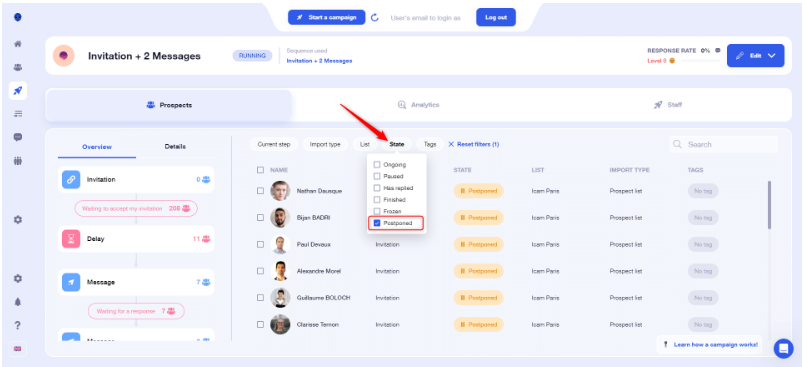
8) Are there any filters in the campaign?
There are several types of filters available from the “Campaign” tab.
To get to this point, you must first click on the tab « Campaign.» Select your campaign. And go to the sub-tab « Staff »:
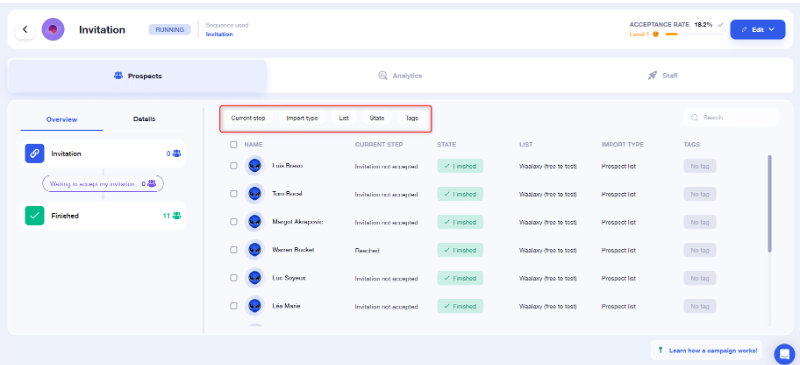
Occasionally, you’ll see a little “waiting for a delay.” Don’t panic; this means that your lead has received the action and is waiting to move on to the next step. 👀
If you ever notice that your prospects are not moving on to the next step, there are several reasons why:
- 1️⃣ They do not meet the necessary conditions (for example, they have not yet accepted the invitation).
- 2️⃣ They are waiting for a delay.
- 3️⃣ It has responded (success), reached the end, or been manually removed.
- 4️⃣ The action is queued but not yet executed.
9) How can I edit the content of my Waalaxy campaign after I have launched it?
Go to “ Campaign,” select the campaign of your choice, then click on “Edit my campaign”:
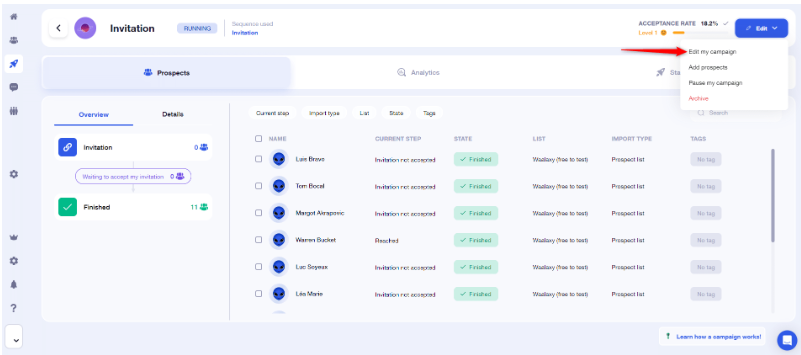
From there, click on the message you want to edit, change the content, and save your changes!
10) How do I add message content when creating my Waalaxy campaign?
If the step is marked with a red dot (message or email), it means that you have not yet added the content of the message or email you are going to send to the prospect, but you can do so by clicking on it. 💬
How about a recap?
One thing I love about Waalaxy is that the more you dig into it, the more you realize that every button, every delay, every tiny step has a logic behind it, even if it’s not always obvious. 🫥
And that’s exactly why this article exists!
This article is the mega FAQ.
A frequently asked questions section where we show you everything—every button, every marketing color, every detail—allowing you to appreciate Waalaxy as a whole. 👽
Now you know:
- How Waalaxy chooses the right branch?
- Why some leads move forward?
- Why others stall?
- What these famous colored dots mean?
- What happens when someone replies?
- How everything fits together?
In short, now you understand how the rocket works. 🚀
If, after reading this mega FAQ, you still have a question that isn’t answered in this article, you know where to find us: at support, hot chocolate in hand, smile included. ☕
Waalaxy offers a free trial if you want to try this LinkedIn and email tool. 👀
Additional questions about Waalaxy
Even though we’ve answered a lot of questions, here are a few more. ⤵️
What sequences can I use during the trial period?
The trial period gives you access to the Business plan, which includes all sequences.
At the end of the trial, your campaigns will be paused until you choose the right plan.
How do I know if a sequence is available with my subscription?
- The Advanced subscription gives you access to all LinkedIn sequences.
- The Business subscription gives you access to all LinkedIn and email sequences.
🚨 Learn more about subscriptions. 🚨
Do you plan to integrate other channels?
Just as you need to master each channel independently before prospecting across multiple channels, we have chosen to develop the best tool on the market for prospecting on LinkedIn and via email before tackling any other channels.
So the answer is yes, but not in the short term. We are waiting to take a step back and look at how our users are using the tool so that we can fully understand the needs and implications of multi-channel prospecting.
There you go, now I thing you know everything there is to know about the Waalaxy campaign! 👽
 Toinon
08/12/2025
Toinon
08/12/2025 













