



- What is an import?
- Which channels can I use to import to Waalaxy?
- Can I automate an import?
- Which subscription allows me to import on Waalaxy?
- How many leads can I import?
- Is there anything I should do before I make my first import?
- How do I know who to import into my Waalaxy?
- Did my import work?
- Does Waalaxy import duplicates?
- What is anti-duplicate security?
- Why do I see “LinkedIn member” in my search and not the prospect’s first and last name?
- What are false positives?
- Can I disable import cleaning?
- Can I import emails from an external file?
- Can I import emails from a LinkedIn search?
- Does my computer have to be switched on to import?
- What should I do if my import is blocked?
- Conclusion
Welcome to the Waalaxy Imports FAQ.
All questions, no matter how small, will be answered here. 😎
Without imports, there’s no prospecting. No prospecting… No prospecting.
It’s the first step in your Waalaxy campaigns.
Welcome to Frequently Asked Questions!

What is an import?
An import is the act of populating and bringing profiles from a tool to Waalaxy.

Which channels can I use to import to Waalaxy?
From LinkedIn:
- The classic search.
- The “My network page” for first-degree connections.
- Event pages.
- Groups.
- The prospect’s LinkedIn profile.
- From the LinkedIn news feed.
From Sales Navigator:
- Search.
- Saved search.
- Lists.
- Filters “Spotlight”.
- Prospect’s Sales Navigator profile.
From Recruiter Lite:
- Search.
- The registered project.
And that’s not all! You can also import prospects via a CSV file, in which case you’ll need to enter the LinkedIn or Sales Navigator URLs of the prospects you wish to import into your file 😉
Can I automate an import?
It is possible to automatically scrape LinkedIn profiles according to a particular condition.
Today there are 5 conditions for automatically importing leads into your lead list on Waalaxy. 👇
- Visited my profile.
- Sent me a connection request (with auto-acceptance).
- Leads from a search saved in Sales Navigator.
- Prospects from a Sales Navigator lead list.
- Commented on a LinkedIn publication.

Which subscription allows me to import on Waalaxy?
All Waalaxy subscriptions, including the Freemium plan, allow you to import leads into Waalaxy. 🚀
How many leads can I import?
Is there a search limit on LinkedIn? Yes and here are some explanations.
LinkedIn limits: 1000 prospects
LinkedIn limits the display of search results to 1000. It is therefore not possible to import more than 1000 leads per search.
If your search contains more than 1000 results, try dividing it into several smaller searches (by varying the regions, for example) to import all the prospects.
Here’s an article that explains how to get around this limit. 😊
Sales Navigator limits: 2,500 leads
Sales Navigator limits the display of search results to 2500. It is therefore not possible to import more than 2,500 leads per search.
If your search contains more than 2500 results, try dividing it into several smaller searches (by varying the regions, for example) to import all the prospects.
Here’s an article that explains how to get around this limit. 😊
Waalaxy limits
In Waalaxy, there are limits to respect depending on your subscription type.
With Advanced and Business subscriptions, you can’t have more than 50,000 leads in the tool. With the Freemium subscription, you’re limited to 10,000 leads.
Is there anything I should do before I make my first import?
We recommend that you warm up your account before using any automation tool, Waalaxy or others.
This involves taking certain steps to ensure that your LinkedIn account is not empty of actions. Indeed, LinkedIn is very suspicious of new accounts, hence this recommendation.
You need to manually add people to your network, people you know: grow your network manually first.
You can add level 2 people, people with whom you have a common relationship; colleagues from your company or former colleagues who are related to what you’ve done in your previous experience or training.
Don’t hesitate to follow the various actions detailed in this article to take the necessary steps. 🔥
How do I know who to import into my Waalaxy?
Finding the right prospects is one of the most important steps in prospecting. LinkedIn is a goldmine, but you need to know how to use it properly.
That’s why we’ve written a guide giving you the keys to good LinkedIn research.
Did my import work?
When you launch an import, you’ll see a box in the bottom left-hand corner of your Waalaxy window indicating the progress of your import 👇
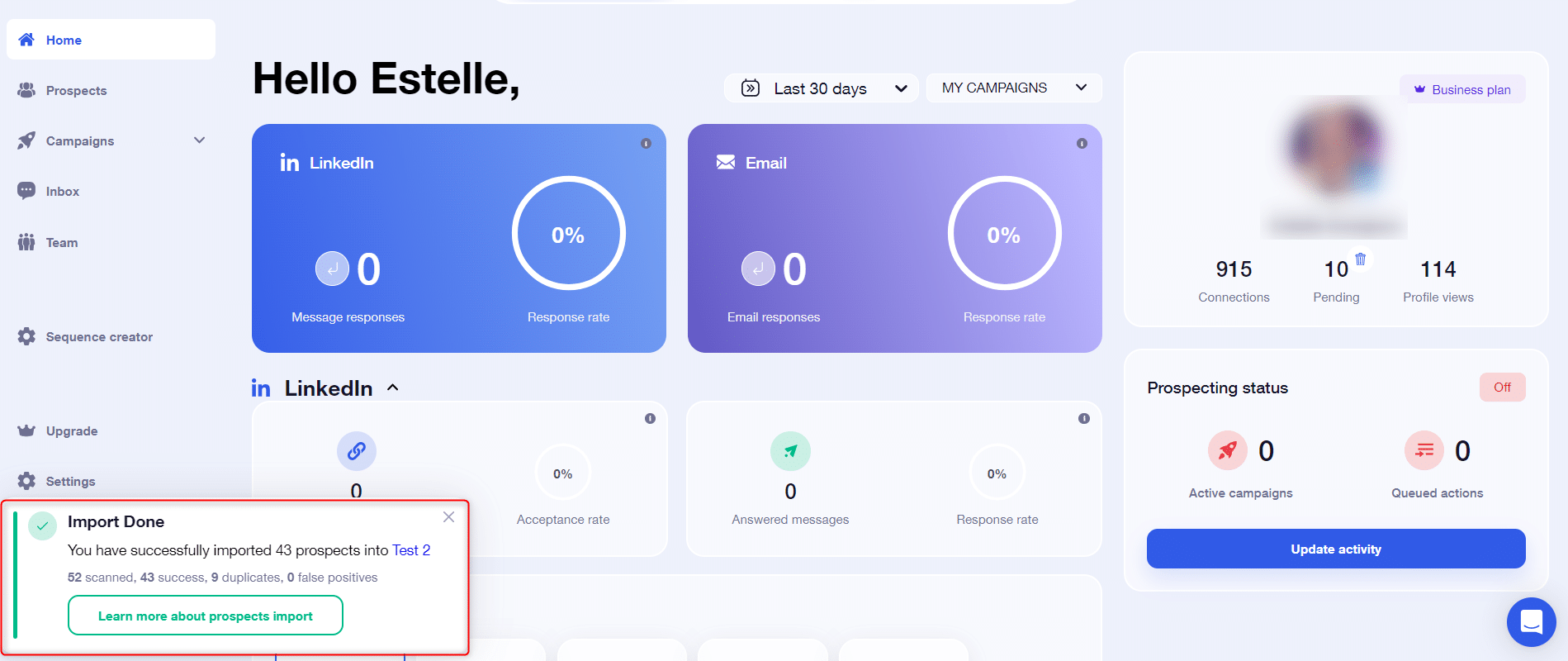
At the end of the import, you can view :
- The number of prospects scanned,
- The number of successes, i.e. those actually imported,
- The number of duplicates, i.e. prospects already in Waalaxy,
- The number of false positives.
You can retrieve the last import report at any time from Settings > Last import 👇
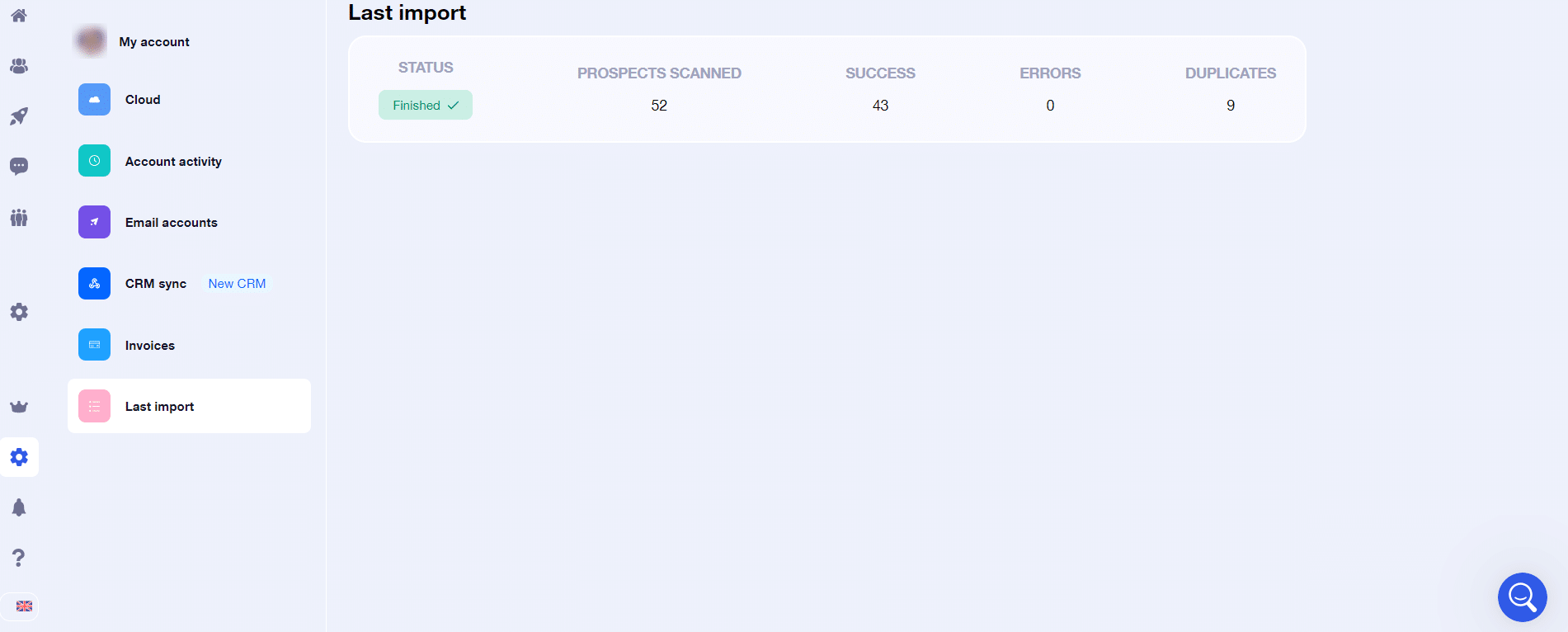
If you notice any errors in the import report, please do not hesitate to contact our hero support 🦸♀️.
Does Waalaxy import duplicates?
Waalaxy handles duplicates, so it’s not possible for it to import people who are already in your tool, regardless of the prospect list concerned.
During an import, Waalaxy will scan all prospects, identify duplicates, and simply not process them.
💡 During a LinkedIn or Sales Navigator import, you have the option of asking Waalaxy to move duplicates from their current list to the new list. 👽

What is anti-duplicate security?
Anti-duplicate security is a feature included in the Team plan only.
For each import, Waalaxy scans the leads and is able to identify prospects that are already in the tool, including in the lists of other Team members. In this case, it ignores the request and does not import the prospect in question.
For each import, you’ll have an import report, which you’ll find in Settings > Last Import. A section is dedicated to duplicates.
However, you can deactivate this security feature and import prospects already present with your colleagues.
➡️ If you’d like to find out more about anti-duplicate control, read this article.
Why do I see “LinkedIn member” in my search and not the prospect’s first and last name?
In LinkedIn, there are levels of contacts: 1ᵉʳ (connected), 2ᵉ and 3ᵉ. The « LinkedIn Members » are level 3 or + people to whom you do not have access, so you cannot import them.
What are false positives?
False positives are prospects identified by the Clean my list and Clean my import options as not corresponding to your targeting intention. The aim is that by using either of these options, the final list you add to your campaign will retain only the crème de la crème of your target, which should greatly improve your success rates 😎.
To go into more detail:
- Your keyword is searched in the « Job title » and « Title » sections of the LinkedIn profile only 🔎.
- This excludes past experience, posts, comments, etc 🖊️.
- Word order does not matter.
- Accents do not count.
- Special characters, Boolean operators and quotation marks are incompatible with this feature.
Can I disable import cleaning?
Yes, you can deactivate the option directly in the ⚙️ import settings.
Can I import emails from an external file?
Yes, this is entirely possible, via a CSV import. However, an email address must be associated with a LinkedIn or Sales Navigator URL to be imported.
Prospects will appear with an “Unknown” status, as these are URLs that are imported, so you’ll need to take a “profile visit” or “profile follow-up” action to update this data.
Can I import emails from a LinkedIn search?
You can retrieve the emails of prospects you import from LinkedIn or Sales Navigator, only if you are connected with these prospects.
If you’re not, whether you’re « on hold » or « not connected », the emails won’t appear, but you can retrieve them either :
- By making a « Invitation » sequence with these prospects, and once they have accepted the invitation.
- By enriching emails via Dropcontact.
You’ll find more possibilities in this article. 😊
Does my computer have to be switched on to import?
Your computer and your LinkedIn tab must both be open and active for the import to take place.
What should I do if my import is blocked?
Most of the time, it’s a cache problem. You can clear your browser’s cache, and restart the extension as shown below 👇

Conclusion
And that’s it! You know all about imports.
If you still have questions not covered in the Waalaxy FAQ on Imports, don’t hesitate to come and see us at support. 😎

 Elodie
07/11/2025
Elodie
07/11/2025 












