



Posting on LinkedIn every week… easier said than done! 😅
Lack of inspiration, vague ideas, lack of time: you know the drill.
This is exactly where prompt for LinkedIn posts become your best allies. Used correctly, they help you structure your ideas, speed up your writing, and create clearer, more regular, and more effective posts. ✨
In this article, you’ll learn how to use prompts as a real lever to boost your visibility and turn your posts into opportunities. 💼
What is a prompt for LinkedIn post, and why use it?
A prompt for LinkedIn post is a clear instruction that you give to AI (or yourself) to help you write a post faster and more easily. It’s nothing complicated. Just a tool to transform a vague idea into a structured message, without losing your style. 😎
Definition of a prompt for LinkedIn post
A prompt is a sentence or set of instructions that guides the creation of a LinkedIn post.
It can be used to launch an idea, rephrase a concept, clarify an experience, or locate the right hook. It helps you avoid writer’s block and create content that truly reflects what you want to share more quickly. 👀
You can use it with an AI assistant (GPT, Copilot, Gemini, etc.) or as a personal mini-framework to frame your thinking before writing. 📝
Why do prompt for LinkedIn posts work?
Prompts work because they act on both you and the algorithm. 📊
On one hand, they reduce mental load. When you start from a clear structure, your brain no longer has to figure out where to begin. It switches straight into creation mode. You gain clarity, flow, and execution speed. 🏃🏻♀️
On the other hand, they help your posts perform better in the feed and attract attention to your LinkedIn profile. A well-constructed prompt naturally encourages you to produce content that is more readable, better organized, and more useful to your audience. And this type of post is precisely the one that the LinkedIn algorithm likes to highlight. This gives you more visibility, more engagement… and more opportunities. 📈
The limitations of prompt for LinkedIn post
A prompt is not an autopilot. It cannot:
- Replace your experience or unique voice.
- Take a position on your behalf.
- It would be beneficial to create a truly relevant post, even if no information is provided.
- Guess your context, market, buyer persona, or business nuances.
In other words, a prompt gives you the structure, but you provide the substance. Without your experience, even the best prompt will only produce generic text… and LinkedIn will detect that very quickly. 😉
12 Best Prompt for LinkedIn post B2B
Here are your LinkedIn post prompts, divided into five categories: visibility, engagement, storytelling, B2B expertise, and lead generation. ✨
Prompts to improve your visibility
1. Prompt for LinkedIn post: Create a hook that really stops the scroll
Act as a LinkedIn writing expert focused on creating high-retention hooks. I want to write a post about [your topic]. Analyze the topic and generate 15 ultra-powerful hooks that are short (maximum 12 words), immediately clear, and designed to stop the scroll.
Use different formats such as a provocative question, a shocking statistic, a counterintuitive statement, an expert insight, and a punchline inspired by personal experience.
For each hook, indicate the main emotion it triggers (curiosity, surprise, aspiration, fear of missing out, etc.), rate the intensity of that emotion on a scale from 1 to 5, and suggest both a softer version and a more powerful version.
The goal is to maximize organic visibility from the first two lines and significantly increase reading time.
2. Prompt for LinkedIn post: Transform a professional improvement
Based on a recent improvement in my work [describe your improvement], write a LinkedIn post designed to maximize visibility and engagement. The post should follow a clear and natural flow. It should open with a strong sentence highlighting the initial problem, then explain what pushed me to make a change. Next, describe the actions I took in two or three concrete steps, and finish by sharing the results—ideally with a number, metric, or clear observation.
End with a broader takeaway that resonates with professionals beyond my role or industry.
Please include two headline variations for A/B testing, a closing question to encourage comments, and a very fluid layout with short sentences to optimize readability in the LinkedIn feed.
3. Prompt for LinkedIn post: Deciphering a market trend
I want to write a LinkedIn post about the following trend: [trend]. Act as an expert analyst skilled at making complex topics easy to understand. Write a clear, engaging post that starts by briefly explaining why this trend is emerging right now.
Then explain the main shift it is creating in the industry and the immediate impact professionals are already seeing, including the risks, opportunities, and early signals worth paying attention to.
Also address the longer-term implications, especially on business models, required skills, and changing practices. Conclude by summarizing three key takeaways for B2B professionals, provide two alternative titles (one analytical, one more catchy), and end with a question that encourages comments and shares. The post should remain educational and easy to read.
Prompts to boost engagement with your LinkedIn posts
4. Prompt for LinkedIn post: Give your opinion to spark a real discussion
Act as a LinkedIn expert known for sharing engaging opinions. I want to write a post where I share my point of view on [topic].
Suggest a structured text that starts with a clear stance, then explains, without oversimplifying, why this topic deserves attention right now. The post should include a short anecdote [your anecdote], a concrete example, or a personal observation to create a real connection with the reader.
End with an open-ended question, phrased in a way that invites people to share their own experience or perspective. The overall tone should remain accessible.
5. Prompt for LinkedIn post: Generate helpful comments
I want to publish a list of practical tips on [topic]. Write a post that presents between five and seven concrete actions that are easy to implement and immediately useful for my LinkedIn audience. Each action should be explained in one or two sentences to show its value. The tone should be accessible, dynamic, and focused on solving a real problem.
Conclude with a question encouraging readers to add their own tips or say which ones they already use.
3 Prompts for your storytelling
6. Prompt for LinkedIn post: Turn a professional experience into a story
I want to turn a professional experience into a storytelling LinkedIn post. Here is the initial context: [describe the experience].
Help me structure the storytelling in a progressive way. Start by setting the scene and describing the initial situation, then introduce the key moment or challenge I encountered. Develop the storytelling by sharing what I felt, realized, or decided at that precise moment, before explaining the action I took and what it changed in concrete terms.
End with what I learned from this experience and what could be useful for other professionals. The tone should feel human and authentic, with short sentences to keep the post easy to read in the LinkedIn feed.
7. Prompt for LinkedIn post: Share feedback
Act as a personal branding consultant specializing in professional storytelling. I want to share real feedback about [describe the situation]. Write a post structured in three parts: an introduction to the context, a development that outlines both successes and difficulties, and a conclusion that explains what this situation taught me professionally. The tone should be sincere, direct, and focused on understanding rather than self-promotion.
Add a final sentence that encourages readers to share their own experiences.
Prompts to showcase your B2B expertise
8. Prompt for LinkedIn post: Propose a mini framework
I would like to create a mini B2B framework around the following topic: [theme]. Help me structure a LinkedIn post that clearly presents this framework in a simple and practical way.
Start by describing a common problem my audience regularly faces, then introduce this framework as a way to bring clarity and structure. The framework should include no more than three or four steps, each with a simple, easy-to-remember name. For each step, briefly explain what it’s used for and how it can be applied in a real professional context, without going too theoretical. End the post with a question inviting readers to share whether they already use a similar method or framework in their work.
9. Prompt for LinkedIn post: Share your expertise on a topic
I want to clearly explain a topic I know well: [concept or theme]. Help me write an educational LinkedIn post aimed at professionals who are not experts on the subject.
The post should begin with a sentence that shows why this concept is important in everyday professional life, then explain it in simple terms, with examples and, if relevant, an easy-to-understand analogy.
Highlight a common mistake or misconception related to this concept, then correct it with facts.
End with a practical tip that readers can apply immediately.
Prompt ideas for generating leads
10. Prompt for LinkedIn post: Highlight a customer case study
Put yourself in the shoes of a specialized B2B consultant. I want to turn a real client case study into a LinkedIn post with real added value. Here is the context: [describe the context, the client, and the problem].
Start by outlining the initial situation and the main challenge the client faced, then explain the approach taken in simple terms, without a sales pitch. Share the results in a credible way, focusing on what truly made the difference.
End with one key lesson other professionals can apply, and invite readers facing a similar issue to reach out via private message to exchange insights.
11. Prompt for LinkedIn post: Use a checklist to attract
I want to create a LinkedIn post about the following topic: [theme], with the goal of generating qualified conversations.
Help me structure a post built around a checklist of six to ten points that allows readers to quickly assess their current situation or maturity level on this topic. The post should clearly explain the problem this checklist helps identify and who it is specifically designed for.
The checklist should be easy to project onto: readers should be able to recognize themselves quickly and reflect on where they stand. At the end of the post, encourage them to self-assess—for example by counting how many points resonate with them or identifying what feels most missing today.
Conclude with a natural invitation for readers who want to go further to exchange private messages. The tone should remain educational, and focused on discussion and peer exchange, not sales.
12. Prompt for LinkedIn post: Answering a frequently asked question from prospects
I want to write a LinkedIn post answering a question my prospects often ask me: [question]. Start by restating the question clearly, then give a simple and informative answer.
Support the answer with a concrete example or real-life situation [your situation] to strengthen credibility. End by inviting readers to share their own questions or perspectives and encourage private conversations.
The benefits of prompt for LinkedIn post
Prompt for LinkedIn posts are a game changer. Here’s what they can do: 👇🏻
- Save time and post more regularly: a prompt gives you immediate direction. No more wondering what to write or how to phrase your idea. You start with a clear outline and adapt the content to your experience. You post faster and more often, without sacrificing quality. 😎
- Improve the editorial quality of your posts: a good prompt encourages you to structure your ideas. It helps you clarify your message, avoid unnecessary detours, and get straight to the point. Your audience will understand what you’re saying better.
- Boost visibility, engagement, and lead generation: LinkedIn loves useful, easy-to-read, value-oriented posts. This type of post is exactly what a prompt helps you create. The clearer and more engaging your content is, the more it will be shown. The more it is shown, the more interactions, conversations, and leads you will generate. In B2B, visibility is not a KPI to be ignored. 📈
What does the data say about prompt for LinkedIn posts?
Recent studies confirm the concrete impact of AI, and therefore prompts, on content ideas and the performance of social media posts. 📲
On performance and engagement:
- 72% of marketers see better results with AI-generated or optimized content.
- 77% say that AI facilitates their relationship with their audience.
- 75% say that AI stimulates their creativity, which is an asset for standing out in the LinkedIn feed.
- 70% see a direct improvement in their brand awareness.
Productivity and publication volume:
- The use of AI reduces content creation time by up to 59% by automating steps.
- Organizations using artificial intelligence publish up to 77% more content.
- More than 53% of marketers already use AI for content creation and 49% for ideation, evidence of widespread adoption.
A B2B freelancer who tested prompt for LinkedIn post for 30 days:
– Published four times more
often than before;
– Doubled their average visibility per post; – Generated 12 qualified conversations, three of which led to business proposals.
There’s nothing miraculous about it. Just a more structured system and better editorial consistency.

How do you write a good prompt for LinkedIn post?
A good prompt for LinkedIn post is not just a simple sentence thrown at AI. It’s a strategic guideline that directly determines the quality of your final post. 👀
The 6 elements of a great prompt for LinkedIn post
An effective prompt is always based on these six key elements: 👇
- The goal of the post: Before writing your prompt, clarify what you want to achieve with the post: visibility, engagement, credibility, or private message conversations. The goal directly influences the tone, structure, and call to action. 🎯
- The target audience: A good prompt always specifies who the post is aimed at. Executives, freelancers, marketers, salespeople, or content creators. The clearer the audience, the more relevant the message will be. 📩
- Context: AI can’t guess anything. The more context you provide (real-life situation, experience, problem encountered, real example), the more credible, specific, and distinctive the post will be. ✨
- Post format: Storytelling, list, framework, feedback, or trend analysis. The format plays a key role in the readability and performance of the post in the LinkedIn feed. 📝
- Tone and style: Professional, accessible, direct, educational, or conversational. The tone must remain consistent with your positioning and audience to avoid a generic post “effect.” 😊
- Call to action: A good prompt always has a clear ending. Open question, invitation to respond, openness to discussion, or private message exchange. Without a CTA, even a good post loses its impact. 🫠
Mistakes to avoid when writing a LinkedIn prompt
Before publishing a post generated from a prompt, make sure you don’t fall into one of these traps:
- A prompt that is too generic: If your prompt could work for any industry or any profile, the final post will lack personality. 🥲
- A lack of context: Without a specific situation, real example, or personal experience, the content produced will remain superficial and lacking in credibility. 🙃
- A tone that is unsuitable for LinkedIn: A style that is too marketing-oriented, too academic, or too robotic will quickly be spotted by your audience. 😅
- Copy-pasting without personalization: A prompt is a starting point, not ready-to-publish content. Without adjustments, the post loses authenticity and therefore visibility. 📉
What tools should you use to generate LinkedIn post prompts?
Prompts set the stage, but it’s the tools that turn your ideas into posts… and then into results. Depending on your level of autonomy and the time you have available, there are several approaches you can take. 🔧✨
Generate posts with AI assistants (Prompt ChatGPT LinkedIn, Copilot, Gemini)
Do you like to keep control over your content? General AI assistants are for you. ChatGPT, Copilot, or Gemini allow you to start with a specific prompt and quickly test several versions of the same post.
This is the most flexible option. You can refine a headline, rework a paragraph, change the tone, or shorten a post in seconds. This is handy when you have a clear idea but need a boost to get it off the ground.
Keep in mind that without a well-constructed prompt for LinkedIn post, the result is often too bland. These tools excel when you already know what you want to say. 👀
Generate posts without LinkedIn prompts with Kawaak
If writing prompts tire you as much as writing the post itself does, Kawaak simplifies everything. Here, there’s no need to provide complex instructions or a detailed structure. This AI LinkedIn post generator draws directly on your context and objectives to generate coherent, usable posts. ⚡

It’s a more guided approach, ideal if you want to post regularly without asking yourself a thousand questions each time. You gain consistency, clarity… and peace of mind. 😊 Here’s how it works:
First, the tool suggests post topics. 😎

Then, you can choose to further customize your post.

Finally, you choose the tone and post that suits you best!
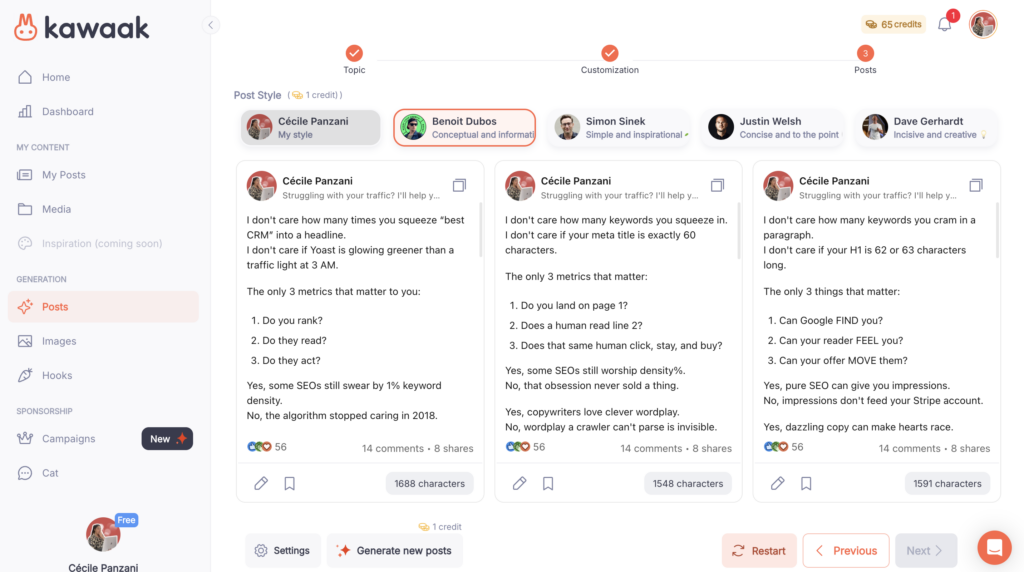
And best of all, Kawaak doesn’t stop at content generation. It also allows you to automate your editorial calendar, so you no longer have to rely on your daily motivation.
Turn your posts into leads with Waalaxy
A good post attracts attention. An excellent system turns that attention into opportunities.
That’s exactly where Waalaxy comes in. 💬
With Waalaxy, you can 👇
- Identify truly engaged profiles: Easily spot people who interact with your posts and show a real interest in your topics. Then import them into your prospecting campaigns. 👀
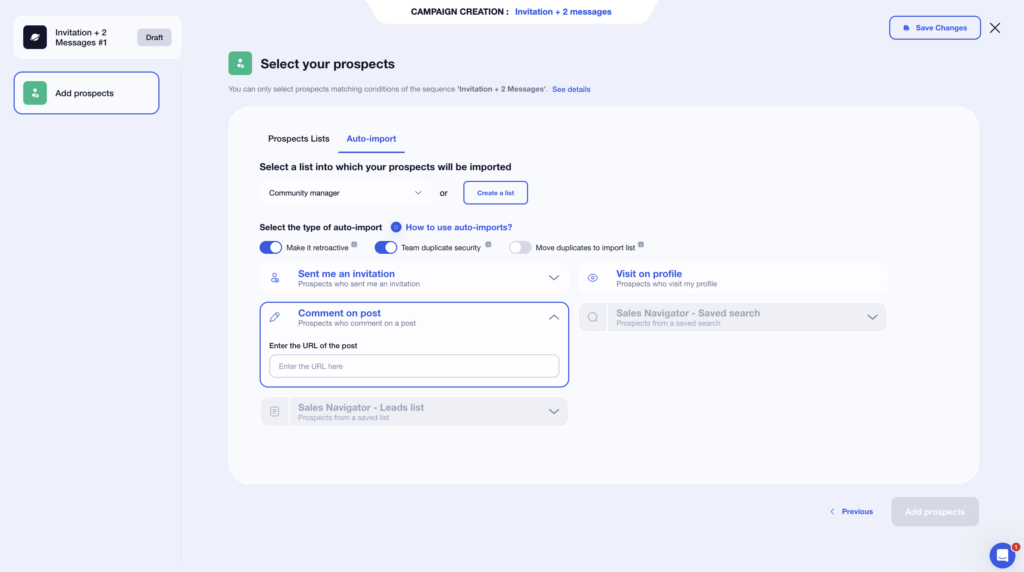
- Start personalized conversations: Engage in conversation naturally, building on existing interactions rather than sending cold messages. 💬
- Structure your LinkedIn prospecting: Set up a clear and progressive process without being intrusive or aggressive in your approach. 🤝
- Turn visibility into concrete opportunities: Use your posts as a gateway to qualified discussions, rather than as a direct sales channel. 💼
- Track clear performance indicators: Easily view response rates, conversations started, interested profiles, and opportunities generated to guide your prospecting. 📊
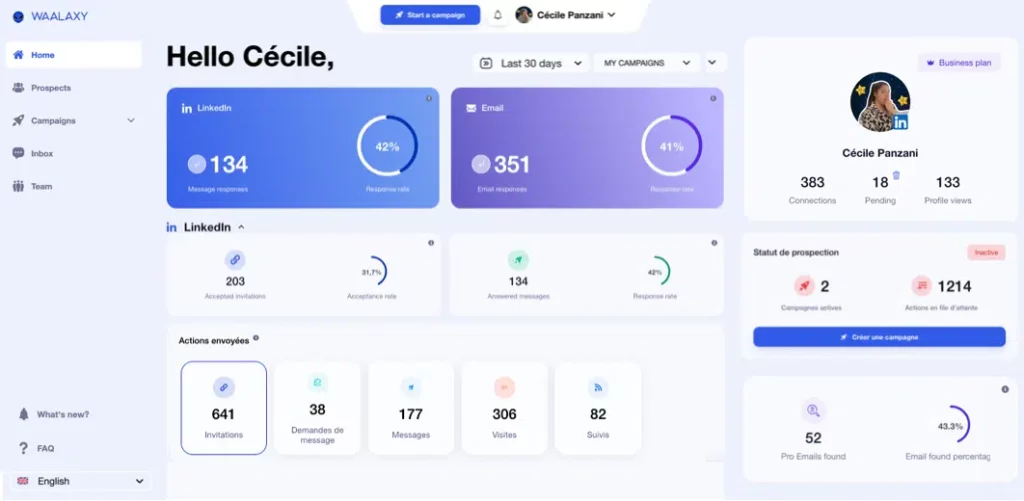
Prompts create impact, posts generate interest… and Waalaxy turns that interest into leads. 📈

Let’s recap on prompt for LinkedIn post, shall we?
Posting on LinkedIn should no longer be a source of stress. With the right prompt for LinkedIn post, you gain clarity, consistency, and impact without spending hours on it. ✨
Prompts help you structure your ideas, tools like Kawaak facilitate creation and consistency, and solutions like Waalaxy allow you to turn that visibility into real business opportunities. 💼
Ultimately, it’s not a question of writing talent but of method. And a good method can be learned… then optimized, post after post. 😉
Frequently asked questions
Is it allowed to use AI for LinkedIn?
Yes, using AI for Linkedin posts is completely allowed. 👍 LinkedIn does not prohibit the use of AI tools or prompts to write content. What matters is not how the post is written, but the value it brings to your audience.
However, LinkedIn penalizes content that is:
- Content that is too generic.
- Without a clear point of view.
- Copied and pasted without personalization.
- That looks like spam or aggressive sales tactics.
As long as you use AI as an assistant and not as an autopilot, you’re on the right track. Your experience, tone, and examples remain essential for long-term performance. 😌
How can I measure whether my prompt-generated posts are performing better?
The only real answer is the numbers. 📊 Compare your prompt-generated posts to your old content using these key indicators:
- Reach and impressions to see if your posts are more visible.
- Engagement rate (likes, comments, shares, saves) to measure real interest.
- Quality of comments: the longer and more detailed they are, the more relevant the content is.
- Private messages received, often the strongest signal in B2B.
- Business opportunities generated, i.e., appointments, incoming requests, collaborations, etc. 💼
Now you know everything there is to know about prompt for LinkedIn post. 🧚🏻♀️
 Elodie
04/02/2026
Elodie
04/02/2026 












