



When you are prospecting on LinkedIn, finding the right strategy or the right sequence is essential. A/B testing is a “scientific” approach that allows you to determine the optimal message for your campaigns. Let’s dive into it.
What is A/B testing?
A/B testing is a fairly simple and scientific technique. “Scientific” because it is based on quantified results. It consists of drafting two different messages (message “A” and message “B”), then sending these 2 messages to a representative sample of your prospects base. Doing so allows you to determine which message is the most effective.
Once you’ve found the message that works best, you can use it on the rest of your prospect base.

Why perform A/B tests?
When prospecting, it is important to test out your best strategies and iterate them. When prospecting on LinkedIn, the prospect base is almost infinite, so you will probably send a very large volume of messages. Under these circumstances, a variation as small as 5-10% in the response or acceptance rate can be huge in the end.
It is therefore important you carry out a certain number of tests and be rigorous in measuring performance before launching a frantic prospecting “strategy”.
How to implement A/B tests with ProspectIn
The golden rule of A/B testing is rigor. The differences between the approaches are, in most cases, quite subtle, and the differences in performance between one approach and the other are often – but not always – small. It is therefore essential you apply a lot of discipline in the execution of these tests, so that the results are meaningful and can positively impact your prospecting.
Get ProspectIn
1st step: target and import your prospects into ProspectIn
For A/B testing to be valid, an approach must be linked to a specific prospect (or persona) segment. Just because message A works very well for the prospect segment “Marketing director in the luxury industry”, does not mean it will be just as effective for the prospect segment “Sales freelance”.
When setting up an A/B test, the 2 messages (“A” message and “B” message) are therefore sent to the same and specific target.
See: How to master the LinkedIn standard search feature
Now that you’ve targeted and exported your prospects to ProspectIn, let’s go on to the next step.
2nd step: definition and distribution of messages
Once again, for A/B testing to be valid, it is crucial you send the message a minimum number of times. In general, we recommend each message is sent at least 100 times. Keep in mind that this is a minimum, but the more times a message is sent, the more significant the results.
The two messages must also be sent the exact same number of times.
Take the example of an A/B testing on the connection request, here we want to measure the acceptance rate of our invitation requests.
Start by defining your 2 messages “A” and “B” on ProspectIn. Keep in mind though that messages associated with connection requests (a “note”) are limited to 300 characters. See: What is the difference between “message” and “connection” on LinkedIn?
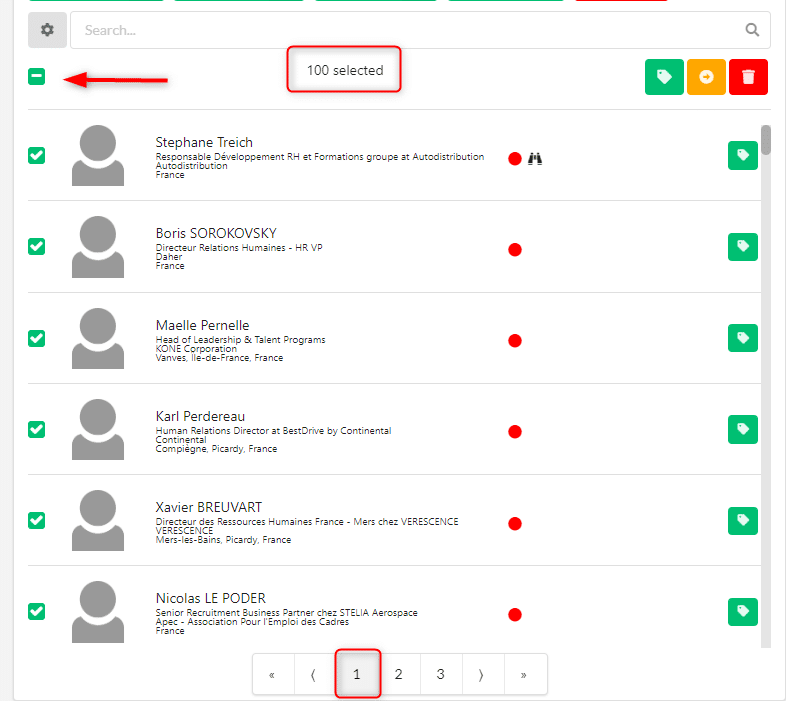
Once your 2 messages are ready, simply send your first message to your first 100 prospects by clicking once on the checkmark. Doing this will select all the prospects on the 1st page.
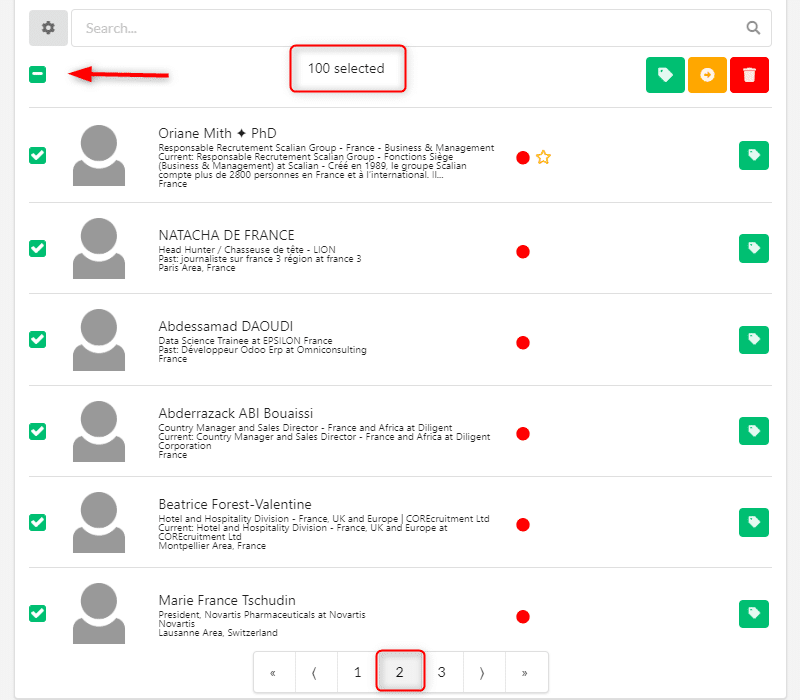
Then send your 2nd message to the next 100 prospects by selecting the 2nd page.
The actions are now in the queue and will be sent gradually – provided you have a LinkedIn tab open.
After a maximum of 3 days (quotas limit connection requests between 80 and 100 requests per day), all your requests will be sent.
3rd step: analysis of the results
In order for the results to be valid, you have to wait a minimum of 10 days. This essentially gives your prospects time to connect to LinkedIn to see your connection request – not everyone connects to LinkedIn every day 😉
Once this waiting period has passed, you only have to consult the results provided by ProspectIn for each of the notes.
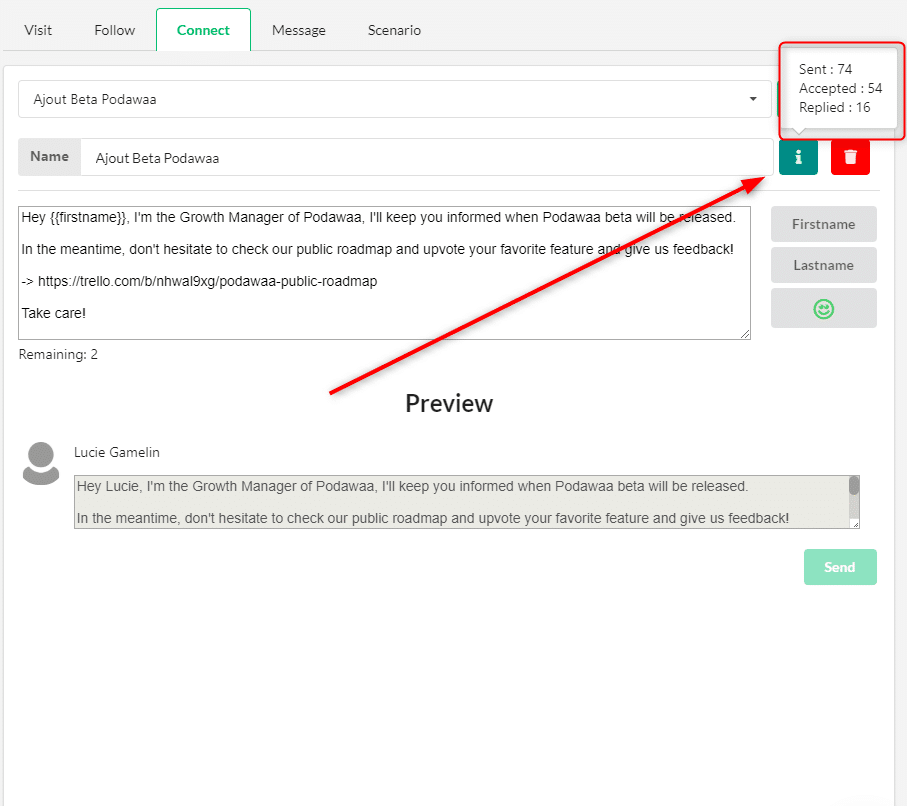
These results will help you determine which approach works best when it comes to acceptance rates.
Note that if you have a large number of prospects on which to perform A/B tests, you can iterate your tests as many times as you want.

A/B testing on messages
We have given here the example of an A/B test on a connection request, but it is also possible to set up A/B tests on messages. The principle remains exactly the same. The only difference is that you will have to already be connected with the prospects, and the response rate will be measured, as opposed to the acceptance rate.
 Toinon
23/01/2026
Toinon
23/01/2026 














