



- What is LinkedIn Teamlink ?
- How Does TeamLink Sales Navigator Improve Your Team’s Sales Performance?
- What are TeamLink’s limitations in lead generation?
- The 3 Steps to Using TeamLink Sales Navigator
- How Can You Automate TeamLink Sales Navigator?
- Let’s Recap TeamLink Sales Navigator
- Frequently Asked Questions: TeamLink Sales Navigator
When it comes to B2B prospecting, the hard part usually isn’t finding leads. It’s getting people to actually respond.
That’s where TeamLink Sales Navigator comes in. This feature helps you see whether someone on your team already knows the prospect you want to contact, so you can get a warm intro instead of relying entirely on cold outreach.
But spotting a connection doesn’t automatically book meetings.
In this article, we’ll break down how to use TeamLink, where its limits are, and how to turn it into a real prospecting advantage. 📈
What is LinkedIn Teamlink ?
TeamLink is a feature inside LinkedIn Sales Navigator that shows whether someone on your team is already connected to the prospect you’re targeting.
Instead of reaching out cold, you can tap into your team’s shared network to get warmer introductions and more credible outreach opportunities.
For sales teams working strategic accounts or running an ABM strategy, TeamLink makes it much easier to find the best way into a company.
How to use TeamLink Sales Navigator ?
It’s Here’s how it works.
Once TeamLink is activated in , LinkedIn scans your team’s connections to identify which prospects already know someone inside your company. At the same time, your teammates can also view your first-degree LinkedIn connections.
When you visit a prospect’s profile, or even browse search results, you’ll see which colleagues are connected to that person. From there, you can:
- Ask for a warm introduction.
- Request a referral.
- Or use the connection as context to make your outreach more relevant. 🎨
The goal isn’t to automate prospecting. It’s to make finding warm outreach opportunities much easier.
Is TeamLink Included in All Sales Navigator Plans?
Yes, but only in certain plans. 👀
TeamLink is included with Sales Navigator Advanced and Advanced Plus plans. Lower-tier subscriptions come with fewer collaboration features.
For small sales teams or SMEs, the value of TeamLink mostly depends on how strong your team’s already is. If your employees are well-connected in your industry, TeamLink can quickly become a powerful prospecting asset. But if your company has a smaller network, the impact will naturally be more limited.
What’s the Difference Between TeamLink and TeamLink Extend?
TeamLink helps sales teams identify which coworkers are already connected to specific prospects, making warm introductions easier.
TeamLink Extend takes things further by expanding visibility to employees who don’t even have a Sales Navigator license. That means you can unlock a much larger internal network.
| Feature | TeamLink | TeamLink Extend |
|---|---|---|
| Visible connections | Sales Nav Team | Broader corporate network |
| Sales Nav license required | Yes | No for added employees |
| Primary use | Sales collaboration | ABM approach at a larger scale |
What Is TeamLink Groups?
TeamLink Groups allows you to combine TeamLink networks from multiple contracts or organizations to further expand the connections available in Sales Navigator. This feature is primarily designed for large enterprises, international groups, or organizations with multiple sales teams spread across different LinkedIn contracts.
With TeamLink Groups, sales reps can access connections beyond their immediate team and collaborate across departments, regions, or subsidiaries to open doors faster.

How Does TeamLink Sales Navigator Improve Your Team’s Sales Performance?
The main benefit of TeamLink is that it transforms a cold outreach into a more credible first contact. Instead of reaching out with no context, you leverage an existing connection within your company. And in B2B prospecting, that makes a huge difference.
Why Warm Introductions Perform Better ?
Warm introductions consistently outperform standard cold outreach. In many cases, reply rates from warm intros can range from 30% to 70%, while traditional cold campaigns often struggle to pass the 10% mark.
That usually translates into:
- ✅ More positive responses.
- 📆 More meetings.
- 🔄 Shorter sales cycles.
- 👩🏻💼 Easier access to decision-makers.
For strategic accounts, the right warm introduction can unlock conversations that cold outreach would probably never reach.
LinkedIn TeamLink Really Shines in ABM Strategies
It’s especially in an ABM or Account-Based Prospecting context that the tool becomes valuable. With large accounts, the goal is no longer to contact a single person, but to increase the number of entry points into the company.
That’s exactly where TeamLink helps. The feature makes it easier to identify which coworkers can open specific doors based on the people you’re trying to reach. For example:
- An SDR might connect with operational teams.
- An AE can focus on decision-makers.
- And a founder can use their personal network to move strategic conversations forward faster.
For more structured sales organizations, it also helps keep SDRs, AEs, CSMs, and founders aligned by giving everyone visibility into the relationships that already exist inside a target account.
What are TeamLink’s limitations in lead generation?
Even though TeamLink improves access to prospects, it still falls short when it comes to execution. The biggest limitations are:
- 👀 It shows connections but does not automatically initiate any actions.
- ✍️ Introduction requests must still be made manually.
- 🔁 No built-in follow-up system.
- 📩 No multi-channel LinkedIn + email sequences.
- 📊 No tracking of performance or warm intro KPIs.
- 🤝 Reliance on colleagues to secure introductions.
- 🧩 Difficulty coordinating efforts between SDRs, AEs, and founders.
- 🌐 Not very useful if the team has a limited LinkedIn network.
- ⚠️ Feature quickly becomes underutilized without a clear ABM process.
Ultimately, it mainly helps identify a contact opportunity. But without a real strategy behind it, seeing a prospect connected to a colleague doesn’t guarantee a conversation or a meeting.

The 3 Steps to Using TeamLink Sales Navigator
Simply having access to your team’s LinkedIn connections won’t magically generate more meetings. To actually get results from TeamLink Sales Navigator, you need a simple and repeatable process.
1. Identify the Right Accounts and Map Connections
Start by pinpointing the high-value accounts you want to target. Then, use it to see who on your team already has relationships inside those companies. The goal is to :
- 🎯 Prioritize strategic accounts.
- 🕸️ Map out your team’s existing connections.
- 👥 Figure out which decision-makers are easiest to reach.
- 🚪 Find the best entry point into the company.
The stronger your team’s LinkedIn network is, the more valuable TeamLink becomes for opening doors inside key accounts.
2. Request a Warm Introduction
The best warm introductions feel natural and low-pressure. What you want to avoid is an awkward intro request or a generic message with zero context.
Briefly explain why you want to contact the person and provide a clear angle to help your colleague craft a relevant introduction. The simpler the message, the higher the chances of getting a quick connection.
Example Slack message:
“Hey Sarah, I noticed you’re connected with Laura at Waalaxy. I’d love to reach out to her about ABM and international prospecting. Would you mind introducing us?”
3. Track the Right TeamLink KPIs
Just like any outbound strategy, TeamLink needs a few key performance indicators to measure what’s actually working. The most useful metrics to track are:
- 📈 Warm intro acceptance rate.
- 💬 Response rates for warm outreach vs. cold outreach.
- 📅 Meeting booking rate.
- ⚡ Sales cycle length.
- 🏢 Accounts opened thanks to internal connections.
- 🙋🏻♀️ New customers generated through warm intros.
This data helps you understand whether it’s truly improving your pipeline or simply showing connections without generating real sales opportunities.
How Can You Automate TeamLink Sales Navigator?
TeamLink Sales Navigator is great for spotting warm opportunities but it doesn’t actually do the outreach for you. To generate real results, you need to plug it into a prospecting workflow with clear next steps after every connection is identified.
Turn Connections Into Actual Outreach
TeamLink shows you that a colleague already knows a prospect or someone in the target account. This is valuable information, but on its own, it doesn’t generate messages, responses, or meetings.
The challenge, therefore, is to turn this visibility into sales action. As soon as an interesting connection is identified, the team must know what to do next: request an introduction, draft a personalized message, determine who takes the lead, and track progress.
Without this process, it risks becoming a feature that’s checked occasionally but rarely used in actual prospecting. With a clear workflow, every connection becomes an actionable opportunity. 😎
Combine Warm Intros With Multichannel Prospecting
A warm intro is usually a great way to start a conversationbut it’s not always enough on its own. Sometimes prospects don’t reply right away. Sometimes they forget the message. And sometimes they need several touchpoints before engaging.
That’s where Waalaxy comes in. TeamLink helps identify the best entry point, while Waalaxy lets you execute the entire prospecting process. From a detected connection, you can launch automated sequences on LinkedIn and via email, send personalized invitations, schedule follow-ups, and track responses all within a single workflow.
Waalaxy also lets you take your sales execution much further with:
- 📩 Ready-to-use multi-channel LinkedIn and cold email campaigns.
- 🔎 A built-in Email Finder to retrieve professional email addresses directly from LinkedIn.
- 🤖 An AI-powered lead scoring system to identify the most engaged prospects.
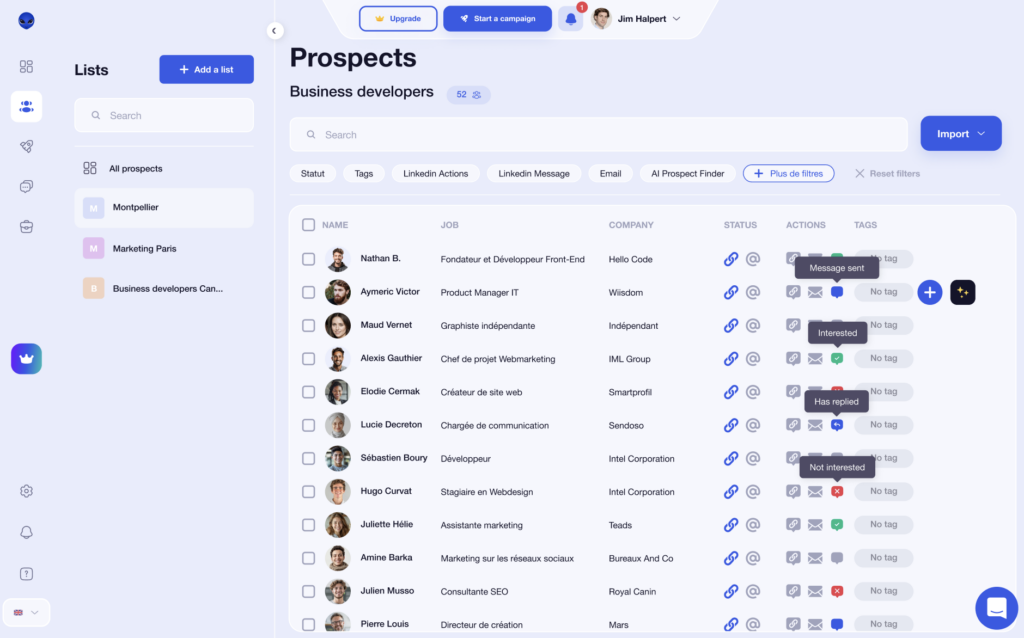
- 💬 A unified inbox to centralize all conversations.
- 📊 Dashboards to track campaign performance.
- 🔗 Native integrations with HubSpot, Salesforce, Pipedrive, and noCRM.
With the Team Plan, sales teams can also share templates, collaborate across multiple LinkedIn accounts, and organize prospecting much more efficiently.
The goal isn’t to replace the human side of sales. It’s to make sure warm opportunities discovered through TeamLink don’t slip through the cracks and to turn LinkedIn connections into real sales conversations.
For example, an SDR can request an internal introduction via TeamLink, then add the prospect to a Waalaxy campaign with a personalized LinkedIn invitation, a follow-up message, and a reminder email. The approach remains human, but it becomes much more structured and scalable.
Let’s Recap TeamLink Sales Navigator
TeamLink Sales Navigator can absolutely help sales teams start conversations faster by using existing LinkedIn connections inside the company. For ABM strategies and key accounts, it’s a powerful way to reach decision-makers faster and create warmer entry points into target accounts. 👩🏻💻
But the feature stops at showing connections.
To turn those opportunities into meetings and real pipeline growth, you still need a solid outreach process with follow-ups, multichannel campaigns, and clear sales execution.
That’s exactly why it becomes much more powerful when combined with tools like Waalaxy helping teams turn a simple LinkedIn connection into an actual sales opportunity.
Frequently Asked Questions: TeamLink Sales Navigator
Can My Employer See My LinkedIn Activity With Sales Navigator?
Yes, in some situations. If you use Sales Navigator through a company license, admins may be able to see certain usage data, including saved accounts, TeamLink connections, or general Sales Navigator activity metrics. 📈
However, your company generally cannot see your private LinkedIn messages, password, or personal activity outside of Sales Navigator.
Does TeamLink Work for Small and Medium-Sized Businesses (SMBs)?
Yes, it can also be useful for SMEs, especially if the team already has a strong LinkedIn network in their industry. Even with a small team, a few well-placed connections can help initiate conversations more quickly with decision-makers who are hard to reach through traditional cold outreach.
On the other hand, if the company has few relevant connections or a very small team, the impact of TeamLink will inevitably be more limited. 🙃
Who Can See My Connections With Sales Navigator TeamLink?
With TeamLink, members of your Sales Navigator team can see if you’re connected to certain prospects or clients on LinkedIn.
However, they do not have access to your private conversations or LinkedIn messages. The tool only displays the existence of the connection to facilitate internal introductions.
Does TeamLink Replace Traditional Prospecting?
No, it does not replace a comprehensive prospecting strategy.
The tool primarily helps identify the best entry points into an account through your team’s connections. But behind the scenes, you still need to manage outreach, follow-ups, LinkedIn messages, and
In practice, TeamLink primarily acts as a lead generation accelerator. It improves the quality of entry points but does not replace multichannel sequences or daily sales efforts.
Is Sales Navigator Advanced or TeamLink Extend Worth It?
For smaller sales teams, the standard feature included in Sales Navigator Advanced is often enough to get warm introductions more easily.
But for larger organizations running ABM campaigns across multiple teams, TeamLink Extend becomes much more valuable because it unlocks a much wider internal network.
What’s the Difference Between TeamLink and SmartLinks?
Even though both features are included in Sales Navigator, they play very different roles in the sales process. TeamLink helps you identify warm entry points into an account, while LinkedIn SmartLinks focuses more on understanding how prospects engage with your content after outreach. ☎️
| Feature | TeamLink | SmartLinks |
|---|---|---|
| Main objective | Identify internal connections | Share marketing content |
| Usage | Warm introductions and networking | Tracking prospect engagement |
| Type of action | Before making contact | After making contact |
| Data displayed | Your team’s relationships | Time spent on content |
| Business value | Initiate conversations | Qualify prospect interest |
| Use cases | ABM, multi-threading, key accounts | Sales enablement, sales follow-ups |
Now you know everything there is to know about TeamLink Sales Navigator ! 🧚🏻♀️
 Elodie
17/06/2026
Elodie
17/06/2026 













