



- Waalaxy auto-import: the basis for automatically scraping LinkedIn profiles
- How and when to use auto-import to scrape LinkedIn profiles?
- Tutorial: how to scrape LinkedIn profiles with Waalaxy auto-import
- 3 Best practices for using Waalaxy auto-import effectively
- Manual scraping vs. Waalaxy auto-import: what’s the real difference?
- How about a recap?
- FAQ for this article
Want to run 100% automated prospecting campaigns where new prospects are added every day?
That’s what Waalaxy lets you do with its auto-import feature! 😄
Scraping LinkedIn profiles automatically is one of the most effective ways to scale outbound prospecting without manual work.
That’s precisely what Waalaxy offers with its auto-import feature. 👽
In this article, you’ll learn how to scrape LinkedIn profiles using Waalaxy’s auto-import feature:
- Profile visitors.
- Post commenters.
- Received invitations.
- Prospects from Sales Navigator.
Here, there is no theory on LinkedIn scraping or comparison of external tools. The goal is simple: to show you how to use Waalaxy’s auto-import feature to enrich your campaigns with relevant LinkedIn profiles in a structured way! ✒️
Let’s get straight to it. (Reading time: 6 minutes)
Waalaxy auto-import: the basis for automatically scraping LinkedIn profiles
To scrape LinkedIn profiles efficiently and continuously, Waalaxy relies on a key feature: auto-import. 🔑
Unlike manual import, auto-import allows you to automatically add new LinkedIn profiles to a prospecting campaign, based on specific criteria defined in advance.
The goal is simple: to automatically feed your campaigns while maintaining a high level of control over the imported profiles. 🔄
There are three ways to import prospects into Waalaxy. ⤵️
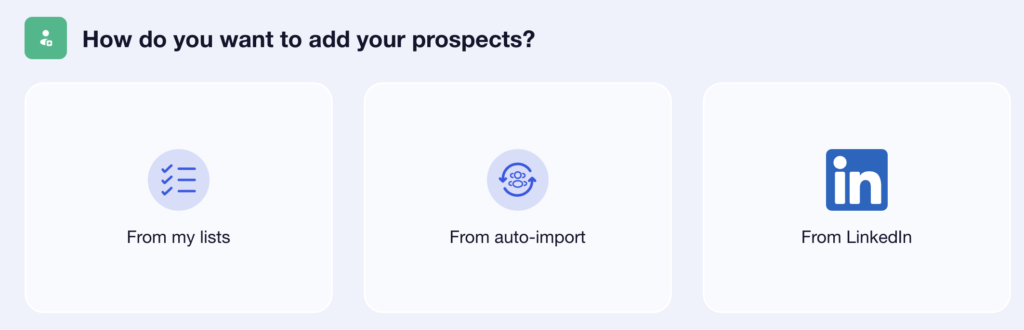
Auto-import works like a trigger: as soon as a LinkedIn profile matches the defined conditions (profile visit, comment on a post, invitation received, addition to a Sales Navigator list, etc.), it is automatically imported into the relevant campaign. 👀
This approach allows you to scrape profiles correctly and automatically, without having to regularly restart manual imports. Once the campaign is active, Waalaxy takes care of retrieving new matching profiles, even when your computer is turned off or the LinkedIn tab is inactive, thanks to its cloud-based operation. ☁️
Auto-import is therefore the ideal basis for automatically scraping LinkedIn profiles with Waalaxy while maintaining a clean, scalable, and prospecting-oriented logic.

How and when to use auto-import to scrape LinkedIn profiles?
Waalaxy auto-import allows you to scrape LinkedIn profiles automatically based on a specific trigger, chosen when you create your campaign. 🌿
Each type of auto-import corresponds to a specific action or signal on LinkedIn (profile visit, comment, invitation, etc.).
In practical terms, data is not retrieved continuously. 🔄
When you launch a campaign with auto-import, an initial retrieval is performed immediately. The auto-import then runs every 12 hours to identify and import new LinkedIn profiles that match the defined criteria.
Auto-import is configured directly when you create your campaign:
- From the Campaigns tab, click on Create a campaign.
- Select the prospecting sequence you want to use.
- In the Add Prospects step, choose an existing prospect list.
- Then click on “Auto-import” and choose the type of auto-import that suits your needs.
- Enable or disable the Retroactive option, depending on whether you want to retrieve profiles that match the criteria before the campaign launch.
- Save, then launch your campaign. 🚀
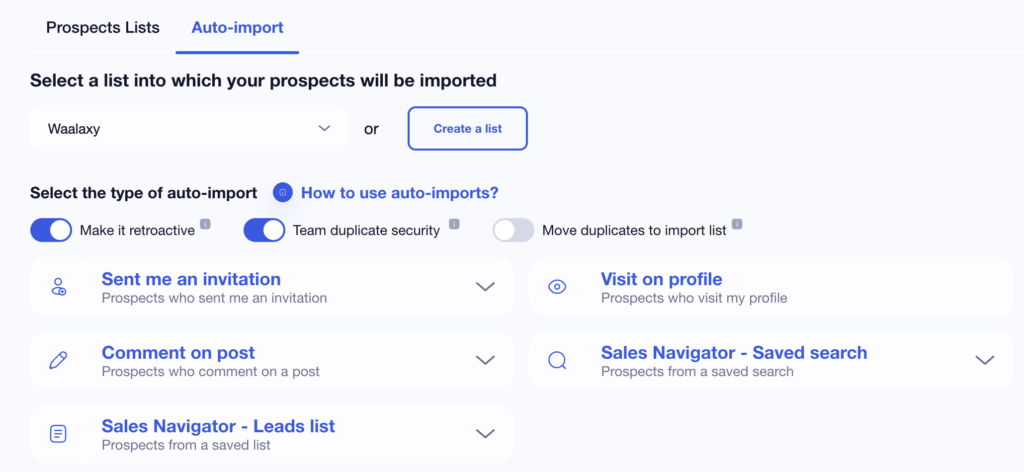
Once the campaign is active, auto-import works autonomously.
LinkedIn profiles that match the defined criteria are added automatically, without any manual action, even when your computer is turned off or the LinkedIn tab is inactive, thanks to the convenient cloud-based operation. 😏
This logic allows you to scrape LinkedIn profiles while maintaining a good level of leads, ensuring that your prospecting campaigns are continuously updated.
Tutorial: how to scrape LinkedIn profiles with Waalaxy auto-import
Here’s how to apply this in real prospecting scenarios; let’s move on to the more practical part. 😏
For each method, you will see:
- When to use it.
- You will also learn how to configure auto-import step by step.
- Why this type of LinkedIn profile scraper is particularly effective for prospecting.
1) LinkedIn scraping: profiles of people who comment on a post
Scraping LinkedIn profiles of people who comment on a post is one of the most effective uses of Waalaxy auto-import. 💪🏼
A linkedin comments scraper shows real interest. The person has interacted publicly with your content, which makes it a strong entry point for outreach. 😇
With auto-import, Waalaxy automatically retrieves the LinkedIn profiles of new commenters and adds them directly to a campaign, without any manual intervention.
Why comments and not likes? 🤔
People who like a LinkedIn post are not automatically retrieved because LinkedIn does not provide this data in a chronological and structured manner. 😕
On a post with several hundred or thousand likes, this would mean multiplying the number of requests at very short intervals.
This could quickly be interpreted as automated behavior (a bot) and therefore non-compliant by LinkedIn. 😅
On the other hand, comments are ranked chronologically, which allows Waalaxy to scrape LinkedIn profiles gradually, every 12 hours (and thus avoid restrictions). 👀
Please note: importing people who like a post directly from that post will be available soon.
Setting it up couldn’t be easier:
- Create a new campaign or open a current campaign.
- At the “How do you want to add your prospects?” step, click on “From my lists.”
- Then choose “Auto-import.”
- Select the “Commented on a LinkedIn post” option.
- Add the LinkedIn URL of the relevant post.
- Confirm and launch your campaign.
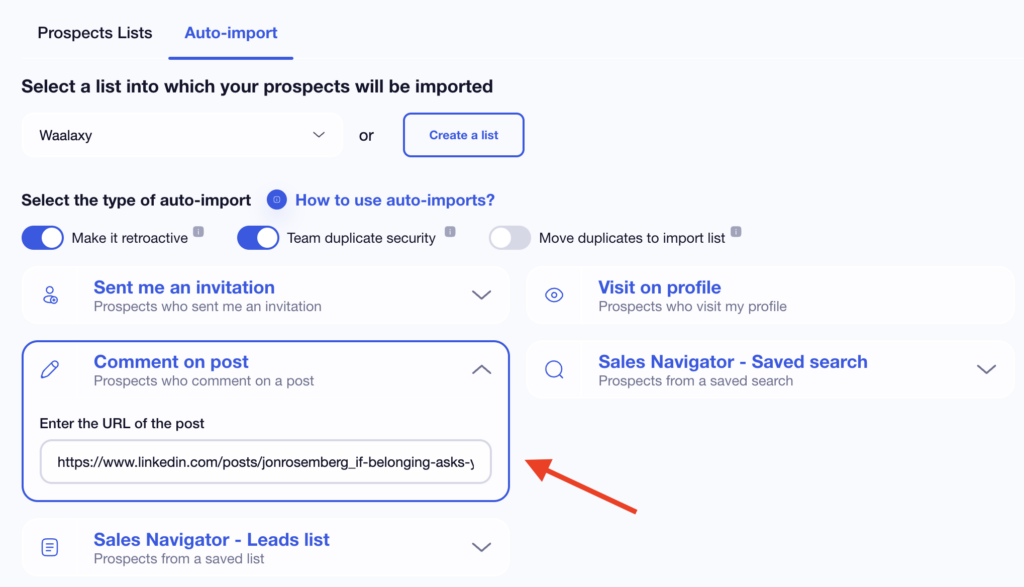
This method is very convenient for webinars, high-engagement posts, and lead magnets. 👀
2) LinkedIn scraper profiles of visitors to your profile
Scraping the LinkedIn profiles of people who visit your profile is a great way to connect with prospects who are already interested in your business!
A visit shows that the prospect is intrigued by you and what you do, which is useful for B2B prospecting. ☺️
How does it work?
When this auto-import is enabled, Waalaxy checks for new visitors to your LinkedIn profile every 12 hours. ⏰
The corresponding profiles are then automatically scraped and added to the associated campaign.
This feature ensures that you never miss a prospect who has shown an interest in your profile, while keeping your prospecting smooth and continuous.
However, on the free version of LinkedIn, only the last four profile visits are visible.
If your profile has many visits, a LinkedIn Premium or Sales Navigator subscription may be necessary to take full advantage of this feature. 😇
The setup is quite similar to the others, except that you select “Visited my profile.”
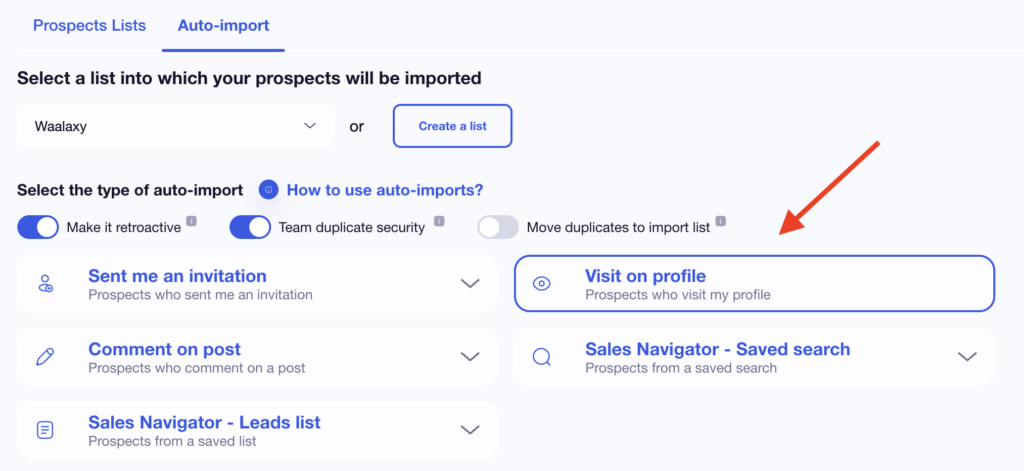
This method is ideal for starting a conversation with prospects who are already curious about your profile, while their interest is still fresh. 👀
3) Scrape the LinkedIn profiles of people who send you an invitation
When this auto-import is enabled, Waalaxy regularly analyzes new connection requests received on your LinkedIn account. 👀
The profiles corresponding to these invitations are then automatically scraped and added to the associated campaign.
There is one point to note here: if you accept or decline an invitation before Waalaxy has had time to process it, the profile cannot be imported. It is therefore recommended that you let the auto-import run before manually managing your connection requests. 😇
To set this up, follow the same steps as for the others:
- Create a new campaign or open a current campaign.
- At the “How do you want to add your prospects?” step, click on “From my lists.”
- Then choose “Auto-import.”
- Select the “Sent me an invitation” option.
- Check or uncheck “Automatically accept invitations.”
- Confirm and launch your campaign.
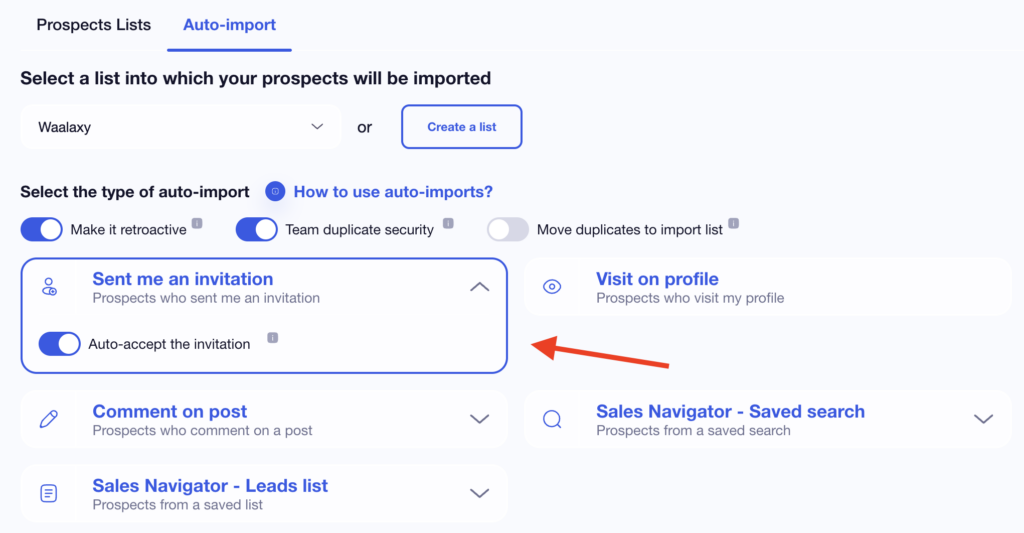
Once the campaign is active, Waalaxy will automatically import LinkedIn profiles corresponding to new invitations received, according to the auto-import schedule. This removes the need for manual follow-up. 😏
This method is useful for sending a personalized welcome message, quickly qualifying a new contact, or automatically integrating these profiles into a tailored prospecting sequence.
4) Automatically scrape new profiles from a saved search (Sales Navigator)
With , you can save a search with your criteria (job title, industry, company size, location, etc.). LinkedIn then highlights new profiles that match this search over time. 👀
Thanks to Waalaxy’s auto-import feature, these new profiles can be automatically scraped and sent directly to a prospecting campaign. 💬
How does it work? 🤔
Once auto-import is activated, Waalaxy will check every 12 hours to see if any new LinkedIn profiles appear in your saved Sales Navigator search.
The matching profiles are then automatically imported into the associated campaign, without any manual action.
This method allows you to scrape LinkedIn profile data as they become available, based on advanced targeting criteria defined in advance in LinkedIn Sales Navigator.
To set this up, keep the same configuration, but simply click on “Sales Navigator – Saved Search.”
Once this is active, the campaign automatically updates with new matching LinkedIn profiles.
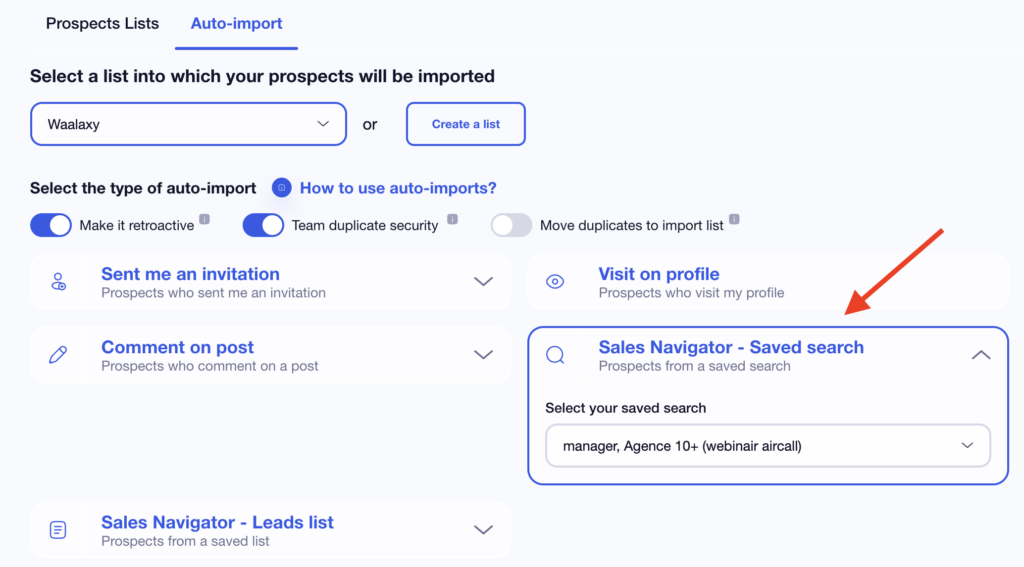
This method is very useful for maintaining a constant flow of new prospects, automating highly targeted prospecting, or taking full advantage of Sales Navigator’s advanced filters. 👀
5) Scrape LinkedIn profiles added to a Sales Navigator list
Sales Navigator lists allow you to manually group LinkedIn profiles that meet your criteria.
They are often used to track strategic prospects or prepare targeted prospecting actions.
When this auto-import is enabled, uses the selected Sales Navigator list. 👀
As soon as a new LinkedIn profile is added to this list, it is automatically imported into the associated campaign. 🔄
To set it up, follow the same steps as above, with one small difference at the end:
- Create a new campaign or open a current campaign.
- At the “How do you want to add your prospects?” step, click on “From my lists.”
- Then choose “Auto-import.”
- Select the “Sales Navigator – Prospect List” option.
- Choose the list, then click “Validate.”
- All you have to do now is launch your campaign.
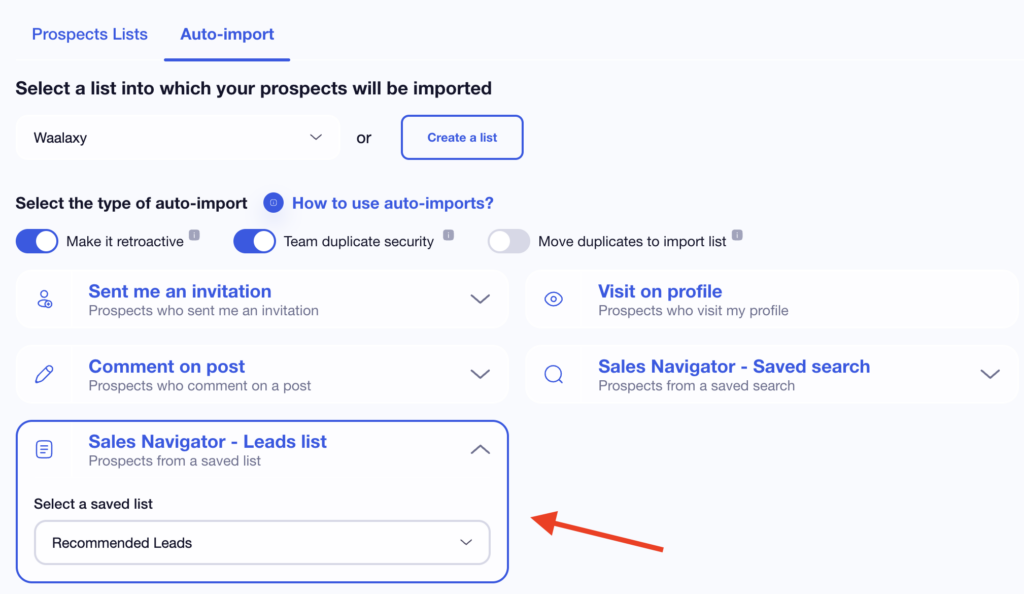
This method is ideal if you want to maintain control over profile selection, structure your prospecting by lists, or combine manual qualification with automation.

3 Best practices for using Waalaxy auto-import effectively
We like you, so we thought we’d give you three best practices for using auto-import on Waalaxy. Don’t thank us. 🎁
1) Only activate auto-import on truly qualified signals.
To scrape LinkedIn profiles effectively, not all triggers are created equal…
Auto-import works best when based on a clear signal of interest, such as: 👇🏼
- People who comment on a LinkedIn post.
- Visitors to your profile.
- Invitations received.
- Profiles from Sales Navigator searches or lists.
Conversely, multiplying auto-imports based on overly broad signals can lead to the import of poorly qualified profiles, and this reduces campaign efficiency 👀.
Fewer auto-imports, but better targeted, allow you to scrape LinkedIn profiles that are more relevant and, above all, easier to engage with.
2) Structure your campaigns as soon as you import LinkedIn profiles
Auto-import allows you to scrape LinkedIn profiles automatically, but you condition the performance of your campaigns upstream. Let me explain.
When creating a campaign, it is advisable to: ⤵️
- Use separate lists depending on the type of auto-import.
- Add clear tags (commenter, visitor, invitation, etc.).
- Adapt the prospecting sequence to the context of the imported profile.
If your database is well organized, your prospecting will be smooth, and your prospecting messages will be more relevant. 😇
3) Regularly check active auto-imports to maintain a good database
Even though auto-import works autonomously, you still need to check it from time to time (like a good stew 🧆).
Over time, some triggers may become less relevant or generate profiles that are already in your lists. 😅
Don’t panic; here’s what to do:
- Verify active auto-imports every week.
- Analyze the imported volumes.
- Deactivate those that no longer add value.
- Adjust the settings according to your prospecting goals.
This allows you to continue scraping LinkedIn profiles efficiently while avoiding duplicates and unnecessary imports.
Manual scraping vs. Waalaxy auto-import: what’s the real difference?
If, after all that, you’re still not convinced to do it automatically and you continue to do web scraping, here’s the difference in practice: the ultimate table! ⤵️
| Criterion | Manual scraping of LinkedIn profiles | Waalaxy auto-import |
|---|---|---|
| Time required | High (repetitive actions, copy-paste) | Automated |
| Adding new profiles | Manual and occasional | Automatic and continuous |
| Campaign updates | Manual | Every 12 hours |
| Risk of missing prospects | High | Low |
| Scaling | Limited | Scalable |
| Profile organization | To be managed manually | Structured upon import |
| Campaign use | Delayed | Immediate |
| Monitoring over time | Restrictive | Centralized |
So, convinced? 😏
How about a recap?
At first, auto-import looks like a simple feature. In practice, it changes how prospecting works.
Then you start using it:
- 🔵 A comment on a post → a new profile added automatically.
- 🔵 A profile visit → a prospect integrated effortlessly.
- 🔵 A Sales Navigator search → a campaign that feeds itself.
Then, little by little, prospecting improves, with less copying and pasting, fewer oversights, and less time spent on campaigns.
More time for what really matters: 👇🏼
- Refining your LinkedIn messages.
- Follow up on responses.
- Turning LinkedIn profiles into qualified sales opportunities.
Automatically scraping LinkedIn profiles with Waalaxy auto-import isn’t about doing more prospecting.
It’s about doing it better, with a structured, continuous method designed to last. 🌞
If you’re looking to intelligently automate your LinkedIn prospecting, auto-import is clearly the solution. 😇
FAQ for this article
Is it possible to scrape LinkedIn profiles, and is it legal?
Scraping is not illegal in itself, but it depends on the type of data collected and how it is used. ☑️
Here are a few points to consider: 👇🏼
- Publicly available data (name, position, and company displayed on a profile) can be collected, subject to compliance with applicable regulations.
- In Europe, the GDPR applies when the data concerns identifiable individuals (clear and legitimate purpose, proportionate use of data, and respect for individual rights).
- LinkedIn’s terms of use also govern access to and use of data available on the professional social network.
Waalaxy’s auto-import feature relies solely on data accessible from your LinkedIn account and on clear actions (profile visits, comments, invitations, etc.). It does not provide access to private or hidden data.
How can I extract data from my LinkedIn account?
There are several ways to extract data accessible from your LinkedIn account, depending on your needs and objectives. 👀
The simplest and most structured method is to use a tool connected to your LinkedIn account, such as Waalaxy, which automatically extracts certain profiles from this social network based on specific actions:
- People who visit your profile.
- People who comment on your posts.
- Invitations received.
- Profiles from LinkedIn searches or Sales Navigator lists.
Thanks to auto-import, these profiles are retrieved over time and integrated directly into your campaigns, without manual export or external processing. 😏
What does “retroactive” mean for auto-import?
By enabling retroactivity, all people who match the criteria before the first auto-import is run will also be imported.
For example, for a LinkedIn post, if you have enabled retroactivity, comments that have already been posted will be retrieved. If you do not enable it, only new people who comment will be imported into the campaign.
Can ChatGPT scrape LinkedIn profiles?
No, ChatGPT cannot scrape LinkedIn profiles. 👀
ChatGPT does not have direct access to LinkedIn, cannot browse private profile data, and cannot extract information from LinkedIn pages automatically.
Scraping LinkedIn profiles requires specialized tools or scripts, and it may violate LinkedIn’s Terms of Service depending on how it’s done. 😇
Now you know everything there is to know about automatically scraping LinkedIn profiles! 😇
 Toinon
26/06/2026
Toinon
26/06/2026 














