



If you type “Jasper AI reviews” into Google, you’ll find a mix of positive and negative results, pretty normal when you’re researching an AI writing tool or looking for a reliable Jasper AI review.
But you’re here for the real answer.
This Jasper AI review breaks down what the tool actually does, how it works, and whether it’s still competitive compared to newer AI writing assistants. 👀
We’ll also look at Jasper pricing, its free trial options, and the best Jasper AI alternatives if you’re comparing tools.
And because I know you’re curious, here’s a summary table. ⤵️
| Features | Jasper AI | Kawaak | Writesonic | Waalaxy | Jenni.ai | Rytr | Copy.ai | Copysmith |
|---|---|---|---|---|---|---|---|---|
| Long article generation | ✅ | ❌ | ✅ | ❌ | ⚠️ (co-writing) | ⚠️ | ⚠️ | ❌ |
| Optimized LinkedIn posts | ⚠️ | ✅ | ⚠️ | ❌ | ⚠️ | ❌ | ⚠️ | ❌ |
| Brand Voice / Custom Tone | ✅ | ⚠️ (user tone) | ⚠️ | ❌ | ⚠️ | ❌ | ❌ | ❌ |
| Integrated AI images | ❌ | ✅ | ⚠️ | ❌ | ❌ | ⚠️ | ❌ | ❌ |
| Integrated SEO tools (Surfer, optimization) | ⚠️ (depending on plan) | ❌ | ✅ | ❌ | ❌ | ❌ | ❌ | ❌ |
| Co-writing/assistance sentence by sentence | ❌ | ⚠️ | ❌ | ❌ | ✅ | ❌ | ❌ | ❌ |
| High-volume production | ✅ | ❌ | ⚠️ | ❌ | ❌ | ❌ | ⚠️ | ⚠️ |
| Automation/workflows | ⚠️ | ❌ | ⚠️ | ⚠️ (prospecting) | ❌ | ❌ | ⚠️ | ⚠️ |
| Multilingual | ⚠️ (Average FR) | ❌ | ✅ | ❌ | ⚠️ | ⚠️ | ⚠️ | ❌ |
| Team collaboration | ✅ | ⚠️ (advanced plans) | ⚠️ | ⚠️ | ❌ | ❌ | ❌ | ⚠️ |
| Prospecting/lead generation | ❌ | ❌ | ❌ | ✅ | ❌ | ❌ | ❌ | ❌ |
| Integrated CRM | ❌ | ❌ | ❌ | ⚠️ (mini-CRM) | ❌ | ❌ | ❌ | ⚠️ |
| Advanced integrations | ⚠️ | ❌ | ⚠️ | ✅ | ❌ | ❌ | ⚠️ | ⚠️ |
| API available | ⚠️ (Business) | ❌ | ✅ | ⚠️ | ❌ | ❌ | ⚠️ | ✅ |
| Ideal long content/SEO | ✅ | ❌ | ✅ | ❌ | ⚠️ | ⚠️ | ⚠️ | ❌ |
| Ideal LinkedIn content | ⚠️ | ✅ | ⚠️ | ❌ | ⚠️ | ❌ | ⚠️ | ❌ |
| Ideal for e-commerce/product pages | ⚠️ | ❌ | ⚠️ | ❌ | ❌ | ⚠️ | ⚠️ | ✅ |
| Ideal for sales/SDR teams | ❌ | ❌ | ❌ | ✅ | ❌ | ❌ | ❌ | ❌ |
Alright, get comfy; this will take you about 7 minutes (reading time: 7 minutes) 🫖.
So what exactly is Jasper AI (formerly Jarvis)?
If you’re new to Jasper AI, imagine a writing assistant that never sleeps, doesn’t drink coffee, and never complains about your deadlines. Handy, right? 😇
Jasper is essentially an AI writing assistant built to speed up content creation
More seriously, Jasper AI is an AI-powered content generation tool designed to help businesses, freelancers, and writers produce blog articles, video scripts or emails.
In short, anything that requires words. 📝
Jasper positions itself as an AI writing assistant built for marketers, creators, and teams who need a fast, scalable content generator.
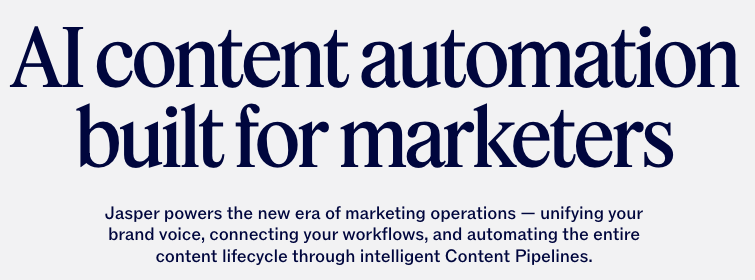
The goal is to help you write faster, with a consistent tone, and without getting stuck staring at a blank page. 📃
Jasper AI is primarily aimed at writers, content managers, startups/growth hackers, and content creators.
On the technical side, the tool works on the basis of language models (LLM) and a proprietary layer that allows you to add your tone, briefs, and preferences.
Now, let’s see what it can actually do. 👀
Jasper AI main features
Let’s get straight to it. Here’s a quick overview of what it offers. ⤵️
1) Content generation (templates + Jasper Chat)
This is the heart of it all. Jasper offers dozens of templates:
- Blog articles.
- Product descriptions.
- Marketing emails.
- LinkedIn or Instagram posts.
- Video scripts.
- Advertising.
You choose a template, provide a brief, approve it, and Jasper generates it.
If you prefer a more interactive experience, there’s Jasper Chat, a conversational assistant that lets you create questions and generate content quickly. 💬
Many users also see Jasper as an all-in-one AI writing tool with built-in workflows for long-form content.
2) Brand voice
Brand Voice is one of the Jasper AI features that sets it apart from most competitors. 👀
This is the feature that sets Jasper apart from other alternatives. You can train the tool on: ⤵️
- Your tone.
- Your existing text.
- Your personal branding.
- Your editorial guidelines.
Few tools like Jasper offer this type of customization.
As a result, Jasper tries to write like you, which is perfect if you manage a brand or a team.
3) Workflows and long documents
If you work with others, Jasper is useful for:
- 🔵 Organizing projects.
- 🔵 Creating long documents (SEO articles, white papers).
- 🔵 Marketing workflows.
With it, you can create:
- 🟣 A brief.
- 🟣 An outline.
- 🟣 Multiple sections.
- 🟣 Social media variations.
All of this is centralized in a fairly user-friendly interface.
4) Multilingual
J asper ai writing assistant can write in over 30 languages, including French. Handy if you work in international markets. ✈️
However, in French, the texts are sometimes a little flat, and you can tell they come from the United States. 🇺🇸
5) Integrations and extensions
Jasper offers several useful connections: 👇🏼
- SurferSEO (for SEO optimization).
- Google Docs.
- CMS.
- Zapier/Make.
- Browser with Chrome extension.
The strengths and limitations of Jasper AI
To save you from reading a novel, here’s a summary. ⤵️
These pros and cons cover what Jasper AI’s advanced AI system provides and where it still falls short.
| ✅ Key features | ⚠️ Limitations |
|---|---|
| Excellent generation speed (perfect for producing a lot, quickly) | High price compared to some alternatives |
| Very strong brand voice to maintain a consistent tone | Results can sometimes be generic if your brief is too short |
| Tool designed for teams and large volumes | Some learning curve to set it up correctly |
| Comprehensive workflows for blog articles, web pages, and campaigns | Quality in French sometimes “ly translated,” or a little flat |
| Useful integrations (SurferSEO, CMS, Zapier, etc.) | No free plan to test it out |
| Pleasant, stable, and professional interface | May be overkill for solo creators or small teams |
What are Jasper’s rates?
If you’re searching for Jasper AI pricing or wondering whether there’s a Jasper AI free plan, here’s how the subscriptions works. 👇🏼
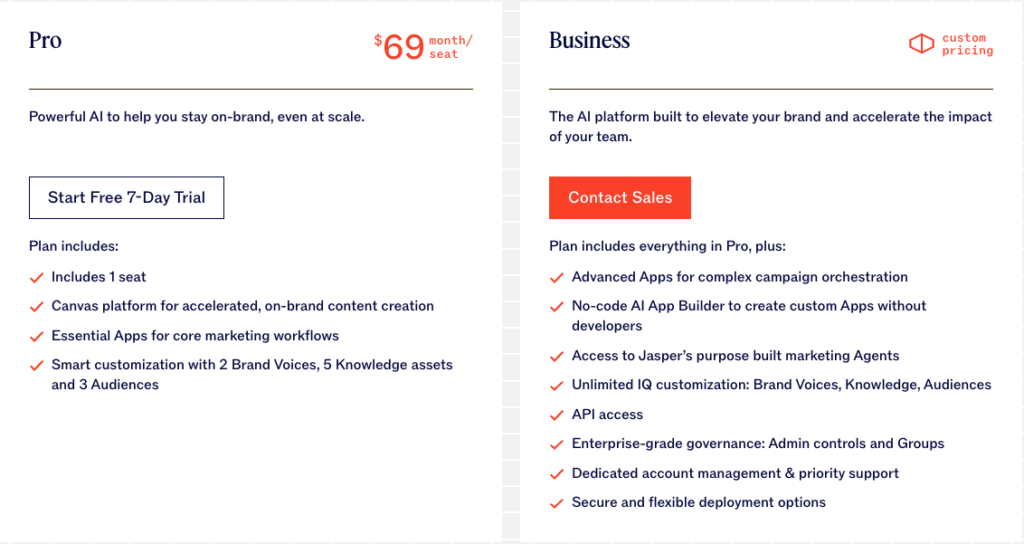
Jasper AI login is required to access billing, features, and your workspace.
While Jasper doesn’t offer a full free version, some users look for a Jasper AI free trial before committing.
What are the reviews on Jasper?
Before diving into Jasper ai for marketing competitors, here’s what real users highlight most often. ⤵️
✅ Strengths:
- Very fast at generating content, even in large volumes.
- Effective brand voice to maintain a consistent tone.
- Intuitive, user-friendly interface designed for teams.
- Customer support is also frequently highlighted as responsive and helpful, especially on higher plans.
❌ Areas for improvement:
- Price considered high, especially for freelancers.
- Uneven quality of French, sometimes sounding too much like a translation.
- Needs to be proofread to achieve a truly natural result.
The tool is rated 3.6 out of more than 4,000 reviews on Trustpilot. ⭐️

6 alternatives to Jasper AI for creating AI content
If you’re comparing Jasper AI alternatives or looking for Jasper AI free alternative, these are some of the most searched Jasper AI competitors, often considered the best Jasper AI alternatives depending on your workflow. ⤵️
Also, this list helps if you want to benchmark AI writing tools. 👀
1) Jasper.ai French vs Kawaak
This is a completely different vibe with Kawaak, a tool that doesn’t just write words for an algorithm. Here, the goal is to help you build a real personal brand on LinkedIn, not just post for the sake of posting. 🎯
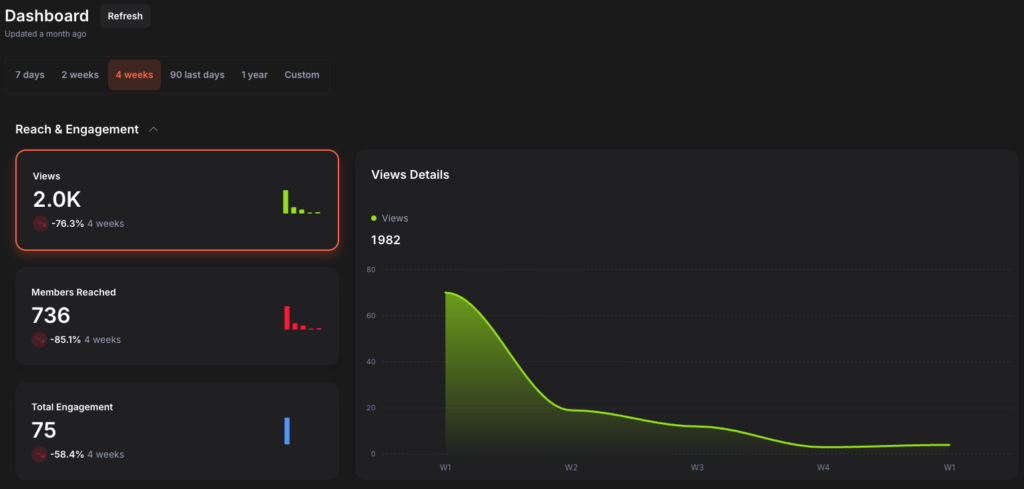
Jasper is more of a machine for producing large quantities of content, while Kawaak is more of an editorial coach, with 10 years of experience as a copywriter. ✏️
Let’s be honest, we’ve all seen those AI-generated LinkedIn posts, and we’re over it.
That’s where Kawaak changes the game. 👀
What are its features?
Kawaak has been designed entirely for LinkedIn, its codes, its algorithm, and its formats. Here’s what it offers:
- Generation of LinkedIn-calibrated posts.
- Prompts created by real copywriters.
- Generation of professional AI images.
- Create posts with your personal style.
- Performance dashboard (really useful).
In short, it’s the perfect tool for understanding what works in your strategy.
What do customers say?
| ✅ Advantages | ❌ Disadvantages |
|---|---|
| Highly impactful headlines, designed for LinkedIn | Focused solely on LinkedIn |
| Customizable tone + authentic respect for user style | No mass automation for teams (at least for now) |
| Integrated professional AI image generation | No CRM integration |
| Smooth, intuitive interface designed for speed | Content-oriented features, not multi-network management |
| Clear dashboard rich in insights | – |

How much does the Kawaak tool cost?
Kawaak offers several plans depending on usage (solo creators, teams, etc.). Here are the details. 👇🏼
| Plan | Price | Who is it for? | Key features |
|---|---|---|---|
| Freemium | $0/month | To get started or post once a week | • 25 credits/month (≈ 5 posts) • 5 generations of personalized posts • Unlimited headline generation • Unlimited comment generation • Real-time dashboard • Post signature • Addition of a first comment • Access to brand connections |
| Starter | $19/month | For those who post 2–3 times/week | • Everything in Freemium, plus: • Up to 20 LinkedIn posts generated • Up to 20 AI Shooting Pro images • Chat support with real humans • Unlimited number of users • Team dashboard • Centralized publication management |
| Business | $39/month | For daily publishing | • Everything in Starter, plus: • Up to 60 posts/month • Up to 60 AI Pro images • Priority support |
| Enterprise | $249/month | For teams with advanced needs | • Everything in Business, plus: • Up to 200 posts/month • Up to 200 AI Pro images • Premium support |
2) Jasper.ai vs Writesonic
Writesonic is a versatile tool capable of generating articles, marketing pages, product descriptions, and even entire landing pages. 😅
Writesonic is often compared to Jasper as one of the most accessible AI writing tools on the market.
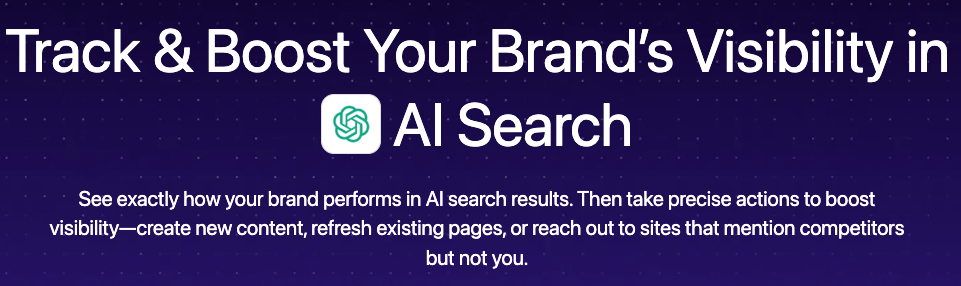
Where Jasper offers an all-in-one solution, Writesonic takes a more accessible, flexible, and often easier-to-use approach. 🖐️
The tool is primarily aimed at writers, entrepreneurs, content creators, e-merchants, and marketing teams.
What are Writesonic’s features?
You have:
- Generation of long articles (with outline, sections, and SEO optimization in seconds).
- Advanced editor: “Sonic Editor,” a kind of Google Docs on steroids.
- SEO integration with SurferSEO and their in-house tool “SEO Checker.”
- Multilingual generation (FR, EN, ES, etc.).
- Creation of AI landing pages, useful for testing offers.
- Paraphrasing and rewriting tool to improve style.
- Choice of AI model (GPT, Claude, or internal model).
- API to automate content workflows.
Writesonic review
We have compiled customer reviews, and here are the results. ⤵️
| ✅ Strengths | ⚠️ Cons |
|---|---|
| Very good value for money | Quality varies depending on the AI model chosen |
| Well-integrated SEO tools | May produce generic texts if the brief is vague |
| Simple, fast, and user-friendly interface | The editor can sometimes lack depth |
| High-performance multilingual | Support is not always responsive |
| Wide variety of templates for e-commerce and marketing | Some tools are locked behind premium plans |
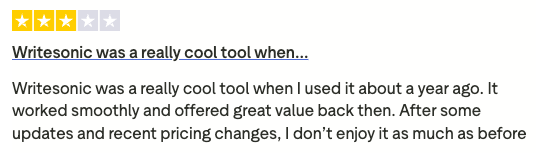
How much does Writesonic cost?

3) Jasper ai reviews vs Jenni.ai
Jenni.ai is the tool that appeals to students, creators, and writers thanks to its more assisted approach.
Basically, the tool is a bit like an AI co-author who helps you write, sentence by sentence.

The tool focuses on co-creation, guided writing, and improved storytelling, rather than mass content generation.
The tool is primarily intended for writers, copywriters, students, newsletter creators, and authors.
What does Jenni.ai offer?
In terms of features, you have:
- Real-time co-writing with LLM ⭢ artificial intelligence completes your sentences as you type.
- Smart suggestions to rephrase, clarify, or expand on an idea.
- Generation of plans, outlines, and article structures.
- Rewriting and stylistic improvement (correction, tone, fluency).
- Automatic citation system (useful for academic documents).
- “Inspiration” mode for brainstorming around a topic.
- Multilingual, but performs best in English.
- Minimalist interface, designed for writing without distractions.
What are customer reviews?
Okay, here are the main points. ⤵️
| ✅ Strengths | ⚠️ Cons |
|---|---|
| Ideal tool for co-creating content (less robotic) | Less suited to high-volume production |
| Very easy to use, minimalist interface | Decent English quality, but far from the best |
| Perfect feature for rephrasing/improving text | Few advanced SEO or marketing tools |
| Very fluid, smart suggestions | Not designed for creating LinkedIn posts |
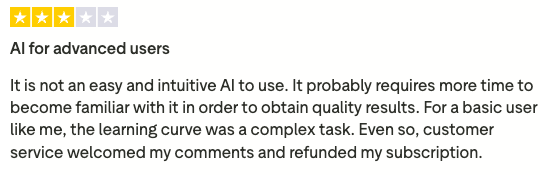
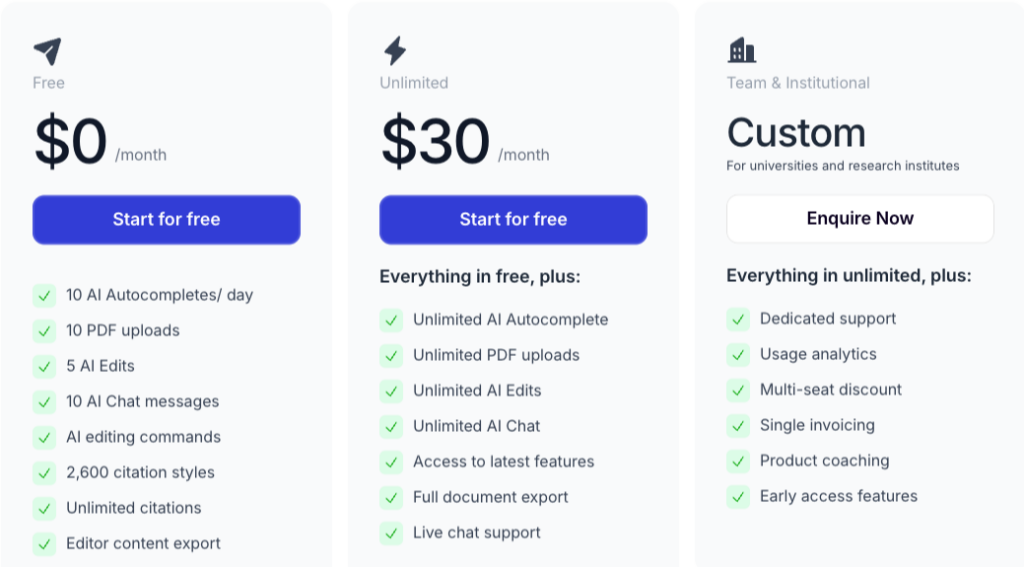
How much does Jenni.ai cost?
The tool has 3 plans; it’s straightforward. 👇🏼
4) Jasper ai reviews vs Rytr
Rytr is the little brother of AI tools: simple, hassle-free, accessible, and affordable.
Its purpose is simple: to create content quickly and easily.
The tool is mainly aimed at freelancers, creators, beginners, small businesses, and low-budget marketing teams.
What are Rytr’s features?
You have:
- Generation of short and medium-length content (posts, descriptions, emails, and content ideas).
- Forty templates for marketing, storytelling, copywriting, and LinkedIn ads.
- Multilingual with good quality in English.
- Rewriting, expansion, and paragraphs of existing texts.
- Simple AI image generation (according to credits).
- Built-in notepad-style editor to structure your ideas.
- Organize projects into folders.
- Accessible API for custom workflows.
Rytr does what it says: it writes quickly, simply, and at a low price.
What are the customer reviews of the tool?
Here’s what we found.
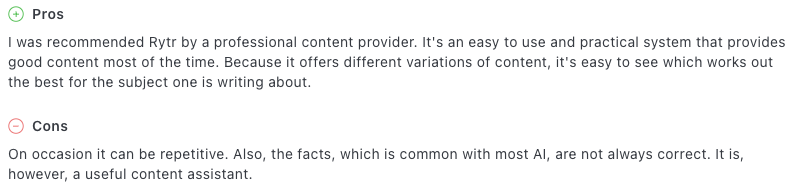
| ✅ Strengths | ⚠️ Cons |
|---|---|
| One of the most affordable AI solutions on the market | Text quality sometimes too generic |
| Very easy to use, perfect for beginners | Not well suited to long content or advanced SEO |
| Ideal for quick, small writing tasks | Less effective in French than some competitors |
| Good overall value for money | Interface is quite limited for intensive professional use |
How much does Rytr cost?

5) Jasper.ai vs Copy.ai
Copy.ai is one of the most popular alternatives to Jasper, especially for those who want to create content quickly without having to configure 15 options. 👀

If Jasper is like a factory for marketing teams, Copy.ai is more like a local business, designed for brainstorming, generating ideas, and producing short texts in seconds. ⏱️
Copy.ai is mainly aimed at freelancers, social media managers, e-commerce professionals, small marketing teams, and entrepreneurs.
What does Copy.ai offer?
Here’s what the tool has to offer:
- Generation of marketing content (posts, emails, product descriptions, landing pages).
- “Tool Chat” to brainstorm ideas, titles, plans, and angles (many users rely on it to generate ideas faster than when prompting Jasper).
- Automated AI workflows to simplify certain tasks.
- Quick copywriting tool (headlines, slogans, sales pitches, scripts).
- Multilingual generation, including French.
- Pre-designed templates for different use cases (ads, cold emails, and storytelling).
- Simple interface, suitable for beginners.
- API for automating large volumes (depending on plan).
It’s not the most sophisticated tool on the market, but it’s practical, fast, and versatile.
What are customer reviews?
So what do customers think about all this? Let’s find out. 👇🏼
| ✅ Strengths | ⚠️ Cons |
|---|---|
| Very easy to use, perfect for beginners | Less suitable for long, structured content |
| Quick generation of ideas and short texts | Can produce very generic texts |
| Excellent simplicity/efficiency ratio | French is correct but sometimes lacks naturalness |
| Many ready-to-use templates | Few collaborative tools compared to Jasper |

How much does Copy.ai cost?
Here are Copy.ai’s pricing plans. ⤵️

6) Jasper.ai vs Copysmith
Jasper focuses on versatility (articles, LinkedIn posts, emails), while Copysmith is geared toward those who need to create a lot of repetitive marketing content but with the same quality.
To this end, the company has developed a tool called “Describely.” 📝
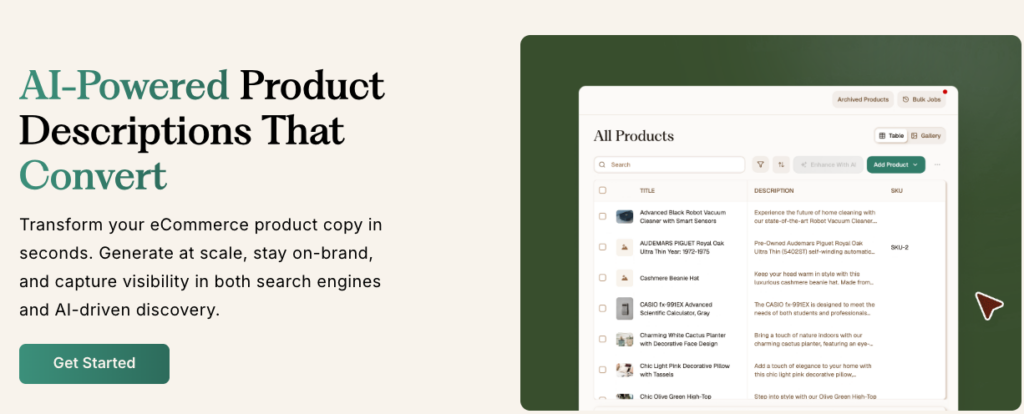
Basically, if you sell products, manage an e-commerce site, or need to generate a lot of product listings, Copysmith is a good alternative.
The tool is aimed at e-merchants, agencies, marketing teams, and marketplaces.
What are Copysmith’s features?
So, here are the main features:
- Generation of product descriptions optimized for e-commerce.
- Creation of advertisements (Google Ads, Facebook Ads, TikTok Ads).
- Writing category/collection pages in minutes.
- Collaborative workflows for marketing teams.
- Integrated project management & reviews.
- CSV import/export to create hundreds of pieces of content at once.
- API to automate the entire content chain.
- Specialized e-commerce AI templates (Shopify, WooCommerce, Amazon).
What are the customer reviews of the tool?
Here’s what customers are saying about Copysmith. ⤵️
| ✅ Pros | ⚠️ Cons |
|---|---|
| Excellent for product pages and e-commerce content | Much less effective for long editorial content |
| Good collaborative workflow for teams | French sometimes lacks naturalness |
| Powerful automation (CSV, API, etc.) | Interface slightly more “pro” but less intuitive |
| Templates really suited to e-commerce | Prices rise quickly for large volumes |

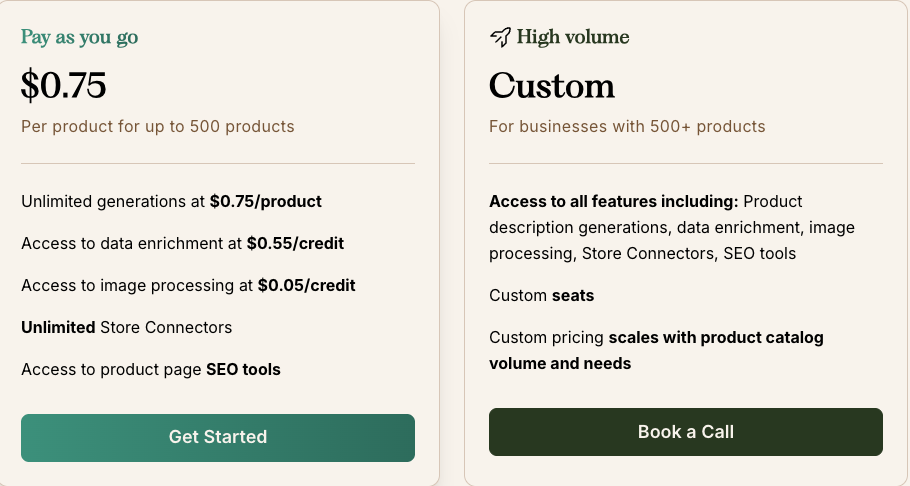
How much does the tool cost?
How to choose the right AI tool to create your content?
With all these alternatives, you may be thinking, “OK, which one should I choose now? 😅»
Don’t panic. We’ll make it simple, clear, and effective. 👀
In reality, the right tool depends mainly on your needs, not on the hype surrounding artificial intelligence.
Here are 5 essential points to help you make the right choice. 👇🏼
1) Your main use
Ask yourself, “What do I really want to produce?”:
- LinkedIn posts → Kawaak.
- Prospecting/conversion → Waalaxy.
- Long articles & team workflows → Jasper.
- SEO & content marketing → Writesonic.
- Natural co-writing → Jenni.ai
- Low budget + simplicity → Rytr.
- E-commerce/product descriptions → Copysmith.
If your main goal is long-form SEO, you’ll likely find Jasper ai writing tool invaluable compared to simpler tools.
There’s no magic tool, just the right tool. 🪄
2) Your budget
You may have noticed: 👇🏼
- Jasper = premium.
- Kawaak / Writesonic / Copy.ai = mid-range.
- Rytr = low price.
If you’re just starting out or still testing your LinkedIn content strategy, there’s no need to aim for a business plan. 👀
If you publish as a team every day, a tool that’s too limited will hold you back. 🥲
3) Your content volume
The more you produce as a team, on a large scale, with multiple formats, the more you will need a robust tool like Jasper or Writesonic.
If you’re working solo and publishing a few times a week, Kawaak or Rytr may be more than enough. 👀
4) The desired level of editing
In short:
- Want to co-write → Jenni.ai.
- Want to automate → Waalaxy, Writesonic.
- You want to structure and delegate → Jasper (this is where using Jasper AI will help the most).
- You want to publish with style → Kawaak.
The more control you want to keep, the more you need a collaborative tool . 😇
5) Your business objectives
Your goal determines your tool:
- Create a personal brand → Kawaak.
- Generate B2B leads → Waalaxy.
- Scale your content production → Jasper.
- Optimize SEO → Writesonic.
- If you handle e-commerce content → Copysmith.
Bottom line: start with your goal, not the technology. 🤖
How to turn content generated by Jasper AI for LinkedIn into qualified leads with Waalaxy?
Waalaxy is not a creation tool like Jasper, but it deserves its place on the list for one simple reason: it transforms your content into qualified leads. 🪄
Its AI SDR features and sales enablement focus make it a strong option for outbound teams.
Some teams also compare Jasper AI’s content features with AI sales enablement or AI SDR features found in outbound automation platforms. 🤖
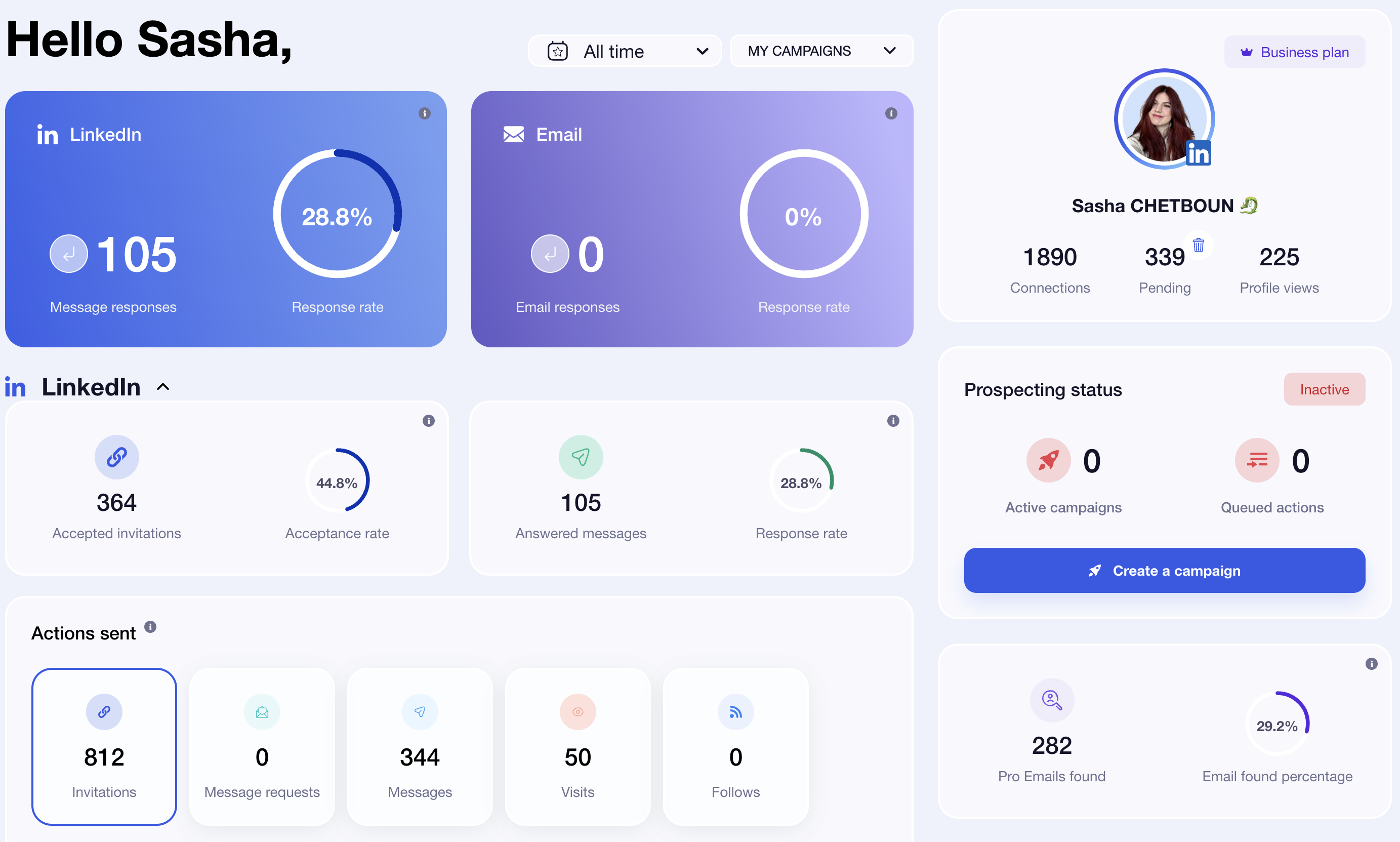
This is a tool designed by a French startup that combines enrichment, multi-channel prospecting (LinkedIn + email), campaign management, and a mini-CRM integrated into a fluid and easy-to-use interface. 👽
Keep in mind that the two are perfectly complementary in a content strategy. 👀
The tool is designed for freelancers, sales teams, agencies, marketers, content creators, and founders.
What are Waalaxy’s features?
- Automatic import of leads from LinkedIn ⭢ profile, event, Sales Navigator, and post.
- Integrated email enrichment (Dropcontact, Bettercontact, Fullenrich).
- Multi-channel sequences: LinkedIn + email in a single flow.
- Unlimited messages (even in Freemium).
- Advanced Email Finder with triple verification for over 99% deliverability.
- Comprehensive dashboard to track acceptance rate, response rate, appointments, deliverability rate, and performance.
- Segmentation and scoring to organize your prospects.
- A/B marketing testing, pre-recorded templates, and advanced conditions.
- Synchronization with over 2,000 tools (HubSpot, Pipedrive, Salesforce, Zapier, etc.).
- Pro security: automatic limits, smart time slots, and humanized deadlines.
- Human support: available even on the free plan.
Waalaxy is used to start conversations, build relationships, and generate business opportunities.
What do customers say about the tool?
Here are the most common comments. ⤵️
| ✅ Strengths | ⚠️ Disadvantages |
|---|---|
| Very easy to learn, even for beginners | Learning curve for advanced sequences |
| Native multichannel: LinkedIn + Email in a single tool | Limited invitations on smaller plans (LinkedIn quota) |
| Responsive customer support in French | Web-based interface only (no mobile app) |
| High deliverability rate thanks to triple email verification | – |
| Clear and accurate dashboard for tracking results | – |
| Freemium model with real features | – |
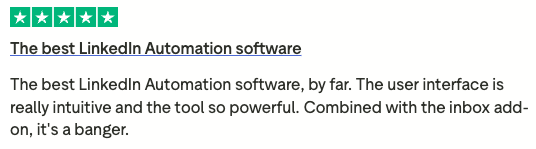
How much does Waalaxy cost?
You’re probably interested in the price, so here it is.
Monthly
Quarterly
Yearly
Without Inbox
With Inbox
Add-on


So, let’s wrap it up about jasper ai reviews
Ultimately, AI will never replace your vision, but it can clearly save you time—a lot of time. 🕰️
Each AI tool has its own style, philosophy, and strengths. The real question isn’t which one is the best, but which one fits naturally into your creative process.
A good writing assistant should improve your writing process with a user-friendly interface, not complicate it.
If a tool simplifies your life, inspires you, and helps you produce without holding you back, it’s the right one. No need to look any further. 👀
Whether you’re coming from Reddit posts searching for Jasper AI reviews Reddit or comparing pricing across AI writing assistants, the key is to test what matches your workflows. 👀
Test, compare, and keep what works. And above all: let AI accelerate your creativity, not replace it.
The rest? It’s your voice that will make the difference.
Frequently asked questions
We have a few more questions that I think you might find interesting. 💬
Is Jasper AI still worth it?
It depends mainly on your volume:
- If you create a lot of content each week or work in a team, the tool can quickly become cost-effective.
- If you publish infrequently, a lighter (and less expensive; some users even look for a Jasper AI free alternative when they’re just starting out) tool may suffice.
Many users compare Jasper AI cost with newer competitors to evaluate ROI.
Also, most users only realize the tool’s potential once they actually log in; the jasper AI login dashboard is where all the core features live.
In short: cost-effective for large-scale needs, less so for occasional use. 😅
Does Jasper AI have a free trial?
Yes, Jasper AI offers a free trial depending on your region and current promotions. You’ll need a Jasper AI login to activate it. 👀
Does using Jasper AI or another AI tool for content creation raise issues of copyright or originality?
In general, you can use the generated texts freely. 💬
But be careful:
- AI can sometimes produce content that is too similar to existing sources.
- Originality is not always guaranteed.
To do this, we recommend that you always check, rephrase, and add your personal touch with LinkedIn emojis, for example: this is the best way to avoid problems and maintain your style. 😇
And that’s a wrap, now you’ve got the full Jasper AI reviews. See you soon! 👋
 Sasha
05/02/2026
Sasha
05/02/2026 













