



There are many ways to import LinkedIn leads into Waalaxy to launch your campaigns.
Let’s recap! 😎
Import from LinkedIn
There are several ways to import directly from LinkedIn. It’s up to you to choose the one that’s right for you!
Import from a standard LinkedIn search
You are limited to 1000 results per LinkedIn search. This means that you won’t be able to export more than 1000 results per search; you’ll have to play with the filters to get access beyond that.
You can read this article to find out how to export more than 1000 results. 😎
Go to LinkedIn, click on the magnifying glass and press “Enter” on the keyboard. This will take you to the LinkedIn search engine.
Filter by « Person », search and import:

To optimize your LinkedIn searches, take a look at our article on how to perform a good LinkedIn search.
Import your LinkedIn contacts
You can also import all your first-degree contacts on LinkedIn. Handy for sending a message, isn’t it? 😌

Import LinkedIn group members

Import participants in a LinkedIn event

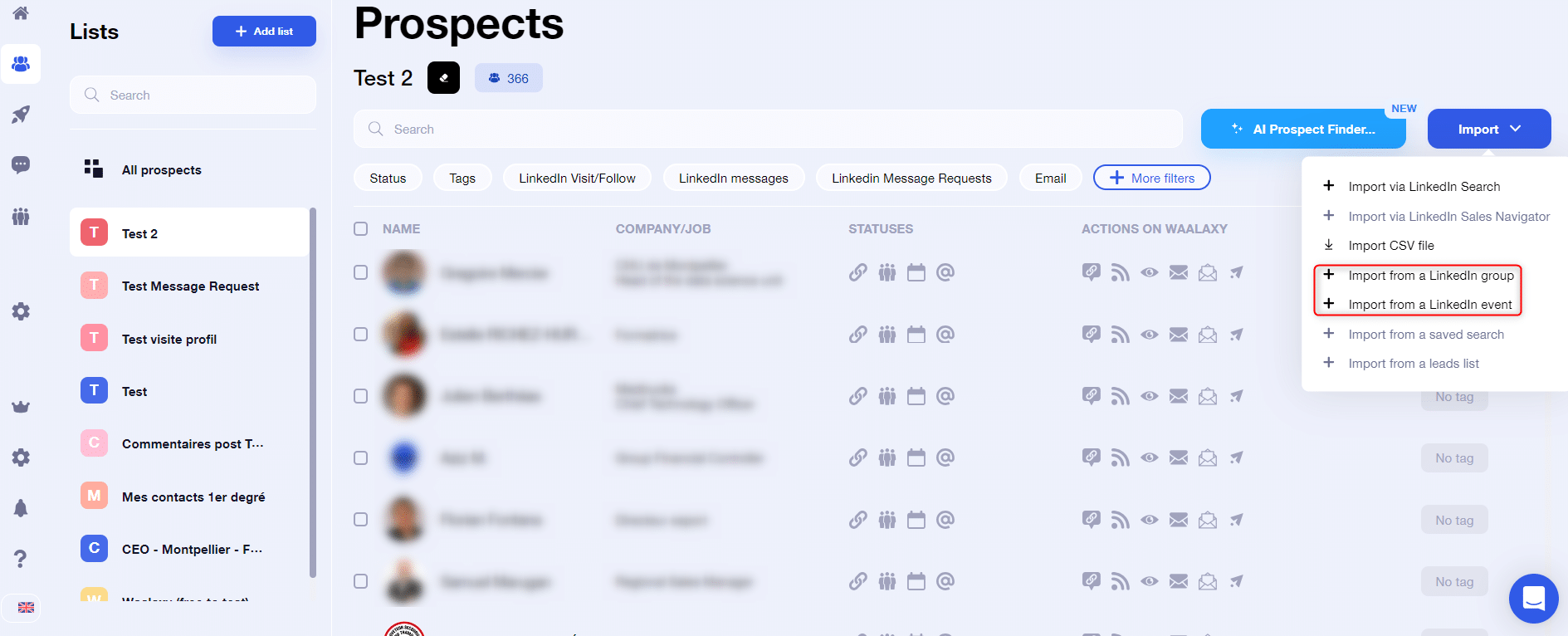
💡You can also import LinkedIn group members and event attendees directly from your Waalaxy account :
Import a single LinkedIn profile
Have you spotted a prospect without going through a search? Waalaxy lets you import them individually!

Import from LinkedIn News Feed
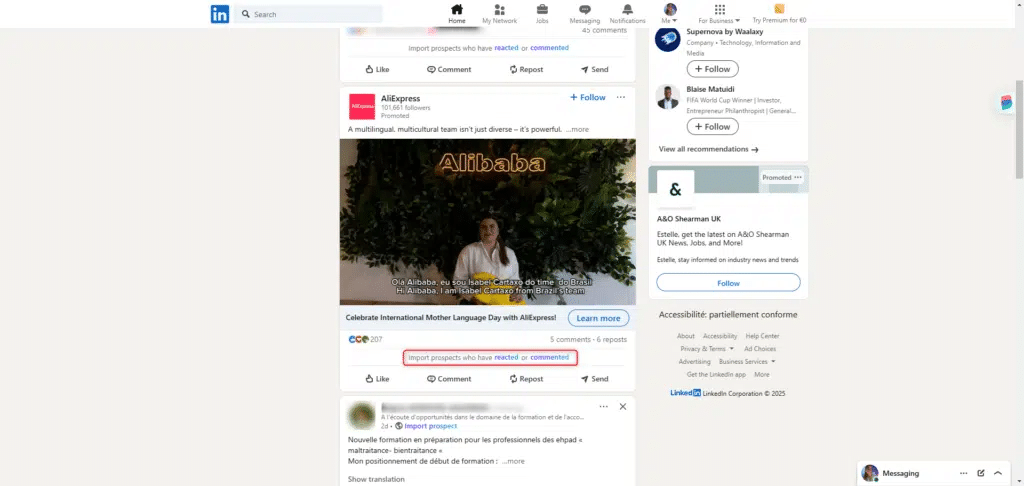
A profile that interests you on News Feed? You can import it in just a few clicks 🚀:

With just a few clicks, you can also find out who is commenting or reacting to a post:

Import from Sales Navigator
Ave you already use Sales Navigator? Here again, there are several import possibilities 😎.
Import from a Sales Navigator search
Unlike classic LinkedIn searches, with Sales Navigator you can export 2,500 search results instead of 1,000. To find out how best to optimize your searches, feel free to read our article on . 👀

Import a search saved on Sales Navigator
Have you saved a search on so that you can identify new prospects matching the filters you’ve applied? The advantage of saved searches is that, depending on the chosen update period (daily, weekly, monthly), you can see the number of new prospects in this search, a big time and organization saver when organizing your prospecting. 🎯
You can import a saved search. What’s more, thanks to Waalaxy’s anti-duplication control, there’s no risk of importing the same prospect twice!

⚠️ Waalaxy is unable to import from the “New results” page. Before trying to launch your import, remember to stay on the tab that displays all results. Only new prospects will be imported if you have already retrieved prospects from this search.
Import a Sales Navigator list
Have you carried out several searches and created lists of prospects matching the same criteria? You can import a Sales Navigator list into Waalaxy:

Import a single Sales Navigator profile

Import from Recruiter Lite
Are you recruiting with Recruiter Lite? Once again, you can import your candidates into Waalaxy in just a few clicks! 👽
Import from a Recruiter Lite search
You can import profiles from a Recruiter Lite search:

Import from a Recruiter Lite registered project
You can also import profiles from projects you’ve saved on Recruiter Lite:


Automatically import people
You can populate your campaigns automatically thanks to the auto-import feature.
There are currently 4 types of auto-import on Waalaxy:
- Visited my profile.
- Commented on my LinkedIn post.
- Sent me a connection request.
- New prospects in a saved search.
Import from a CSV file
Do you have your prospects’ data in a ? Here’s how to import them into Waalaxy:

Conclusion
It’s never been easier to import LinkedIn leads, right? 🤗
Many more import possibilities will be developed on Waalaxy and will therefore be added to this article, so stay tuned! 😁
 Elodie
17/06/2026
Elodie
17/06/2026 













