



B2B prospecting tools are evolving fast, and the competition has never been fiercer. HeyReach is one of the newer players making noise, built specifically for teams managing multiple LinkedIn accounts at scale.
But is the hype justified?
In this article, we cover:
- A complete feature breakdown
- Honest user reviews
- Pricing details
- Comparison with the top alternatives
Everything you need to know before committing. 4-minute read.
What Is HeyReach and Who Is It For?
Heyreach is a LinkedIn outreach tool designed to automate large-scale, multi-account campaigns in a secure and scalable way. 🪜
It’s built for agencies, sales teams, or freelancers who manage multiple LinkedIn accounts.
Its goal is to scale outbound outreach without getting blocked by LinkedIn, by automating campaigns across multiple accounts simultaneously.
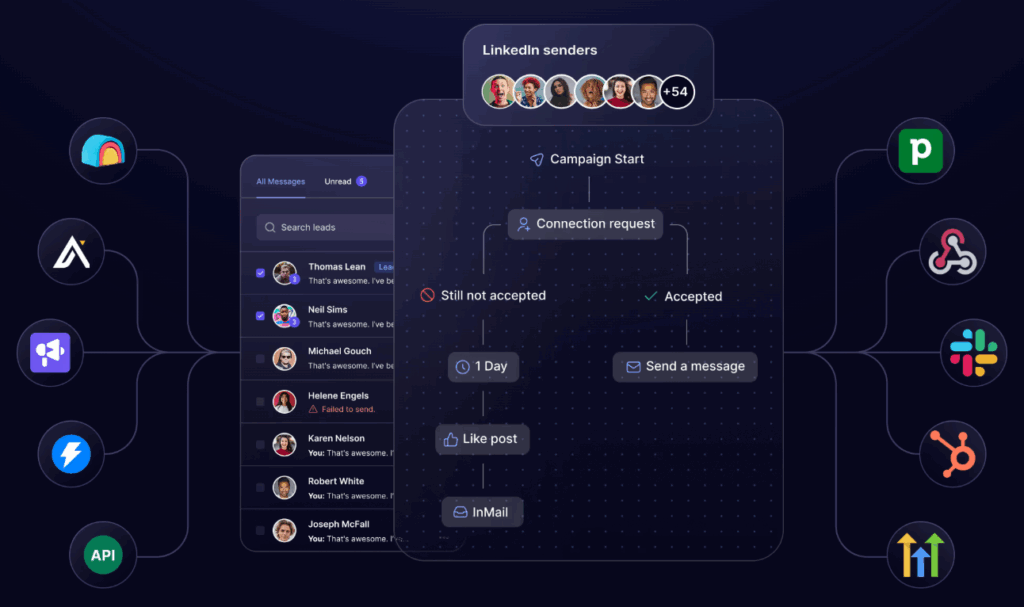
HeyReach Key Features: What Does It Actually Do?
As mentioned earlier, Heyreach focuses heavily on multi-account automation, but it also offers a suite of features designed to simplify LinkedIn campaign management. Here’s a breakdown of each feature 🔎
1️⃣ Multi-account management
This is Heyreach’s standout feature. You can connect multiple LinkedIn accounts (up to dozens depending on your plan) and run campaigns that automatically use those accounts to contact your prospects.
Need to reach 1,000 prospects? Heyreach spreads the workload across your 10 accounts — 100 messages per account.
2️⃣ Smart automated campaigns
The interface lets you build custom sequences (profile visits, connection requests, personalized messages) with:
- Delay management between each step
- Message personalization with variables
- Lead status tracking
3️⃣ Security and anti-blocking
Heyreach is fully cloud-based with dedicated proxies per account, which reduces the risk of getting blocked by LinkedIn:
- Account rotation
- Daily limits respected for each profile
- Auto-reconnect when accounts get disconnected
4️⃣ Centralized dashboard
What’s great is that you get a single interface to:
- Track the status of each campaign
- Analyze reply, acceptance, and conversion rates
- Manage connected accounts and their status
What Users Say About HeyReach: Pros & Cons
Let’s take a look at the pros and cons of Heyreach based on real user feedback. 👇🏼
| ✅ Pros | ❌ Cons |
|---|---|
| Highly effective multi-account system for agencies and sales teams. | Interface feels a bit rigid compared to more visual tools like Waalaxy. |
| Secure cloud environment + dedicated proxies → reduces LinkedIn ban risks. | Requires several active LinkedIn accounts → not ideal for solo users. |
| Well-designed unified inbox to manage all conversations in one place. | Limited native integrations with CRMs or external tools (except Zapier). |
| Clear dashboard, perfect for managing large-scale campaigns. | Learning curve is a bit steeper for beginners. |
| Ability to scale quickly without worrying about LinkedIn quotas. | No extended free trial available at time of testing. |
| Responsive customer support, according to user feedback. | Feature set still in early stages (no scraping, scoring, or advanced triggers yet). |

HeyReach Pricing: How Much Does It Cost?
Pricing is based on the number of active LinkedIn accounts (senders) and the services included (support, onboarding, etc.):
- 🥇 Starter — $79/sender/month → for small teams or initial testing
- 🥈 Agency — $999/month for 50 senders → for structured outreach teams
- 🥉 Unlimited — $1,999/month with unlimited senders → for high-volume agencies
You can test Heyreach for free for 30 days.
The 5 Best HeyReach Alternatives in 2026
Heyrech is a good tool, but maybe not the one suited to your budget or needs. That’s why, here are 5 alternatives! 👇🏼
1 – Waalaxy: Best for Simplicity & Multichannel Outreach
If you don’t know it yet, Waalaxy is an automated prospecting tool on LinkedIn (and email), designed for small teams and freelancers.
The interface is smooth, the onboarding is quick, and above all, everything is designed to scale without complexity.
With this tool, you will be able to:
- Create LinkedIn + email campaigns in just a few clicks.
- Automate sequences with conditions (if accepted ⭢ message).
- Manage your prospects in one single place.
- Track performance via a dashboard.
Here’s what Waalaxy’s pricing looks like:
Monthly
Quarterly
Yearly
Without Inbox
With Inbox
Add-on

Here’s what real users are saying:
| ✅ Pros | ❌ Cons |
|---|---|
| Smooth navigation and UX designed for both beginners and advanced users. | Tool is desktop-only (no mobile app available). |
| LinkedIn campaigns are efficient, well-structured, and deliver fast results. | Some email automations may face limits, especially with Gmail. |
| Perfectly suited for freelancers and small teams thanks to its flexibility. | LinkedIn quotas can limit campaign volume. |
| Quick and easy scenario setup with a good balance of simplicity and power. | – |
#2 – Instantly
Instantly is a tool designed for massive cold email campaigns. Its strong point? The ability to send thousands of emails per day thanks to an integrated warm-up system. 💬
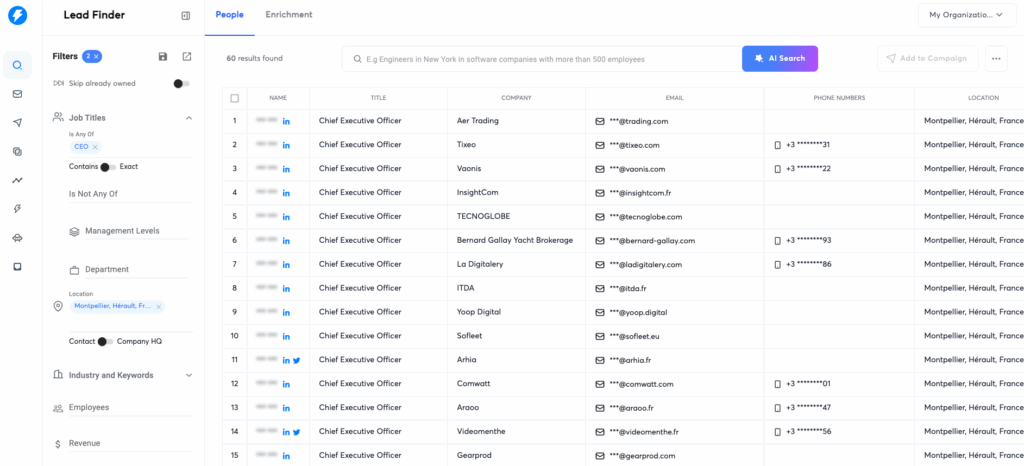
With this tool, you will be able to: ⬇️
- 🔷 Connect multiple email addresses to bypass sending limits.
- 🔷 Use the built-in warm-up tool to improve your domain’s reputation.
- 🔷 Analyze performance with KPIs (open rates, clicks, responses).
On the pricing side, it’s quite simple and it evolves according to your volume:
- Growth ⭢ $37/month: for freelancers or small teams with up to 3 email accounts.
- Hypergrowth ⭢ $98/month: for sending at scale with up to 15 email accounts.
- Agency ⭢ $197 / month: to manage multiple client accounts.
A free 14-day trial is available.
Here’s what real users are saying: 🤔
| ✅ Pros | ❌ Cons |
|---|---|
| Mass email sending with excellent deliverability thanks to automatic inbox rotation. | No native features for LinkedIn or other multichannel outreach. |
| Built-in warm-up tool is highly effective at maintaining domain reputation. | Interface may feel a bit technical for cold email beginners. |
| Affordable pricing for small volumes, with room to scale. | Limited lead analytics (no scoring or data enrichment features). |
| Perfect for agencies sending thousands of emails per week. | Email personalization is more basic compared to some competitors. |
#3 – Apollo.io
Apollo.io is a prospecting tool that combines a B2B database, CRM, and automated email sequences.
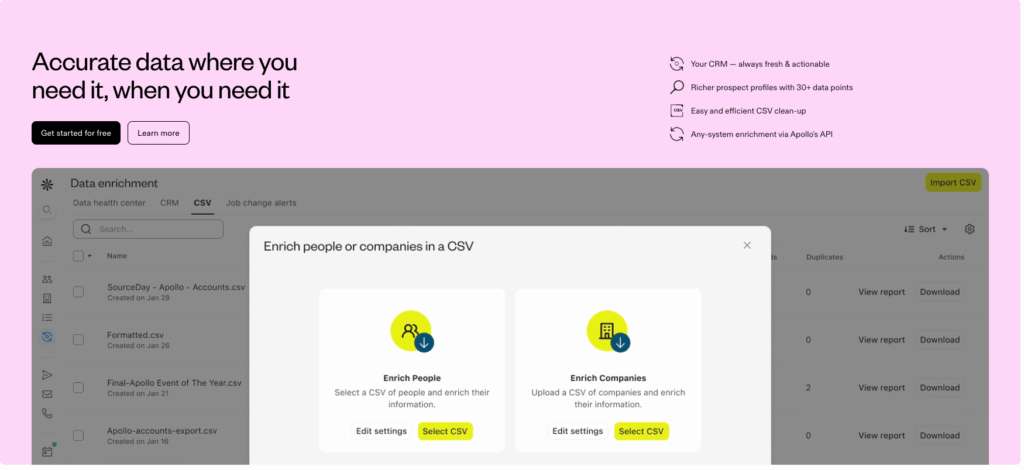
With, you will be able to:
- Search and filter over 260 million contacts in their database.
- Launch personalized email campaigns (with A/B testing and automation).
- Track your prospects through an integrated CRM and powerful analysis tools.
- Automatically enrich your contact data.
Apollo.io is suitable for B2B sales teams.
Regarding pricing, you have several plans. 👇🏼
| Plan | Price | Key Features |
|---|---|---|
| Free | Free | Limited access to database and email sequences |
| Basic | $49 / month | Automated sequences, more search credits, CSV export |
| Professional | $99 / month | A/B testing, lead scoring, API, advanced CRM integrations |
| Organization | Custom pricing | Team management, advanced reporting, enhanced security, SSO |
Here’s what real users are saying: ⬇️
| ✅ Pros | ❌ Cons |
|---|---|
| Access to a massive, qualified B2B lead database. | Steep learning curve for new users. |
| Built-in CRM and email sequences in one interface. | Not ideal for LinkedIn automation (not native). |
| Very complete tool with lead enrichment and scoring. | Can be expensive for smaller teams with limited needs. |
| Free version is good enough to test the platform. | Dense UI that may feel overwhelming for basic use. |
#4 – ZoomInfo
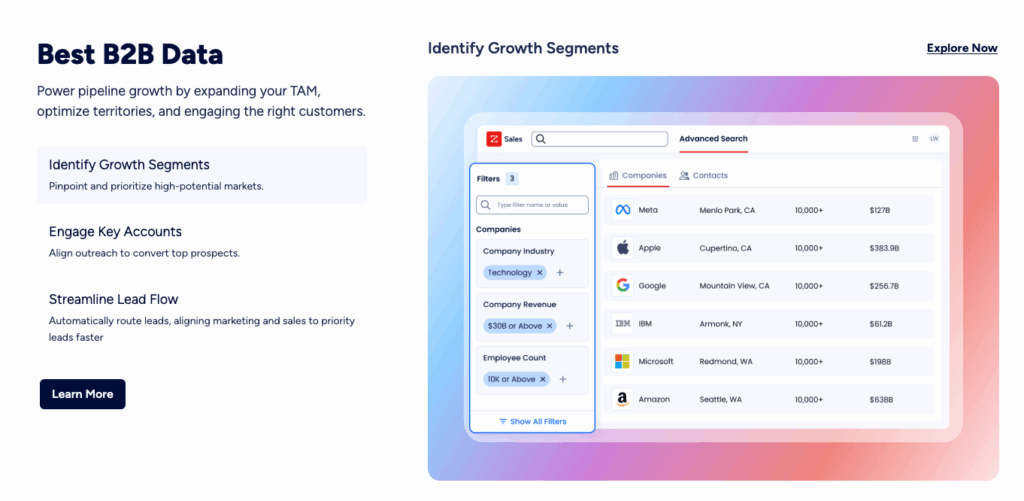
ZoomInfo is not used to automate message sending, but to find the right prospects, enriched, qualified, and filtered.
💡The tool is designed for large companies that bet everything on quality B2B data.
Here are some features:
- Obtain precise information about the accounts, the decision-makers.
- Allows you to know who is ready to buy.
- Connect the data directly to your CRM.
- Regarding the rates, everything is done by quote, depending on:
- Of the number of users.
- Activated modules (SalesOS, Marketing OS, TalentOS).
- The volume of data consumed/exported.
👉🏼 Prices often start around $15,000 to $20,000 per year.
Here’s what real users are saying:
| ✅ Pros | ❌ Cons |
|---|---|
| Extremely complete and precise B2B database. | Very high pricing, inaccessible for small businesses. |
| Native integrations with all major CRMs. | No native campaign automation features (only data). |
| Ability to filter leads by purchase intent. | Complex interface, requires proper onboarding. |
| Professional-grade customer support and onboarding. | Marketing features are sometimes too segmented. |
Want to find out more about this tool? It’s in our Zoominfo alternatives comparison article. 🎁
#5 – Seamless.ai
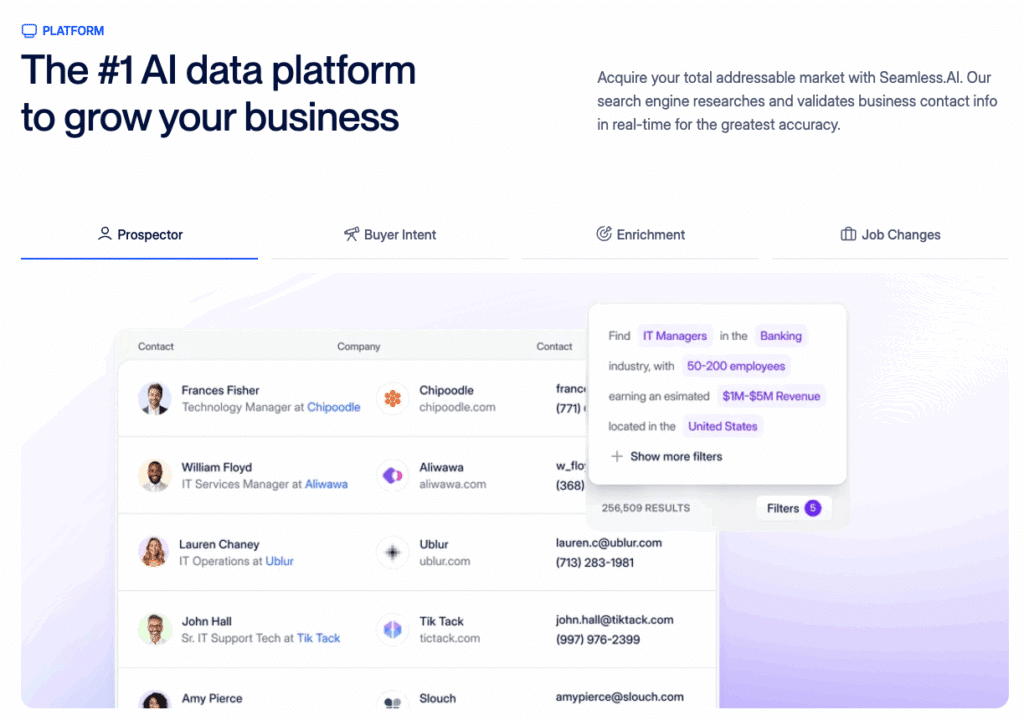
Seamless.ai is a real-time lead enrichment solution that helps salespeople and marketing teams identify the right contacts at the right time.
This tool does not automate message sending, but it provides you with verified and actionable leads.This tool does not automate message sending, but it provides you with verified and actionable leads.
Basically, you’ll be able to:
- Find verified email addresses and phone numbers with one click.
- Filter prospects by industry, company size, position.
- Automatically add contacts to your CRM or outbound campaigns.
- Use integrations with LinkedIn, HubSpot, Salesforce.
Here’s what real users are saying:
| ✅ Pros | ❌ Cons |
|---|---|
| Access to verified emails and phone numbers in real time. | No native automation for outreach messaging. |
| Integrations with LinkedIn, Salesforce, HubSpot, and more. | Interface feels outdated compared to newer tools. |
| Fast and efficient lead enrichment. | Relatively expensive (starts at $147/month). |
| Allows for precise filtering by industry, company size, job title, etc. | Limited international coverage compared to ZoomInfo. |
| Ideal to fuel outbound sequences with high-quality data. | No built-in CRM or lead scoring functionality. |
Want to dig deeper? Check out our full Seamless.ai alternatives breakdown.

HeyReach vs. Competitors: Final Comparison
If you’ve made it this far, you’re probably managing a serious outreach operation or seriously evaluating tools to build one.
Here’s the full picture:
| Tool | Multichannel | Personalization | Scalability | Price 💰 | Overall Rating ⭐ |
|---|---|---|---|---|---|
| Heyreach. | ❌ LinkedIn only. | ⭐⭐⭐ | ⭐⭐⭐⭐⭐ | From $79/sender/month. | ⭐⭐⭐⭐ |
| Waalaxy. | ✅ (Email + LinkedIn). | ⭐⭐⭐⭐⭐ | ⭐⭐⭐⭐ | From $16/month. | ⭐⭐⭐⭐⭐ |
| Instantly.ai. | ❌ Email only. | ⭐⭐ | ⭐⭐⭐⭐⭐ | From $37/month. | ⭐⭐⭐⭐ |
| Apollo.io. | ✅ (Email + CRM). | ⭐⭐⭐⭐ | ⭐⭐⭐⭐⭐ | From $49/month. | ⭐⭐⭐⭐⭐ |
| ZoomInfo. | ❌ Data + Email. | ⭐⭐⭐ | ⭐⭐⭐⭐⭐ | Custom quote (premium). | ⭐⭐⭐⭐ |
| Seamless.ai. | ❌ Data only. | ⭐⭐⭐ | ⭐⭐⭐ | From $147/month. | ⭐⭐⭐ |
HeyReach is a genuinely powerful tool — but power comes with complexity. It’s built for agencies running outreach across dozens of LinkedIn accounts, and it delivers on that promise. If that’s your situation, it’s hard to argue against it.
But if you’re looking for a tool that’s fast to set up, easy to use, and effective without a steep learning curve — Waalaxy is the stronger choice. LinkedIn and email outreach in one place, no technical overhead, and results from day one.
No 80-page manual. No managing multiple profiles. Just a clean, intuitive tool built for people who want to spend less time prospecting and more time closing.
👉 Try Waalaxy free — no credit card required.
Now you have everything you need to choose the right tool for your outreach stack.
Frequently Asked Questions About HeyReach
How to contact HeyReach?
HeyReach offers a few ways to get in touch with their team:
- Live chat — available directly on their website for quick questions
- Email support — for more detailed requests or billing issues
- Help center — a self-serve knowledge base with articles covering the most common setup and troubleshooting questions
For most issues, the live chat is the fastest option.
Can HeyReach get your LinkedIn account banned?
It’s a legitimate concern with any LinkedIn automation tool.
HeyReach reduces this risk by operating on a fully cloud-based infrastructure with dedicated proxies assigned to each account. It also enforces daily action limits that stay within LinkedIn’s acceptable usage range.
That said, no tool can guarantee 100% safety — if you run aggressive campaigns or ignore recommended limits, your account can still get flagged. The key is to use HeyReach responsibly: respect daily quotas, warm up new accounts gradually, and avoid spammy messaging.
Does HeyReach work with Sales Navigator?
Yes. HeyReach integrates with LinkedIn Sales Navigator, allowing you to import prospect lists directly from your searches.
This makes it particularly powerful for agencies and sales teams that rely on Sales Navigator for precise targeting. Keep in mind that Sales Navigator is a separate LinkedIn subscription and is not included in HeyReach’s pricing.
What’s the difference between HeyReach and Waalaxy?
Both tools automate LinkedIn outreach, but they target very different users. HeyReach is built for agencies and large sales teams that manage multiple LinkedIn accounts simultaneously — its core strength is scale across many senders.
Waalaxy, on the other hand, is designed for individuals, freelancers, and small teams who want a simple, intuitive tool that combines LinkedIn and email outreach in one place.
If you need to manage 20+ LinkedIn accounts at once, HeyReach has the edge. If you’re looking for ease of use, multichannel campaigns, and faster ROI with a single account, Waalaxy is the better fit.
Is HeyReach worth it for solo users or freelancers?
Probably not — at least not at its current price point.
HeyReach’s pricing model is built around multiple senders, which means solo users end up paying for infrastructure they don’t need. The Starter plan at $79/sender/month can be justified if you’re running high-volume outreach, but for most freelancers or independent consultants, tools like Waalaxy offer comparable LinkedIn automation at a fraction of the cost, with a much gentler learning curve.
What is the difference between PhantomBuster and HeyReach?
PhantomBuster and HeyReach take fundamentally different approaches to LinkedIn outreach.
PhantomBuster is primarily a data extraction and automation tool. It lets you:
- Scrape data from LinkedIn, Instagram, Google Maps, and more
- Automate actions like connection requests and message sending
- Schedule and run scripts (“Phantoms”) via API or a built-in scheduler
HeyReach, on the other hand, is focused purely on LinkedIn outreach at scale. It offers:
- Centralized management of multiple LinkedIn accounts
- Automated outreach sequences
- A unified inbox for all conversations across accounts
- Cloud-based infrastructure with dedicated proxies per account
Bottom line: PhantomBuster is the better choice if you need flexible data scraping across multiple platforms. HeyReach wins if your goal is running large-scale LinkedIn campaigns across multiple accounts safely and efficiently.
 Toinon
23/06/2026
Toinon
23/06/2026 














