



In your B2B campaigns, you may have already come across catch all emails…these are addresses that accept all messages sent to a domain, even when the address does not exist. 🤯
Useful for avoiding losing a prospect, but detrimental to your deliverability: a catch-all can increase your bounce rate and skew your email checks. 📉
In this article, we’ll take a simple look at what catch-all emails are really for, why some companies still use them, and how to manage them intelligently to protect your performance. ✨
What is catch-all email address?
Before we get into the benefits, risks, and strategies, let’s start by clarifying what a catch all email actually is. 👀
A catch all email is an inbox configured to receive all emails sent to a domain, even when the recipient’s address does not exist 🙃.
In B2B, this allows a company to never miss a potential message, even if the sender makes a mistake in the spelling or format of the address.
For example:
You write cecile.panzani@startup.com when the real address is c.panzani@startup.com, the catch-all still retrieves the message ✉️.
Technically, the server is programmed to say:
“Regardless of the address, I accept everything that comes to @domain.com.”
This is convenient… but it also prevents you from checking whether the address actually exists, which complicates the life of verification tools and may expose you to more bounces. 🫠
Why do some companies use catch-all emails?
Despite the risks, many companies keep a catch-all for 👇🏻:
- Avoid losing a lead or an important request.
- Absorb common input errors .
- Centralize the management of incoming emails.
- Maintain continuity of communication even when an employee leaves.
What about cold emails? Companies that use a catch-all for themselves don’t necessarily think about the consequences this will have on your B2B campaigns.
Advantages and risks of a catch-all email
Before deciding whether a catch-all email domain is a good or bad idea for your B2B campaigns, you need to understand what it actually offers… and what it can put at risk. ⚠️
The advantages of catch-all addresses
A catch-all address can have several benefits for a company, particularly internally:
- 🔎 Don’t lose important emails: Even if there is a typing error, the company will still receive the message. This is useful for ensuring that no prospects or urgent requests are missed.
- 📋 Simplify email management: Everything that arrives at “@domain.com” is captured and redirected to a dedicated inbox.
- 🔄 Ensure continuity: When an employee leaves the company or an address is deleted, no messages are lost.
- 🫠 Filter out human error: Typos, misspelled first names, approximate initials… everything ends up in the same place.
It’s a useful safety net… but not without trade-offs.
Risks to your bounce rates, deliverability, and reputation
This is where things get tricky for B2B prospecting 👀. Even if a catch-all domain accepts emails, there is no guarantee that they will actually be delivered or read. The main risks are:
- 📈 A higher bounce rate: Some catch-all boxes accept the email… then reject it afterwards. Your server sees this as a bounce.
- 🙃 A weakened sender reputation: Regularly sending to uncertain addresses signals to ISPs (Internet Service Providers) that your lists are unreliable.
- 😅 Very low engagement: Many catch-all addresses are rarely (if ever) checked. This results in lowe remail open rates, which leads to lower trust and more spam.
- 🥲 Impossible to verify the actual validity of the address: Verification tools cannot confirm the existence of a recipient in a catch-all domain.
If you send cold emails, it’s a slippery slope for your prospecting.

Catch-all and cold emails: when to keep them or exclude them?
When prospecting, a catch all email can be 👇🏻:
- Keep this if your overall bounce rate is very low and you are targeting reliable companies (mid-sized companies, large accounts).
- Exclude if your sending domain is new, fragile, or if your email reputation is not yet solid.
- Segment when you want to test engagement on an isolated batch without jeopardizing your main domain.
Catch-alls aren’t necessarily bad, but they require vigilance. 🚨
What the numbers say about catch all emails
To give you a concrete benchmark, verification tool data shows a clear difference between traditional addresses and domains configured as catch-all. 👀
For a named address, i.e., not catch-all, the bounce rate observed generally remains very low, at less than 5%. This means that the vast majority of your mailings will reach their destination, which naturally protects your reputation as a sender. 🙆🏻♀️
On the other hand, when a domain is catch-all, even the most advanced tools cannot confirm the actu existence of the recipient. It is therefore common to see bounce rates climb as high as 15%. This is three times higher, and therefore three times more risky for your deliverability.
This does not mean that you should ban catch-alls from your campaigns, far from it. But it does mean that you need to treat them with a little more care 🔍.
How to verify catch-all emails ?
Identifying a catch all email is not always easy… and that’s precisely what gives them their reputation 😅. Since the server accepts all messages, standard validation tests are not enough.
How can you tell if a domain is configured as a catch-all?
The most common way to detect a catch-all domain is to use a specialized email verification service. Catch-all email verifier such as Dropcontact, CaptainVerify, ZeroBounce, NeverBounce, and Netim perform advanced SMTP tests to determine whether the server systematically accepts all addresses.😎
These tools send a request to the server and observe its response. If the server responds with “yes” to any made-up address, such as blabla@domaine.com, there is a high probability that the domain is configured as catch-all.
Certain technical patterns can also tip you off, such as a recent domain, shared hosting, basic configuration, or redirect-to-email tools, which may indicate a higher probability of catch all email. This is not a substitute for a full check, but it helps you know when to be extra cautious 👀.
Finally, a manual test can be performed internally, but it is rarely as reliable as a dedicated tool. You may miss cases or misinterpret the server’s responses. It is better to automate this step. 🤓
Your email database audit checklist
Before sending out a prospecting campaign, it is essential to audit your database to limit the risk of bounces. If you have purchased an email list, collected emails via scraping, or inherited an aging database, a catch-all audit is essential.
Here is the most effective approach to auditing your email database 👇🏻
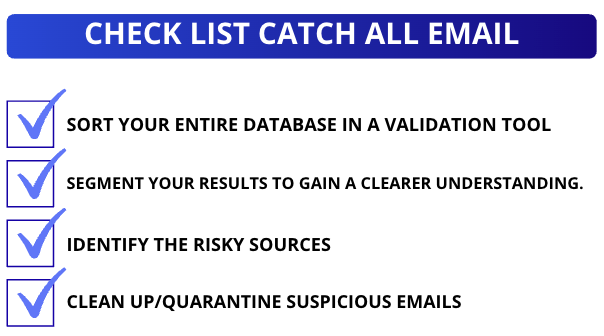
- Run your entire database through a validation tool: This is an essential step. The goal is to quickly isolate suspicious addresses: catch all emails, unknown emails, invalid addresses… anything that could cause your bounce rate to skyrocket 👀.
- Segment your results for greater clarity: Once validation is complete, classify your emails into three distinct categories.
• Validated addresses: those that can receive your campaigns without risk. ✅
• Catch-all addresses: accepted by the server, but impossible to verify. 🙆🏻♀️
• Unverified or invalid addresses: should not be used under any circumstances. ❌
This segmentation allows you to know exactly where to take priority action. - Identify risky sources: A database is never bad by chance. Bounces often come from:
• Purchased email files (often full of catch-all and dead addresses).
• Emails retrieved via scraping without verification.
• Databases that are too old or have never been cleaned.
These sources are generally the main causes of high bounce rates 📉. - Clean up or quarantine suspicious segments: Before sending your campaign, remove invalid addresses and place catch all emails in a separate segment. This protects your sender reputation and prevents your domain from being blacklisted “blacklister” by ISPs. 🧹. You can then test these segments in small doses or process them through other channels (LinkedIn, phone, etc.).

Alternatives for limiting the risks of catch all emails
Even though catch all emails are part of the B2B landscape, you can significantly reduce their impact on your campaigns. The goal is not necessarily to ban them, but to implement practices that truly protect your deliverability. ✨
Use a multi-level email checker
The first best practice is to use a tool that can analyze emails on several levels: syntax, server, domain status, SMTP behavior, etc. The more detailed the analysis, the more realistic your view of the risk associated with each address will be. 😇
➡️ Multi-level solutions enable you to:
- Quickly confirm 100% valid addresses.
- Isolate catch all emails.
- Detect potentially dangerous emails (spam traps, inactive domains, suspicious patterns).
This gives you greater accuracy and confidence when launching a campaign 📧.
Set up continuous cleanup rules
An email database is never clean once and for all. It evolves, ages, deteriorates… and must be maintained regularly. Implementing continuous cleaning is therefore essential to limit risks.
This means 👇🏻:
- Check your new addresses as soon as they are entered into the CRM.
- Resume regular checks of old databases.
- Monitor open and bounce rates to identify anomalies.
- Automatically isolate domains detected as catch-all or unstable.
It’s a small daily effort, but a huge gain in deliverability in the long run. 🥰
How does Waalaxy help manage catch all emails intelligently?
Catch all emails can quickly become a real headache during a B2B prospecting campaign 😅. With Waalaxy, they’re no longer a blocker, but a signal you can manage intelligently to maximize your chances of reaching prospects—without hurting your deliverability 😇.
Get more valid emails
Instead of relying on a single source, Waalaxy uses cascade enrichment. If one provider can’t find an email, another one automatically takes over 👀.
Fewer missing emails, fewer catch-alls… and much cleaner lists right from the start 😌.
👉 You can recover up to +60% confirmed professional emails, as explained in our ebook dedicated to database enrichment 📘.
Avoid bounces with smart verification
Before every send, Waalaxy automatically checks your emails with its Email Finder. You immediately know which ones are valid, which ones are catch-all, and which ones are risky 🤓.
In practice, this helps you:
- Cut bounces drastically.
- Protect your domain reputation.
- Send campaigns with way more peace of mind 📉.
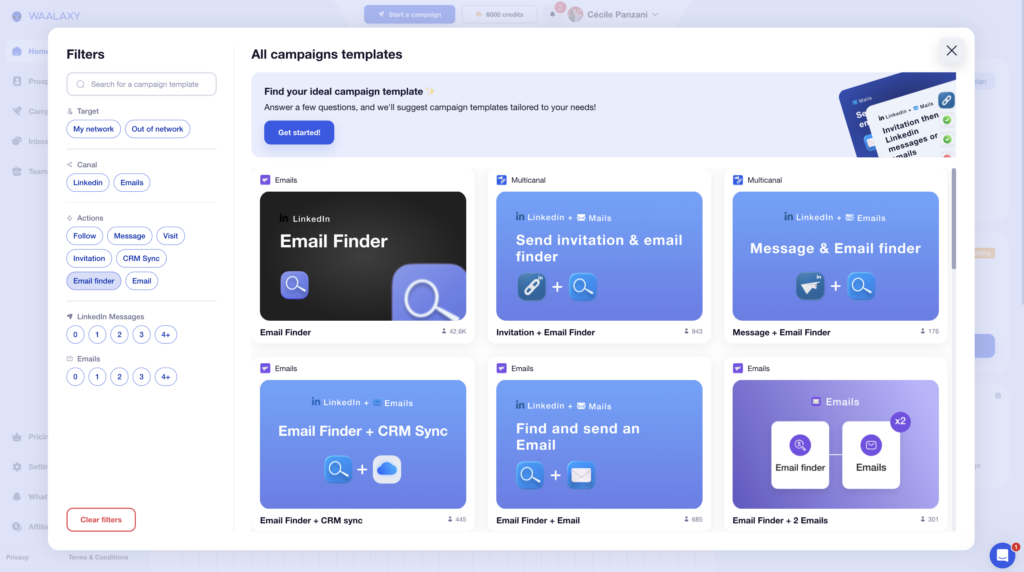
Each email is used at the right moment in your campaign, in the right way.
Stop losing prospects because of catch all email
When an email isn’t reliable, Waalaxy doesn’t leave you stuck. It automatically launches a multichannel sequence: LinkedIn messages, profile visits, follow-ups… 💬
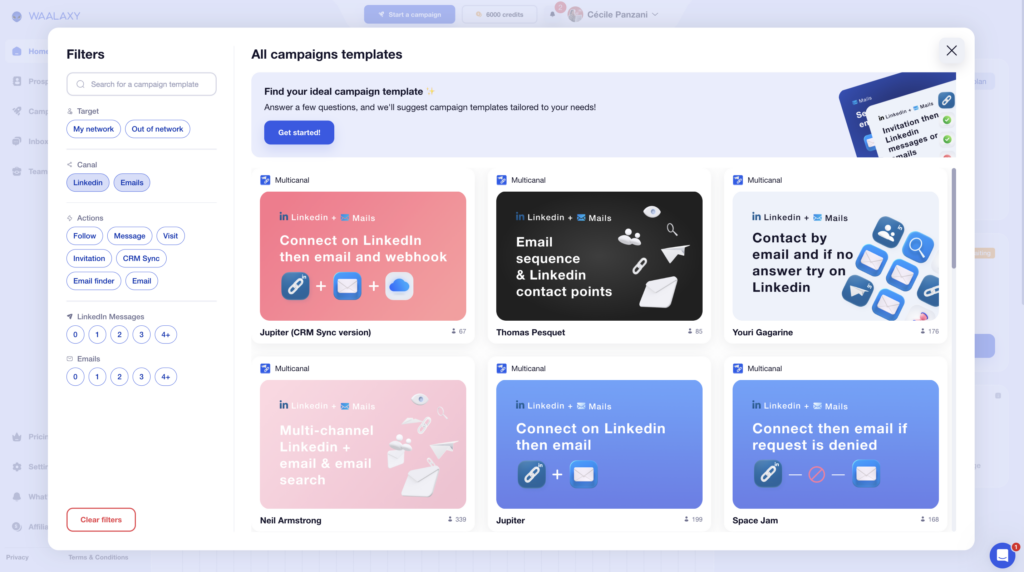
👉 You stay visible, even without a verified email.
👉 You keep the conversation alive.
👉 You boost your chances of replies and conversions.
Better deliverability and GDPR compliance
By sending fewer “risky” emails, your sender reputation stays strong. Your domain “warms up” less, your emails land better, and your open rates increase, so you avoid the negative spiral of poorly managed catch all email 🌀.
All while following GDPR best practices, since Waalaxy focuses only on professional data with a double opt-in process.
You save time, improve lead quality, and your campaigns perform better—even with catch all emails in the mix 🥰.
Let’s recap catch all emails
Catch all emails accept all messages sent to a domain, even if the address does not exist. This is useful for ensuring that you do not lose any prospects, but it is risky for your email campaigns, as it increases bounces and prevents you from verifying your emails.
Companies use them to centralize, avoid errors, and ensure continuity. On your end, when prospecting, they can be kept, excluded, or segmented based on your sender reputation 👀.
Keep this in mind: a traditional address has a bounce rate of less than 5%. A catch-all can go up to 15%. So be vigilant.
Waalaxy simplifies everything with automatic verification, cascading enrichment (+60% confirmed emails), and multi-channel prospecting to bypass uncertain emails. 🚀
Frequently asked questions
What is the difference between catch-all email, redirect, and alias?
Here is a very simple table to help you avoid confusing them: 👇
| Address type | Function | Advantage | Risk/Limitation |
|---|---|---|---|
| Catch all email | Receives all emails from a domain, even if the address does not exist. | No messages are lost. | Impossible to verify the address, resulting in more bounces. |
| Forwarding | Redirect email domain automatically forwards emails from one address to another. | Useful for managing multiple mailboxes. | The original address still exists. |
| Alias | Several different addresses point to the same mailbox. | Simpler for filtering or organizing. | Does not capture non-existent addresses. |
How can you tell if a domain is configured as a catch all email address?
Here’s how to check this with different email providers. 👀
1. Microsoft catch-all email (Outlook)
Outlook does not offer native catch-all, but a company can configure it via Exchange Admin Center. To check:
- Send a deliberately incorrect email (example: test-inexistant@domaine.com),
- If no error message (“undeliverable”) is returned, there is a good chance that the domain is catch-all.
Exchange may also hide certain bounces, so caution is advised.
2. Catch all email Gmail (Google Workspace)
Google Workspace officially allows the creation of catch-all accounts. To check:
- Send a test email to a made-up address.
- If the message is accepted without error, the domain is probably catch-all.
- If you receive this message, then there is no catch-all.
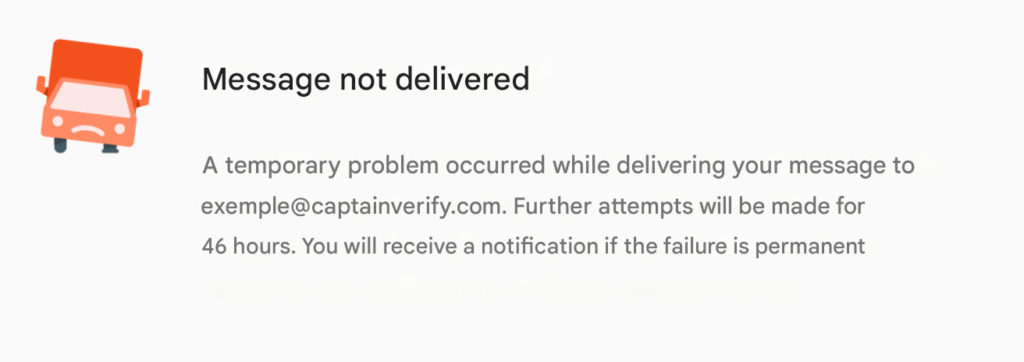
You can also check the header of the message you received. Gmail sometimes indicates the routing system used. Google is one of the environments where catch all emails are most common ⚠️.
3. Apple Mail (iCloud / Apple Business)
Apple does not offer a simple catch-all on iCloud, but some companies using Apple Business can simulate it via advanced rules. To check, it’s the same as with the previous providers:
- Send an email to a non-existent address,
- If you receive a return message “invalid email”, the domain is not catch-all,
- If you do not receive a reply and the company receives the email in a generic mailbox such as info@…, then catch-all is active.
This tip works for all providers. The most reliable test, regardless of the provider, is to send a deliberately incorrect email and observe the server’s response.
Now you know everything about catch all email !🧚🏻♀️
 Lisa
23/01/2026
Lisa
23/01/2026 












