



Your LinkedIn profile is clean and complete… but it’s not really generating opportunities? It’s often a question of visible credibility. Today, LinkedIn certification has become a strong signal to reassure recruiters and clients.
When chosen well and highlighted effectively, it improves your visibility, reinforces your perceived expertise, and can even become a real lever for prospecting. In this article, we’ll look at which certifications are worthwhile, how to add them, and, above all, how to use them intelligently to attract clients.
Why have LinkedIn certifications become important?
On LinkedIn, almost everyone displays attractive job titles, well-chosen skills, and a professional photo. As a result, profiles tend to look very similar. Certifications allow you to stand out from the crowd by providing concrete proof of your skills, without having to overdo it. 👀
What exactly is a LinkedIn certification?
A LinkedIn certification isn’t a single, standardized format. It refers to any certification you display in the “Licenses & Certifications” section of your profile. This can include 👇🏻:
- A recognized professional certification (Google, Microsoft, HubSpot, Meta, etc.).
- A certification or badge from an e-learning platform.
- One offered or shared by LinkedIn (LinkedIn Ads certification, LinkedIn Learning certificates, Recruiter, etc.).
LinkedIn does not always create the certification, but it becomes its public showcase. 👀
Why do they really boost your credibility?
A certification acts as a mental shortcut. In a matter of seconds, anyone viewing your LinkedIn profile understands that you have taken the time to train and validate a specific skill.
For a recruiter, it’s an indicator of professionalism and skill development.
For a potential client, it’s a sign of trust: you’re not just saying you’re an expert, you’re proving it. 🙂
This is particularly useful for prospecting, as a visible certification can remove an objection before you even send your first message. 📩
LinkedIn certifications and profile SEO
When we talk about SEO on LinkedIn, we’re not talking about Google, but LinkedIn’s internal search engine. And this engine works largely on the keywords in your profile. Certifications play an important role in this regard. ✨
Each certification you add has a specific title that is often highly sought after: the name of a tool, skill, or recognized program. This information helps LinkedIn better understand who you are. 🙆🏻♀️
Certifications boost your visibility in several key ways 👇🏻:
- More frequent appearance in LinkedIn searches related to your skills.
- Better matching with the filters used by recruiters and prospects.
- Strengthened relevance of your profile in a specific field.
- Increased qualified profile visits.
Another often underestimated aspect is the overall consistency of your profile. When your title, “About,” your experience, and your certifications use similar keywords, LinkedIn considers your profile to be more relevant to these topics. This improves your ranking in search results, especially for targeted searches. 🎯
Certifications are not a miracle solution on their own. However, when integrated into a profile optimization strategy, they become a catalyst for visibility and credibility, particularly useful if you are looking to attract clients or develop your LinkedIn prospecting. 📈
Mistakes that reduce the impact of LinkedIn certifications
LinkedIn certifications can clearly boost your credibility on LinkedIn… but only if they are used correctly. Here are the most common mistakes to avoid 😅:
- Adding little-known certifications: A certification that is unknown in your industry does not add perceived value. If the person viewing your profile does not immediately understand what the certification is worth, its impact will be virtually nil. It is better to display fewer certifications, but ones that are recognized. 👀
- Filling in fields incorrectly: Many certifications are incorrectly filled in with useless license numbers, vague titles, etc. Focus on the essentials: a clear name, an identifiable organization, and a public link to the certification. 🔗
- Never updating them: An outdated or obsolete certification can send the wrong message, especially in fast-moving fields. Remember to sort through them regularly, delete anything that is no longer relevant, and highlight your current skills. 😇
- Accumulating too many certifications: Adding all your certifications can make your profile difficult to read. Too much information dilutes your expertise and makes your positioning confusing. 🫤

How to add certificate on LinkedIn?
Adding LinkedIn licenses & certifications is simple, but you still need to do it correctly. Depending on the type of certificates you have (standard, LinkedIn Learning, or external badge), the process is the same, but certain details make a difference. Here’s how to do it step by step. 🤓
Where to add certifications on Linkedin (Google, HubSpot, Microsoft, etc.)
This is the most common case. To add this type of certification, go to your LinkedIn profile, then 👇🏻:
1. Click on “Add profile section.”
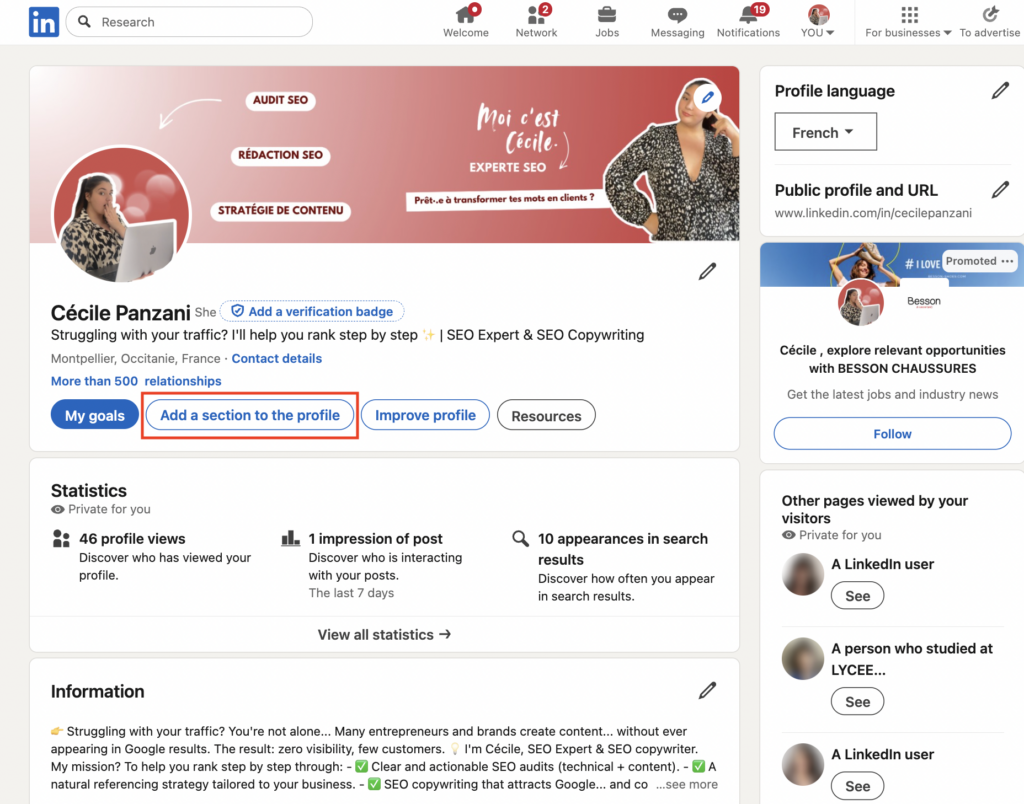
2. Select “add licenses & certifications.”

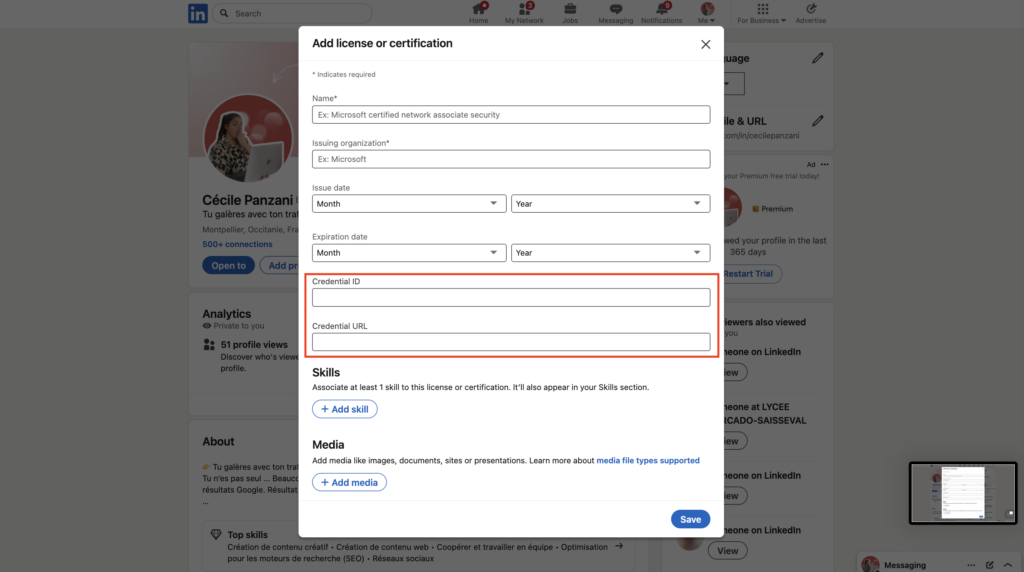
3. Fill out the form.

You will then need to fill in several fields. The most important ones are:👇🏻
- Certification name: Use the official title (e.g., Google Data Analytics Certificate”).
- Issuing organization: Google, HubSpot, Microsoft, etc.
- Date obtained: Optional but recommended.
- Certification URL: Very useful for boosting credibility.
However, some fields are often misused. The license number is generally unnecessary if no one is going to check it. It’s better to leave this field blank than to fill it in randomly. 😉
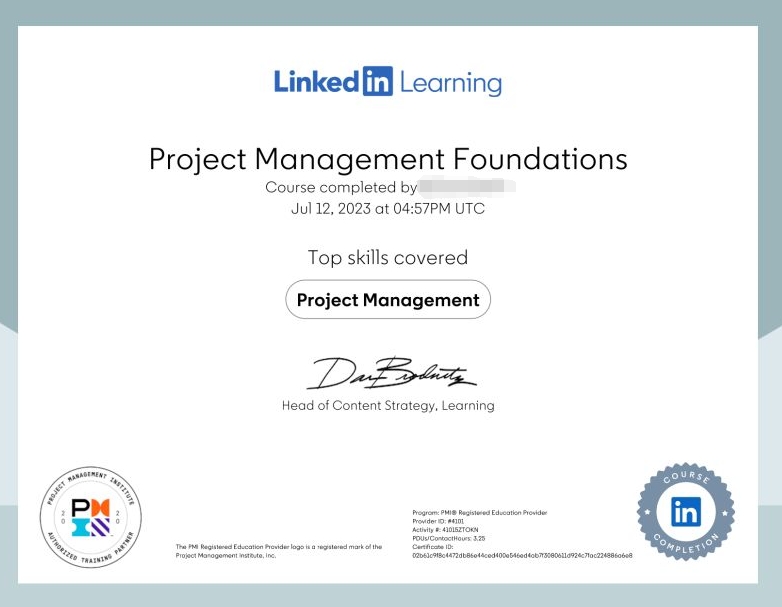
Add a LinkedIn Learning certification
Certifications from LinkedIn Learning are even easier to add. Once you have completed the course or program, LinkedIn automatically offers to add it to your profile.
The advantage is that these certifications are:
- Directly linked to your LinkedIn account.
- Easily identifiable by recruiters.
- Consistent with the LinkedIn algorithm.
Add a certification with a badge or external link
Some platforms (Credly, Open Badges, and software publishers) provide a digital badge or verifiable public link. The good news is that LinkedIn allows you to showcase them. 🪪
In this case:
- Use the certification URL field to link to the badge.
- Check that the link is public and accessible without logging in.
- Choose a clear, skill-oriented title.
23 Best LinkedIn certifications to have
Not all LinkedIn certificates are created equal. Some clearly boost your credibility, while others have little impact or may even muddy your positioning. The goal is not to display as many as possible, but to choose those that speak to your target audience. 🤩
Marketing & growth certifications
In marketing and growth professions, what matters most is showing that you have mastered the most widely used acquisition levers and platforms today. Here is a small selection of certifications:
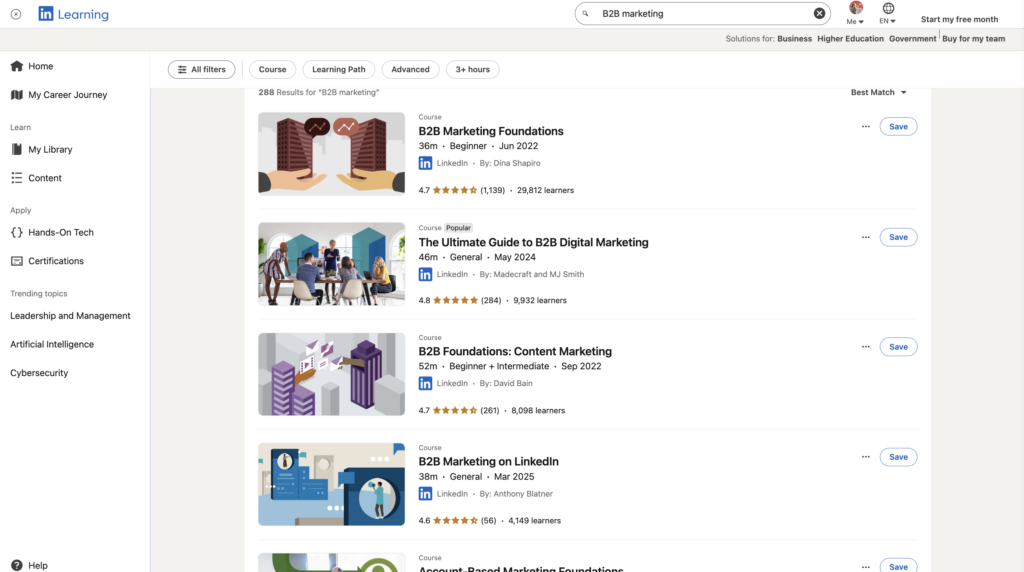
- LinkedIn Marketing Labs: Publicité sur les réseaux sociaux : Créer des campagnes efficaces
- LinkedIn Marketing Labs: B2B Marketing on LinkedIn.
- LinkedIn Marketing Labs: Content Marketing on LinkedIn.
- Google Analytics Certification (GA4).
- HubSpot Inbound Marketing Certification.
- Meta Digital Marketing Associate.
IT & Data Certifications
For IT, data, or technical profiles, the goal is to demonstrate concrete skills. Here are some certifications that meet this objective:
- LinkedIn Learning: Become a Data Analyst.
- LinkedIn Learning: Data Analytics Foundations.
- Linkedin ai certification: Building ChatGPT Skills for Business Professionals.
- Google Data Analytics Professional Certificate.
- Microsoft Certified: Power BI Data Analyst Associate.
- Microsoft Azure Fundamentals (AZ-900).
- AWS Certified Cloud Practitioner.
Sales & business development certifications
In sales roles, certifications are mainly used to demonstrate your mastery of prospecting methods, social selling, and B2B sales techniques. You can take the following training courses:
- LinkedIn Learning: Sales Navigator Core Certification.
- LinkedIn Learning: B2B Sales Foundations.
- LinkedIn Learning: Social Selling Foundations.
- HubSpot Sales Software Certification.
- MEDDIC Sales Certification.
Human resources & Recruitment Certification
When it comes to HR and recruitment, the challenge is to show that you know how to use LinkedIn as a powerful tool for sourcing, employer branding, project management, and talent management. With these certifications, you’ll be able to prove it:
- LinkedIn Learning: LinkedIn Recruiter Certification.
- LinkedIn Learning: Talent Acquisition Foundations.
- LinkedIn Learning: Employer Branding on LinkedIn.
- SHRM Talent Acquisition Specialty Credential.
- Talent Management Certification (CIPD or equivalent).
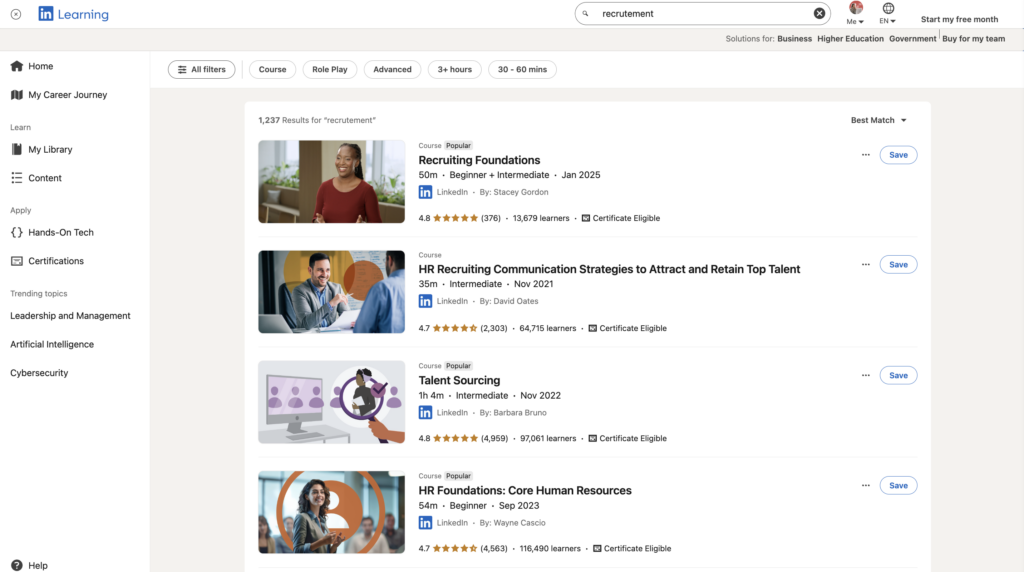
Ideally, you should choose LinkedIn certifications that are understandable even to someone who is not an expert in your field. If the name speaks for itself, that’s a good sign. 👀
Free vs. Paid LinkedIn Certifications: Which One Should You Choose?
The good news is that the price of the certification is not what determines its value on LinkedIn. What really matters is its recognition, its relevance to your audience, and how it aligns with your profile. 😎
| Type of certification | Examples | Advantages | Disadvantages | Recommended if… |
|---|---|---|---|---|
| Free certifications | LinkedIn Learning, Google Analytics… | Easy to access, recognized, a good indicator of skill, and ideal for getting started. | Sometimes more basic, less distinctive. | You want to quickly improve your visibility and credibility. |
| Paid certifications | AWS, Microsoft Azure… | More in-depth, high credibility, differentiation. | Cost, longer time to obtain. | You are looking to specialize or position yourself as an expert. |

How can you turn your LinkedIn certifications into clients?
A well-chosen certification isn’t just there to look good on your profile. Used intelligently, it can become a lever for prospecting, without aggressive sales talk. The idea is not to sell your certification but to use it as proof of credibility to open up conversation. 🧚🏻♀️
Certifications as a lever for trust in prospecting
Even before you send an invitation message, your certifications are working for you. When a prospect views your profile and sees a recognized certification, they immediately understand that you are an expert in a specific subject. 🤓
➡️ Result:
- Less mistrust.
- More curiosity.
- A greater willingness to respond to your message.
In a prospecting approach, a certification acts like a reassurance mechanism. You don’t say “I’m an expert”, you prove it. This makes it possible to start the conversation in a much more natural way, without a sales pitch from the very first message. 🥳
Target prospects by skills and certifications with Waalaxy
With Waalaxy, you don’t prospect at random. You start with a strong common ground, a skill or tool that your prospect already uses. And your certifications become an excellent excuse to start the conversation without forcing it. 👌
LinkedIn allows you to filter profiles very finely according to job title, industry, tools used, or declared skills. By combining these filters with Waalaxy, you can create highly targeted prospect lists that align with your expertise. 🤓
The logic is simple:👇🏻
- You identify a skill related to your offering. 👀
- You target profiles with this skill. 🕵🏻
- You rely on relevant certification. 😎
- You tailor your message based on this commonality. 📮
For example, if you are certified in LinkedIn Ads, Google Analytics, or HubSpot, you can refer to these tools in your messages. This makes your approach more credible and much less sales-oriented. 👀
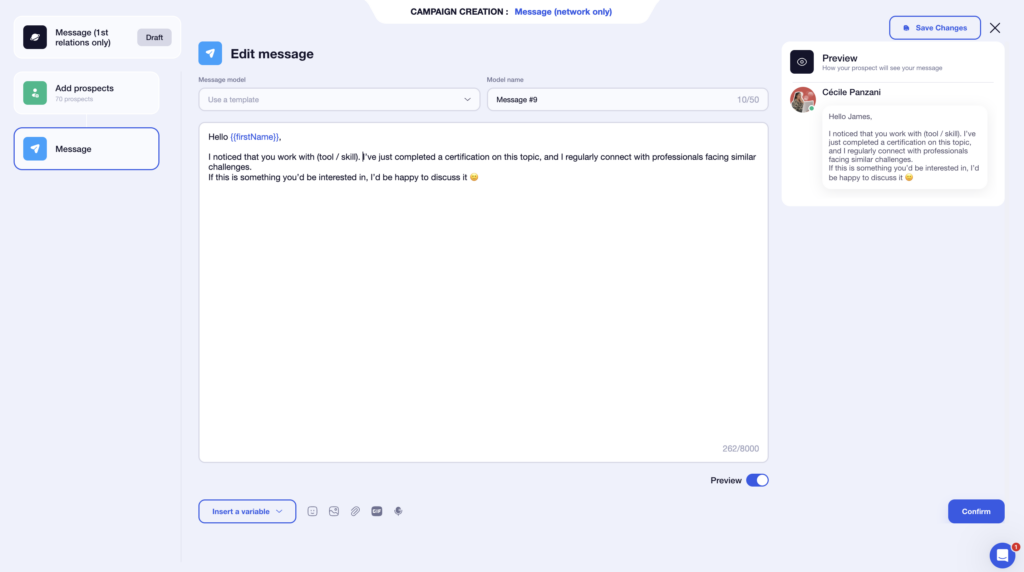
➡️ This type of message works well because it
– Doesn’t sell anything
– Highlights expertise.
– Opens the door to conversation.
With Waalaxy, you can deploy this type of message on a large scale while maintaining a high level of personalization, track response and acceptance rates, and then adjust your sequences based on the results. 📊
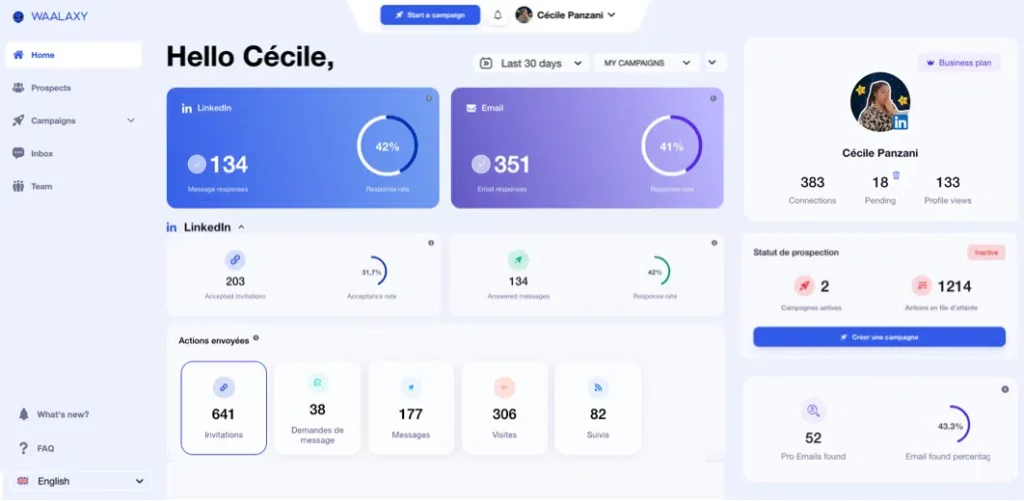
This is where LinkedIn, combined with a tool like Waalaxy, really comes into its own. 😉
Let’s recap on LinkedIn certification.
LinkedIn certifications are much more than just an addition to your profile. When chosen and highlighted effectively, they strengthen your credibility, improve your visibility, and support your professional development by clearly showcasing your skills. 👀
According to LinkedIn’s COO, profiles with at least one certification receive six times more views on average.
The goal isn’t to collect certificates but to analyze which certifications truly support your positioning and then use them strategically, especially in prospecting. Combined with an optimized profile and a tool like Waalaxy, they help you earn trust faster, create qualified conversations, and generate real business opportunities 💸
Frequently asked questions
Are LinkedIn certifications verified or checked by LinkedIn?
Not systematically. LinkedIn does not manually verify all certifications added to profiles. In most cases, these are self-declared certifications; you add them yourself and are responsible for their accuracy. 🙂
That said, not all certifications carry the same weight. They can be divided into several categories: 👇🏻
- Official LinkedIn certifications: Issued by LinkedIn Learning, LinkedIn Ads, or LinkedIn Recruiter, these are directly linked to your account. They are easily recognizable and generally inspire more confidence. 👀
- Recognized external certifications: Google, HubSpot, Microsoft, and Meta are very well regarded on LinkedIn. If you add a verifiable public link, you further enhance your credibility. 🔗
- Certifications that are difficult or impossible to verify: Without a known organization or accessible link, their impact is limited. They rarely add any real perceived value. 😅
Can I add an expired or obsolete certification?
Yes, technically it’s possible, but it’s not always a good idea. 🫠
An expired or very old certification can give the impression that your skills are no longer up to date, especially in fast-moving fields like marketing, tech, data, or artificial intelligence. 📊
If the certification is still relevant (core fundamentals or a method that’s still widely used), you can keep it, especially if it fits within a broader learning path that shows continuous improvement. However, if it relates to an outdated tool or practice, it’s usually better to remove or hide it. 🫣
Now you know everything there is to know about LinkedIn certifications. 🧚🏻♀️
 Lisa
23/01/2026
Lisa
23/01/2026 












