



You want to limit your visibility on search engines? And you want to know How not to appear on Google search when someone types in your first and last name? We’ll show you all the tips here. 🤫
How can I avoid appearing in the Google search engine?
It’s mainly related to a setting error on your LinkedIn account.
Unlike people who are looking for a job, you don’t want your profile to be visible on search engines. And you don’t want to be spotted from Google by recruiters when they do a search with your first and last name.
To fulfill this totally legitimate request and to restrict the visibility of your profile information outside of LinkedIn.
- Head to your profile and click on “Me” in the menu bar. Then click on “Settings & Privacy.”
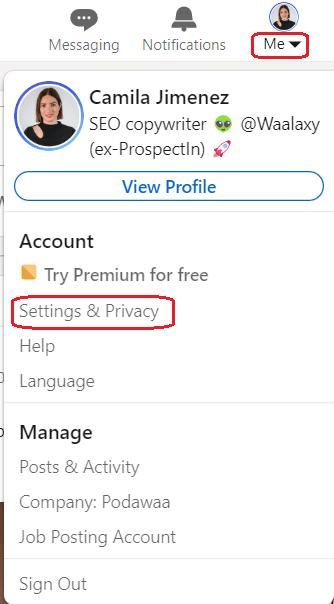
- You will then be taken to a menu with multiple tabs: Go to “Visibility”,
- Scroll down and stop in the “Profile discovery and visibility off LinkedIn” section. This is where you will need to make the change.
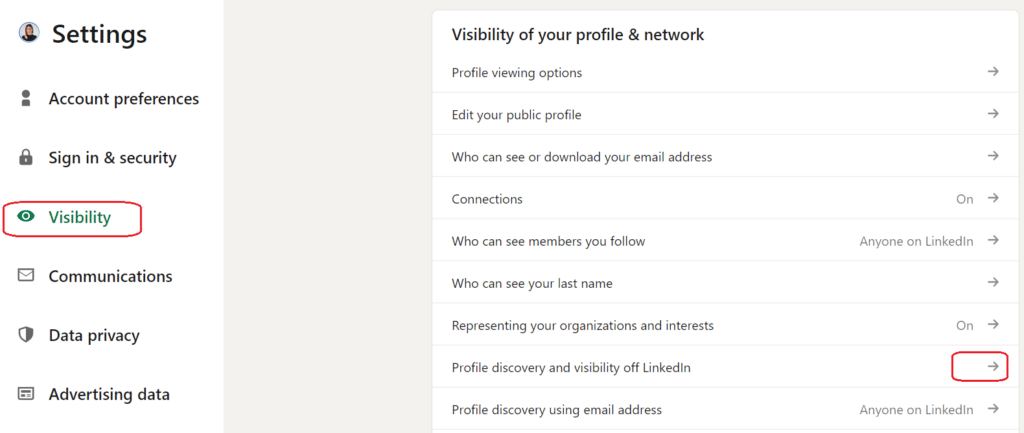
- Click on the arrow to change it.
- On your right, you need to turn off the “Profile visibility outside LinkedIn” as shown below.
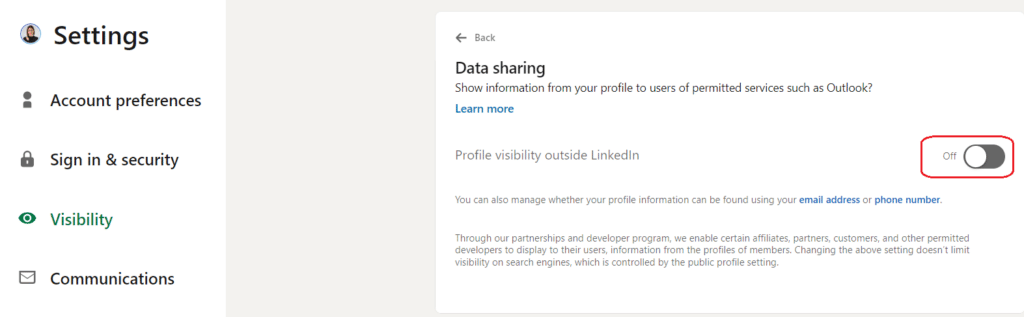
And that’s it! It may take a few weeks for the change to take effect, but you will no longer see your LinkedIn profile on Google. And if you want to know who has viewed your profile, read this article! 👈

Conclusion: How not to appear in Google searches?
It is very common that when searching for our name or even our identity documents on Google, they appear in the results. For example, if we are on the list of people admitted to a course, if the profile of a social network has been indexed, etc. 🧐
Sometimes it is not fun and in this article we explain what you can do so that your data does not appear published on the Internet and indexed in search engines to avoid that everyone can see them. ⚠️ We have several options to prevent our personal information from being published on the Internet and appearing on Google for anyone.

Below, we will look at some basic general tips to set up social networks and prevent sensitive content from being displayed, as well as how to remove posted content:
- Avoid posting personal information online. ❌
The most important thing is to avoid posting personal information online. For example, we are talking about public forums, commenting on websites, etc. All of these can be indexed in search engines, and this information can be accessed by third parties with a simple search. You should never publish your email address in open forums, nor your phone number, your full name, your username…. In short, anything that we do not want to be accessible to other people.
- Control the content posted on social networks. ✍️
Of course, another very important point is to control social networks. For example, our LinkedIn profile can be indexed on the Internet and appear in search engines. Anyone can find us by name and see the content we have. It is possible to prevent a Facebook profile from appearing in Google. We can also configure other social networks such as Twitter or Facebook to be private and not show information to anyone. This point is one of the most crucial for anonymity on the Internet.
- Ask the website to delete the data. 🧹
What happens if we notice that a website contains personal data, such as our ID, and it appears on Google? Simply put, we can ask this website to remove certain personal data that we do not want to appear. It can even be an image or a video. The easiest way to do this is to go to the contact details of the website and send an email or fill out the form that appears. We indicate that there are some data that we want to delete. While it is not something they always do, we have to keep in mind that it is our right.
- Ask Google to remove the content. 🚩
On the other hand, Google also allows you to request data removal. They have a web page to inform about the whole process. There they explained to us under what circumstances we could require this procedure and how we could do it. Google is the main search engine, so this is where our personal data will mainly be visible to third parties. If something comes up that is not in our best interest, we may contact them to remove the .
👉 In conclusion, these are some options to try to remain anonymous on the Internet and have your personal data that does not appear on Google, LinkedIn or any other online platform. Privacy is an important factor that we must protect in this ultra-connected world.
Frequently asked questions from the article
How to view a LinkedIn profile anonymously?
To view LinkedIn profiles anonymously, follow this tutorial 👇:
- Log in to your LinkedIn account.
- Go to “Preferences & Privacy.”
- Click on “How others see your LinkedIn activity.”
- Turn on private mode to make your LinkedIn activity invisible.
By switching your profile to private mode, you can use the normally and view LinkedIn profiles anonymously, i.e., without appearing in viewing notifications.
🔎 This is convenient for browsing the B2B network anonymously and protecting your privacy.

Now you know How not to appear on Google search while using your LinkedIn profile!
 Melany
17/06/2026
Melany
17/06/2026 














