



- What is a message request on LinkedIn?
- Why use the LinkedIn messages request?
- How do you send a LinkedIn messages request?
- 6 linkedin connection request message
- What should you do once the LinkedIn conversation starts?
- Let’s recap the LinkedIn messages request
- Frequently Asked Questions about What is request in LinkedIn
The LinkedIn messages request is one of the most overlooked features out there… and it can be incredibly effective for prospecting. 👀
It lets you contact prospects even if you’re not connected yet, so you don’t have to rely only on invitations anymore (especially now that they’re limited).
In this article, you’ll learn how the LinkedIn messages request works, when to use it, and most importantly, how to turn it into a real asset for your acquisition strategy. 😎
What is a message request on LinkedIn?
How can you message someone on Linkedin without premium ? The answer is simple: the LinkedIn messages request is a feature that lets you message someone without being connected to them. 🔗
Unlike standard messages (which are only for your connections), this feature is available in specific cases or anytime if you have a Premium account ( via InMails). 🫣
You can send a LinkedIn messages request if you have something in common with the person 👇🏻:
- You’re in the same LinkedIn group.
- You’re attending the same LinkedIn event.
- The person has Open Profile enabled.
- You work at the same company.
How does the LinkedIn messages request work?
When you send a LinkedIn messages request, here’s what happens :
- Your message goes directly to the recipient’s inbox.
- It appears as a specific LinkedIn message notification.
- The person can choose to accept or ignore it.
What’s the difference between a message request on LinkedIn and an invitation?
➡️ The difference is simple:
- LinkedIn Invitation: You have to wait for the person to accept before you can chat.
- Message request: You can send a message right away.
That makes it a great way to start conversations faster, especially when you don’t want to rely on connection requests 😎

Why use the LinkedIn messages request?
With LinkedIn limiting invitations, it’s getting harder to reach a large number of prospects using connection requests alone.
Since LinkedIn’s May 2021 update, you’re limited to 100 invitations per week. That’s exactly where the LinkedIn messages request becomes a game changer. 🥸
✅ The main benefits are:
- Start real conversations: You can add context from the very first message and make it easier to engage. 📨
- An underused channel: Most users ignore it, which means less competition and more visibility for your messages. 🤩
- More visibility: Your message shows up in a dedicated notification—often easier to spot than others. 👀
- More targeted outreach: Thanks to LinkedIn events and groups, you reach people who are already interested in a specific topic.😌
- A workaround for LinkedIn’s limits: You bypass invitation restrictions and continue to generate new opportunities.😏
Keep in mind:
– The LinkedIn messages request only works if you share something in common.
– If your request is ignored or declined, you won’t be notified.
– If your message is too salesy, your chances of getting a response drop significantly.
Should you prioritize messages or invitations?
Both approaches work together… but they serve different purposes. It all depends on your situation and goals.
| Criterion | LinkedIn Messages Request | LinkedIn Invitation |
|---|---|---|
| Access to the message | Immediate, no connection required | Only after acceptance |
| Conditions | Requires a common connection | No conditions |
| Volume | No clear limit | Limited (≈100/week) |
| Response rate | Often high (less commonly used) | Varies depending on approach |
| Ideal use | Targeted prospecting (events, groups) |
How do you send a LinkedIn messages request?
Sending a LinkedIn message request is simple… as long as you meet one of the required conditions, especially since LinkedIn can you message without premium only in certain cases. 😇
Step 1: Find a common connection
First and foremost, you need to identify a context that allows you to send a LinkedIn message request:
- Join a group. 👭
- Attend an event. 🥳
- Find a profile with an Open Profile. 🚪
- Work at the same company. 👩🏻💼
Without a common connection, you won’t be able to send a message unless you have LinkedIn Premium.
Step 2: Access the profile
Once you’ve found a connection:
- Go to the person’s LinkedIn profile.
- Click ”Message”.
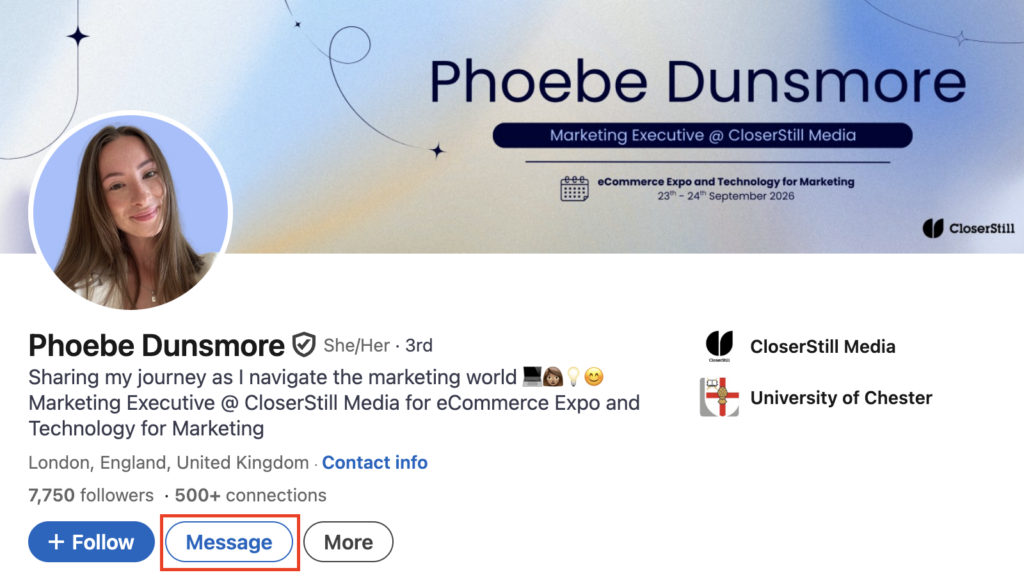
- Then write a short message (around 300 characters), mention your shared context right away, and ask a simple question.
- If the message request accepted Linkedin and they open it, you’ll see a “read” notification on LinkedIn.
Step 3: Follow up if necessary
If you don’t receive a reply, you can send a follow-up message, but be careful! If your LinkedIn request message is ignored or declined, your subsequent messages won’t be seen. 🥲

6 linkedin connection request message
A LinkedIn messages request works primarily because of its simplicity. There’s no need to write a long or overly salesy message: the goal is to start a conversation, not to sell immediately. 😌
Example message related to a B2B event
Hey {{firstName}},
I saw that we’re both attending the event on LinkedIn prospecting, so I thought it would be worth connecting. 😉
I’m really interested in how people use LinkedIn to generate opportunities.
How are you approaching that right now?
➡️ Why it works:
- Your natural tone.
- peer-to-peer approach.
- A simple question.
You can try too :
Hi {{firstName}},
I saw you’re attending the same event, looks like a good one. 😌
I’m trying to get a sense of what people are actually expecting from it.
What are you hoping to get out of it?
➡️ Why it works:
- Focus on expectations (angle différent).
- Feels spontaneous and conversational.
- Easy question that invites a real answer.
Example via a LinkedIn group
Hi {{firstName}},
We’re in the same digital marketing group, and I often see interesting discussions there.
I was curious how you’re using LinkedIn in your business these days. Are you pretty active, or just getting started? 👀
➡️ Why it works:
- Credible context.
- Conversational tone.
- No pressure.
A more direct example for a targeted profile
Hello {{firstName}},
I came across your profile and thought your background was interesting. I’ve been speaking with people in similar roles about their acquisition challenges. Open to a quick chat about it? ☺️
➡️ Why it works:
- Personalized without being pushy.
- Honest approach.
- Simple CTA.
Example for someone at the same company
Hello {{firstName}},
I’m reaching out because we work at the same company. 🙂
I’m curious how people use LinkedIn or work on [topic: acquisition, marketing, sales, relations…] internally.
Would love your take, open to a quick chat?
➡️ Why it works:
- Highly legitimate context (same company).
- Simple and natural approach.
- Accessible networking.
Example via an Open Profile
Hi {{firstName}},
I saw your profile is open to messages, so I figured I’d reach out. ☺️
I’ve been exploring how people approach [topic: sales, growth…], and your background caught my attention.
How are you handling this right now?
➡️ Why it works:
- Legitimate context (open profile).
- Natural and transparent approach.
- Simple, easy-to-answer question.
What should you do once the LinkedIn conversation starts?
Today, LinkedIn messages requests are mostly sent directly on the platform. Automation is limited at this stage, so it’s best to keep things manual to maximize personalization. 🥰
But once the conversation starts, that’s where you can really structure your approach. 🤓
Waalaxy, a tool to structure your B2B prospecting
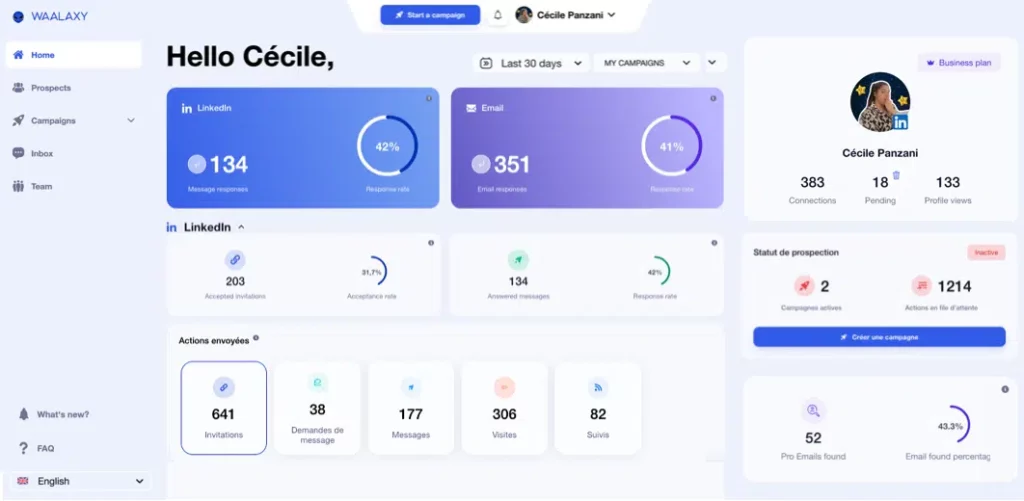
Waalaxy helps you manage, organize, and track your LinkedIn conversations more effectively.
It doesn’t send the LinkedIn messages request itself but it becomes powerful once contact is established. 😌
Its role is to help you 👇🏻:
- Centralize your conversations.
- Structure your follow-ups.
- Organize your prospects.
- Set up LinkedIn prospecting campaigns or campaigns
Structure your exchanges
As soon as a prospect replies, don’t leave the conversation to chance.
Why? Because 80% of sales require at least 5 touchpoints, yet most opportunities are lost due to poor follow-up.
Start by organizing your contacts:
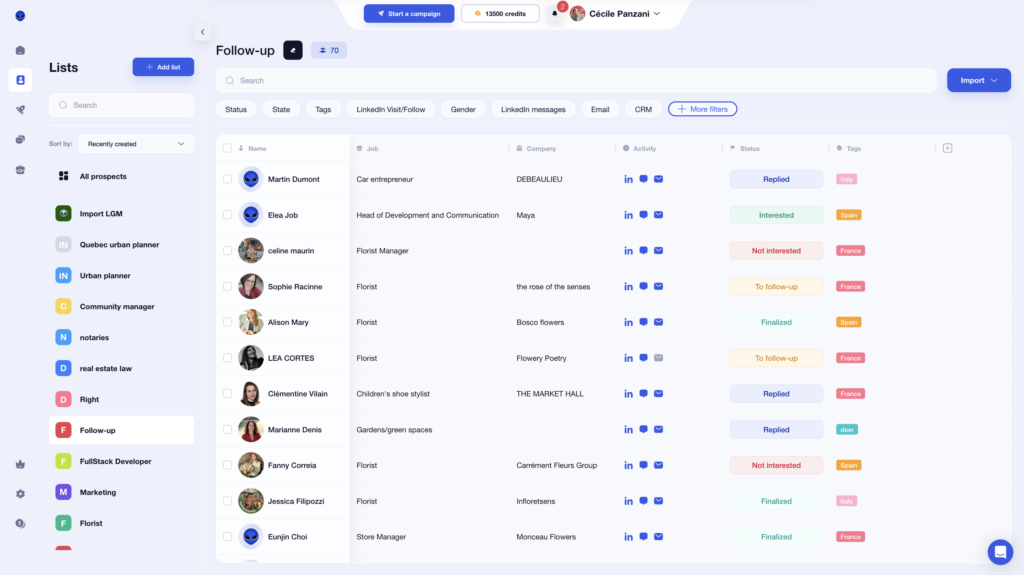
- Create lists (hot leads, leads to follow up on, unqualified leads, etc.).
- Add tags based on profile, need, or level of interest.
- Segment based on responses to the first message (interested, to follow up on, non-priority, etc.).
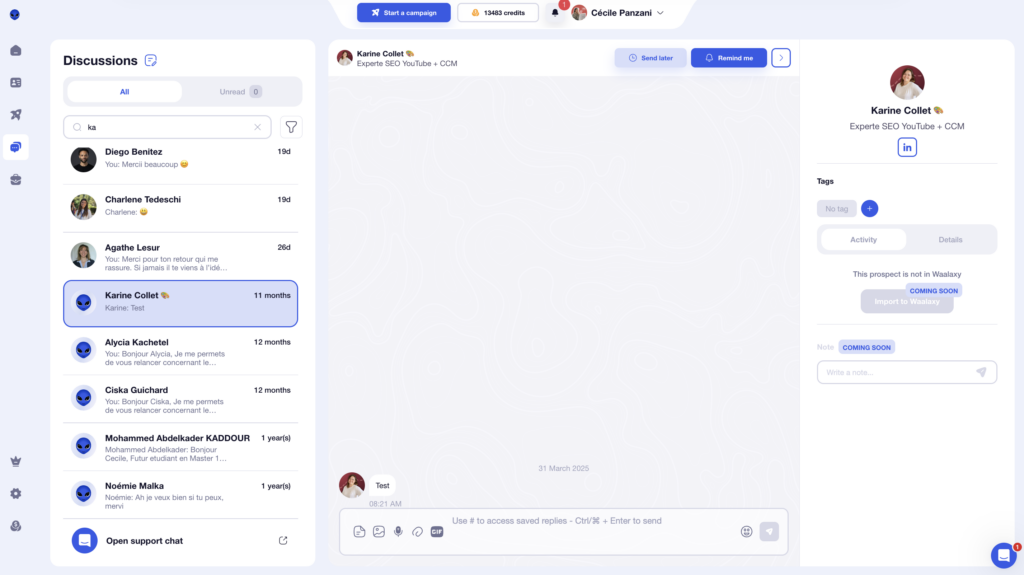
Next, it’s time to manage your conversations! With the Waalaxy Inbox, you can centralize your messages, allowing you to easily track ongoing conversations, quickly find a specific exchange without searching everywhere, and sort them.🕺🏻
Enrich your prospect information
Once contact is established, you have a real opportunity: to understand your prospect beyond what LinkedIn shows. 🔍
The more you know, the more relevant and natural your conversations become. 🍀
Instead of sticking to a simple message, take the time to dig a little deeper: look into their role, their company, their recent activities, or their potential challenges. This allows you to tailor your message and avoid generic messages. 😌
If you plan to run automated campaigns, segment your targets based on what they have in common.
You can also enrich your database with tools like an Email Finder to retrieve professional email addresses 📩. In some cases, this lets you continue the conversation outside LinkedIn in a more direct and flexible way.
Let’s recap the LinkedIn messages request
The LinkedIn messages request is still underused… but it has huge potential for your prospecting. 👀 It lets you contact qualified prospects without being connected, bypass invitation limits, and send messages without a Premium subscription.
As long as you use it the right way 👇🏻:
- Use the right targeting (groups, events…).
- A simple message.
- A solid follow-up strategy in place.
Because ultimately, sending a message is great… but turning a response into an opportunity is That’s why what happens next matters just as much.
Structure your conversations, follow up at the right time, and enrich your data to take things further. 😎
Frequently Asked Questions about What is request in LinkedIn
How do i find message requests ?
To find your message requests, go to your LinkedIn inbox and click on the “…” (more options) at the top of the messaging window. Then select “Message Requests Inbox” to access all requests from people outside your network. 🤓
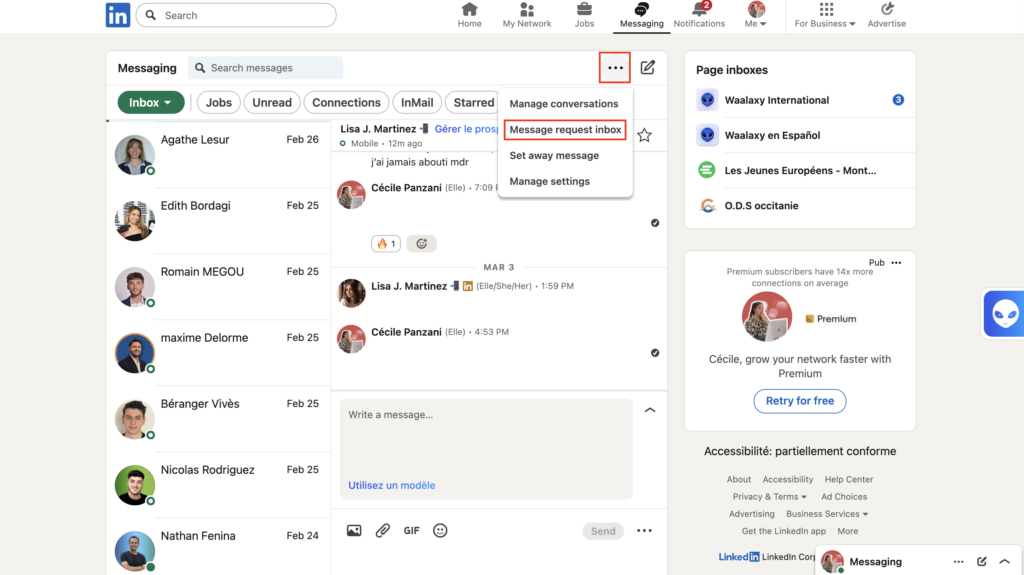
If you’re wondering does LinkedIn show all requests, they’re simply stored in a separate section, not your main inbox.📨
To stay on top of your latest message requests, check this tab regularly so you don’t miss important conversations or opportunities. ⭐️
When is the best time to send a LinkedIn messages request?
There’s no perfect time, but certain times slots perform better. Early in the day (8 a.m.–10 a.m.) and on weekdays, especially Tuesday through Thursday, are often the most effective, as users check LinkedIn at the start of the day. ☀️
That said, don’t focus only on timing, your message and shared context (group, event, etc.) matter much more. 😇
Can you send a LinkedIn messages request to multiple people at the same time?
No, the LinkedIn messages request feature doesn’t let you message multiple prospects at once. Each message must be sent individually. That’s why personalization matters and why overly automated approaches don’t work well here. 🤓
How to know if a LinkedIn message is legit?
Not all LinkedIn messages are trustworthy, so it’s important to spot the signals. 👀 A legit message usually feels personal, contextual and natural:
- It mentions a mutual context.
- It’s written in a human tone.
- It doesn’t try to sell something immediately.
On the other hand, red flags include: 🚩
- Very generic messages (“Dear user…”).
- Links sent right away.
- Urgent or overly promotional tone.
If the message feels like it could have been sent to 100 people without changes… it’s probably not legit.😒
Can LinkedIn block message requests?
Yes, LinkedIn can temporarily limit or block your messaging activity.
For example, try not to exceed around 100 messages per week on a free account to avoid restrictions. 😢
If you exceed these limits or if your messages are too repetitive, LinkedIn may:
- Slow down your activity.
- Limit your actions.
- Temporarily block your account.
Sending the same message in bulk can be flagged as spam and increase your risk of being restricted. 🥲
Now you know everything about LinkedIn messages requests. 🧚🏻♀️
 Elodie
23/06/2026
Elodie
23/06/2026 













