



In this article, we explain how to insert a link as a comment on LinkedIn. Just click on the “add comment” button and paste the external link you want to insert. ✍️
In addition, to discover the 5 must-know tips on how to use LinkedIn, click here! 🧨
How to use a link as a comment on LinkedIn?
LinkedIn allows you to create daily content and interact with hundreds or even thousands of people a day. Many people post daily to share news from their companies, their own experiences or global news. 🪐
On the other hand, there are some questions that come up frequently regarding posts on your LinkedIn account: Where to put a link to sites on LinkedIn? Should you add a visible link in the post or in the comments? 🤔
Indeed, there are rumors that LinkedIn will punish posts that show “links in comments”. Nevertheless, some studies have shown that placing relevant links in comments are three times better than those who have embedded hyperlinks in their posts. 💥
So, here are the steps to insert a hyperlink into a comment on your LinkedIn post:
- Copy your web link.
- Create a comment below your post.
- Paste the link to the site.
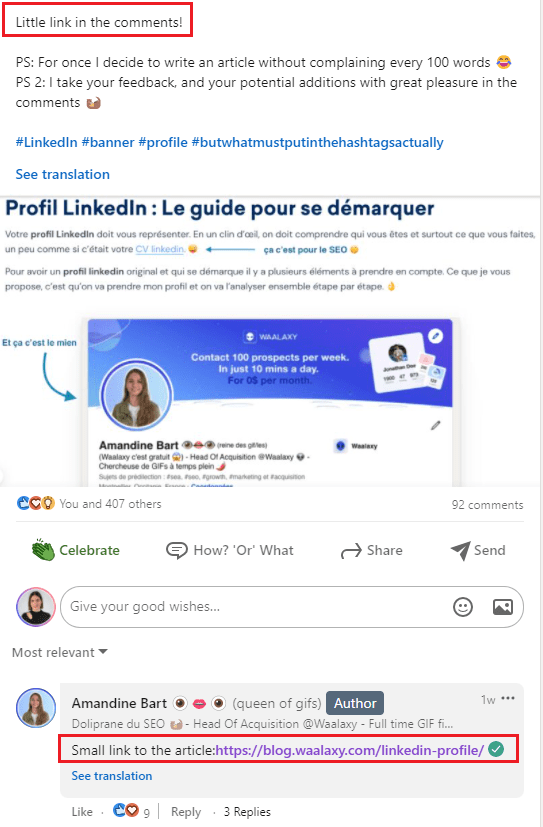
You actually have the option to put text in addition to the comment, but only allows you to add an image in addition to the comment. Mixing link with text is of course what is most recommended. 🤓
Including a link back to your site, in a comment on a post that is not yours, can be seen as aggressive advertising and will not make people want to go read your content. (It will actually be deleted 90% of the time 🤨).
Your link, leading to your website, must first be consistent with your LinkedIn post. For example, if you recommend a tool, place a link to the dedicated article, to your homepage…

Why should I insert a link as a comment on LinkedIn?
Internal link sharing is the ideal solution to make your content known. You can indeed share a link containing your blog, your YouTube channel or even your podcast. 🗣️
However, be careful to publish a text link related to the post, otherwise we will quickly understand that your only goal is to generate traffic. 🤐

Inserting links to other pages must be part of a certain logic if you don’t want to be perceived as a user who spams the posts of other members of this professional social network. 🙈
If you really want to get the word out about your latest article or video, you can create a dedicated post or send it as a private message, always with a text that explains your purpose! 👌
Is it possible to schedule a comment with a link?
It is not possible to schedule your actions on LinkedIn directly from the social network. 😥
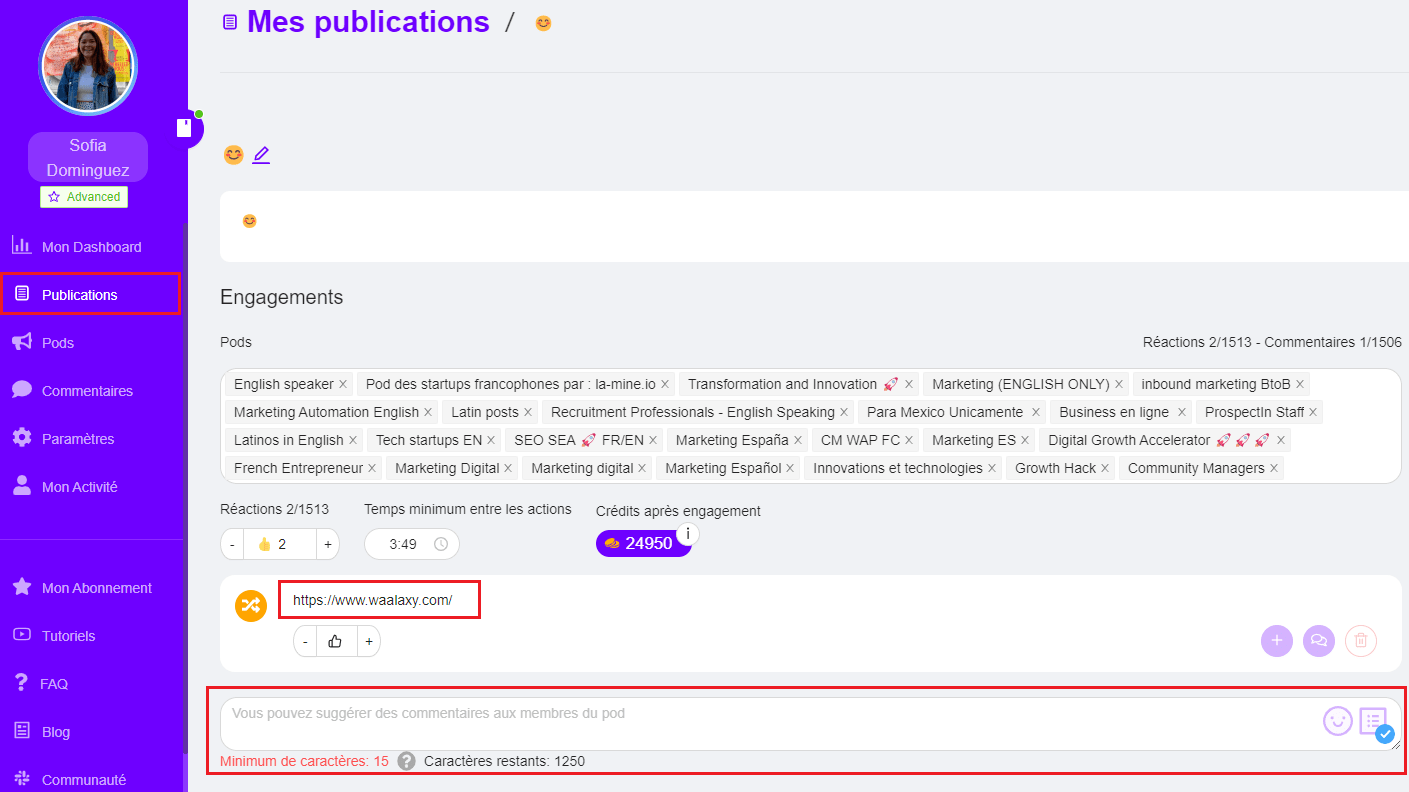
However, Podawaa allows you to schedule your posts, but also to schedule your comments! ⚡
Double action, you can schedule a post, and schedule your comment with or without showing the link, and even put the reply to it. 😜

Conclusion
Our tips? 😏
- Consider using the “Link in Comment” technique on your LinkedIn post. And to test, consider alternating between including links in comments and creating links directly in the post. 🤷
- Also, consider using automation tools like Podawaa to increase the engagement of your LinkedIn posts. Plus, it’s free, so you have nothing to lose by trying it today. 🟣
You can then have your own opinion on the subject and adjust your digital content strategy if needed! 👍
FAQ: Insert a link as a comment
1. How do I add a hyperlink to my LinkedIn profile?
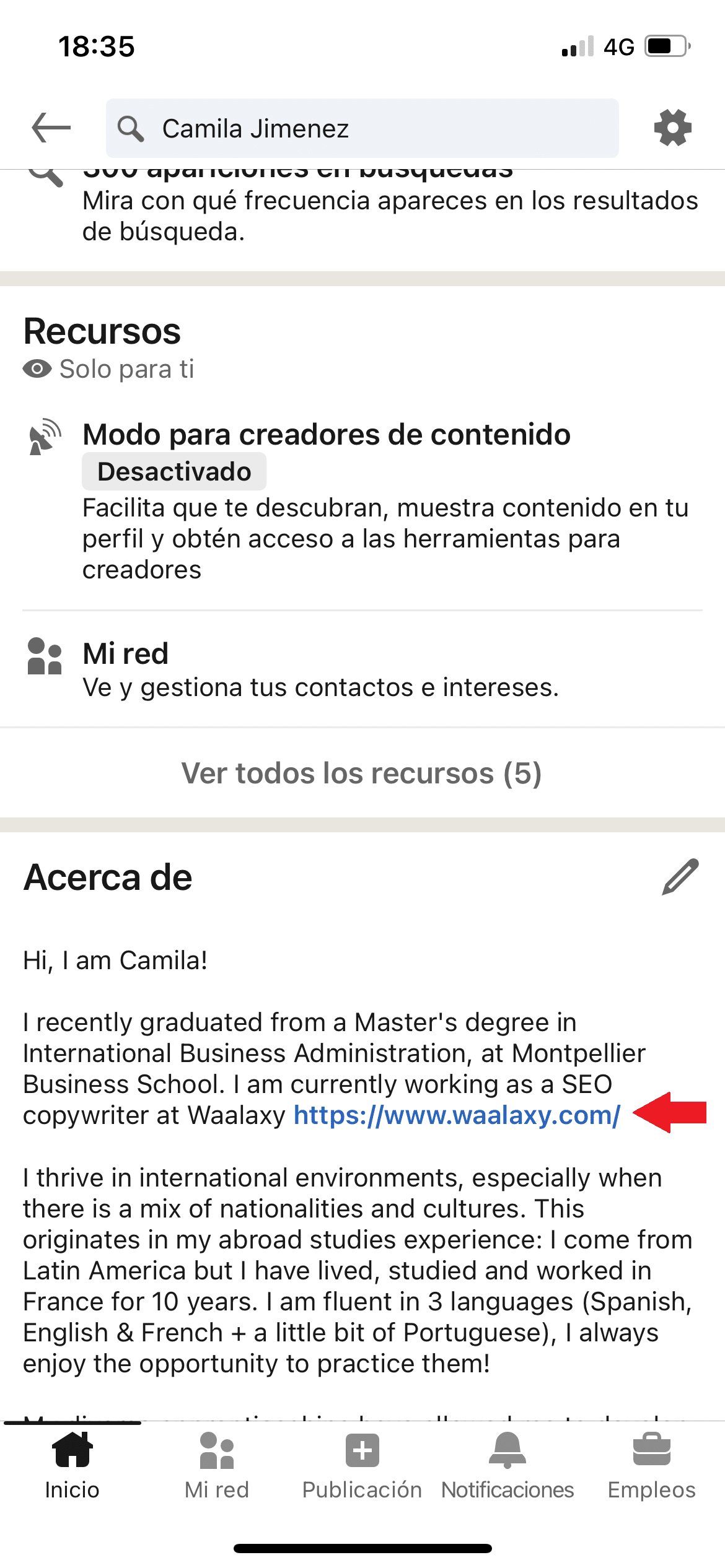
Now you can create a direct link in your LinkedIn summary! 🥳
This is great, don’t you think? 🎊
You must manually paste the URL into your profile description. The link will be clickable on the LinkedIn mobile app.
2. Link as a comment on LinkedIn: for or against it?
There are two perspectives on this.
On the one hand, LinkedIn’s algorithm tends to favor content that keeps users on the platform. Posts with external links may receive slightly less reach. To avoid this, many users place links in the comments instead of in the main post.
On the other hand, this approach can reduce engagement. Some readers may not take the extra step to check the comments, which means fewer clicks and missed opportunities.

So, how do you go about it? 😮
It’s simple; if your link refers to a “call to action” to attend a LinkedIn event for example, from this fact the best is to put it directly in the publication. ✨
On the other hand, if your site link is just a complement to the info shared in your publication, like a link to a tutorial video. Then, your potential customers will surely take the time to check it out in the comments. 🧐
3. Can I add clickable links directly in LinkedIn posts?
Yes, but they appear as raw URLs. LinkedIn does not allow custom anchor text in posts.
4. Should I put the link in the post or in the comments?
If the link is essential (event registration, sign-up page), place it in the post.
If it is additional information, you may place it in the comments.
5. Does LinkedIn reduce reach for posts with links?
LinkedIn may favor content that keeps users on the platform. However, high-quality, engaging content still performs well even with links.
6. Is it better to edit the post later and add the link?
Some users publish a post without a link and add it later in the comments to test performance. This strategy can work, but timing matters as adding the link too late may reduce visibility and engagement.
It’s up to you whether you’ll use a link as a comment on LinkedIn or not, so take the test! 😉
 Toinon
26/06/2026
Toinon
26/06/2026 














